
欢迎来到 Mega Randomizer,这是一款可自定义的 Minecraft 随机化工具。
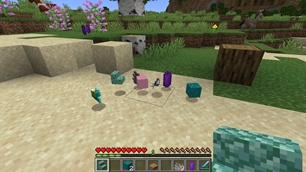
- 你可以选择是否对方块、生物或玩家的掉落物进行随机化,或者三者全部随机!
- 生物生成现在也支持随机化!
- 未来更新计划加入更多随机化功能。
- 开启“易变”(volatile)模式,使每次破坏/击杀时的掉落物都重新随机,而不是基于世界种子固定掉落。
- 每个随机化功能均可通过游戏内菜单或 /gamerule 命令启用或禁用。
- 你还可以选择将非生存模式物品包含或排除在可用随机掉落物之外。
- (特别感谢 TheUnknownLarry 贡献此功能!)**仅适用于 1.20.1 及以上版本
加入我们的官方 Discord 获取支持、建议并融入社区!
- 使用 gamerule
doVolatileDrops,生物和方块的掉落物现在可以在每次破坏或击杀时随机变化,而不是基于世界种子保持恒定。 - 生物生成现在支持随机化!!
- 可以通过
/gamerule excludeBosses false将 Boss 纳入生成随机化范围 - 在此上下文中,“Boss”包括:
- 远古守卫者
- 末影龙
- 巨型僵尸
- 监守者
- 凋灵
- 可以通过
** 2026年9月12日更新:
- 新增“追踪器”屏幕,帮助你跟踪掉落物的随机化情况。
- 它还会显示哪些随机生成的生物替换了原版生成的生物!
- 你可以通过游戏内暂停菜单访问追踪器屏幕,或者简单地在游戏中按下
G键。- 追踪器屏幕将原版的掉落物映射到其随机化后的替代品:
<原版掉落物> ➡ <随机化掉落物>- 例如:如果你破坏一个草方块,追踪器屏幕将显示
Dirt ➡ <随机化掉落物> - 请注意,这意味着追踪器屏幕是根据被替换的掉落物来跟踪随机化掉落物的,而不是根据掉落物的“来源”。
- 这是有意为之:如果按“来源”跟踪掉落物,由于某些物品会掉落多种物品、根据工具/附魔不同而掉落不同物品,或者有时不掉落任何物品等,追踪器屏幕会变得非常混乱且难以阅读。
- 例如:如果你破坏一个草方块,追踪器屏幕将显示
- 物品会在被发现时出现在追踪器屏幕上,因此你会从一个(几乎)空的追踪器开始,随着你发现更多的掉落物和生成生物,它们将被添加到追踪器中。
- 当更改任何“排除”类 gamerule 时,追踪器将被重置,无论是针对掉落物还是生物,因为整个掉落物池或生物池都已改变,意味着之前的追踪器信息将过时。
- 追踪器屏幕将原版的掉落物映射到其随机化后的替代品:
/reshuffle命令已被移除。当更改任一“排除”类 gamerule 时,掉落物和生成池会自动更新。
![]()
基本用法
在游戏中按下 G 键,或通过游戏内暂停菜单,即可访问 Mega 追踪器屏幕。
Mega Randomizer 选项菜单屏幕可通过游戏内暂停菜单访问。
或者,可以使用以下命令自定义随机化功能:
- 方块掉落随机化:
/gamerule doBlockRandomDrops <true/false> - 生物掉落随机化:
/gamerule doEntityRandomDrops <true/false> - 玩家掉落随机化:
/gamerule doPlayerRandomDrops <true/false> - 生物生成随机化:
/gamerule doRandomizeSpawns <true/false> - 掉落物的“易变随机化”:
/gamerule doVolatileDrops <true/false> - 排除/包含生成蛋:
/gamerule excludeSpawnEggs <true/false> - 排除/包含生物头颅:
/gamerule excludeHeads <true/false> - 排除/包含仅限创造模式的物品:
/gamerule excludeCreativeItems <true/false> - 在生物生成随机化中排除/包含 Boss:
/gamerule excludeBosses <true/false> - **注意,旧的
/reshuffle命令已被移除,因为它已不再必要;使用“排除”命令对掉落物/生成池所做的更改现在会立即生效。
例如,要包含生物头颅,请运行:
/gamerule excludeHeads false
如果你喜欢 Mega Randomizer,考虑请我喝杯咖啡吧!你的慷慨有助于维持这个项目的持续开发。

Welcome to Mega Randomizer, the Minecraft randomizer that you can customize.
- You can choose whether to randomize drops from blocks, mobs, players, or all three!
- Mob spawns are now also randomized!
- Even more randomization features are planned for future updates.
- Toggle "volatile" mode for randomizing drops every break/kill instead of per-world seed.
- Each randomization feature can be turned on or off using the in-game menu, or with /gamerule commands.
- You can also choose to include or exclude non-survival mode items as available randomized drops.
- (Special thanks to TheUnknownLarry for contributing this feature!) **Only in version 1.20.1 and up
Join our official Discord for support, suggestions, and community!
- Using the gamerule
doVolatileDrops, drops from mobs and blocks can now be randomized with every break or kill, rather than consistent drops based on the world seed. - Mob spawns are now randomized!!
- Bosses can be included in spawn randomization with
/gamerule excludeBosses false - "Bosses" in this context includes:
- Elder Guardian
- Ender Dragon
- Giant
- Warden
- Wither
- Bosses can be included in spawn randomization with
** Sep 12, 2026 Updates:
- There is now a 'Tracker' screen to help you keep track of drop randomizations.
- It also shows what randomized mobs have replaced the vanilla-spawned ones!
- You can access the Tracker screen from the in-game Pause menu, or by simply pressing the
Gkey while in-game.- The Tracker screen maps vanilla drops to their randomized replacements:
<vanilla drop> ➡ <randomized drop>- For example: If you break a Grass Block, the Tracker screen will show
Dirt ➡ <randomized drop> - Please keep in mind that this means randomized drops are tracked in the Tracker screen based on the drop they have replaced, not the "source" they dropped from.
- This intentional: Tracking drops by their "source" would have made for a much messier, harder-to-read Tracker screen, since some things drop multiple items, have different drops based on tools/enchantments used, or sometimes drop nothing, etc.
- For example: If you break a Grass Block, the Tracker screen will show
- Items show up in the tracker screen as they are discovered, so you will start with an (almost) empty tracker, and as you discover more drops and spawns, they will be added to the Tracker.
- When any of the "exclude" game rules are changed, the tracker will be reset for either drops or mobs because the entire drop or mob pool will have changed, meaning the previous Tracker information would have been out-of-date.
- The Tracker screen maps vanilla drops to their randomized replacements:
- The
/reshufflecommand has been removed. Drop and spawn pools are now updated automatically when one of the 'exclude' gamerules is changed.
![]()
Basic Usage
The Mega Tracker screen can be accessed by pressing the G key while in-game, or from the in-game Pause menu.
The Mega Randomizer options menu screen can be accessed from the in-game Pause menu.
Alternatively, randomization features can be customized using the following commands:
- For block drops randomization:
/gamerule doBlockRandomDrops <true/false> - For mob drops randomization:
/gamerule doEntityRandomDrops <true/false> - For player drops randomization:
/gamerule doPlayerRandomDrops <true/false> - For mob spawn randomization:
/gamerule doRandomizeSpawns <true/false> - For "volatile randomization" of drops:
/gamerule doVolatileDrops <true/false> - To exclude/include spawn eggs:
/gamerule excludeSpawnEggs <true/false> - To exclude/include mob heads:
/gamerule excludeHeads <true/false> - To exclude/include creative-mode-only items:
/gamerule excludeCreativeItems <true/false> - To exclude/include bosses in mob spawn randomization:
/gamerule excludeBosses <true/false> - **Note that the old
/reshufflecommand has been removed, as it is now unnecessary; changes made to the drop/spawn pools using 'exclude' commands now take effect immediately.
For example, to include mob heads, you would run:
/gamerule excludeHeads false
If you like Mega Randomizer, consider buying me a cup of coffee! Your generosity helps keep this project going.
下载 Mega Randomizer
需要联机服务器吗?
稳定流畅、一键部署,几分钟即可和朋友联机开服
最低仅需 8 元/月 即可畅快联机
下载 Mega Randomizer
需要联机服务器吗?
稳定流畅、一键部署,几分钟即可和朋友联机开服
最低仅需 8 元/月 即可畅快联机
下载 Mega Randomizer
需要联机服务器吗?
稳定流畅、一键部署,几分钟即可和朋友联机开服
最低仅需 8 元/月 即可畅快联机
下载 Mega Randomizer
需要联机服务器吗?
稳定流畅、一键部署,几分钟即可和朋友联机开服
最低仅需 8 元/月 即可畅快联机
下载 Mega Randomizer
需要联机服务器吗?
稳定流畅、一键部署,几分钟即可和朋友联机开服
最低仅需 8 元/月 即可畅快联机
下载 Mega Randomizer
需要联机服务器吗?
稳定流畅、一键部署,几分钟即可和朋友联机开服
最低仅需 8 元/月 即可畅快联机
下载 Mega Randomizer
需要联机服务器吗?
稳定流畅、一键部署,几分钟即可和朋友联机开服
最低仅需 8 元/月 即可畅快联机
- 添加了追踪器屏幕,用于查看已发现的随机掉落物和生物
- 移除了现在不再需要的 '/reshuffle' 命令
关于这个资源的讨论、问题反馈与使用心得
还没有讨论,来发第一帖吧
你是这个资源的作者?登录后可认领此资源。
相似资源
模组
缓冲的原始输入和线程化的事件轮询
模组
可定制的鞘翅模组,支持装饰纹饰、旗帜图案等更多功能!
模组
一个用于收集生物掉落物的多区块模组。
模组
显示你正在注视的方块的信息。(适用于 Minecraft 1.16+ 的 Hwyla/Waila 分支)
模组
原版世界生成优化模组
模组
使用 JavaScript 编辑配方、添加自定义物品、编写世界事件!
评论 0
登录后参与评分
还没有评论,来抢沙发吧