Minecraft Bingo
成为首个收集所有所需 items(物品)、mobs(生物)和 advancements(进度)以赢得比赛的队伍!

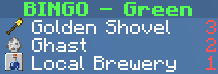
Minecraft Bingo 让你和朋友在 Minecraft 中玩宾果游戏。
玩家被分为不同的队伍,必须收集所有随机选择的物品、生物和进度才能获胜。
该模组高度可配置,可以根据不同的游玩风格进行调整。
该模组设计用于多人服务器游玩,但也可以在无服务器的情况下进行单人游玩。
开始使用
- 安装 Fabric
- 下载 Fabric API 并将其放入 mods 文件夹
- 从 Modrinth 下载 Minecraft Bingo 并将其放入 mods 文件夹
- (可选 - 但强烈推荐)使用 Minecraft Bingo Resource Pack
命令
/bingo 或 /b - 打开宾果 GUI,显示所有需要收集的物品/bingo teams - 打开队伍选择 GUI/bingo settings - OP 打开设置 GUI/bingo start - OP 使用当前设置开始新的宾果游戏/bingo stop - OP 停止当前的宾果游戏/bingo pause - OP 暂停当前的宾果游戏/bingo resume - OP 恢复当前的宾果游戏/bingo reset <suggested random string> - OP 停止服务器并使用新的种子重置世界。末尾的随机字符串用于防止意外重置/top - 传送你到地表(如果你在地狱或末地,则传送到世界出生点)/backpack 或 /bp 或 /ec - 打开队伍背包
队伍
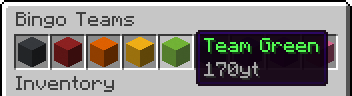
玩家可以通过使用 /bingo teams 命令加入队伍。
OP 的队伍管理
Bingo 中的队伍使用标准的 Minecraft 队伍系统进行管理。Bingo 使用的所有队伍都由模组自动创建和管理(共使用九个不同的队伍)。
OP 可以使用原版的 /team 命令来管理队伍中的玩家。以下命令可用:
/team join <team> [<members>] - OP 加入指定队伍/team leave <members> - OP 离开队伍
设置
设置会在各局之间自动保存,因此你无需每次重新配置。

从左上到右下的所有可用设置:
PvP - 启用玩家对玩家战斗No Damage - 玩家不会受到伤害No Hunger - 玩家不会失去饥饿值Keep Inventory - 死亡后保留物品栏Allow Flying - 为所有玩家启用创造模式飞行Block Break Speed - 方块破坏速度倍率Movement Speed - 移动速度倍率(包括游泳)Step Height - 额外台阶高度Command Top - 启用 /top 命令Team Backpack - 启用队伍背包 (/backpack)Goal Amount - 每支队伍需要收集的物品、生物和进度的数量Goal Type: Items - 启用物品作为目标Goal Type: Mobs - 启用生物作为目标Goal Type: Advancements - 启用进度作为目标- 启用/禁用最多 18 个池子(参见 Pools)
Stop Game - 停止当前游戏并显示排行榜Pause/Resume Game - 暂停或恢复当前游戏Start Game - 使用当前设置开始新游戏
图标
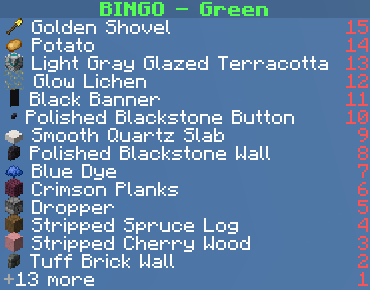
计分板可以为每个目标显示图标。为此,玩家(客户端)需要安装 Minecraft Bingo Resource Pack。
有关如何安装资源包的说明,请参阅 Minecraft Bingo Resource Pack。
Pools
Pool(池子)用于将目标分组到不同的类别中。每个池子包含一组可以被选为目标的项目、生物和进度。
每个池子都有一个配置文件,可以修改该文件以添加或删除目标。
你还可以通过在 config/bingo/pools 文件夹中创建新的配置文件来创建自己的自定义池子。
在那里,你还将找到现有的池子配置文件,你可以对其进行修改。
Bingo 默认附带以下池子:
Overworld Easy
几乎不需要旅行,可以在短时间内完成。
大多数目标都与挖掘、制作和战斗有关。
包含:Coal(煤)、Iron(铁)、Copper(铜)
Overworld Medium
需要适量的旅行和洞穴探索。
一些交易可能有助于完成目标。
包含:Gold(金)、Redstone(红石)、Emerald(绿宝石)、Lapislazuli(青金石)、Diamond(钻石)
Overworld Hard
需要大量的旅行。
包含:高级交易、丝绸之触、基础下界、蜜蜂
Nether
完全可以在下界中进行游玩。
排除了极端物品,如下界之星和盔甲纹饰。
End
完全可以在末地进行游玩。
建议仅使用末地时配备起始装备。
Extreme
来自所有维度的最难物品。
包含:染色潜影盒、老化铜变体、试炼密室、信标
常见问题
- 我在 Bingo 目标物品栏和计分板中看到了奇怪的纹理。我该怎么办?
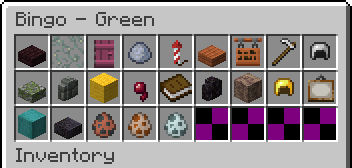
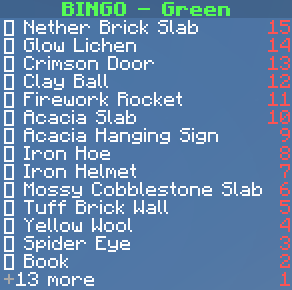
你需要安装 Minecraft Bingo Resource Pack。
- 我需要将模组安装在客户端吗?
不需要,该模组仅适用于服务端。如果服务端已安装,则无需在客户端安装。
该模组旨在配合原版客户端在服务端游玩,不需要任何客户端模组。
Minecraft Bingo
Be the first team to collect all required items, mobs and advancements to win the game!
Minecraft Bingo lets you and your friends play a game of bingo in Minecraft.
Players are divided into teams and must collect all randomly selected items, mobs and advancements to win.
The mod is highly configurable and can be adjusted to suit different playing styles.
The mod is designed to be played on a multiplayer server, but can also be played without a server.
Getting Started
- Install Fabric
- Download Fabric API and put it in the mods folder
- Download Minecraft Bingo from Modrinth and put it in the mods folder
- (Optional - but highly recommended) Use the Minecraft Bingo Resource Pack
Commands
/bingo or /b - Opens the bingo GUI, that shows all items to collect/bingo teams - Opens the team selection GUI/bingo settings - OP Opens the settings GUI/bingo start - OP Starts a new bingo game with the current settings/bingo stop - OP Stops the current bingo game/bingo pause - OP Pauses the current bingo game/bingo resume - OP Resumes the current bingo game/bingo reset <suggested random string> - OP Stops the server and resets the world with a new seed. The random string at the end is used to prevent accidental resets/top - Teleports you to the surface (or to the world spawn if you are in the nether or the end)/backpack or /bp or /ec - Opens the team backpack
Teams
Players can join a team by using the /bingo teams command.
Team Management for OPs
Teams in Bingo are managed using the standard Minecraft team system. All teams used by Bingo are automatically created and managed by the mod (nine different teams are used).
OPs can use the vanilla /team command to manage the players in the teams. The following commands are available:
/team join <team> [<members>] - OP Joins the specified team/team leave <members> - OP Leaves the team
Settings
The settings are automatically saved between rounds so you do not have to reconfigure them every time.
All available settings from top left to bottom right:
PvP - Enable player vs player combatNo Damage - Players do not take damageNo Hunger - Players do not lose hungerKeep Inventory - Keep inventory on deathAllow Flying - Enable creative flight for all playersBlock Break Speed - Multiplier for block break speedMovement Speed - Multiplier for movement speed (including swimming)Step Height - Additional step heightCommand Top - Enable the /top commandTeam Backpack - Enable team backpacks (/backpack)Goal Amount - The amount of items, mobs and advancements each team needs to collectGoal Type: Items - Enable items as goalsGoal Type: Mobs - Enable mobs as goalsGoal Type: Advancements - Enable advancements as goals- Enable/Disable up to 18 Pools (see Pools)
Stop Game - Stops the current game and shows the leaderboardPause/Resume Game - Pauses or resumes the current gameStart Game - Starts a new game with the current settings
Icons
The scoreboard can display icons for each goal. For this to work, the player (client) needs to have the Minecraft Bingo Resource Pack installed.
For instructions on how to install the resource pack, see Minecraft Bingo Resource Pack.
Pools
Pools are used to group goals into different categories. Each pool contains a set of items, mobs and advancements that can be selected as goals.
Each pool has a config file that can be modified to add or remove goals.
You can also create your own custom pools by creating a new config file in the config/bingo/pools folder.
There you will also find the existing pool config files that you can modify.
Bingo comes with the following pools by default:
Overworld Easy
Requires little to no traveling and can be completed in a short amount of time.
Most goals are related to mining, crafting and fighting.
Includes: Coal, Iron, Copper
Overworld Medium
Requires a decent amount of traveling and caving.
Some trading might be helpful to complete the goals.
Includes: Gold, Redstone, Emerald, Lapislazuli, Diamond
Overworld Hard
Requires a lot of traveling.
Includes: advanced Trading, Silk Touch, basic Nether, Bees
Nether
Playable fully in the nether.
Excludes extreme items, like nether stars and armor trims.
End
Playable fully in the end.
Starting gear is recommended for end only.
Extreme
The hardest items from all dimensions.
Includes: dyed Shulker Boxes, aged Copper Variants, Trial Chambers, Beacons
FAQ
- I see weird textures in the bingo goals inventory and the scoreboard. What can I do?
You need to install the Minecraft Bingo Resource Pack.
- Do I need to install the mod on the client side?
No, the mod is server-side only and does not require the client to have it installed if it's already installed on the server.
The mod is designed to be played on a server with vanilla clients and does not require any client-side mods.


 模组
 模组

 模组
 模组

 模组

 模组

评论 0
登录后参与评分
还没有评论,来抢沙发吧