
AutoTools

AutoTools 会扫描你的整个背包,并找到挖掘方块或攻击生物的最佳工具。工具的选择基于挖掘速度、挖掘等级、附魔以及每秒伤害(DPS)。该模组提供了高度自定义选项,包含多种配置参数。对于偏好丝触(SilkTouch)的方块,请参阅 silk_touch.json;对于幸运(Fortune),请参阅 fortune.json。剪刀将始终优先用于 shears.json。
所有配置选项均可通过 ClothConfig UI 方便地进行编辑:
-
选择配置 [默认值]:
- toggle [false]: AutoTools 将始终处于激活状态并尝试为你获取最佳工具。可通过设置的按键进行切换。
- disableCreative [true]: 如果 toggle 已启用,则在创造模式下禁用 AutoTools。
- keepSlot [false]: 在切换到新工具时保留所选槽位,而不是使用原版机制。
- hotbarOnly [false]: AutoTools 仅从快捷栏中选择工具
- preserveDurability [true]: 如果未找到合适的工具,AutoTools 将切换到耐久度耗尽的物品
- hotbarOnly [false]: AutoTools 仅从快捷栏中选择工具
- preferHotBarTool [true]: 如果多个工具的挖掘速度相同,无论其耐久度如何,AutoTools 将优先选择你快捷栏中已有的工具。
- preferLowDurability [false]: 如果工具的挖掘速度和附魔相同,AutoTools 将优先选择耐久度较低的工具,而不是较高的那个。
- preserveDurability [true]: 如果未找到合适的工具,AutoTools 将切换到耐久度耗尽的物品
- switchBack [false]: 在破坏方块后,AutoTools 将切换回你此前手中的物品
- showDPS [true]: 当悬停在武器上时,以提示框形式显示武器的伤害值
- changeForEntities [true]: 注视实体时,AutoTools 将切换为 DPS 最高的工具
- keepAxe [false]: 手持斧头时,AutoTools 不会切换到更好的武器(例如剑)
- enabled [always]:
- always: AutoTools 将始终处于激活状态
- tool: 仅在手持工具时,AutoTools 才处于激活状态
- no_tool: 仅在未手持工具时,AutoTools 才处于激活状态
- ignoredSlots [[]]: 如果当前选中的是这些槽位之一,AutoTools 将不执行任何操作
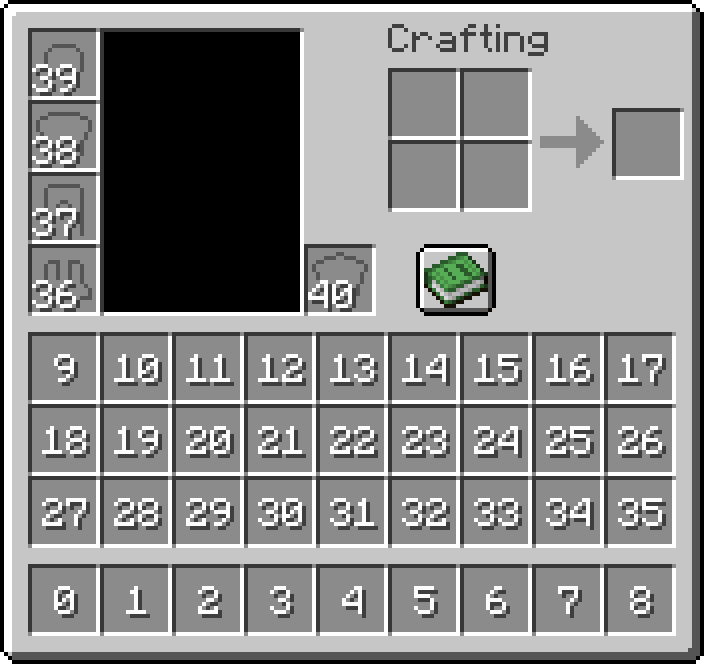
- targetSlots [[1,2,3,4,5,6,7,8,9]]: AutoTools 仅将这些槽位中的物品视为工具
- ignoredInventorySlots [[]]: AutoTools 不会从你背包的这些槽位中选择工具。参见 Inventory Slots
- minDurability [0.0]: 如果 < 1:视为百分比:低于 minDurability 的工具不会被选中
否则:视为耐久度数值:工具将被选中直到达到 minDurability(例如设置为 1 则永远不会损坏工具) - durabilityCheck [true]: 防止在低于 minDurability 时进行挖掘
- experimentalBreakDelay [false]: 如果启用了 toggle,则在切换工具后破坏方块前增加一个实验性的 1 Tick = 50ms 延迟。如果你遇到即时挖掘时的不同步问题(如幽灵方块),请启用此选项。
-
方块行为:
- onlySwitchIfNecessary [false]: 只有在需要新工具才能破坏方块时,AutoTools 才会尝试更换工具
- alwaysPreferFortune [false]: Autotools 将对砂砾和树叶使用幸运附魔
- preferSilkTouch [except_ores]:
- always: Autotools 还将对以下方块使用丝触附魔:草、石头、矿石、树叶、雪
- ores: AutoTools 还将对矿石使用丝触附魔
- except_ores: Autotools 还将对以下方块使用丝触附魔:草、石头、树叶、雪
- never: 仅在破坏方块必需的情况下,Autotools 才会使用丝触附魔。
- customTools
- 添加 JSON 格式的自定义工具配置(例如 customTools={"minecraft:block_id":"minecraft:tool_id"} 或 customBlocks={"minecraft:block_id":["minecraft:tool_id_1", "minecraft:tool_id_2"]})
- 注意: 在 Forge 和 NeoForge 上,你需要使用 customTools="{"minecraft:block_id":"minecraft: tool_id"}"
- 当添加多个工具时,排在第一位的工具优先级最高 还有预定义的工具组列表:autotools:pickaxe, autotools:axe, autotools:shovel, autotools:hoe, autotools:sword
- 要完全禁用某个方块的 AutoTools,请使用:"autotools:disabled"
- 这适用于方块和实体(例如 "minecraft:stone" 或 "minecraft:sheep")
兼容性
提供适用于 Forge、NeoForge 和 Fabric 加载器的版本(使用 Fabric 版本时支持 ModMenu 集成)
AutoTools 需要 ClothConfig。
AutoTools 完全是客户端模组,可在服务器环境中运行,并与许多第三方模组兼容。
AutoTools 也可与 Controllable 配合使用
对于开发者:
物品兼容性:
工具:应实现 Item.isCorrectToolForDrops(BlockState) 和 Item.getDestroySpeed(Item, BlockState)。此外,
方块需正确实现 requiresCorrectToolForDrops(Mojmap 映射)
武器:物品需要将其攻击伤害(及攻击速度)存储为属性修饰符(AttributeModifiers)
模组集成:
如果您希望在您的项目中依赖 AutoTools,请使用以下任一配置。可用包列表可在以下地址找到:
或
repositories {
    maven {
        name = "Zelythia Releases"
        url = uri("https://maven.zelythia.net/releases")
    }
}
根据 GitHub 文档:
repositories {
    maven {
        url = uri("https://maven.pkg.github.com/zelythia/AutoTools")
        credentials {
            username = project.findProperty("gpr.user") ?: System.getenv("USERNAME")
            password = project.findProperty("gpr.key") ?: System.getenv("TOKEN")
        }
   }
}
AutoTools
AutoTools looks through your whole inventory and finds the best tool to mine a block or attack a mob. The tool is determined by mining speed, mining level, enchantments, and the DPS. the Mod features a high level of customisation with many config options. For blocks where SilkTouch is preferred see silk_touch.json and for Fortune fortune.json. Shears will always pre preferred for shears.json.
All config options can conveniently be edited using the ClothConfig UI:
-
Selection Config [default]:
- toggle [false]: AutoTools will always be active and try to get you the best tool. Can be toggled with the set key.
- disableCreative [true]: Disables AutoTools in creative-mode if toggle is enabled.
- keepSlot [false]: Keeps the selected slot when swapping to a new tool instead of using the vanilla mechanics.
- hotbarOnly [false]: AutoTools will only select tool from you hotbar
- preserveDurability [true]: AutoTools will switch to an item with no durability if no suitable tool has been found
- hotbarOnly [false]: AutoTools will only select tools from you hotbar
- preferHotBarTool [true]: AutoTools will prefer the tool already in your hotbar if multiple tools have the same mining speed, regardless their durability.
- preferLowDurability [false]: AutoTools will prefer the tool with the lower durability, instead of the higher one, if they have the same mining speed and enchantments.
- preserveDurability [true]: AutoTools will switch to an item with no durability if no suitable tool has been found
- switchBack [false]: AutoTools will switch back to the item you had in your hand before breaking the block
- showDPS [true]: Displays the weapons Damage when hovering over it as a tooltip
- changeForEntities [true]: AutoTools will change to the tool with the most DPS when looking at an entity
- keepAxe [false]: AutoTools won't change to a better weapon(e.g. a sword) when holding an axe
- enabled [always]:
- always: AutoTools will always be active
- tool: AutoTools will only be active while holding a tool
- no_tool: AutoTools will only be active while not holding a tool
- ignoredSlots [[]]: AutoTools won't do anything if the currently selected one of these
- targetSlots [[1,2,3,4,5,6,7,8,9]]: AutoTools only puts tools in these slots
- ignoredInventorySlots [[]]: AutoTools won't select tools from these slots in your inventory. See Inventory Slots
- minDurability [0.0]: If < 1: Seen as a percentage: Tools below minDurability won't be selected
Else: Seen as durability: tools will be selected until at minDurability (e.g. set to 1 to never break a tool) - durabilityCheck [true]: Prevents mining when going under minDurability
- experimentalBreakDelay [false]: Adds an experimental 1 Tick = 50ms delay if toggle is enabled before breaking a block after a tool switch. Enable this if you are experiencing Desyncs like Ghost-Blocks when instant mining.
-
Block Behaviour:
- onlySwitchIfNecessary [false]: AutoTools only tries to get a new tool if it is needed to break the block
- alwaysPreferFortune [false]: Autotools will use Fortune for Gravel and Leaves
- preferSilkTouch [except_ores]:
- always: Autotools additionally will use SilkTouch for: grass, stone, ores, leaves, snow
- ores: AutoTools additionally will use SilkTouch for ores
- except_ores: Autotools additionally will SilkTouch for: grass, stone, leaves, snow
- never: Autotools will only use SilkTouch if its required to mine a block.
- customTools
- Add custom tool-configurations in JSON format (e.g. customTools={"minecraft:block_id":"minecraft:tool_id"} or customBlocks={"minecraft:block_id":["minecraft:tool_id_1", "minecraft:tool_id_2"]})
- Note: On Forge and NeoForge you have the use customTools="{"minecraft:block_id":"minecraft: tool_id"}"
- When adding multiple tools, the first one has the highest priority There are also pre-define lists for tool groups: autotools:pickaxe, autotools:axe, autotools:shovel, autotools:hoe, autotools:sword
- To completely disable AutoTools for a block use: "autotools:disabled"
- This works on both blocks and entities (e.g. "minecraft:stone" or "minecraft:sheep")
Compatability
There is a version available for the Forge, NeoForge and Fabric mod loader (ModMenu integration when using the Fabric
version)
AutoTools requires ClothConfig.
AutoTools is entirely client-side and works on servers and with many third-party mods.
AutoTools also works with Controllable
For Developers:
Item Compatability:
Tools: Should implement Item.isCorrectToolForDrops(BlockState) and Item.getDestroySpeed(Item, BlockState). Additionally, Blocks should correctly implement requiresCorrectToolForDrops (Mojmap Mappings)
Weapons: Items need their attack damage (and attack speed) stored as AttributeModifiers
Mod Integration:
If you want to depend on AutoTools in your own project, use either one of these configs. A list of available packages can be found at:
or
repositories {
    maven {
        name = "Zelythia Releases"
        url = uri("https://maven.zelythia.net/releases")
    }
}
According to the GitHub Documentation:
repositories {
    maven {
        url = uri("https://maven.pkg.github.com/zelythia/AutoTools")
        credentials {
            username = project.findProperty("gpr.user") ?: System.getenv("USERNAME")
            password = project.findProperty("gpr.key") ?: System.getenv("TOKEN")
        }
   }
}

下载 AutoTools
下载 AutoTools
下载 AutoTools
下载 AutoTools
下载 AutoTools
下载 AutoTools
下载 AutoTools
下载 AutoTools
下载 AutoTools
下载 AutoTools
26.3 更新
关于这个资源的讨论、问题反馈与使用心得
还没有讨论,来发第一帖吧
你是这个资源的作者?登录后可认领此资源。
相似资源
 模组

显示你正在注视的方块的信息。(适用于 Minecraft 1.16+ 的 Hwyla/Waila 分支)
 模组

可定制的鞘翅模组,支持装饰纹饰、旗帜图案等更多功能!
 模组
使用 JavaScript 编辑配方、添加自定义物品、编写世界事件!
 模组

查看物品与配方
 模组
在游戏画面角落显示附近世界地形、玩家、生物和实体的地图。可创建路径点,帮助你找到标记过的位置。
 模组
AE2:一款流行的自动化与存储模组
评论 0
登录后参与评分
还没有评论,来抢沙发吧