终极挖矿伴侣!?⛏️
矿工指南针是一款革命性工具,彻底改变了你在 Minecraft 中的挖矿体验。无论你是原版玩家还是拥有 100+ 模组的用户,该指南针都能智能检测并引导你前往最需要的矿石所在地。
完美适用于模组服务器、大型整合包以及原版玩家!
? 2.0 版本更新内容
自动检测模组矿石
无需手动配置!指南针自动检测来自任何模组的矿石:
- ✅ Create - 锌矿石
- ✅ Mythic Metals - 全部 20+ 种矿石(Adamantite, Mythril, Orichalcum 等)
- ✅ Immersive Engineering - 铝、铅、镍、银、铀
- ✅ SoulsWeapons - 月光石、Verglas
- ✅ Blue Skies - Charoite、Diopside、Pyrope 等
- ✅ 支持更多其他模组,均自动兼容
智能矿石分组
智能分组系统将矿石变体合并:
- “铁矿石” 包含
iron_ore 和 deepslate_iron_ore
- “月光石矿” 组合所有月光石变体
- 正确命名 - 不再显示“月亮矿”或“深板岩矿”
现代化 GUI 系统
- 右键点击打开精美的矿石选择界面
- 可视化矿石列表,带有正确的颜色和名称
- 多选你喜欢的矿石
- 搜索查找你所需要的确切目标
强大配置功能
完全控制矿石检测:
- 排除整个矿石类型 (
"coal", "zinc")
- 排除特定方块 (
"minecraft:coal_ore")
- 添加来自任何模组的自定义矿石
- 针对大型整合包的性能调优
? 主要特性
通用模组兼容性
开箱即用,适用于任何整合包:
- 自动检测 80+ 种常见模组矿石
- 后备模式 用于未知模组
- 自定义矿石支持 处理边缘情况
- 面向未来 的设计以适配新模组
智能导航
- 动态瞄准 - 始终指向最近的矿石
- 多矿石追踪 - 同时搜索多达 20 种矿石类型
- 基于区块扫描 - 可配置的搜索半径
- 跨维度支持 - 在下界、末地及模组维度中均可工作
高级过滤
- 硬度过滤 - 排除装饰性方块
- 模组排除 - 忽略有问题的模组
- 智能分组 - 相关矿石归类在一起
- 自定义类别 - 创建你自己的矿石类型
性能优化
- 高效扫描 - 对游戏性能影响极小
- 可配置半径 - 在覆盖范围和性能之间取得平衡
- 智能缓存 - 记住之前的搜索结果
- 异步处理 - 不会阻塞游戏玩法
? 使用方法
入门指南
- 按照配方合成指南针
- 右键点击打开矿石选择 GUI
- 选择你想要寻找的矿石
- 点击“完成” 开始挖矿!
高级用法
- Shift+右键点击矿石方块可快速添加/移除它们
- Shift+右键点击空气可清除所有选择
- 在
.minecraft/config/miners-compass.json5 中进行配置
合成配方
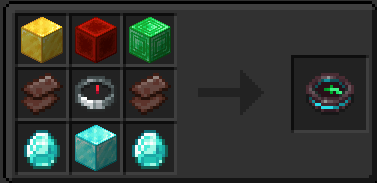
⚙️ 完整配置指南
完整配置示例
{
  // 搜索玩家周围多少个区块 (0-100)
  // 数值越高 = 范围越大但性能影响也越大
  "chunkRadius": 2,

  // 一次最多可选取的矿石类型数量 (0-20)
  // 在灵活性和性能之间取得平衡
  "maxBlocks": 3,

  // 启用模组矿石的自动检测
  // 设为 false 则仅使用自定义定义
  "enableAutoDiscovery": true,

  // 将矿石变体组合在一起 (coal_ore + deepslate_coal_ore = "Coal Ore")
  // 设为 false 则将每个方块单独对待
  "groupSimilarOres": true,

  // 矿石检测的最小方块硬度 (0.0-50.0)
  // 数值越高过滤掉的软装饰方块越多
  "minimumHardness": 1.0,

  // 帮助检测遗漏矿石的其他关键词
  // 添加模组矿石名称中常用的术语
  "additionalOreKeywords": [
    "gem",
    "crystal",
    "ingot",
    "core",
    "debris"
  ],

  // 从矿石检测中排除整个模组
  // 添加会导致误报的模组 ID
  "excludedMods": [
    "decorative_blocks",
    "chisel"
  ],

  // 添加未自动检测到的自定义矿石类型
  // 格式:"oreName:COLOR:blockId1,blockId2"
  "customOreTypes": [
    "exquisite:BLACK:arphex:exquisite_ore"
  ],

  // 强制将特定方块包含为矿石
  // 用于那些应该被检测但未检测到的方块
  "forceIncludeBlocks": [],

  // 排除整个矿石类型(移除所有变体)
  // 隐藏你不想要的矿石类别
  "excludedOreTypes": [],

  // 排除特定的矿石方块但保留该类型
  // 对单个方块进行细粒度控制
  "excludedBlocks": []
}
配置选项说明
基本设置
chunkRadius - 玩家周围的搜索区域(越大 = 卡顿越严重)maxBlocks - 可同时选定的矿石类型数量enableAutoDiscovery - 自动查找模组矿石 vs 仅手动查找groupSimilarOres - 合并变体 vs 分开条目minimumHardness - 过滤掉柔软的装饰方块
检测增强
additionalOreKeywords - 帮助检测名称不寻常的矿石customOreTypes - 添加未自动检测到的矿石forceIncludeBlocks - 强制将特定方块视为矿石
排除控制
excludedMods - 忽略导致问题的整个模组excludedOreTypes - 隐藏整个矿石类别(所有煤炭、所有锌等)excludedBlocks - 隐藏特定方块但保留矿石类型
常见配置示例
性能优化版
{
  "chunkRadius": 2,
  "maxBlocks": 3,
  "minimumHardness": 2.0,
  "excludedOreTypes": ["coal", "iron", "copper"]
}
仅稀有矿石
{
  "excludedOreTypes": ["coal", "iron", "copper", "zinc", "tin", "lead", "aluminum"]
}
仅原版设置
{
  "excludedMods": ["create", "mythicmetals", "immersiveengineering", "soulsweapons"]
}
无深层板岩变体
{
  "excludedBlocks": [
    "minecraft:deepslate_coal_ore",
    "minecraft:deepslate_iron_ore",
    "minecraft:deepslate_gold_ore",
    "create:deepslate_zinc_ore"
  ]
}
自定义矿石可用颜色
WHITE, YELLOW, GOLD, RED, DARK_RED, GREEN, DARK_GREEN, AQUA, DARK_AQUA, BLUE, DARK_BLUE, LIGHT_PURPLE, DARK_PURPLE, GRAY, DARK_GRAY, BLACK
? 从 v1.x 迁移
v1.x 用户:您的旧配置文件仍然有效,但建议升级:
旧配置 (v1.x)
{
  "chunkRadius": 2,
  "maxBlocks": 3
}
新配置 (v2.0)
{
  // 基本设置(兼容)
  "chunkRadius": 2,
  "maxBlocks": 3,

  // 新功能
  "enableAutoDiscovery": true,
  "excludedOreTypes": ["coal", "iron"],
  "customOreTypes": ["mythril:AQUA:modname:mythril_ore"]
}
迁移是自动的 —— 您的旧配置将继续正常工作,同时新功能也将变得可用!
常见问题解答
Forge/回退版支持?
对于 Forge 支持,Sinytra Connector、Connector Extras、Forgified Fabric API 的组合经过测试并符合预期。
Y 轴方向?
对于那些想了解 Y 轴方向的用户,我强烈推荐使用由 AdamRaichu 开发的 Compass3D。感谢他为本模组集成该功能的支持。
The Ultimate Mining Companion! ?⛏️
The Miner's Compass is a revolutionary tool that transforms how you mine in Minecraft. Whether you're playing vanilla or with 100+ mods, this compass intelligently detects and guides you to the ores you need most.
Perfect for modded servers, large modpacks, and vanilla players alike!
? What's New in Version 2.0
Automatic Modded Ore Detection
No more manual configuration! The compass automatically detects ores from ANY mod:
- ✅ Create - Zinc ore
- ✅ Mythic Metals - All 20+ ores (Adamantite, Mythril, Orichalcum, etc.)
- ✅ Immersive Engineering - Aluminum, Lead, Nickel, Silver, Uranium
- ✅ SoulsWeapons - Moonstone, Verglas
- ✅ Blue Skies - Charoite, Diopside, Pyrope, and more
- ✅ Many more other mods supported automatically
Intelligent Ore Grouping
Smart grouping system that combines ore variants:
- "Iron Ore" includes both
iron_ore and deepslate_iron_ore
- "Moonstone Ore" groups all moonstone variants
- Proper names - No more "Moon Ore" or "Deepslate Ore"
Modern GUI System
- Right-click to open sleek ore selection screen
- Visual ore list with proper colors and names
- Multi-select your favorite ores
- Search and find exactly what you need
Powerful Configuration
Complete control over ore detection:
- Exclude entire ore types (
"coal", "zinc")
- Exclude specific blocks (
"minecraft:coal_ore")
- Add custom ores from any mod
- Performance tuning for large modpacks
? Key Features
Universal Mod Compatibility
Works with ANY modpack out of the box:
- Automatic detection of 80+ common modded ores
- Fallback patterns for unknown mods
- Custom ore support for edge cases
- Future-proof design for new mods
Intelligent Navigation
- Dynamic targeting - Always points to the closest ore
- Multi-ore tracking - Search for up to 20 ore types simultaneously
- Chunk-based scanning - Configurable search radius
- Cross-dimension support - Works in Nether, End, and modded dimensions
Advanced Filtering
- Hardness filtering - Excludes decorative blocks
- Mod exclusions - Ignore problematic mods
- Smart grouping - Related ores grouped together
- Custom categories - Create your own ore types
Performance Optimized
- Efficient scanning - Minimal impact on game performance
- Configurable radius - Balance between coverage and performance
- Smart caching - Remembers previous searches
- Async processing - Doesn't block gameplay
? How to Use
Getting Started
- Craft the compass with the recipe below
- Right-click to open the ore selection GUI
- Select ores you want to find
- Click "Done" and start mining!
Advanced Usage
- Shift-right-click on ore blocks to quickly add/remove them
- Shift-right-click air to clear all selections
- Configure in
.minecraft/config/miners-compass.json5
Crafting Recipe
⚙️ Complete Configuration Guide
Full Configuration Example
{
  // How many chunks around player to search (0-100)
  // Higher values = larger area but more performance impact
  "chunkRadius": 2,

  // Maximum ore types selectable at once (0-20)
  // Balance between flexibility and performance
  "maxBlocks": 3,

  // Enable automatic detection of modded ores
  // Set false to only use custom definitions
  "enableAutoDiscovery": true,

  // Group ore variants together (coal_ore + deepslate_coal_ore = "Coal Ore")
  // Set false to treat each block separately
  "groupSimilarOres": true,

  // Minimum block hardness for ore detection (0.0-50.0)
  // Higher values filter out soft decorative blocks
  "minimumHardness": 1.0,

  // Additional keywords to help detect missed ores
  // Add terms commonly used in mod ore names
  "additionalOreKeywords": [
    "gem",
    "crystal",
    "ingot",
    "core",
    "debris"
  ],

  // Exclude entire mods from ore detection
  // Add mod IDs that cause false positives
  "excludedMods": [
    "decorative_blocks",
    "chisel"
  ],

  // Add custom ore types not detected automatically
  // Format: "oreName:COLOR:blockId1,blockId2"
  "customOreTypes": [
    "exquisite:BLACK:arphex:exquisite_ore"
  ],

  // Force include specific blocks as ores
  // For blocks that should be detected but aren't
  "forceIncludeBlocks": [],

  // Exclude entire ore types (removes all variants)
  // Hide ore categories you don't want
  "excludedOreTypes": [],

  // Exclude specific ore blocks while keeping the type
  // Fine-grained control over individual blocks
  "excludedBlocks": []
}
Configuration Options Explained
Basic Settings
chunkRadius - Search area around player (larger = more lag)maxBlocks - How many ore types you can select simultaneouslyenableAutoDiscovery - Automatically find modded ores vs manual onlygroupSimilarOres - Combine variants vs separate entriesminimumHardness - Filter out soft decorative blocks
Detection Enhancement
additionalOreKeywords - Help detect ores with unusual namescustomOreTypes - Add ores that aren't detected automaticallyforceIncludeBlocks - Force specific blocks to be treated as ores
Exclusion Controls
excludedMods - Ignore entire mods that cause problemsexcludedOreTypes - Hide entire ore categories (all coal, all zinc, etc.)excludedBlocks - Hide specific blocks while keeping the ore type
Common Configuration Examples
Performance-Optimized
{
  "chunkRadius": 2,
  "maxBlocks": 3,
  "minimumHardness": 2.0,
  "excludedOreTypes": ["coal", "iron", "copper"]
}
Rare Ores Only
{
  "excludedOreTypes": ["coal", "iron", "copper", "zinc", "tin", "lead", "aluminum"]
}
Vanilla-Only Setup
{
  "excludedMods": ["create", "mythicmetals", "immersiveengineering", "soulsweapons"]
}
No Deepslate Variants
{
  "excludedBlocks": [
    "minecraft:deepslate_coal_ore",
    "minecraft:deepslate_iron_ore",
    "minecraft:deepslate_gold_ore",
    "create:deepslate_zinc_ore"
  ]
}
Available Colors for Custom Ores
WHITE, YELLOW, GOLD, RED, DARK_RED, GREEN, DARK_GREEN, AQUA, DARK_AQUA, BLUE, DARK_BLUE, LIGHT_PURPLE, DARK_PURPLE, GRAY, DARK_GRAY, BLACK
? Migration from v1.x
v1.x users: Your old config will work, but consider upgrading:
Old Config (v1.x)
{
  "chunkRadius": 2,
  "maxBlocks": 3
}
New Config (v2.0)
{
  // Basic settings (compatible)
  "chunkRadius": 2,
  "maxBlocks": 3,

  // New features
  "enableAutoDiscovery": true,
  "excludedOreTypes": ["coal", "iron"],
  "customOreTypes": ["mythril:AQUA:modname:mythril_ore"]
}
Migration is automatic - your old config continues working while new features become available!
Q&A
Forge/Backport?
For forge support, Sinytra Connector, Connector Extras, Forgified Fabric API combination tested and works as expected.
Y-Axis Direction?
For those interested in knowing the Y-axis direction, I highly recommend using Compass3D, developed by AdamRaichu. My gratitude goes out to him for integrating support for this feature into the mod.


 模组

 模组

 模组
 模组

 模组
 模组
评论 0
登录后参与评分
还没有评论,来抢沙发吧