
描述
此模组可以将方块转化为微型模型。你甚至可以将一座山放入一个方块中。
微型模型仅具有装饰用途。书架、红石等方块没有实际功能。
使用方法
手持微型模型工具,右键点击作为起始点的方块,再右键点击另一个方块作为结束点。该范围内的所有方块都将被收集为微型模型。
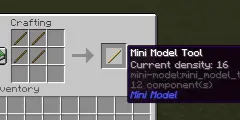
你可以按住 Shift 并滚动鼠标滚轮来切换工具的密度。微型模型的缩放比例等于 1/密度。此方法可将密度设置为 8、16、32 和 64。但密度的值可以是 [1, 128] 范围内的任意整数。你可以使用命令 "/minimodel density <value>" 更自由地设置密度。
你也可以使用命令 "/minimodel <x1> <y1> <z1> <x2> <y2> <z2>" 来收集方块。这种方法对于无法通过右键交互的方块(例如水)非常方便。
这些命令不需要 OP 权限,因此你无需开启作弊即可使用它们。
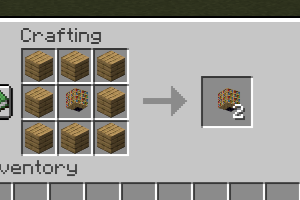
你可以使用 8 块木板轻松复制微型模型,而无需重新收集。

你是这个资源的作者?登录后可认领此资源。
相似资源
 模组

鞘翅纹饰Elytra Trims
KikuGie
可定制的鞘翅模组,支持装饰纹饰、旗帜图案等更多功能!
装饰装备
253
 模组

AAA Particles
ChloePrime
适用于 MC 1.18+ 的 Effekseer 加载器
前置装饰
173
 模组

YUNG's Better Desert Temples
YUNGNICKYOUNG
对 Minecraft 的沙漠神殿进行了全面重新设计!
冒险装饰
75
 模组

EnhancedVisuals
creativemd
感受痛苦!
冒险装饰
70
 模组

群峦传说TerraFirmaCraft
eerussianguy
TerraFirmaCraft (TFC) 是一个全面转换模组,对生存模式进行了彻底的改造与重新设计。
冒险玩法机制
68
 模组

舒适用品Comforts
TheIllusiveC4
添加睡袋和吊床,分别用于便携性和昼夜转换,同时不会设置新的出生点。共有16种颜色可选!
冒险装饰
58
评论 0
登录后参与评分
还没有评论,来抢沙发吧