Molecules
这个仅客户端模组会在工具提示中展示来自 GregTech CEu 及其附加模组和整合包的有机分子结构图。它是 原版 的一个分支,已为 NeoForge 1.21.1 重写。
示例
合金
额外内容支持
MolDraw 开箱即用地支持不仅包含基础 GTCEu 中的大多数有机材料和合金,还支持一系列附加模组和整合包。目前支持的扩展包括:
- Monifactory
- Star Technology
- Cosmic Frontiers
- Phoenix Forge Technologies
- TerraFirmaGreg
- GT--
- GregTech Community Additions
- Gregicality Rocketry
关于人们对本模组的评价
这是我见过任何人用工具提示做出的最酷的事情。
它让我每天 reminder 我:基本上所有有机化学都是苯环加上一些附属基团。
我只想说:这简直太棒了。
现在我可以欣赏我正在构建的聚合物的复杂性了。
这已经够酷了,而颜色的加入让它更棒!
我应该被允许给 Gregtech 的附加模组颁发米其林星级,因为 Madeline 做得非常出色。
极其无用,却又极其酷炫!
yay aro representation(注:指 Aromancy 或相关社区梗,通常保留原文或意译为“芳香族代表”)
添加您自己的分子
分子数据存储在资源包下的 assets/<namespace>/molecules/<compound>.json 路径中,对应 ID 为 <namespace>:<compound> 的 GregTech 材料。
分子遵循以下架构:
// ARGB 颜色或 RGB 十六进制字符串,将始终被使用;或者是一个对象,包含上述属性以及是否可通过配置禁用的说明
type ElementColor = number | string | {
  color: number | string;
  optional: boolean;
};

// 只是一个符号,可用于普通原子;或者是一个对象,指定符号、是否不可见以及颜色
type Element = string | {
  symbol: string;
  invisible?: boolean; // 新的不可见元素即使旨在具有不同颜色,仍需使用不同于空字符串的不同符号;无论如何都不会显示
  color?: ElementColor;
  material?: string; // 与此元素关联的 GregTech 材料的 ID,用于“按材质着色”设置。
};

// 原子数量默认为 1
type CountedElement = string | [string, number];
interface AtomCommon {
type: 'atom';
index: number; // 用于引用该原子的标识符
element?: CountedElement; // 原子的主要元素,如果原子应为不可见的碳则不显示
above?: CountedElement; // 在主元素上方显示的额外元素
right?: CountedElement; // 以此类推
below?: CountedElement;
left?: CountedElement;
spin_group?: number; // 具有相同组号的原子将以相同的速率旋转(前提是它是分子 spin 属性中的有效索引)
}
// 原子可以指定 X 和 Y 坐标……
interface AtomXY extends AtomCommon {
x: number;
y: number;
}
// 或者 U 和 V 坐标,它们分别是相对于正水平半轴逆时针和顺时针倾斜 30 度的单位向量……
interface AtomUV extends AtomCommon {
u: number;
v: number;
}
// 或者完整的三维 X、Y 和 Z 坐标。
interface AtomXYZ extends AtomCommon {
x: number;
y: number;
z: number;
}
// 向内和向外的键会朝着第二个原子逐渐变大。
type Line = 'solid' | 'dotted' | 'inward' | 'outward' | 'thick';
interface Bond {
type: 'bond';
a: number; // 键的第一个原子
b: number; // 键的第二个原子
centered?: boolean // 如果线条可以偏移半个单位以居中,则为 true
lines: Line[];
}
// 括号是围绕某些原子的方括号,用于显示下标和/或上标。
interface Parens {
type: 'parens';
sup?: string; // 上标文本
sub?: string; // 下标文本
atoms: number[]; // 需要被包围的原子的列表
}
// 在原子环内部绘制的圆形;自动居中到它们的质心。
interface CircleCommon {
type: 'circle';
atoms: number[];
}
// 按 x 和 y 缩放的轴对齐圆形。
interface CircleXY extends CircleCommon {
x: number;
y: number;
}
// 应用于单位圆的线性变换。
interface CircleMatrix extends CircleCommon {
a00: number;
a01: number;
a10: number;
a11: number;
}
// 苯环
interface BenzeneCommon {
type: 'benzene';
start_index: number; // 环中第一个原子的索引
clockwise?: boolean; // 环是否顺时针运行(默认为顺时针)
spin_group?: number; // 环中原子的旋转组号
}
interface BenzeneXY extends BenzeneCommon {
x0: number; // 第一个原子的 X 坐标
y0: number; // 第一个原子的 Y 坐标
x1: number; // 第二个原子的 X 坐标
y1: number; // 第二个原子的 Y 坐标
}
interface BenzeneUV extends BenzeneCommon {
u0: number; // 第一个原子的 U 坐标
v0: number; // 第一个原子的 V 坐标
u1: number; // 第二个原子的 U 坐标
v1: number; // 第二个原子的 V 坐标
}
interface BenzeneXYZ extends BenzeneCommon {
x0: number; // 第一个原子的 X 坐标
y0: number; // 第一个原子的 Y 坐标
z0: number; // 第一个原子的 Z 坐标
x1: number; // 第二个原子的 X 坐标
y1: number; // 第二个原子的 Y 坐标
z1: number; // 第二个原子的 Z 坐标
}
type SpinSpec
= boolean // 启用默认速度的旋转
| number // 启用旋转并设置速度
| number[]; // 为多个组设置速度
type MoleculeElement = AtomXY | AtomUV | AtomXYZ | Bond | Parens | CircleXY | CircleMatrix | BenzeneXY | BenzeneUV | BenzeneXYZ;
// 分子 JSON 文件的类型为 Molecule。
interface Molecule {
contents: MoleculeElement[];
spin?: SpinSpec;
}
原子的位置可以存储为一对 `x` 和 `y` 坐标,或一对 `u` 和 `v` 坐标,后者分别是相对于正水平半轴逆时针和顺时针倾斜 30 度的单位向量。通常,使用 `u` 和 `v` 编码位置更容易,因为有机化合物的骨架图尽可能遵循六边形网格。

例如,如果不使用 `benzene` 组件,这是苯的编码方式:

```json
{
  "contents": [
    {
      "type": "atom",
      "index": 0,
      "u": 0.0,
      "v": 0.0
    },
    {
      "type": "atom",
      "index": 1,
      "u": -1.0,
      "v": 1.0
    },
    {
      "type": "atom",
      "index": 2,
      "u": -1.0,
      "v": 2.0
    },
    {
      "type": "atom",
      "index": 3,
      "u": 0.0,
      "v": 2.0
    },
    {
      "type": "atom",
      "index": 4,
      "u": 1.0,
      "v": 1.0
    },
    {
      "type": "atom",
      "index": 5,
      "u": 1.0,
      "v": 0.0
    },
    {
      "type": "bond",
      "a": 0,
      "b": 1
    },
    {
      "type": "bond",
      "a": 1,
      "b": 2,
      "lines": ["solid", "solid"]
    },
    {
      "type": "bond",
      "a": 2,
      "b": 3
    },
    {
      "type": "bond",
      "a": 3,
      "b": 4,
      "lines": ["solid", "solid"]
    },
    {
      "type": "bond",
      "a": 4,
      "b": 5
    },
    {
      "type": "bond",
      "a": 5,
      "b": 0,
      "lines": ["solid", "solid"]
    }
  ]
}
添加自定义合金
类似地,合金存储在资源包的 assets/<namespace>/alloys/<compound>.json 目录下,对应于 ID 为 <namespace>:<compound> 的 GT 材料。
在最简单的情况下,只需将材料标记为合金,然后其成分可以通过 GregTech 的材料成分系统自动计算。在这种情况下,只需将以下文件放在正确的位置:
{
  "derive": true
}
如果你想手动指定成分,例如指示材料成分中未存在的杂质,合金遵循以下简单模式:
// 材料 ID 和整数数量,默认为 1
type Datum = string | [string, number];

// 合金 JSON 文件的类型为 Alloy
interface Alloy {
  components: Datum[];
}
Molecules
This clientside only mod adds molecule drawings for organic molecules from GregTech CEu and its addons and modpacks in tooltips. It is a fork of the original, rewritten for NeoForge 1.21.1.
Examples
| Color |
Polyethylene |
Polybenzimidazole |
Chloroform |
| None |
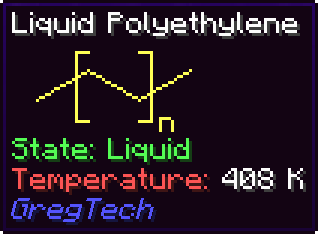 |
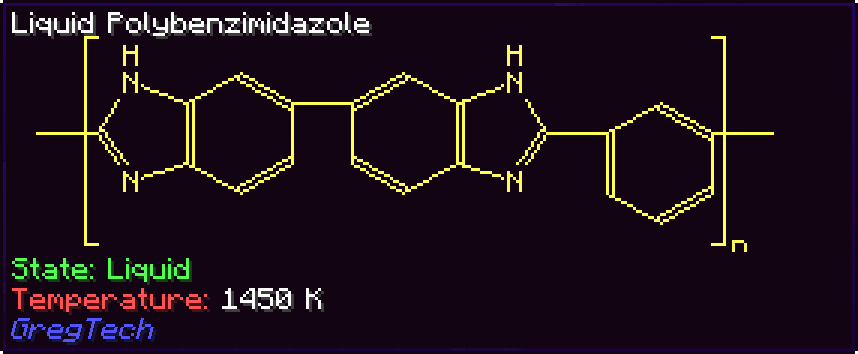 |
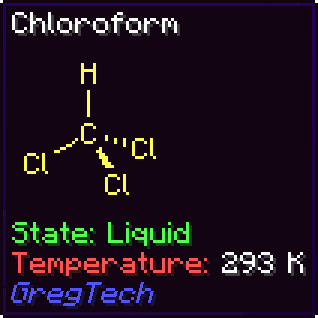 |
| CPK |
|
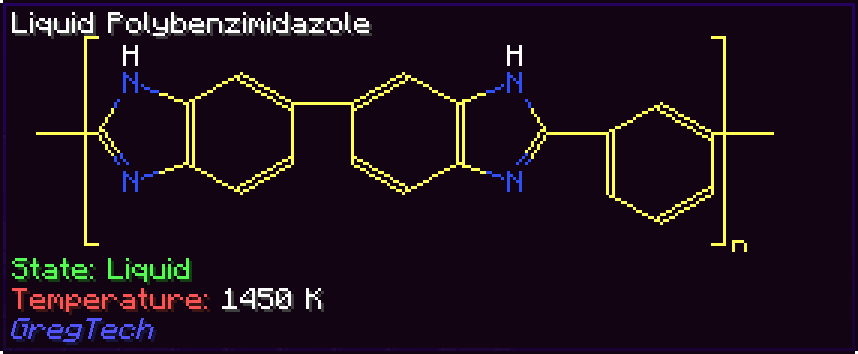 |
 |
| Material |
|
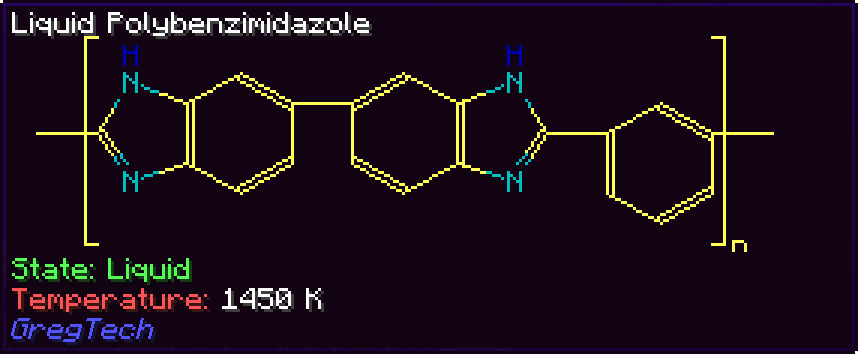 |
 |
Alloys
| Mode |
HSS-E |
| By mass |
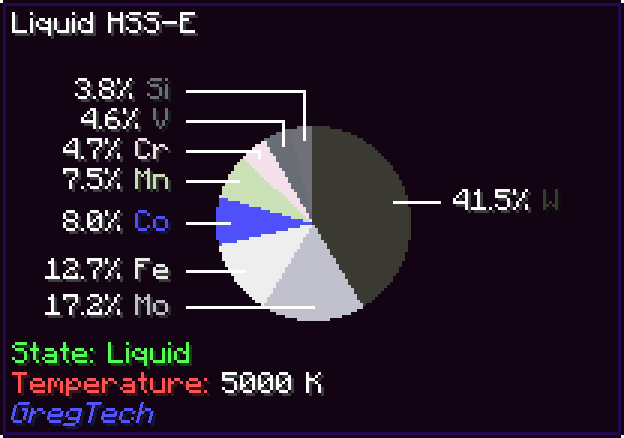 |
| Not recursive |
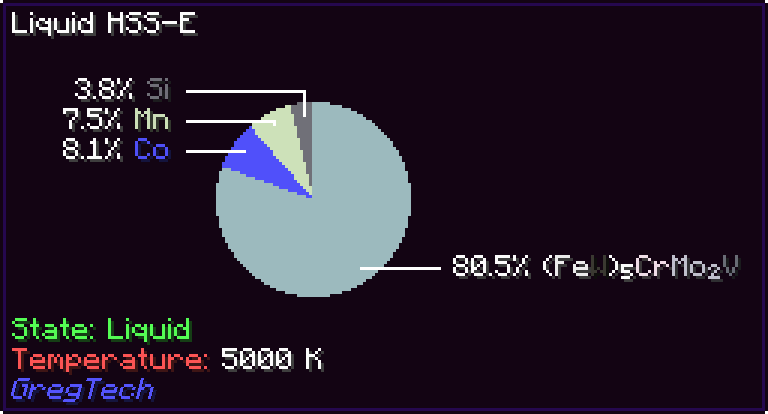 |
| By count |
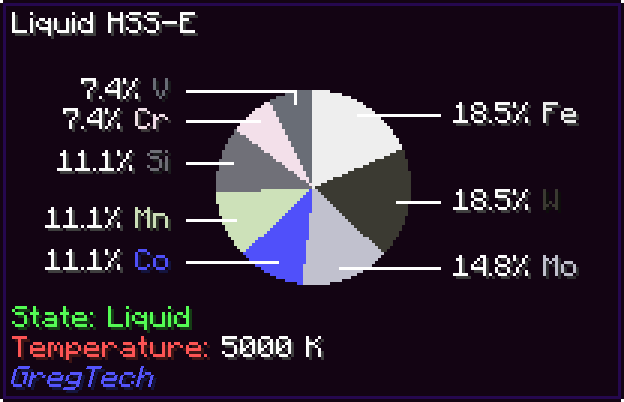 |
Additional content support
MolDraw comes out of the box with support for not only most of the organic materials and alloys from base GTCEu, but also a bunch of addons and modpacks. The currently supported extensions are:
- Monifactory
- Star Technology
- Cosmic Frontiers
- Phoenix Forge Technologies
- TerraFirmaGreg
- GT--
- GregTech Community Additions
- Gregicality Rocketry
What people say about this mod
Probably the coolest thing I've ever seen anyone do with tooltips.
My daily reminder that basically all organic chemistry is benzene with bits sticking out.
The only thing I have to say is that it's peak.
Now I can appreciate how complex the polymers I'm building are.
This was already so cool and colors made it even better!
I should be allowed to give Michelin stars to Gregtech add-ons because Madeline is cooking things right.
Incredibly useless, and yet incredibly cool!
yay aro representation
Adding your own molecules
Molecules are stored in resource packs under assets/<namespace>/molecules/<compound>.json, corresponding to the GT material with ID <namespace>:<compound>.
Molecules follow this schema:
// ARGB color or RGB hex string, which will always be used, or an object with the same and a specification of whether it's disableable by config
type ElementColor = number | string | {
  color: number | string;
  optional: boolean;
};

// Just a symbol, which can be used for normal atoms, or an object specifying a symbol, whether it's invisible, and the color
type Element = string | {
  symbol: string;
  invisible?: boolean; // New invisible elements that are intended to have different colors will still need a different symbol than the empty string; it will not be shown either way
  color?: ElementColor;
  material?: string; // The ID of the GregTech material associated with this element, used for the color by material setting.
};

// Amount of atoms defaults to 1
type CountedElement = string | [string, number];

interface AtomCommon {
  type: 'atom';
  index: number; // The identifier used for referring to this atom
  element?: CountedElement; // The main element of the atom, not present if the atom should be an invisible carbon
  above?: CountedElement; // An element to show above the main one
  right?: CountedElement; // etc
  below?: CountedElement;
  left?: CountedElement;
  spin_group?: number; // Atoms with the same group spin at the same rate, if it's a valid index in the molecule's spin property
}

// An atom can either specify X and Y coordinates...
interface AtomXY extends AtomCommon {
  x: number;
  y: number;
}

// or U and V coordinates, which are unit vectors tilted 30 degrees respectively anticlockwise and clockwise from the positive X semiaxis...
interface AtomUV extends AtomCommon {
  u: number;
  v: number;
}

// or the full 3D X, Y and Z coordinates.
interface AtomXYZ extends AtomCommon {
  x: number;
  y: number;
  z: number;
}

// Inward and outward bonds grow in size towards the second atom.
type Line = 'solid' | 'dotted' | 'inward' | 'outward' | 'thick';

interface Bond {
  type: 'bond';
  a: number; // The first atom of the bond
  b: number; // The second atom of the bond
  centered?: boolean // True if the lines can be offset by half an unit to center them
  lines: Line[];
}

// Parens are square brackets around certain atoms that show subscripts and/or superscripts.
interface Parens {
  type: 'parens';
  sup?: string; // Superscript text
  sub?: string; // Subscript text
  atoms: number[]; // List of atoms that are to be surrounded
}

// A circle drawn inside a cycle of atoms; automatically centered to their centroid.
interface CircleCommon {
  type: 'circle';
  atoms: number[];
}

// An axis-aligned circle scaled by x and y.
interface CircleXY extends CircleCommon {
  x: number;
  y: number;
}

// A linear trasformation applied to the unit circle.
interface CircleMatrix extends CircleCommon {
  a00: number;
  a01: number;
  a10: number;
  a11: number;
}

// A benzene ring
interface BenzeneCommon {
  type: 'benzene';
  start_index: number; // The index of the first atom in the ring
  clockwise?: boolean; // Whether the ring runs clockwise or counterclockwise (defaults to clockwise)
  spin_group?: number; // Spin group of the atoms in the ring
}

interface BenzeneXY extends BenzeneCommon {
  x0: number; // X coordinate of the first atom
  y0: number; // Y coordinate of the first atom
  x1: number; // X coordinate of the second atom
  y1: number; // Y coordinate of the second atom
}

interface BenzeneUV extends BenzeneCommon {
  u0: number; // U coordinate of the first atom
  v0: number; // V coordinate of the first atom
  u1: number; // U coordinate of the second atom
  v1: number; // V coordinate of the second atom
}

interface BenzeneXYZ extends BenzeneCommon {
  x0: number; // X coordinate of the first atom
  y0: number; // Y coordinate of the first atom
  z0: number; // Z coordinate of the first atom
  x1: number; // X coordinate of the second atom
  y1: number; // Y coordinate of the second atom
  z1: number; // Z coordinate of the second atom
}

type SpinSpec
  = boolean // Enable spinning with the default speed
  | number // Enable spinning and set a speed
  | number[]; // Set speeds for multiple groups

type MoleculeElement = AtomXY | AtomUV | AtomXYZ | Bond | Parens | CircleXY | CircleMatrix | BenzeneXY | BenzeneUV | BenzeneXYZ;

// A molecule JSON file is of type Molecule.
interface Molecule {
  contents: MoleculeElement[];
  spin?: SpinSpec;
}
An atom's position can either be stored as a pair of x and y coordinates or a pair of u and v coordinates, which are the unit vectors tilted 30 degrees respectively anticlockwise and clockwise from the positive horizontal semiaxis. Most often, encoding positions with u and v is easier since organic compounds' skeletal diagrams follow a hexagonal grid as much as possible.
For example, this is the encoding of benzene, if it didn't use the benzene component:
{
  "contents": [
    {
      "type": "atom",
      "index": 0,
      "u": 0.0,
      "v": 0.0
    },
    {
      "type": "atom",
      "index": 1,
      "u": -1.0,
      "v": 1.0
    },
    {
      "type": "atom",
      "index": 2,
      "u": -1.0,
      "v": 2.0
    },
    {
      "type": "atom",
      "index": 3,
      "u": 0.0,
      "v": 2.0
    },
    {
      "type": "atom",
      "index": 4,
      "u": 1.0,
      "v": 1.0
    },
    {
      "type": "atom",
      "index": 5,
      "u": 1.0,
      "v": 0.0
    },
    {
      "type": "bond",
      "a": 0,
      "b": 1
    },
    {
      "type": "bond",
      "a": 1,
      "b": 2,
      "lines": ["solid", "solid"]
    },
    {
      "type": "bond",
      "a": 2,
      "b": 3
    },
    {
      "type": "bond",
      "a": 3,
      "b": 4,
      "lines": ["solid", "solid"]
    },
    {
      "type": "bond",
      "a": 4,
      "b": 5
    },
    {
      "type": "bond",
      "a": 5,
      "b": 0,
      "lines": ["solid", "solid"]
    }
  ]
}
Adding your own alloys
Similarly, alloys are stored in resource packs under assets/<namespace>/alloys/<compound>.json, corresponding to the GT material with ID <namespace>:<compound>.
In the simplest case, a material just needs to be marked as being an alloy, and then its composition can be computed automatically via GregTech's material composition system. In that case, just put the following file in the correct place:
{
  "derive": true
}
If you want to specify components manually, such as to indicate impurities not present in the material composition, alloys follow this simple schema:
// A material ID and an integer amount, which defaults to 1
type Datum = string | [string, number];

// An alloy JSON file is of type Alloy
interface Alloy {
  components: Datum[];
}


 模组

 模组

 模组

 模组

 模组
 模组
评论 0
登录后参与评分
还没有评论,来抢沙发吧