
多用途工具,为新版本量身打造!

多用途工具是一种新型工具,它将所有主要工具(镐、斧、锹、锄)合二为一,从而节省背包空间。为了平衡这一优势,多用途工具的耐久度为所有组合工具耐久度总和的一半(可配置)。它共有四种材质:下界合金、钻石、黄金和铁。
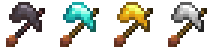
合成
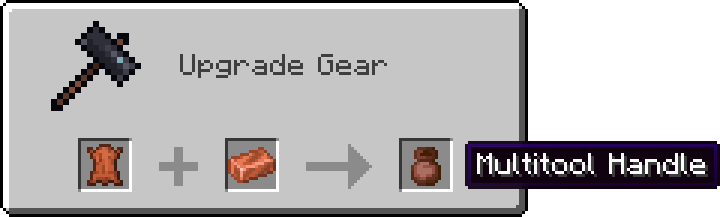
制作多用途工具的第一步是先锻造手柄。在锻造台中将铜锭与皮革结合,即可得到多用途工具手柄!
注意: 对于 1.20+ 版本,请使用工作台而非锻造台。
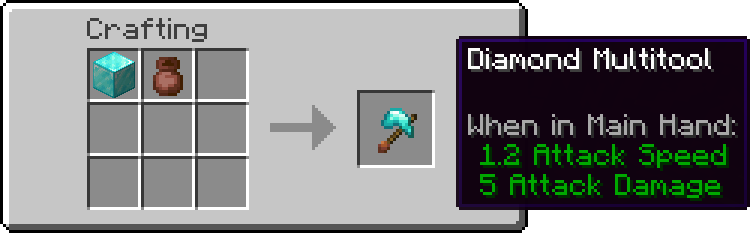
最后,将手柄与所有工具或所需材质的方块结合,即可制成多用途工具!

或者
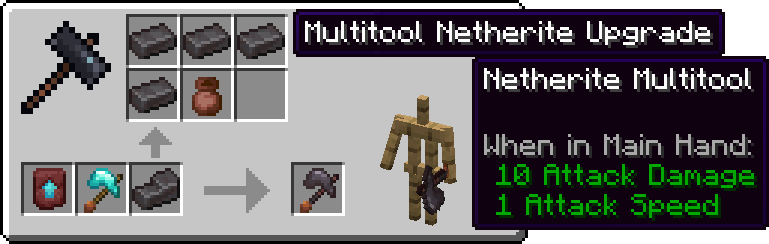
以及从钻石升级到下界合金:
去皮、除氧化、去蜡、修路与耕地
斧头的右键操作(去皮、除氧化和去蜡)均适用于多用途工具。只需右键点击原木或铜块即可体验其效果!
站立时,右键点击泥土变体方块会使用锹的功能来创建小路。若要耕地,请按住 Shift 键(或蹲伏键)后再进行右键点击。
Multitools, done right for the newer versions!
Multitools are a new tool type that combines all primary tools (pickaxe, axe, shovel, hoe) into one item to save up on inventory space. To balance this out, multitools have half the durability of all combined tools (configurable). They come in 4 materials: Netherite, Diamond, Gold, Iron.
Crafting
First step of crafting a multitool is smithing the handle first. Applying a copper ingot to leather in a smithing table will result in a Multitool Handle!
NOTE: For versions 1.20+ use the crafting table instead of the smithing table.
And lastly combining the handle with all the tools or a block of desired material will result in a Multitool!
or
and upgrading from Diamond to Netherite:
Stripping, Deoxidizing, Unwaxing, Pathing and Tilling
Axe right click actions (stripping, deoxidizing and unwaxing) all work with the multitool. Simply right click a log or a copper block to see it in action!
While stading, right clicking a variant of dirt block will use the shovel, creating a path. To till the ground instead, hold shift (or your crouching button) and then right click.
下载 Multitools Enhanced
下载 Multitools Enhanced
下载 Multitools Enhanced
下载 Multitools Enhanced
下载 Multitools Enhanced
下载 Multitools Enhanced
下载 Multitools Enhanced
下载 Multitools Enhanced
下载 Multitools Enhanced
下载 Multitools Enhanced
已更新至 MC 1.21.1
关于这个资源的讨论、问题反馈与使用心得
还没有讨论,来发第一帖吧
你是这个资源的作者?登录后可认领此资源。
相似资源
 模组

可定制的鞘翅模组,支持装饰纹饰、旗帜图案等更多功能!
 模组

显示你正在注视的方块的信息。(适用于 Minecraft 1.16+ 的 Hwyla/Waila 分支)
 模组

查看物品与配方
 模组

原版世界生成优化模组
 模组
在游戏画面角落显示附近世界地形、玩家、生物和实体的地图。可创建路径点,帮助你找到标记过的位置。
 模组
使用 JavaScript 编辑配方、添加自定义物品、编写世界事件!
评论 0
登录后参与评分
还没有评论,来抢沙发吧