

Multitool
你是否讨厌背包里被各种工具弄得一团糟?
有了这个数据包,你可以将所有工具合并为一个 Multitool。

功能特性
Multitool 始终可以挖掘斧头、锄头、镐或锹对应的方块,无论它当前处于何种形态。
当你注视某个方块时,Multitool 会自动切换为适合该方块的形态,例如将斧头切换为剥皮模式以处理原木,或将锹切换为创建路径的形态。
在注视可耕种方块时潜行,Multitool 会切换为锄头形态,以便你开垦新的农田。
你可以对 Multitool 进行附魔!
它支持所有通常可用于工具的附魔。
Multitool 的耐久度是相同材质普通工具的 3 倍。
Multitool 甚至支持资源包,例如 Dukette 制作的 这款,它可以将 Multitool 变为长戟!
获取方法
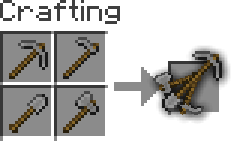
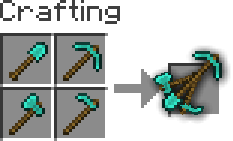
要合成一个 Multitool,只需在工作台中将同一种材质的四种工具组合在一起即可。
添加或移除 Multitool
你可以通过配置配置文件并构建来生成你自己的 Multitool 数据包。
这也适用于模组工具,但请注意某些模组会破坏数据包的兼容性,因此我不保证兼容性或提供支持。
-
安装 Python 和 beet
如果已安装 Python,只需运行 pip install beet 即可安装 beet
-
克隆或下载 GitHub 仓库
-
在 multitool_config.yml 中添加或移除 materials,并配置 overwrites(用于那些不遵循原版命名方案的模组中的工具)
你可以按下 F3 + H 后在物品栏中查看物品来轻松找到命名空间,其格式应为 <namespace>:<material>_<tool>
-
使用终端进入此文件夹并运行 beet,它将创建一个名为 build 的文件夹,其中包含你的数据包
Multitool
Do you hate it when your whole inventory is cluttered by tools?
Well, with this data pack you can combine all the tools into the Multitool.

Features
The Multitool can always break blocks meant for the axe, hoe, pickaxe or shovel, no matter what form it is currently in.
If you look at a block, the Multitool switches to a tool suited for that block like an axe to strip logs or a shovel to create paths.
When sneaking while looking at tillable blocks, the Multitool swaps to a hoe, so you can create fresh farmland.
You can enchant the Multitool!
It supports any enchantment that you can normally put onto a tool.
The Multitool has 3 times the durability of a regular tool made from the same material.
Mutlitool even supports resource packs, like this one by Dukette, it turns the Multitool into a halberd!
How to get

To craft a Multitool, you just need to combine all four types of tools of the same material in the crafting grid.
Adding or removing a Multitool
You can generate your own Multitool data pack simply by configuring a config and building it
This also works for modded tools but note that some mods break data packs so I won't guarantee compatability or support
-
Install Python and beet
If Python is allready installed, you should just be able to run pip install beet to install beet
-
Clone or download the GitHub repository
-
Add or remove materials in multitool_config.yml and configure overwrites, for mods where a tool isn't following vanilla's naming scheme
You can easily find the namespace by looking at the item in your inventory after pressing F3 + H, it should be in the form <namespace>:<material>_<tool>
-
Move to this folder with a terminal and run beet, it should create a folder called build with your data pack in it
评论 0
登录后参与评分
还没有评论,来抢沙发吧

