
 Multitool
你是否讨厌背包里被各种工具弄得一团糟?
有了这个数据包,你可以将所有工具合并为一个 Multitool。


功能特性
Multitool 始终可以挖掘斧头、锄头、镐或锹对应的方块,无论它当前处于何种形态。
当你注视某个方块时,Multitool 会自动切换为适合该方块的形态,例如将斧头切换为剥皮模式以处理原木,或将锹切换为创建路径的形态。
在注视可耕种方块时潜行,Multitool 会切换为锄头形态,以便你开垦新的农田。
你可以对 Multitool 进行附魔! 它支持所有通常可用于工具的附魔。
Multitool 的耐久度是相同材质普通工具的 3 倍。
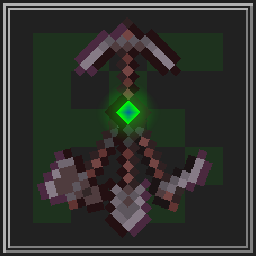
Multitool 甚至支持资源包,例如 Dukette 制作的 这款,它可以将 Multitool 变为长戟!
获取方法
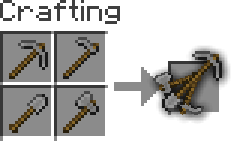
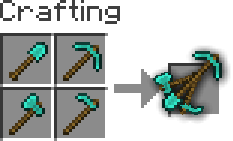
要合成一个 Multitool,只需在工作台中将同一种材质的四种工具组合在一起即可。
添加或移除 Multitool
你可以通过配置配置文件并构建来生成你自己的 Multitool 数据包。
这也适用于模组工具,但请注意某些模组会破坏数据包的兼容性,因此我不保证兼容性或提供支持。
-
安装 Python 和 beet
如果已安装 Python,只需运行pip install beet即可安装 beet -
克隆或下载 GitHub 仓库
-
在
multitool_config.yml中添加或移除materials,并配置overwrites(用于那些不遵循原版命名方案的模组中的工具)你可以按下 F3 + H 后在物品栏中查看物品来轻松找到命名空间,其格式应为
<namespace>:<material>_<tool> -
使用终端进入此文件夹并运行
beet,它将创建一个名为build的文件夹,其中包含你的数据包
Multitool
Do you hate it when your whole inventory is cluttered by tools?
Well, with this data pack you can combine all the tools into the Multitool.
Features
The Multitool can always break blocks meant for the axe, hoe, pickaxe or shovel, no matter what form it is currently in.
If you look at a block, the Multitool switches to a tool suited for that block like an axe to strip logs or a shovel to create paths.
When sneaking while looking at tillable blocks, the Multitool swaps to a hoe, so you can create fresh farmland.
You can enchant the Multitool! It supports any enchantment that you can normally put onto a tool.
The Multitool has 3 times the durability of a regular tool made from the same material.
Mutlitool even supports resource packs, like this one by Dukette, it turns the Multitool into a halberd!
How to get
To craft a Multitool, you just need to combine all four types of tools of the same material in the crafting grid.
Adding or removing a Multitool
You can generate your own Multitool data pack simply by configuring a config and building it
This also works for modded tools but note that some mods break data packs so I won't guarantee compatability or support
-
Install Python and beet
If Python is allready installed, you should just be able to runpip install beetto install beet -
Clone or download the GitHub repository
-
Add or remove
materialsinmultitool_config.ymland configureoverwrites, for mods where a tool isn't following vanilla's naming schemeYou can easily find the namespace by looking at the item in your inventory after pressing F3 + H, it should be in the form
<namespace>:<material>_<tool> -
Move to this folder with a terminal and run
beet, it should create a folder calledbuildwith your data pack in it

下载 Multitool
需要联机服务器吗?
稳定流畅、一键部署,几分钟即可和朋友联机开服
最低仅需 8 元/月 即可畅快联机
下载 Multitool
需要联机服务器吗?
稳定流畅、一键部署,几分钟即可和朋友联机开服
最低仅需 8 元/月 即可畅快联机
下载 Multitool
需要联机服务器吗?
稳定流畅、一键部署,几分钟即可和朋友联机开服
最低仅需 8 元/月 即可畅快联机
下载 Multitool
需要联机服务器吗?
稳定流畅、一键部署,几分钟即可和朋友联机开服
最低仅需 8 元/月 即可畅快联机
下载 Multitool
需要联机服务器吗?
稳定流畅、一键部署,几分钟即可和朋友联机开服
最低仅需 8 元/月 即可畅快联机
下载 Multitool
需要联机服务器吗?
稳定流畅、一键部署,几分钟即可和朋友联机开服
最低仅需 8 元/月 即可畅快联机
- 更新至 1.21.9 和 1.21.10
- 当注视铜块并潜行时,工具将切换为斧头
- 当注视营火并潜行时,工具将切换为铲子
- 添加铜制多功能工具
关于这个资源的讨论、问题反馈与使用心得
还没有讨论,来发第一帖吧
你是这个资源的作者?登录后可认领此资源。
相似资源
 模组

可定制的鞘翅模组,支持装饰纹饰、旗帜图案等更多功能!
 模组

显示你正在注视的方块的信息。(适用于 Minecraft 1.16+ 的 Hwyla/Waila 分支)
 模组

查看物品与配方
 模组
在游戏画面角落显示附近世界地形、玩家、生物和实体的地图。可创建路径点,帮助你找到标记过的位置。
 模组
使用 JavaScript 编辑配方、添加自定义物品、编写世界事件!
 模组
AE2:一款流行的自动化与存储模组
评论 0
登录后参与评分
还没有评论,来抢沙发吧