
MySkins
MySkins 是一款适用于 Fabric 的客户端与服务器端模组,允许玩家在游戏中直接管理皮肤、披风、身体比例以及盔甲可见性。
访问界面
你可以通过主标题屏幕上的专用按钮、暂停菜单(Esc),或在控制设置中绑定自定义按键来打开管理界面。
身体缩放与调整
编辑器面板允许配置各个身体部位的宽度、高度和深度:
- 头部
- 躯干
- 手臂
- 腿部和脚部
它还包含两种视角设置:
- 相机高度: 根据头部比例的调整适配第一人称相机的位置。
- 手部缩放: 将第一人称手臂模型按比例缩放以匹配你配置的手臂比例。
从 URL 下载
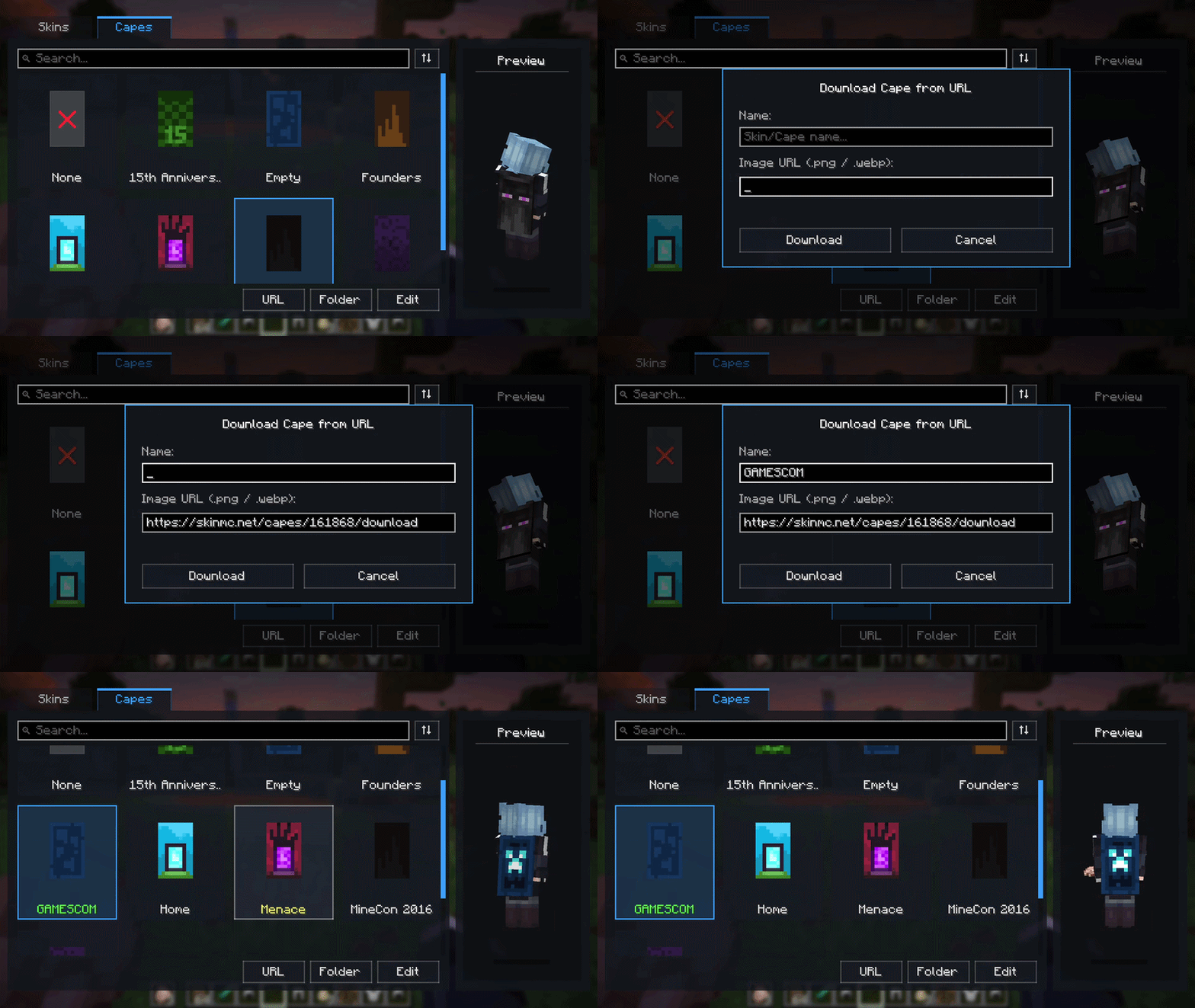
你可以无需打开文件管理器即可导入皮肤和披风。粘贴图片的直接链接(.png 或 .webp),为其命名,模组便会将其下载并存储到模组目录中。
装饰性盔甲可见性
每件装备的盔甲(头盔、胸甲、护腿、靴子)都可以通过点击 3D 模型下方的图标来隐藏视觉效果。盔甲的属性值、耐久度和附魔效果依然完全正常运作。
多人游戏同步
该模组在单人游戏中完全可用,也兼容原版服务器(仅限客户端)。
如果在客户端和服务器端均安装了此模组,你的皮肤、披风、自定义身体比例以及隐藏的盔甲状态将通过网络同步,其他安装了该模组的玩家可以看到这些更改。未安装该模组的原版玩家仍可正常连接至服务器,不会出现问题。
文件存储
所有图像和配置档案均存储在以下路径内:
.minecraft/myskins/
├── skins/
├── capes/
└── config/
这种自包含的结构使得备份和实例迁移变得简单直接。
许可证与整合包使用
本项目采用“保留所有权利”(All Rights Reserved)许可证。只要通过 Modrinth 进行下载,你可以自由地将 MySkins 包含在任何公开或私有的整合包中。禁止将该模组的二进制文件重新上传到其他网站。
MySkins
MySkins is a client and server mod for Fabric that allows managing skins, capes, body proportions, and armor visibility directly in-game.
Accessing the Interface
You can open the management screen using the dedicated button on the main title screen, through the pause menu (Esc), or by setting a custom keybind in the controls menu.
Body Scaling and Adjustments
The editor panel allows configuring the width, height, and depth of individual body parts:
- Head
- Torso
- Arms
- Legs and feet
It also includes two perspective settings:
- Camera Height: Adapts the first-person camera position to match head scale changes.
- Hand Scaling: Scales the first-person arm model to match your configured arm proportions.
Downloading from URL
You can import skins and capes without opening your file explorer. Paste a direct link to an image (.png or .webp), give it a name, and the mod downloads and stores it into the mod directory.
Cosmetic Armor Visibility
Each equipped armor piece (helmet, chestplate, leggings, boots) can be hidden visually by clicking the icons below the 3D model. Armor values, durability, and enchantments remain completely functional.
Multiplayer Synchronization
The mod works fully in singleplayer and on vanilla servers (client-side only).
If installed on both client and server, your skins, capes, custom body scales, and hidden armor states are synchronized over the network so other players with the mod can see them. Vanilla players without the mod can still connect to the server without issues.
File Storage
All images and configuration profiles are stored inside:
.minecraft/myskins/
├── skins/
├── capes/
└── config/
This self-contained structure makes backups and instance transfers straightforward.
License and Modpack Usage
This project is licensed under All Rights Reserved. You are free to include MySkins in any public or private modpack as long as downloads go through Modrinth. Reuploading the mod binary to other websites is not permitted.

下载 MySkins
下载 MySkins
下载 MySkins
下载 MySkins
下载 MySkins
下载 MySkins
下载 MySkins
下载 MySkins
下载 MySkins
下载 MySkins
修复
- 修复了在全新安装(Minecraft 26.1.x – 26.3)时,加入世界后默认原版披风无法显示的问题。
更改
- 在所有版本中添加了俄语 (
ru_ru) 语言支持。
关于这个资源的讨论、问题反馈与使用心得
还没有讨论,来发第一帖吧
你是这个资源的作者?登录后可认领此资源。
相似资源
 模组

可定制的鞘翅模组,支持装饰纹饰、旗帜图案等更多功能!
 模组

显示你正在注视的方块的信息。(适用于 Minecraft 1.16+ 的 Hwyla/Waila 分支)
 模组
使用 JavaScript 编辑配方、添加自定义物品、编写世界事件!
 模组

查看物品与配方
 模组
在游戏画面角落显示附近世界地形、玩家、生物和实体的地图。可创建路径点,帮助你找到标记过的位置。
 模组
AE2:一款流行的自动化与存储模组
评论 0
登录后参与评分
还没有评论,来抢沙发吧