NeOPoculus
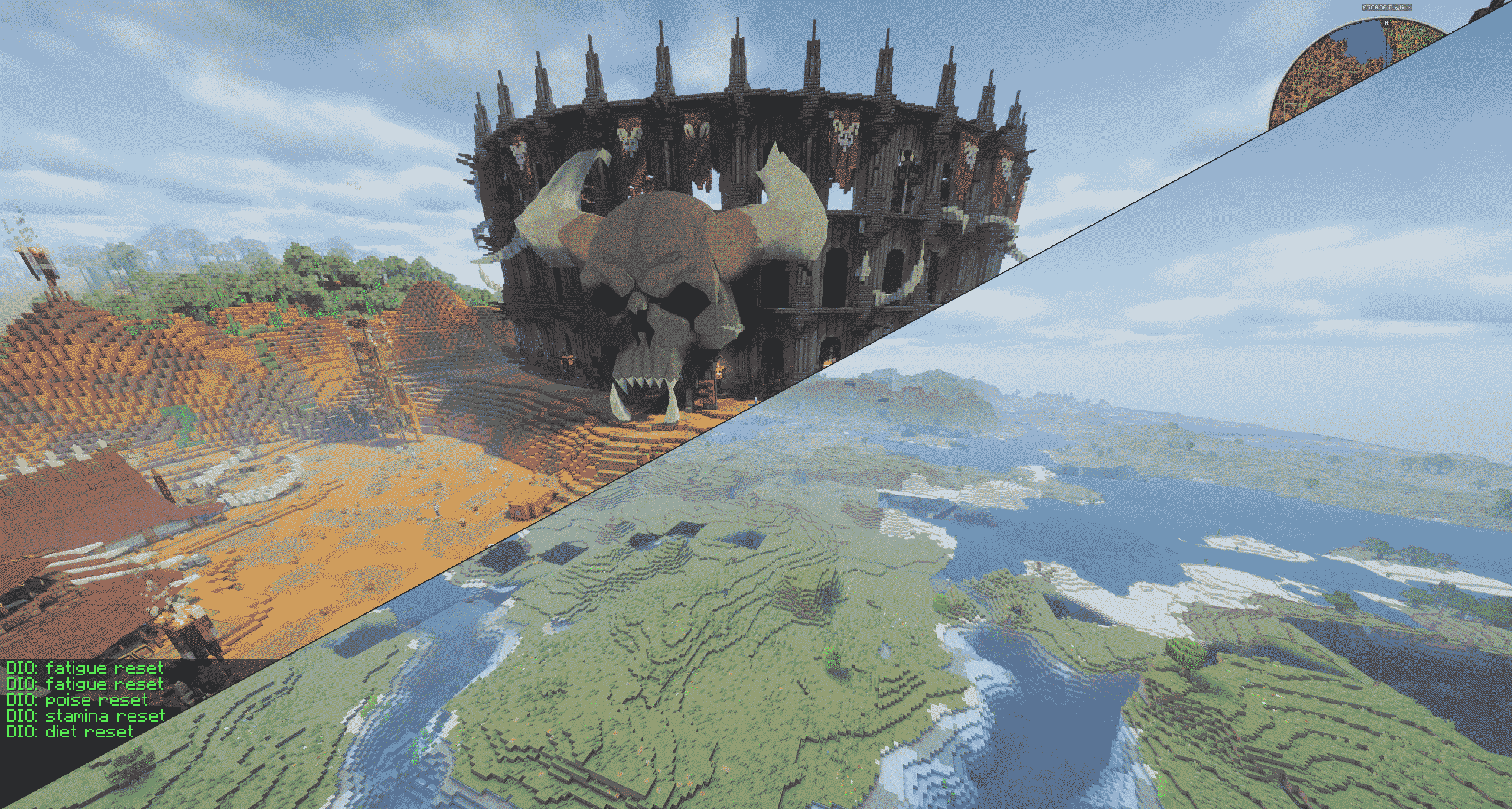
适用于 NeoForge 的光影,让你的世界延伸至视距之外。
NeOPoculus 是 NeOculus 的一个分支,
而 NeOculus 又是 Oculus 的分支,后者将
Iris 移植到了 Forge 系列加载器上。
这些项目所做的所有工作——加载 OptiFine/ShadersMod 光影包、游戏内光影选项界面、Embeddium 集成——均归功于它们,且在这里依然有效。
此分支新增的功能是 Horizon:一套内置的远距离地形系统,以及针对此前会导致崩溃或无法渲染的模组和平台的一系列兼容性修复。
Discord · 源码 · 报告错误
Horizon — 视距之外的地形
Horizon 会记录你探索过的地形,按世界和维度进行保存,并在服务器视距之外绘制这些地形。它不需要服务端模组,也不需要额外下载:所有内容都从你的客户端已接收的区块中捕获,因此它同样适用于原版服务器、Realms 和单人游戏。已探索的地形会被写入磁盘,因此世界在会话之间能保持全景状态。
细节会随着距离分五个阶段逐渐减少,从而降低远处地形的性能开销。最靠近你的环以完整的方块分辨率绘制,并故意与你已加载的区块重叠,这使得过渡变得不可察觉——同时它会回填仍在加载中的区块,防止世界在你渲染距离边缘出现“ popping in ”(突然生成)的现象。
默认开启,只需取消勾选即可关闭。
两种引擎
|
Classic(默认) |
Voxel(实验性) |
| 存储内容 |
表面高度、水面高度、每列一种颜色 |
实际的方块、生物群系和光照信息(按单元格) |
| 洞穴、悬空结构、内部空间 |
不表示 |
表示 |
| 纹理 |
每列单一颜色 |
真实的方块纹理 |
| 方块形状 |
完整立方体 |
台阶、雪层、地毯、栅栏、植物保留其原始形状 |
| 水体 |
不透明表面 |
真正的半透明 |
Classic 引擎基于高度图,是你开箱即用的选择:更轻量、更成熟、经过验证。Voxel 引擎则是较新的版本,也是当前开发的重点——如果你希望在远距离看到洞穴、纹理和真实的方块形状,可以在 Voxel Engine (Experimental) 下切换启用。标注为实验性是诚实的说明:它是两者中较新的一个,且在野外环境下的测试时间较短。
光影包支持
远处地形是通过你的光影包绘制的,因此它能获得光影包自带的光照、雾效和阴影效果,而不是看起来像贴在水平线上的扁平剪贴画。
有两种实现方式。支持 Distant Horizons 的光影包包含一个 dh_terrain 程序,Horizon 会将地形数据通过该程序处理。没有此类程序的光影包则通过其普通的 gbuffers_terrain 进行绘制——每个光影包都有这个程序,这也是唯一能显示真实方块纹理的路径。
在测试的 16 个光影包中,有 11 个可以渲染带阴影的远处地形:
- 通过
dh_terrain 渲染 —— Bliss, BSL, Complementary Reimagined, Complementary Unbound, Sildur's Vibrant Shaders, Solas
- 通过
gbuffers_terrain 渲染 —— ARTShade, Aurora's Shaders, Kappa, Lux, The Better Default
目前有五个光影包完全无法加载:iterationT, Noble, PaintBound, photon 和 Reverie。这些光影包在 Embeddium/Iris 层的着色器编译过程中失败,报错类似 undefined variable "iris_FogColor"。这是着色器栈本身的缺陷,与 Horizon 无关——无论是否开启远处地形,这些光影包都无法在此模组中正常工作。这是一个已知问题,并非受支持的配置。
未列入此列表的光影包属于未经测试,而非不受支持。
多人游戏与预生成地形
服务器管理员可以提前生成远处地形,并在玩家加入时流式传输给他们——这样新玩家就能立即看到整个景观,而不是一堵随着时间推移逐渐后退的浓雾墙。
/horizon lod 命令可以为区域、半径或整个世界生成地形,仅限权限等级 4(服务器所有者)使用。来自服务器的地形被视为不可信数据:方块 ID 和生物群系 ID 会被转换为客户机自己的编号体系,而非直接采用;长度和 ID 会进行范围检查;磁盘预算也会限制单次会话接受的数据量。表现不良的服务器最多只能导致远处风景看起来有些奇怪。
在单人游戏中通过命令生成 LOD 需要使用 Voxel 引擎。
磁盘占用
远处地形会在磁盘上进行缓存,且缓存大小有限制。当达到上限时,你会收到提示,而不是困惑于为何地平线不再填充。可选的自动清理功能会优先删除离你最远的区域以释放空间——你实际居住的地面会被保留,而旧探险的最远端会被首先清除。还有一个清除按钮可以彻底清空缓存,但需要确认勾选。
设置
所有设置均位于 视频设置 → Horizon LOD(Embeddium 的界面,或原版界面)中,且可在游戏内编辑。
| 设置项 |
默认值 |
作用 |
| Horizon LOD |
on |
主开关。 |
| Voxel Engine |
off |
较新的引擎:支持洞穴、纹理和真实的方块形状。 |
| Render with shaders |
on |
通过你的光影包渲染远处地形。 |
| LOD distance |
256 chunks |
远处地形的渲染距离(16–4096)。 |
| Distant vegetation |
33% |
渲染远处草和花的比例。通常能带来最大的性能提升。 |
| Per-cell LOD textures |
on |
在光影下以真实大小显示方块纹理;会消耗几何资源。 |
| Textured LOD under shaders |
off |
即使对于支持 Distant Horizons 的光影包,也强制使用带纹理的路径。 |
| LOD memory budget |
256 MB |
Voxel 引擎在将地形写回磁盘前可保留在地形中的内存量。 |
| Auto-clean / purge |
off |
磁盘缓存管理。 |
此外,还提供 detail-ring、upload-rate、worker-thread 和 save-interval 控件用于微调。
每个选项也会写入 config/neoculus-horizon.properties。
如果远处地形占用过多性能: 首先降低 Distant vegetation —— 植物由许多细小的透明四边形组成,其像素成本远高于实心地面。然后减少 LOD distance,接着关闭 Per-cell LOD textures。
兼容性修复
这些是对之前损坏内容的修复,而非新功能。
基于 Sodium API 构建的模组
大量渲染模组是基于 Sodium 的公开 API 编写的。在运行 Embeddium 而非 Sodium 的 NeoForge 环境中,这些类不存在,此类模组会在你到达主菜单之前就因 NoClassDefFoundError 而在加载时崩溃。
此分支提供了一个该 API 的替代实现——包括颜色和法线辅助函数、矩阵和内存内在函数、精灵工具,以及通用的顶点格式和属性——从而使这些模组能够加载并运行。它们通过普通路径进行渲染,而非 Sodium 的快速路径,这是在此堆栈上的正确结果:快速路径会礼貌地报告“不可用”,而行为良好的模组会回退到其自身实现。
两个诚实的说明。一个 要求 快速路径而非请求它的模组仍将拒绝运行——API 设计有“尝试”和“必须拥有”两个入口点,只有前者可以优雅降级。并且仅 Flerovium 经过端到端验证;其他 Sodium-API 模组可能有效但未经测试。如果某个模组无法工作,在 Discord 或问题跟踪器上提交报告确实很有帮助。
LittleTiles
LittleTiles 在 Embeddium 下渲染正确,包括半透明瓦片——玻璃结构显示正常,而不是消失或呈现不透明状态——并且在编辑结构时面会被正确剔除,因此更改后瓦片不会留下空洞或过时表面。
平台与驱动
- macOS —— 捆绑的 AcceleratedRendering 以前会在加载世界时导致原生崩溃,特别是在不支持 OpenGL 计算硬件的所有 Mac 上。现在它已被自动检测并关闭,回退到原版渲染。
- Sinytra Connector —— 安装 Connector 后,不再在 Initializing game 期间崩溃。
- 更严格的 OpenGL 驱动 —— 游戏不再因驱动报告 GL 3.2 核心上下文但通过扩展暴露 4.x 而拒绝启动。
- 实体闪烁 —— 移动时,实体、方块实体、手持物品和你的手臂不再闪烁消失。
AcceleratedRendering 也已从 1.0.0 更新到 1.0.8。
要求
- Minecraft 1.21.1
- NeoForge 21.1.0 或更高版本
- Embeddium —— 必需
不兼容 OptiFine。请勿与 Oculus、Iris 或 NeOculus 一起安装——本模组将替换它们。
已知限制
- 未声称任何性能数据。 Horizon 绘制了更多世界内容,因此比不绘制它消耗更多资源。是否值得取决于你的硬件,上述设置允许你自己决定。
- 十六个已测试的光影包中有五个无法加载,原因与远处地形无关(见上文)。
- 远处地形目前为双面渲染;计划改为单面渲染,这将降低成本。
- 你看不到的地下地形仍会被绘制。计划对其进行剔除。
- Classic 引擎无法显示洞穴或悬垂物——这正是 Voxel 引擎的作用。
支持与错误报告
报告渲染问题时,提供 光影包名称和版本、你的 latest.log,以及关闭 Horizon LOD 后问题是否仍然存在——仅凭最后这一点就能区分是 Horizon 的 Bug 还是光影堆栈的 Bug。
致谢与许可
本模组建立在他人工作之上:
Horizon 受 Distant Horizons 和 Voxy 启发,但与两者无任何代码共享。
采用 LGPL-3.0 许可,继承自 Iris。
NeOPoculus
Shaders for NeoForge, with a world that keeps going past your render distance.
NeOPoculus is a fork of NeOculus,
which forks Oculus, which ports
Iris to Forge-family loaders.
Everything those projects do — loading OptiFine/ShadersMod shader packs, the in-game shader
options screen, Embeddium integration — is theirs, and it all still works here.
What this fork adds is Horizon: a built-in extended-distance terrain system, plus a set of
compatibility fixes for mods and platforms that previously crashed or rendered nothing.
Discord · Source · Report a bug
Horizon — terrain beyond the view distance
Horizon records the terrain you explore, saves it per world and dimension, and draws it far
past the server's view distance. It needs no server mod and no extra downloads: everything is
captured from chunks your own client already receives, so it works on vanilla servers,
realms and singleplayer alike. Explored terrain is written to disk, so a world keeps its
panorama between sessions.
Detail falls away with distance in five steps, so distant ground stays cheap. The ring closest
to you is drawn at full block resolution and deliberately overlaps your loaded chunks, which is
what makes the join invisible — and it backfills chunks that are still loading, so the world
stops popping in at the edge of your render distance.
On by default, and turned off with a single tick box.
Two engines
|
Classic (default) |
Voxel (experimental) |
| Stores |
surface height, water height, one colour per column |
real blocks, biome and light per cell |
| Caves, overhangs, interiors |
not represented |
represented |
| Textures |
flat colour per column |
real block textures |
| Block shapes |
full cubes |
slabs, snow, carpets, fences, plants keep their shape |
| Water |
opaque surface |
genuinely translucent |
The Classic engine is a heightmap and is what you get out of the box: lighter, older, and
proven. The Voxel engine is the newer one and is where the work has gone — switch it on under
Voxel Engine (Experimental) if you want caves, textures and real block shapes at distance.
It is marked experimental honestly: it is the newer of the two and has had less time in the
wild.
Shader pack support
Distant terrain is drawn through your shader pack, so it gets the pack's own lighting,
fog and shadows instead of looking like a flat cut-out pasted onto the horizon.
There are two ways this happens. A pack that supports Distant Horizons has a dh_terrain
program, and Horizon feeds its terrain through it. A pack with no such program is drawn
through its ordinary gbuffers_terrain instead — which every pack has, and which is also the
only path that shows real block textures.
Of 16 packs tested, 11 render shaded distant terrain:
- Through
dh_terrain — Bliss, BSL, Complementary Reimagined, Complementary Unbound,
Sildur's Vibrant Shaders, Solas
- Through
gbuffers_terrain — ARTShade, Aurora's Shaders, Kappa, Lux, The Better Default
Five packs do not currently load at all in this mod: iterationT, Noble, PaintBound, photon
and Reverie. These fail during shader compilation in the Embeddium/Iris layer, with errors
like undefined variable "iris_FogColor". That is a defect in the shader stack and has
nothing to do with Horizon — those packs do not work here whether distant terrain is on or
off. It is a known issue, not a supported configuration.
Packs not on this list are untested rather than unsupported.
Multiplayer and pre-generated terrain
A server operator can generate distant terrain ahead of time instead of waiting for players to
walk it, and stream it to players as they join — so a new player sees the whole landscape
immediately rather than a wall of fog that slowly retreats.
The /horizon lod commands generate terrain for a zone, a radius or the whole world, and are
restricted to permission level 4 (server owner). Terrain arriving from a server is treated
as untrusted: block and biome ids are translated into the client's own numbering rather than
adopted, lengths and ids are range-checked, and a disk budget caps how much a session will
accept. The worst a misbehaving server achieves is odd-looking distant scenery.
Generating LOD from the command requires the Voxel engine on a singleplayer world.
Disk use
Distant terrain is cached on disk and the cache is capped. When the cap is reached you are
told, rather than left wondering why the horizon stopped filling in. Optional auto-clean
frees space by deleting the regions farthest from you first — the ground you actually live on
is kept, the far edge of an old expedition goes first. A purge button clears the cache
entirely, behind a confirmation tick.
Settings
All settings live under Video Settings → Horizon LOD (Embeddium's screen, or the vanilla
one) and are editable in game.
| Setting |
Default |
What it does |
| Horizon LOD |
on |
Master switch. |
| Voxel Engine |
off |
The newer engine: caves, textures, real block shapes. |
| Render with shaders |
on |
Draw distant terrain through your shader pack. |
| LOD distance |
256 chunks |
How far distant terrain reaches (16–4096). |
| Distant vegetation |
33% |
How much distant grass and flowers to draw. Usually the largest single performance gain. |
| Per-cell LOD textures |
on |
Block textures at true size under shaders; costs geometry. |
| Textured LOD under shaders |
off |
Force the textured path even on packs that support Distant Horizons. |
| LOD memory budget |
256 MB |
Memory the Voxel engine may hold terrain in before writing it back to disk. |
| Auto-clean / purge |
off |
Disk cache management. |
Plus detail-ring, upload-rate, worker-thread and save-interval controls for tuning.
Every option is also written to config/neoculus-horizon.properties.
If distant terrain costs you too much: lower Distant vegetation first — plants are many
small see-through quads, which cost far more per pixel than solid ground. Then reduce LOD
distance, then turn off Per-cell LOD textures.
Compatibility fixes
These are fixes to things that were broken before, not new features.
Mods built against Sodium's API
A great many rendering mods are written against Sodium's public API. On a NeoForge setup
that runs Embeddium instead, those classes do not exist, and such a mod dies at load with
NoClassDefFoundError before you ever reach the main menu.
This fork ships a stand-in for that API — colour and normal helpers, matrix and memory
intrinsics, sprite utilities, and the common vertex formats and attributes — so those mods
load and run. They render through the ordinary path rather than Sodium's fast one, which is
the correct outcome on this stack: the fast path politely reports "not available" and a
well-behaved mod falls back on its own.
Two honest caveats. A mod that demands the fast path instead of asking for it will still
refuse to run — the API is designed with both a "try" and a "must have" entry point, and only
the first can degrade gracefully. And only Flerovium has been verified end to end; other
Sodium-API mods are likely to work but are untested. If one does not, a report on Discord or
the issue tracker is genuinely useful.
LittleTiles
LittleTiles renders correctly
under Embeddium, translucent tiles included — glass structures show properly instead of
disappearing or rendering opaque — and faces are re-culled correctly when you edit a
structure, so tiles do not leave holes or stale surfaces behind after a change.
Platforms and drivers
- macOS — the bundled AcceleratedRendering used to crash the game natively while loading a
world on hardware with no OpenGL compute support, which includes every Mac. It is now
detected and switched off transparently, falling back to vanilla rendering.
- Sinytra Connector — no longer crashes during Initializing game when Connector is
installed.
- Stricter OpenGL drivers — the game no longer refuses to launch on drivers reporting a GL
3.2 core context while exposing 4.x through extensions.
- Entity flicker — entities, block entities, your held item and your arm no longer blink
out while moving.
AcceleratedRendering is also updated from 1.0.0 to 1.0.8.
Requirements
- Minecraft 1.21.1
- NeoForge 21.1.0 or newer
- Embeddium — required
Not compatible with OptiFine. Do not install alongside Oculus, Iris or NeOculus — this replaces
them.
Known limitations
- No performance numbers are claimed. Horizon draws more of the world, so it costs more
than not drawing it. Whether that is worth it depends on your hardware, and the settings
above exist to let you decide.
- Five of the sixteen tested shader packs do not load, for a reason unrelated to distant
terrain (see above).
- Distant terrain is currently drawn two-sided; single-sided drawing is planned and will make
it cheaper.
- Underground terrain you cannot see is still drawn. Culling it is planned.
- The Classic engine cannot show caves or overhangs — that is what the Voxel engine is for.
Support and bug reports
Reporting a rendering problem is far more useful with the shader pack name and version,
your latest.log, and whether the problem still happens with Horizon LOD turned off —
that last one alone separates a Horizon bug from a shader-stack bug.
Credits and licence
This mod stands on other people's work:
Horizon is inspired by Distant Horizons and
Voxy, and shares no code with either.
Licensed under LGPL-3.0, as inherited from Iris.


 模组

 模组

 模组
 模组

 模组
 模组
评论 0
登录后参与评分
还没有评论,来抢沙发吧