

NeoSync
一心多用。多重躯体。
NeoSync 将传奇的 Sync 体验带到了 NeoForge 1.21.1。
培育额外的身体,或称外壳(shells),每个外壳都拥有独立的物品栏、经验等级和游戏模式。你可以随意在它们之间切换意识。在一个外壳中死亡?你会在另一个中醒来。 把一个留在下界待命,而你去主界挖矿。将一个装满附魔装备的外壳存放在服务器的另一端作为备用。一切皆有可能。
工作原理
- 制作一个外壳构造器(Shell Constructor) 并将其放置。
- 提供基因样本 —— 用空手右键点击构造器。
⚠️ 使用默认配置时,这将消耗 20点生命值(极限模式下为40点)。如果你不想为了科学献出生命,请持有图腾、吃金苹果,或在配置文件中将
warnPlayerInsteadOfKilling设为开启。 - 为构造器充能。在其旁边放置一台跑步机(Treadmill),引诱一只猪或狼站在其前方的方块上,然后“猪力”(piggawatts)就会流动起来。或者将其连接到任何你喜欢的科技模组提供的 Forge Energy (FE) 能源源。
- 制作一个外壳存储箱(Shell Storage),放置它,并为其输入红石信号或FE。
- 走进一个未关闭的外壳存储箱,会出现一个径向外壳菜单——选择你的目标身体并同步。
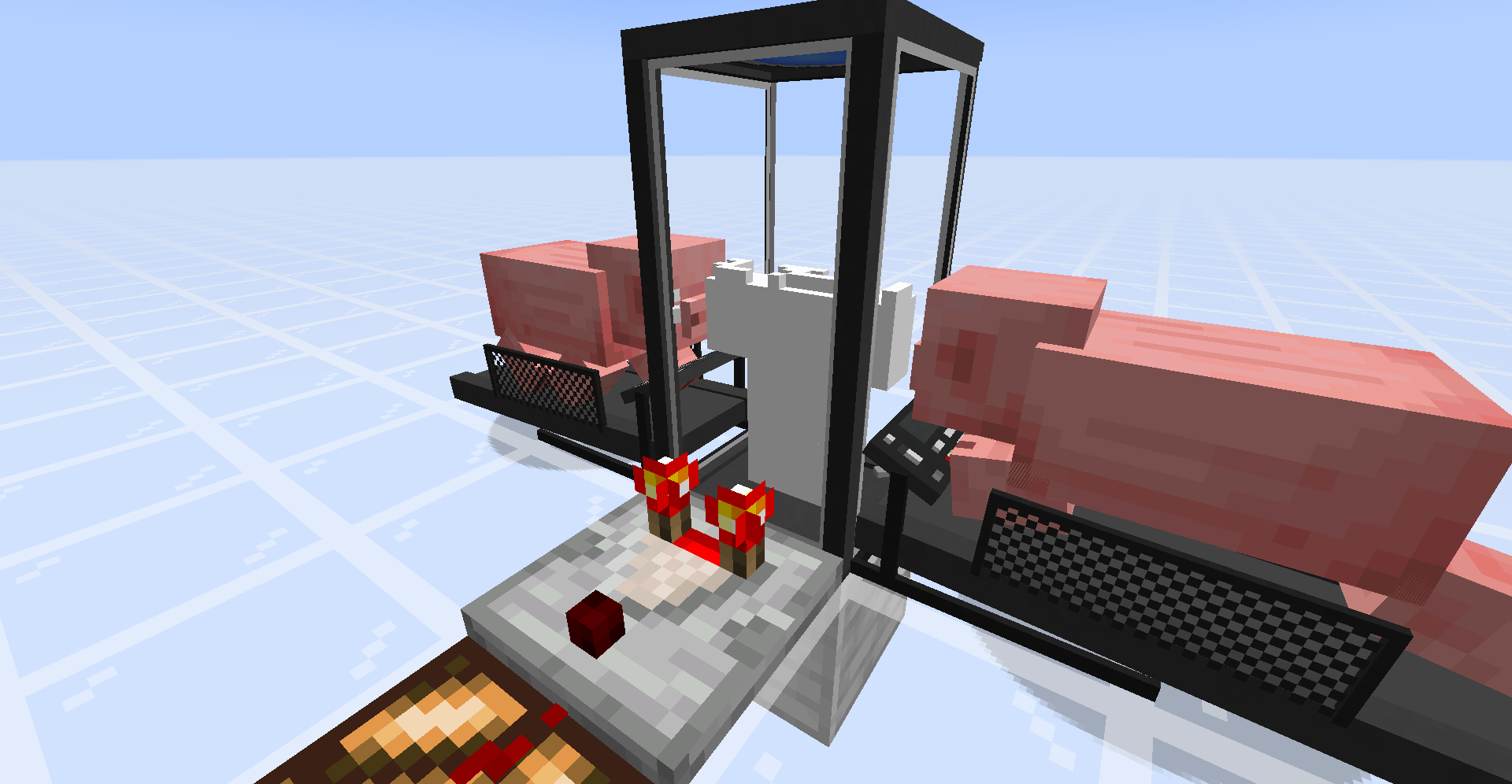
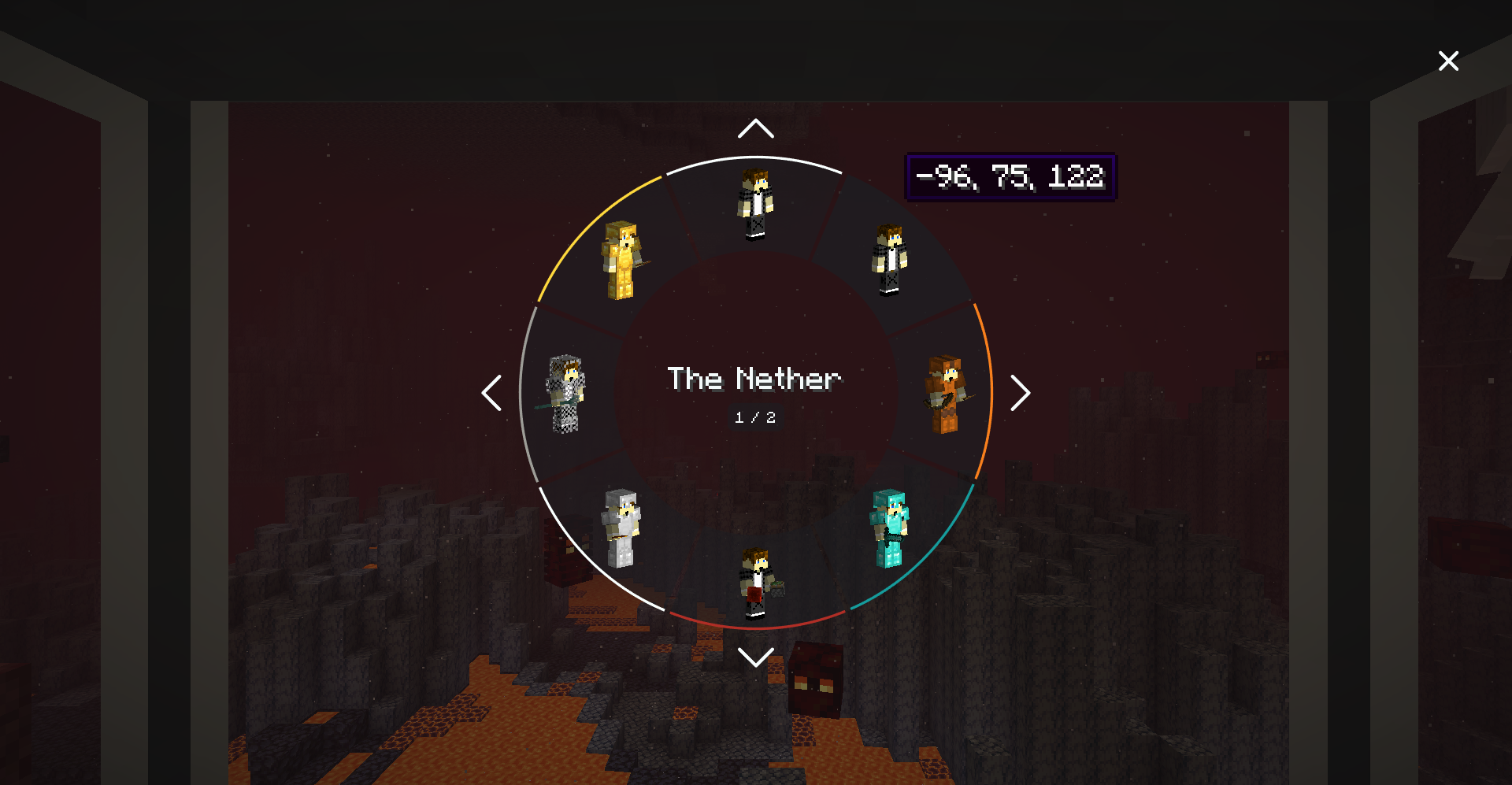
特性
- 跨维度同步。将外壳停放在主界、下界、末地或任何模组添加的维度中,并即时在其中同步切换。
- 独立的外壳物品栏、经验和游戏模式。每个外壳都是一个完全独立的个体,拥有各自的装备和进度。
- 死亡交接。如果一个外壳死亡,你将自动同步回原始身体,如果原始身体已不存在,则随机同步到剩余的一个外壳。外壳的死亡不会计入你的死亡计数器。
- 自动化支持。可以将盔甲和工具通过管道输入到外壳存储箱中以装备停放的外壳,或将装备拉出。
- 染色存储箱。用染料右键点击外壳存储箱即可为其上色,方便在众多容器中找到“挖矿用的那个”。
- 可配置的同步优先级。死亡时,自动同步到你选择的
NATURAL(自然)、NEAREST(最近)或特定染料颜色的外壳。 - 灵活的能源。外壳存储箱接受原始红石信号和/或 FE。跑步机可向任何接受能量的方块输出 FE。
- 比较器输出。容器会根据建造进度或物品栏满载度发出信号——右键点击扳手(默认为木棍)以切换模式。
方块与物品
| 方块 / 物品 | 用途 |
|---|---|
| 外壳构造器 (Shell Constructor) | 消耗 FE,从你的基因样本中培育出新外壳。 |
| 外壳存储箱 (Shell Storage) | 容纳一个外壳;走进去会打开径向选择器。需要能源来维持外壳存活。 |
| 跑步机 (Treadmill) | 两格高的结构。引诱动物站上;动物行走;FE 产生。 |
| 同步核心 (Sync Core) | 关键合成原料——与灰色混凝土结合,可制作任意一种外壳容器。 |
模组集成
- JEI — 为每个同步相关的方块提供深入的信息面板,解释工作流程,并提供 Treadmill Energy Sources(跑步机能源)分类,列出所有支持的实体及其每刻产生的 FE 量。
- Jade — 准星悬停在 Shell Constructors、Storages 和 Treadmills 上时显示提示,包含所有者、建造进度、颜色、通电状态和能量信息。
这两项均为可选功能。NeoSync 在没有它们的情况下也能正常运行。
配置
所有内容均可在 config/neosync-common.toml 中进行调整。以下是部分配置项:
| 键值 | 默认值 | 效果 |
|---|---|---|
enableInstantShellConstruction |
false |
创造模式下瞬间完成外壳构建。 |
warnPlayerInsteadOfKilling |
false |
在提取样本时不杀死低生命值玩家。 |
fingerstickDamage / hardcoreFingerstickDamage |
20 / 40 |
每次提取样本所消耗的生命值。 |
shellConstructorCapacity |
256000 |
完成一个外壳所需的 FE 总量。 |
shellStorageCapacity / shellStorageConsumption |
320 / 16 |
FE 缓冲上限 + 每刻维持外壳存活的消耗量。 |
shellStorageAcceptsRedstone |
true |
接受原始红石信号作为能源。 |
shellStorageMaxUnpoweredLifespan |
20 |
无能源情况下存储箱维持外壳存活的 tick 数。 |
energyMap |
chicken=2, pig=16, player=20, wolf=22, villager=25, creeper=80, enderman=160 | 每种实体在跑步机上每刻产生的 FE 量。 |
syncPriority |
NATURAL |
死亡时的自动同步目标:NATURAL(自然)、NEAREST(最近)或任意染料颜色。 |
wrench |
minecraft:stick |
用于切换容器比较器输出的物品。 |
致谢与许可
- 原始概念: iChun —— 原版 Sync 模组。
- Fabric 重制版: Kir_Antipov。
- NeoForge 1.21.1 移植版: BreakinBlocks。
本模组基于 MIT 许可证开源。详情请参阅 LICENSE 文件。
NeoSync
One mind. Many bodies.
NeoSync brings the legendary Sync experience to NeoForge 1.21.1.
Grow extra bodies, or shells, each with its own inventory, experience level, and gamemode. Swap your consciousness between them at will. Die in a shell? You wake up in another. Leave one parked in the Nether while you mine the Overworld. Keep a spare set of enchanted gear loaded in a shell halfway across the server. The possibilities are yours.
How it works
- Craft a Shell Constructor and place it down.
- Provide a genetic sample — right-click with an empty hand.
⚠️ With default config this costs 20 HP (40 in hardcore). Hold a totem, eat a golden apple, or flip
warnPlayerInsteadOfKillingin the config if you'd rather not die for science. - Power the Constructor. Place a Treadmill next to it, lure a pig or wolf onto the front block, and piggawatts flow. Or hook it up to any Forge Energy source from your favourite tech mod.
- Craft a Shell Storage, place it, and feed it redstone or FE.
- Walk into an open Shell Storage and a radial shell menu appears — pick your destination body and sync.
Features
- Cross-dimensional syncing. Park shells in the Overworld, Nether, End, or any modded dimension and sync between them instantly.
- Per-shell inventory, XP, and gamemode. Each shell is a fully independent body with its own loadout and progression.
- Death handoff. If a shell dies, you auto-sync back to your original body or to a random remaining shell if the original is gone. Shell deaths don't count toward your death counter.
- Automation support. Pipe armor and tools into a Shell Storage to equip the parked shell, or pull gear back out.
- Dye your storages. Right-click a Shell Storage with dye to color-code it makes spotting "the mining shell" across a dozen containers easier.
- Configurable sync priority. On death, auto-sync to the
NATURAL,NEAREST, or dye-color-matched shell of your choice. - Flexible power. Shell Storages accept raw redstone signal and/or FE. Treadmills output FE to any energy-accepting block.
- Comparator output. Containers emit signal based on either build progress or inventory fullness — right-click with a wrench (stick by default) to toggle.
Blocks & Items
| Block / Item | Purpose |
|---|---|
| Shell Constructor | Consumes FE to grow a new shell from your genetic sample. |
| Shell Storage | Houses a shell; walking in opens the radial selector. Needs power to keep the shell alive. |
| Treadmill | Two-block structure. Lure an animal on; it walks; FE flows. |
| Sync Core | Key crafting ingredient — combine with gray concrete to make either shell container. |
Mod Integration
- JEI — in-depth info panels on every sync block explaining the workflow, plus a Treadmill Energy Sources category listing every supported entity and its FE/tick output.
- Jade — crosshair tooltips for Shell Constructors, Storages, and Treadmills showing owner, build progress, color, powered state, and energy.
Both are optional. NeoSync runs fine without them.
Configuration
Everything is tunable in config/neosync-common.toml. A taste of the knobs:
| Key | Default | Effect |
|---|---|---|
enableInstantShellConstruction |
false |
Instant shell builds in creative. |
warnPlayerInsteadOfKilling |
false |
Don't kill low-HP players on fingerstick. |
fingerstickDamage / hardcoreFingerstickDamage |
20 / 40 |
HP consumed per shell sample. |
shellConstructorCapacity |
256000 |
FE needed to finish a shell. |
shellStorageCapacity / shellStorageConsumption |
320 / 16 |
FE buffer + per-tick drain to keep a shell alive. |
shellStorageAcceptsRedstone |
true |
Accept raw redstone signal as power. |
shellStorageMaxUnpoweredLifespan |
20 |
Ticks a storage holds a shell without power. |
energyMap |
chicken=2, pig=16, player=20, wolf=22, villager=25, creeper=80, enderman=160 | FE/tick each entity generates on a treadmill. |
syncPriority |
NATURAL |
On-death auto-sync target: NATURAL, NEAREST, or any dye color. |
wrench |
minecraft:stick |
Item that toggles a container's comparator output. |
Credits & License
- Original concept: iChun — the original Sync mod.
- Fabric reimplementation: Kir_Antipov.
- NeoForge 1.21.1 port: BreakinBlocks.
Licensed under MIT. See the LICENSE file for details.

下载 NeoSync
下载 NeoSync
下载 NeoSync
下载 NeoSync
下载 NeoSync
下载 NeoSync
下载 NeoSync
下载 NeoSync
下载 NeoSync
下载 NeoSync
新增
- 可以通过铁砧重命名 Shell Storages(弹壳存储)和 Shell Constructors(弹壳构造器),并在拾取时保留名称。弹壳选择器会为其中存储的任何弹壳显示该名称,因此你可以标记诸如“主基地”或“下界前哨站”之类的地点。
- 在弹壳选择器中悬停某个弹壳也会显示其位置。此前,已命名的弹壳会隐藏其坐标信息。
新增
neosync:no_death_sync标签中的伤害类型代表真实死亡:受到该伤害死亡时,即使开启了autoSyncOnDeath,也不会将你同步到其他躯壳中。
新增
- 在
neosync-client.toml中添加了一个客户端配置选项syncCameraAnimation。当玩家同步或死亡时,关闭摄像机飞行效果,以避免引发晕动症。将其设置为false可立即切换至新的外壳(FTBTesting/Testing-Issues#4851)。 - 在外壳选择器中滚动鼠标滚轮可在世界之间切换,功能与上下箭头键相同。当某个世界的外壳数量超出单页显示范围时,按住 Shift 键并滚动可切换页面(FTBTesting/Testing-Issues#4860)。
修复
- 外壳选择器中过长的维度名称(例如团队基地维度)不再横向溢出到相邻的外壳上。文本现在会在圆环内自动换行显示为两行,仅在两行仍不足以容纳全部文本时才会缩小字体大小(FTBTesting/Testing-Issues#4852)。
已修复
- 其他玩家在您死亡并同步到另一个维度的壳中后,不再看到您侧躺。
- 自动打开附近门的模组(如 EyeMine)在玩家走过时,不再右键点击壳存储器和壳建造器。这些方块的门状态现在为
doors_open,而非原版中的open。
关于这个资源的讨论、问题反馈与使用心得
还没有讨论,来发第一帖吧
你是这个资源的作者?登录后可认领此资源。
相似资源
 模组

一个用于收集生物掉落物的多区块模组。
 模组

显示你正在注视的方块的信息。(适用于 Minecraft 1.16+ 的 Hwyla/Waila 分支)
 模组

查看物品与配方
 模组
在游戏画面角落显示附近世界地形、玩家、生物和实体的地图。可创建路径点,帮助你找到标记过的位置。
 模组
使用 JavaScript 编辑配方、添加自定义物品、编写世界事件!
 模组
添加区块认领和玩家组队功能,并与 Xaero's Minimap 和 World Map 集成
评论 0
登录后参与评分
还没有评论,来抢沙发吧