


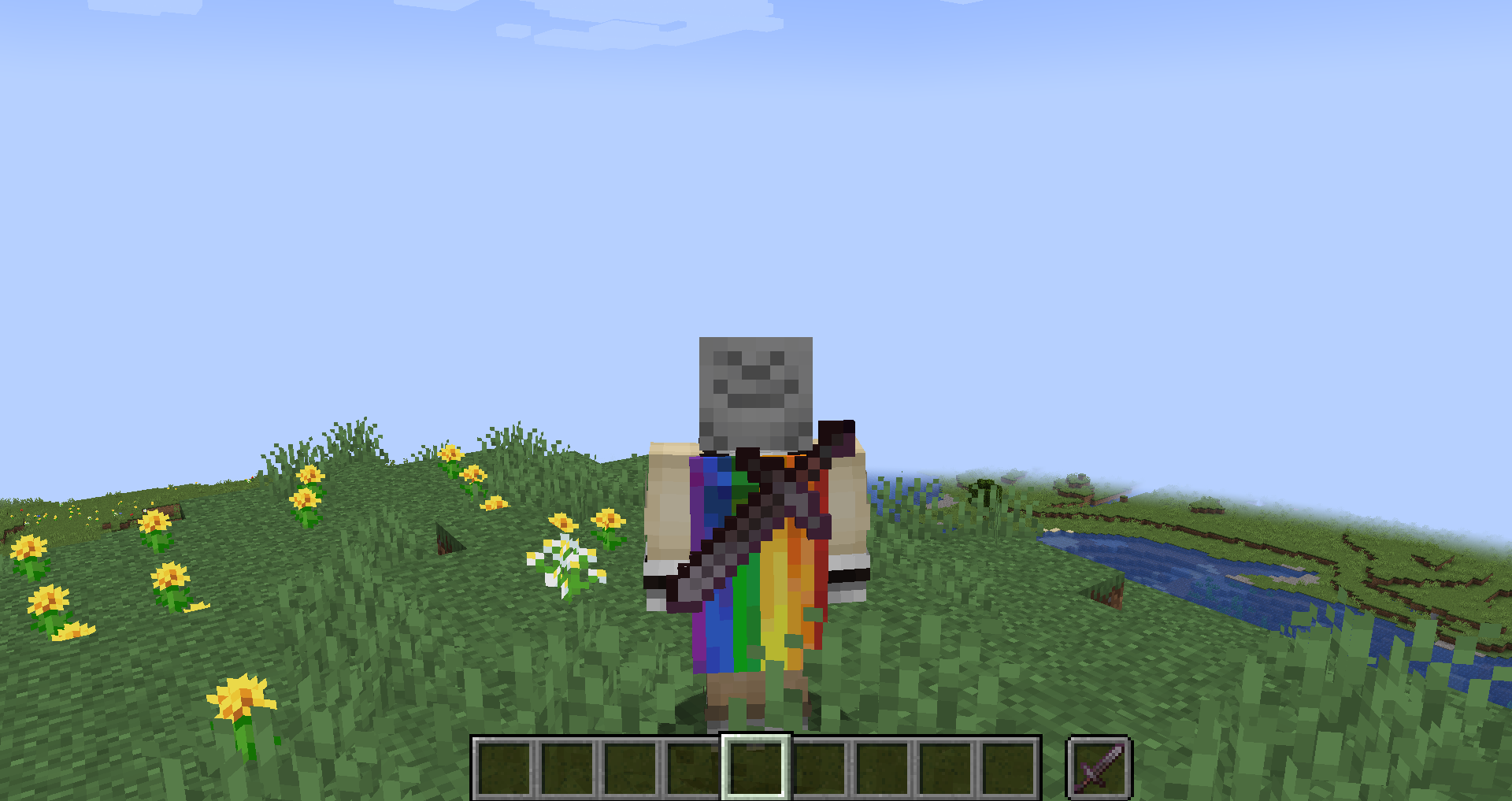
简易后槽模组。 使用 G 键切换物品槽位
资源包创作者 / 模组开发者
若要自定义玩家背部显示的物品模型,请在 nicos_backslot 目录内创建一个文件夹,其名称应为你要修改的物品的 ID。
示例文件结构:
assets
└── nicos_backslots
    └── backslot_data
        └── minecraft
            ├── shield.json
            └── trident.json
每个 JSON 文件对应一个物品,允许你调整其 display mode(显示模式)、scale(缩放)、offset(偏移)和 rotation(旋转)。
配置示例(三叉戟):
{
  "mode": "none",
  "scale": {
    "x": 1.25,
    "y": 1.25,
    "z": 1.25
  },
  "offset": {
    "x": -0.5,
    "y": -1.32,
    "z": 0.5
  },
  "rotation": {
    "x": 0,
    "y": 0,
    "z": 45
  }
}
mode 属性定义了物品的变换模式。可用选项包括:
none
third_person_left_hand
third_person_right_hand
first_person_left_hand
first_person_right_hand
head
gui
ground
fixed
Simple Backslot mod. Keybind for switching with G
For Resource Pack Creators / Mod Developers
To customize the model that appears on the player's back, create a folder inside of nicos_backslot directory, named after the ID of the item you want to modify.
Example File Structure:
assets
└── nicos_backslots
    └── backslot_data
        └── minecraft
            ├── shield.json
            └── trident.json
Each JSON file corresponds to an item and allows you to adjust its display mode, scale, offset and rotation.
Example Configuration (Trident):
{
  "mode": "none",
  "scale": {
    "x": 1.25,
    "y": 1.25,
    "z": 1.25
  },
  "offset": {
    "x": -0.5,
    "y": -1.32,
    "z": 0.5
  },
  "rotation": {
    "x": 0,
    "y": 0,
    "z": 45
  }
}
The mode property defines the transformation mode of the item. Available options include:
none
third_person_left_hand
third_person_right_hand
first_person_left_hand
first_person_right_hand
head
gui
ground
fixed

下载 Nicos Backslots
需要联机服务器吗?
稳定流畅、一键部署,几分钟即可和朋友联机开服
最低仅需 8 元/月 即可畅快联机
下载 Nicos Backslots
需要联机服务器吗?
稳定流畅、一键部署,几分钟即可和朋友联机开服
最低仅需 8 元/月 即可畅快联机
下载 Nicos Backslots
需要联机服务器吗?
稳定流畅、一键部署,几分钟即可和朋友联机开服
最低仅需 8 元/月 即可畅快联机
下载 Nicos Backslots
下载 Nicos Backslots
下载 Nicos Backslots
下载 Nicos Backslots
下载 Nicos Backslots
下载 Nicos Backslots
下载 Nicos Backslots
- 更改了盾牌在背部的显示方式
- 适配 1.19.X
关于这个资源的讨论、问题反馈与使用心得
还没有讨论,来发第一帖吧
你是这个资源的作者?登录后可认领此资源。
相似资源
 模组

可定制的鞘翅模组,支持装饰纹饰、旗帜图案等更多功能!
 模组

显示你正在注视的方块的信息。(适用于 Minecraft 1.16+ 的 Hwyla/Waila 分支)
 模组
在游戏画面角落显示附近世界地形、玩家、生物和实体的地图。可创建路径点,帮助你找到标记过的位置。
 模组

查看物品与配方
 模组
使用 JavaScript 编辑配方、添加自定义物品、编写世界事件!
 模组
AE2:一款流行的自动化与存储模组
评论 0
登录后参与评分
还没有评论,来抢沙发吧