如果你希望零 effort 地为 No Op Spawn Protection 模组搭建服务器,请通过 BisectHosting 租用服务器,并使用代码 kreezxil 作为新用户获得首月 25% 的折扣。
Logo 来源:Pixabay CC0 公共领域 源地址:
在 1.8 版本中,Mojang 更改了 server.properties 中 spawn_protection 设置的工作方式。如果在创建世界时没有 OP(管理员),该设置将被忽略并禁用。稍后创建 OP 并不能启用它。此模组会独立保护世界出生点周围的区域,无论服务器上是否有 OP。
此模组提供默认的 16 格出生点保护范围。你可以将其设置为 0 到 10000 之间的任意值,并可选择性地精细控制出生点允许执行的操作。受保护的区域是一个以世界出生点为中心的正方形;只计算 X 和 Z 轴,高度不计入。
适用于 NeoForge 26.3 版本的 Minecraft。请在服务器上安装。规则在服务端运行,因此专用服务器、单人游戏和局域网世界均受到保护。加入服务器的玩家无需安装此模组,且它不会增加任何网络数据包。安装了该模组的游戏会在“模组”菜单中显示配置界面。
功能特性
保护并配置三个主要维度(主世界、下界和末地)的出生点属性。每个维度都有独立的开关(默认主世界开启,下界和末地关闭),它们共享同一个半径和主世界出生点坐标。其他维度永远不会受到保护。
仅对玩家进行限制。在受保护区域内,未获许可的玩家:
- 无法破坏方块(始终生效)
- 如果开启“放置方块”选项,则无法放置方块
- 如果开启电路选项,则无法按下按钮或拨动拉杆
- 如果开启“门”选项,则无法打开或关闭门、栅栏门和陷阱门
- 如果开启容器选项,则无法打开箱子、熔炉和机器等任何容器类方块
- 如果开启“右键点击方块”选项,则无法右键点击其他方块
- 如果开启“右键点击物品”选项,则无法右键点击物品
除破坏方块外,上述所有操作默认均为允许状态。由非玩家实体(如生物、爆炸、活塞、火焰)放置或破坏的方块不受影响。
关于运算符(OP)和创造模式玩家:默认情况下,没有人能通行,OP 和创造模式玩家在出生点像其他玩家一样被阻挡(blockOpsToo 为 true)。将 blockOpsToo 设置为 false,则创造模式玩家可以通行,专用服务器名单上的 OP 也可以通行(在单人和局域网模式下,只有创造模式能让玩家通行)。
所有内容均可在配置文件中配置,或在“模组”菜单中的模组界面(模组 -> No Op Spawn Protection -> 配置)中配置,也可以使用游戏内命令修改配置而无需重启服务器。
命令
命令可在服务端在游戏中改变模组的行为。
当执行命令时,服务器配置文件会随之更新,从而消除了重启服务器的需求。
/sp-allow <circuits|containers|doors|place|block|item> <true|false>
/sp-debug <true|false>
/sp-dimension <end|nether|overworld> <true|false>
/sp-display [all|worlds|protection|interaction|commands]
/sp-blockOpsToo <true|false>
/sp-radius <range>
其他名称:/spawnprotection 和 /sp-diameter 用于 /sp-radius,/sp-permit 用于 /sp-allow,/sp-debugmode 用于 /sp-debug,/sp-dim 用于 /sp-dimension,以及 /sp-show 和 /sp-view 用于 /sp-display。
这些命令默认需要 1 级运算符权限(即任何在 ops 列表中的玩家),服务器控制台也可以使用它们。该权限级别由 commandPermissionLevel 选项决定(范围为 1 到 4),可在配置文件或配置界面中设置。/sp-display 仅显示配置信息,任何人都可以使用它。
/sp-radius 接受 0 到 10000 的范围值,影响三个世界的出生点半径。
/sp-blockOpsToo true 表示 OP 也会被阻挡,false 表示不会被阻挡。默认值为 true,你可以完全从自己的 OP 或创造模式账号测试命令的强大功能,而不必担心附近有生存玩家。/sp-blockOpsToo false 允许 OP 和创造模式玩家通行。
调试模式是在存在时,我可能会让你在未来帮助我使用的功能。开启后,位于受保护区域内的玩家会收到模组做出的决定通知,以及如果他们被允许通行,原因是什么。
/sp-display 命令,不带参数或带 all 参数,会显示所有设置,以便你根据需要调整。它还会显示世界出生点的位置以及受保护的 X 和 Z 范围,并且当玩家运行该命令时,会显示保护是否适用于该玩家当前站立的位置。输出内容如下所示:
Worlds Spawn Protection
=======================
OverWorld: true
Nether: false
TheEnd: false
Spawn Protection
Radius: 16
Debug Mode: false
Block Ops Too: true
World spawn: 144, 65, 720 (protected: X 128 to 160, Z 704 to 736)
Interaction Control
Circuits: true
Containers: true
Doors: true
Place Blocks: true
RightClickBlocks: true
RightClickItems: true
命令
若不存在则创建 /spawn:true
修改配置所需的权限等级:1
/spawn 命令
当 createSpawnCommand 选项开启时(默认值),模组会添加 /spawn 命令,任何玩家均可使用它返回到世界出生点附近的安全位置。该命令在其他维度也能生效,因为它会将你传送到世界出生点所在维度的出生点(通常是主世界)。如果其他模组或原版已经存在名为 spawn 的命令,本模组不会添加新命令,并在服务器日志中记录相关情况。该选项在命令注册时读取,因此更改将在下次启动服务器或世界后生效,或在执行 /reload 后生效。
配置
配置文件位于 config/spawnprotection-common.toml,Mod 菜单中的配置界面也包含相同的选项。除了上述选项外,还包括半径(spawn_protection,0 到 10000)、debugMode、三个维度开关和六个交互开关。
每次启动时,如果配置文件夹中不存在 spawnprotection.example.cf,模组会将其放入其中。它会列出每个选项及其默认值和注释。模组不会读取此文件,因此请勿将其重命名为 spawnprotection-common.toml。
从旧版本升级的用户注意:旧的 ignoreOp 选项现在称为 blockOpsToo,在配置升级时会保留其原有值。旧的 /sp-ignore、/sp-ignore_op 和 /sp-ignoreop 命令已不再存在,请使用 /sp-blockOpsToo。
注意事项
如果你发现尽管设置了模组,其他人似乎仍被完全阻止,请编辑你的 server.properties 并将 spawn-protection 设置为 0. 这是原版设置,与本模组无关,且原版不对管理员应用此限制。
你可以通过更改配置或使用游戏内命令来调整保护范围和控制方式。无需重启服务器或重置世界。
目前它不会阻挡压力板,因为压力板不触发事件,而我是通过事件来实现此模组的。
与村民和其他实体的交互始终允许。如果你希望将此设为可配置项,请告知我。
待办事项
- 为不同维度设置不同的出生点半径
- 支持自定义维度
- 防止生物破坏
- 防止爆炸
- 防止其他可预防的行为
整合包
欢迎使用。无需征得同意。如果能提供链接回本模组页面将不胜感激,但非必需。
本项目自豪地基于 NeoForge 运行,没有它便无法实现。更多信息请访问 。
早于 26.3 版本的 NeoForge 使用说明见下文。
剧透
如果您希望以零 effort 为 No Op Spawn Protection 模组搭建服务器,请通过 BisectHosting 获取服务器服务,并在使用代码 kreezxil 注册为新客户时享受首月 25% 的折扣。
Logo 致谢:Pixabay CC0 公共领域 来源:
在 Minecraft 1.8 中,Mojang 更改了 server.properties 中 spawn_protection 设置的工作方式。如果在创建世界时没有管理员(op),该设置将被忽略并禁用。稍后创建管理员并不能启用它。
此模组提供默认的 16 格出生点保护范围。您可以在 0 到 10000 的任意范围内设置保护范围,并可选择性地精细控制出生点允许执行的操作。此模组必须安装在专用服务器上。它对客户端无效,客户端也不需要安装此模组。
功能特性
具体控制以下任何玩家行为:
- 按钮按下和拉杆切换(电路)
- 门、栅栏门、陷阱门的开启和关闭
- 箱子、熔炉、机器(任何容器类方块)
- 放置方块
- 右键点击物品
- 右键点击方块
- 游戏内命令,无需重启服务器即可修改配置文件
命令
命令可以在服务器端改变模组在游戏内的行为。
当执行命令时,服务器配置文件会随之更新,因此无需重启服务器。
/sp-allow <circuits|containers|doors|place|block|item> <true|false>
/sp-debug <true|false>
/sp-dimension <end|nether|overworld> <true|false>
/sp-display <all|worlds|protection|interaction>
/sp-ignore_op <true|false>
/sp-radius <range>
使用 /sp-ignore true 您可以完全测试这些命令的功能,而无需让生存模式玩家靠近您或处于生存模式中。
调试模式是将来我可能会建议您使用的功能,以帮助我改进模组。
目前,/sp-radius 会影响三个世界的出生点半径。我将在即将到来的版本中增加更精细的控制选项。
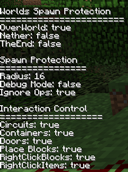
/sp-display 命令将显示类似以下的读数,以便您根据需要调整各项设置。
注意事项
如果您发现尽管已正确设置模组,其他人似乎仍被完全阻挡,请编辑您的 server.properties 并将 spawn-protection 设置为 0.
您可以通过更改配置文件或使用游戏内命令来调整保护范围和权限控制。无需重新加载服务器或重置世界。
目前该模组不会阻挡压力板,因为它们不触发事件,而我是利用事件来实现此模组的。
与村民交互是永久允许的。如果您希望使其可配置,请告知我。
待办事项
- 不同维度使用不同的出生点半径
- 支持自定义维度
- 防止生物破坏
- 防止爆炸
- 防止其他可预防的问题
整合包
随意使用。无需征得许可。如果能附上链接则非常好,但不是必须的。
本项目自豪地由 FORGE 提供支持,没有 FORGE 就不可能实现。请帮助 FORGE 移除 Adfocus 广告:。
If you want a server setup for the No Op Spawn Protection mod with zero effort, get a server with BisectHosting and receive 25% off your first month as a new customer using the code kreezxil
Logo Credit: Pixabay CC0 Public Domain Src:
In 1.8 Mojang changed how the spawn_protection setting in server.properties functions. If there is no op at the time of world creation the setting is ignored and disabled. Creating an op later does not enable it. This mod protects the area around the world spawn on its own, whether or not the server has an op.
This mod gives you a default spawn protection of 16 blocks. It can be set anywhere in the range of 0 to 10000 with optional granular level controls for what can be done at spawn. The protected area is a square centred on the world spawn point; only X and Z count, the height does not.
For Minecraft 26.3 on NeoForge. Install it on the server. The rules run on the server side, so a dedicated server, singleplayer and LAN worlds are all protected. Players who join a server do not need the mod, and it adds no network packets. A game that has the mod installed gets a config screen in the Mods menu.
Features
Protect and configure spawn properties for the 3 main dimensions: Overworld, Nether, and The End. Each has its own switch (Overworld on, Nether and The End off by default) and they share the one radius and the Overworld spawn coordinates. Other dimensions are never protected.
Only players are restricted. Inside the protected area, a player who is not let through:
- cannot break blocks (always on)
- cannot place blocks, if you turn that on (Block Placing)
- cannot push buttons or flip levers, if you turn that on (circuits)
- cannot open or close doors, gates and trap doors, if you turn that on (doors)
- cannot open chests, furnaces and machines, if you turn that on (anything that is a container)
- cannot right click other blocks, if you turn that on (Right Clicking Blocks)
- cannot right click items, if you turn that on (Right Clicking Items)
Every one of these except block breaking is allowed by default. Blocks placed or broken by anything other than a player (mobs, explosions, pistons, fire) are not affected.
Operators and creative players: by default nobody is let through, ops and creative players are blocked at spawn like everyone else (blockOpsToo is true). Set blockOpsToo to false and players in creative mode are let through, and so are operators on the ops list of a dedicated server (in singleplayer and LAN only creative mode lets a player through).
Everything is configurable in the config file, in the config screen in the Mods menu (Mods, No Op Spawn Protection, Config), or with in-game commands that change the config without needing to restart the server.
Commands
commands change the behavior of the mod in the game on the server side
when commands are executed the server config is updated thus removing the requirement to reboot the server.
/sp-allow <circuits|containers|doors|place|block|item> <true|false>
/sp-debug <true|false>
/sp-dimension <end|nether|overworld> <true|false>
/sp-display [all|worlds|protection|interaction|commands]
/sp-blockOpsToo <true|false>
/sp-radius <range>
Other names: /spawnprotection and /sp-diameter for /sp-radius, /sp-permit for /sp-allow, /sp-debugmode for /sp-debug, /sp-dim for /sp-dimension, and /sp-show and /sp-view for /sp-display.
The commands need operator level 1 by default (anyone on the ops list), and the server console can use them. The level is the commandPermissionLevel option (1 to 4), set in the config file or the config screen. /sp-display only shows the config and anyone can use it.
/sp-radius takes a range of 0 to 10000 and affects the spawn radius for the 3 worlds.
/sp-blockOpsToo true means ops are blocked too, and false means they aren't. With the default of true you can fully test the power of the commands from your own op or creative account, without a survival player near you. /sp-blockOpsToo false lets ops and creative players through.
While present, the debug mode is something I might tell you to use to help me in the future. With it on, a player inside the protected area is told what the mod decided, and if they are let through, why.
The /sp-display command, with no argument or with all, shows every setting so that you can tweak things as you desire. It also shows where the world spawn is and the X and Z range that is protected, and when a player runs it, whether the protection applies to that player where they stand. The readout looks like this:
Worlds Spawn Protection
=======================
OverWorld: true
Nether: false
TheEnd: false
Spawn Protection
Radius: 16
Debug Mode: false
Block Ops Too: true
World spawn: 144, 65, 720 (protected: X 128 to 160, Z 704 to 736)
Interaction Control
Circuits: true
Containers: true
Doors: true
Place Blocks: true
RightClickBlocks: true
RightClickItems: true
Commands
Create /spawn if none exists: true
Operator level to change the config: 1
The /spawn command
When the createSpawnCommand option is on (the default), the mod adds /spawn, which any player can use to go back to the world spawn point, moved to a safe spot nearby. It works from other dimensions too, because it takes you to the spawn point in the dimension the world spawn is in (usually the Overworld). If another mod or vanilla already has a command named spawn, this mod does not add one, and the server log says what happened. The option is read when commands are registered, so a change applies at the next server or world start, or after /reload.
Config
The config file is config/spawnprotection-common.toml, and the same options are in the config screen in the Mods menu. Besides the options above it has the radius (spawn_protection, 0 to 10000), debugMode, the three dimension switches and the six interaction switches.
On every launch the mod puts spawnprotection.example.cf into the config folder if it is not there. It lists every option with its default value and comments. The mod never reads it, so do not rename it to spawnprotection-common.toml.
Coming from an older version: the old ignoreOp option is now called blockOpsToo, and its value is carried over when the config is upgraded. The old /sp-ignore, /sp-ignore_op and /sp-ignoreop commands no longer exist, use /sp-blockOpsToo.
Notes
If you notice that others seem to be utterly blocked despite how you set the mod. Edit your server.properties and change spawn-protection to 0. That is the vanilla setting, it is separate from this mod, and vanilla does not apply it to ops.
You can change the size of the protection and the protection controls by changing the config or by using the in-game commands. There is no need to reload your server or reset your world.
It currently does not block pressure plates as they do not fire an event and I'm using events to make this mod happen.
Interacting with Villagers and other entities is permanently allowed. If you want this to be configurable let me know.
Todo
- Different spawn radii for the dimensions
- Support Custom dimensions
- prevent mob griefing
- prevent explosions
- prevent other preventables
Modpacks
Go for it. No need to ask. A link back would be awesome but not required.
This project is proudly powered by NeoForge, without whom it would not be possible. Learn more at .
Instructions for versions prior to 26.3 NeoForge are contained below.
Spoiler
If you want a server setup for the No Op Spawn Protection mod with zero effort, get a server with BisectHosting and receive 25% off your first month as a new customer using the code kreezxil
Logo Credit: Pixabay CC0 Public Domain Src:
In 1.8 Mojang changed how the spawn_protection setting in server.properties functions. If there is no op at the time of world creation the setting is ignored and disabled. Creating an op later does not enable it.
This mod gives you a default spawn protection of 16 blocks. It can be set anywhere in the range of 0 to 10000 with optional granular level controls for what can be done at spawn. The mod must be installed on the dedicated server. It has no effect on the client and is also not required on the client.
Features
Specifically control any of the following player actions.
- Button pushing and lever flipping (circuits)
- Door, gate, trap door (doors) opening and closing
- Chests, furnace, machines (anything that is a container)
- Block Placing
- Right Clicking Items
- Right Clicking Blocks
- In-game commands for modifying the config without needing to restart the server
Commands
commands change the behavior of the mod in the game on the server side
when commands are executed the server config is updated thus removing the requirement to reboot the server.
/sp-allow <circuits|containers|doors|place|block|item> <true|false>
/sp-debug <true|false>
/sp-dimension <end|nether|overworld> <true|false>
/sp-display <all|worlds|protection|interaction>
/sp-ignore_op <true|false>
/sp-radius <range>
Using /sp-ignore true you can fully test the power of the commands without having a survival player near you or having to be in survival mode.
While present, the debug mode is something I might tell you to use to help me in the future.
Currently the /sp-radius affects spawn radius for the 3 worlds. I'll add more granularity to this in an upcoming release.
The /sp-display command will show a readout similar to the following so that you can tweak things as you desire.
Notes
If you notice that others seem to be utterly blocked despite how you set the mod. Edit your server.properties and change spawn-protection to 0.
You can change the size of the protection and the protection controls by changing the config or by using the in-game commands. There is no need to reload your server or reset your world.
It currently does not block pressure plates as they do not fire an event and I'm using events to make this mod happen.
Interacting with Villagers is permanently allowed. If you want this to be configurable let me know.
Todo
- Different spawn radii for the dimensions
- Support Custom dimensions
- prevent mob griefing
- prevent explosions
- prevent other preventables
Modpacks
Go for it. No need to ask. A link back would be awesome but not required.
This project is proudly powered by FORGE, without whom it would not be possible. Help FORGE get rid of Adfocus at


 模组
 模组

 模组

 模组

 模组

 模组
评论 0
登录后参与评分
还没有评论,来抢沙发吧