

Notebook 是一款高度可定制、轻量级的仅客户端实用模组,它将交互式、可拖拽的待办事项清单和物品收集追踪器直接集成到你的 HUD 中。
非常适合用来追踪你的刷怪配额、每日服务器任务或建筑材料,无需使用外部应用或频繁切换窗口!
? 预览
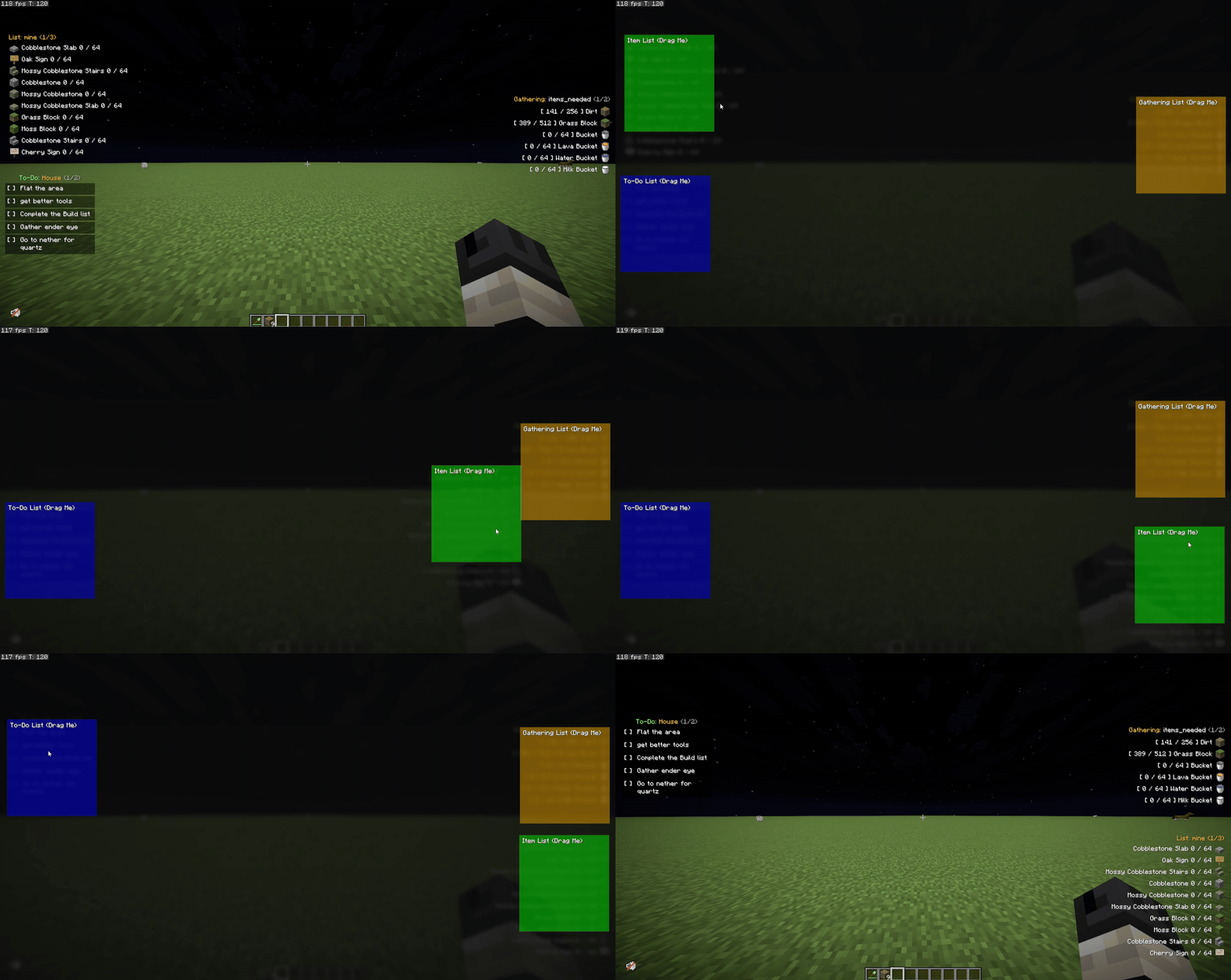
可拖拽界面
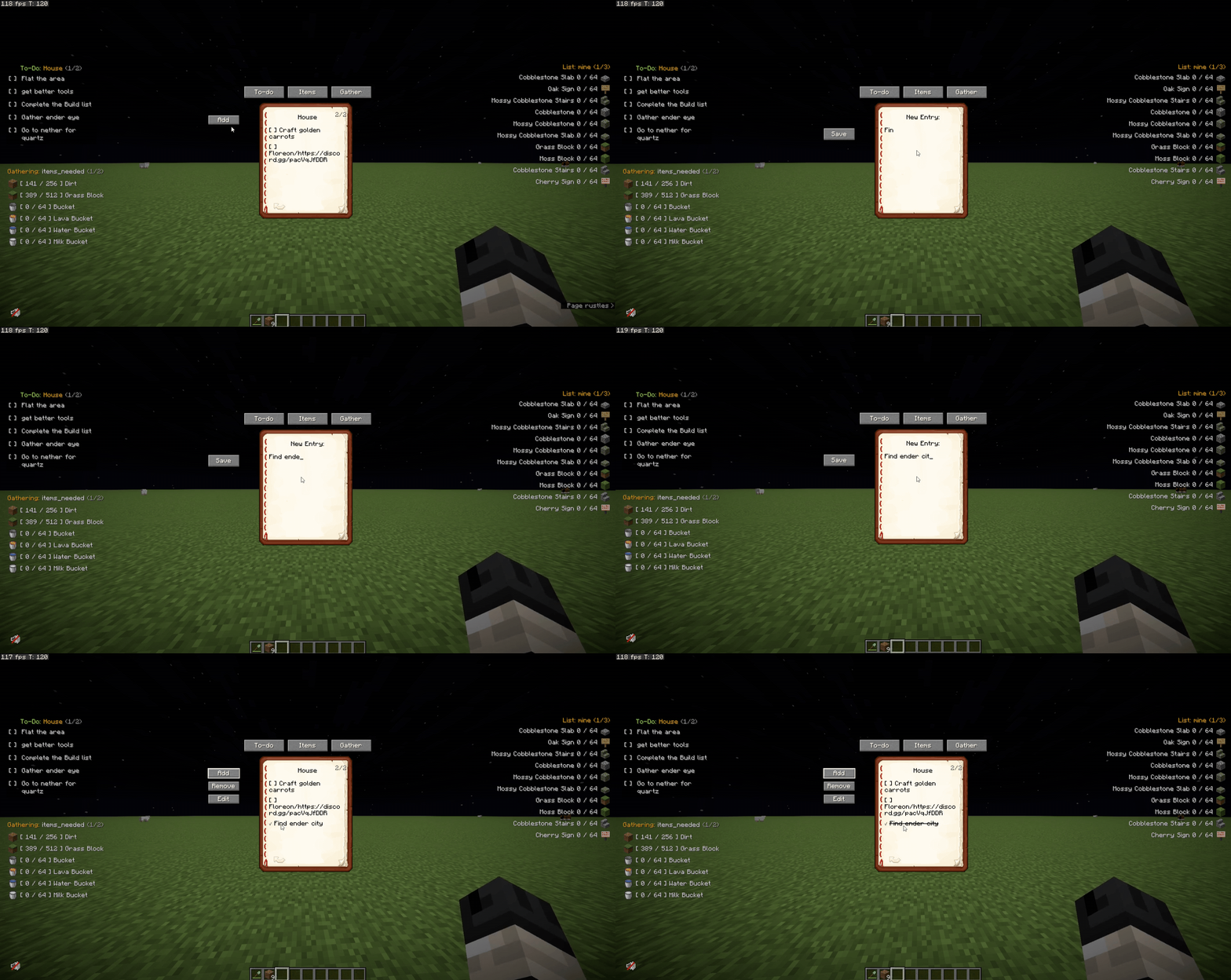
添加与管理列表
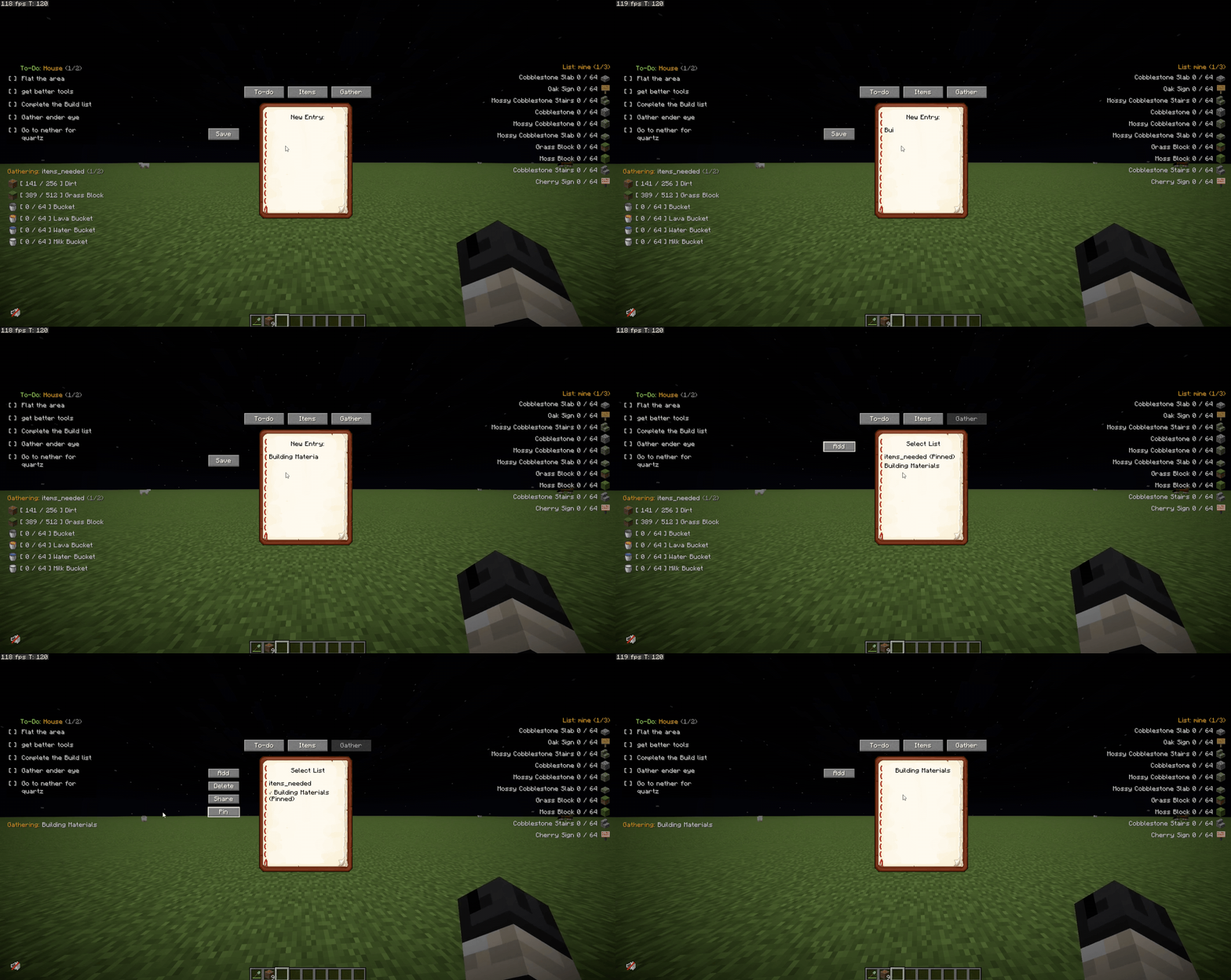
固定到 HUD
✅ 功能
- ? 可拖拽界面 → 通过编辑 HUD 菜单轻松将物品清单和任务列表在屏幕上移动。
- ? 待办事项清单 → 追踪你的每日目标。动态勾选已完成的任务以将其划掉。
- ? 物品收集追踪器 → 为某件物品设定目标数量,并实时追踪你的库存。
- ? 智能配额颜色 → 当物品数量达到精确目标时,文本变为绿色;超出目标时变为红色!
- ?️ 防错保护 → 防止你意外地将无效或拼写错误的物品添加到追踪器中。
- ? 列表共享 → 将当前活动的物品列表直接发送到服务器聊天频道,以便团队协作。
- ? 分页功能 → 列表太长?可以通过命令或自定义按键轻松翻页。
- ? 100% 仅客户端 → 在原版服务器或模组整合包 SMP 中均可完美运行。
⌨️ 命令
? 物品清单(别名:/il)
- /itemlists → 显示你创建的所有物品清单。
- /il create <name> → 创建并显示一个新的物品清单。
- /il delete <name> → 删除指定的清单。
- /il display <name> → 切换 HUD 以显示此清单。
- /il add <listName> <item> <quantity> → 向清单中添加物品配额 (示例:
/il add base dirt 64)。 - /il remove <listName> <item> <quantity> → 从清单中移除物品。
- /il share <name> → 将物品清单分享到服务器聊天。
- /il next 或 /il n → 翻到物品清单的下一页。
- /il previous 或 /il p → 翻到上一页。
? 待办事项清单(命令:/todo)
- /todo → 显示你创建的所有待办事项清单。
- /todo create <name> → 创建一个新的待办事项清单。
- /todo delete <name> → 删除指定的待办事项清单。
- /todo display <name> → 切换 HUD 以显示此待办事项清单。
- /todo add <listName> <task> → 向清单中添加新任务。
- /todo check <listName> <task> → 标记任务为已完成。
- /todo uncheck <listName> <task> → 取消标记任务。
- /todo next 或 /todo n → 翻到任务列表的下一页。
- /todo previous 或 /todo p → 翻到上一页。
⛏️ 收集清单(别名:/gl)
- /gatheringlists → 显示你创建的所有收集清单。
- /gl create <name> → 创建并显示一个新的收集清单。
- /gl delete <name> → 删除指定的清单。
- /gl display <name> → 切换 HUD 以显示此清单。
- /gl add <listName> <item> <quantity> → 向收集清单中添加物品。
- /gl remove <listName> <item> <quantity> → 从收集清单中移除物品。
- /gl share <name> → 将收集清单分享到服务器聊天。
- /gl next 或 /gl n → 翻到收集清单的下一页。
- /gl previous 或 /gl p → 翻到上一页。
- /gl import → 导入清单数据。
- /gl help → 显示收集清单的一般帮助说明。
⚙️ 按键绑定
(可在选项 -> 控制 -> Notebook 中自定义)
- 编辑 HUD →
](点击并拖拽你的列表到任意位置!) - 切换物品清单 →
I - 切换待办事项清单 →
O - 切换收集清单 →
G - 物品清单 上/下一页 → (默认未绑定)
- 待办事项 上/下一页 → (默认未绑定)
- 收集 上/下一页 → (默认未绑定)
? 致谢与社区
衷心感谢 Skia 和 Luriel 对本模组的建议与灵感启发! 在这里查看他们精彩的 Minecraft 服务器社区:NeoCity SMP
? 发现错误或有什么建议? 想免费请求制作一个模组?加入 Discord 服务器!
- Discord: 加入开发者社区
- GitHub: Notebook 问题与建议
Notebook is a highly customizable, lightweight client-side utility mod that brings interactive, draggable To-Do lists and Item Gathering trackers directly to your HUD.
Perfect for keeping track of your grinding quotas, daily server tasks, or building materials without needing external apps or constantly alt-tabbing!
? Previews
Draggable UI
Adding & Managing Lists
Pinning to HUD
✅ Features
- ? Draggable UI → Easily move your item and task lists around your screen using the Edit HUD menu.
- ? To-Do Lists → Track your daily goals. Check off completed tasks dynamically to cross them out.
- ? Item Gathering Tracker → Set a target amount for an item and track your inventory in real-time.
- ? Smart Quota Colors → Item text turns Green when you hit your exact target, and Red when you exceed it!
- ?️ Typo Protection → Prevents you from accidentally adding invalid or misspelled items to your tracker.
- ? List Sharing → Share your active item list straight to the server chat for team collaboration.
- ? Pagination → Got a long list? Easily flip through pages using commands or customizable keybinds.
- ? 100% Client-Side → Works perfectly on vanilla servers or modded SMPs.
⌨️ Commands
? Item Lists (Aliases: /il)
- /itemlists → Shows all the item lists you have created.
- /il create <name> → Creates and displays a new item list.
- /il delete <name> → Deletes the specified list.
- /il display <name> → Switches your HUD to show this list.
- /il add <listName> <item> <quantity> → Adds an item quota to your list (example:
/il add base dirt 64). - /il remove <listName> <item> <quantity> → Removes an item from the list.
- /il share <name> → Shares the item list to the server chat.
- /il next or /il n → Flips to the next page of your item list.
- /il previous or /il p → Flips to the previous page.
? To-Do Lists (Command: /todo)
- /todo → Shows all your created To-Do lists.
- /todo create <name> → Creates a new To-Do list.
- /todo delete <name> → Deletes the specified To-Do list.
- /todo display <name> → Switches your HUD to show this To-Do list.
- /todo add <listName> <task> → Adds a new task to your list.
- /todo check <listName> <task> → Marks a task as completed.
- /todo uncheck <listName> <task> → Unmarks a task.
- /todo next or /todo n → Flips to the next page of tasks.
- /todo previous or /todo p → Flips to the previous page of tasks.
⛏️ Gathering Lists (Aliases: /gl)
- /gatheringlists → Shows all the gathering lists you have created.
- /gl create <name> → Creates and displays a new gathering list.
- /gl delete <name> → Deletes the specified list.
- /gl display <name> → Switches your HUD to show this list.
- /gl add <listName> <item> <quantity> → Adds an item to your gathering list.
- /gl remove <listName> <item> <quantity> → Removes an item from the gathering list.
- /gl share <name> → Shares the gathering list to the server chat.
- /gl next or /gl n → Flips to the next page of your gathering list.
- /gl previous or /gl p → Flips to the previous page.
- /gl import → Imports list data.
- /gl help → Displays general help instructions for gathering lists.
⚙️ Keybinds
(Customizable in Options -> Controls -> Notebook)
- Edit HUD →
](Click and drag your lists anywhere!) - Toggle Item List →
I - Toggle To-Do List →
O - Toggle Gather List →
G - Item List Next/Prev Page → (Unbound by default)
- To-Do Next/Prev Page → (Unbound by default)
- Gather Next/Prev Page → (Unbound by default)
? Credits & Community
A massive thank you to Skia and Luriel for suggesting and inspiring this mod! Check out their awesome Minecraft Server community here: NeoCity SMP
? Found a bug or have a suggestion? Want to request a mod for free? Join the Discord Server!
- Discord: Join the developer community
- GitHub: Notebook issues and suggestions

下载 Notebook
需要联机服务器吗?
稳定流畅、一键部署,几分钟即可和朋友联机开服
最低仅需 8 元/月 即可畅快联机
下载 Notebook
需要联机服务器吗?
稳定流畅、一键部署,几分钟即可和朋友联机开服
最低仅需 8 元/月 即可畅快联机
下载 Notebook
需要联机服务器吗?
稳定流畅、一键部署,几分钟即可和朋友联机开服
最低仅需 8 元/月 即可畅快联机
下载 Notebook
下载 Notebook
需要联机服务器吗?
稳定流畅、一键部署,几分钟即可和朋友联机开服
最低仅需 8 元/月 即可畅快联机
下载 Notebook
需要联机服务器吗?
稳定流畅、一键部署,几分钟即可和朋友联机开服
最低仅需 8 元/月 即可畅快联机
下载 Notebook
需要联机服务器吗?
稳定流畅、一键部署,几分钟即可和朋友联机开服
最低仅需 8 元/月 即可畅快联机
下载 Notebook
✨ v2 更新内容
⛏️ 全新推出收集清单功能!
- 新增一种专门用于追踪刷怪掉落物和建造材料的列表类型。
- 提供完整的
/gl命令套件(例如/gl create、/gl add、/gl share),用于管理你的物品配额。 - 支持实时库存追踪:当数量达到目标时数字变绿,超出目标时变红。
?️ 可拖拽界面与自定义选项
- 现在你可以将物品清单、待办事项和收集清单自由拖动到屏幕的任何位置!
- 按下
](默认快捷键)打开新的编辑 HUD 菜单,并将界面元素拖动到你偏好的布局位置。
? 固定功能与视觉优化
- 改进了在 HUD 上即时添加和固定列表的视觉体验。
- 整体管理流程更加流畅,无需切换窗口即可轻松跟踪任务。
? 有反馈或发现 Bug? 加入 生活质量模组 Discord!
关于这个资源的讨论、问题反馈与使用心得
还没有讨论,来发第一帖吧
你是这个资源的作者?登录后可认领此资源。
相似资源
 模组

显示你正在注视的方块的信息。(适用于 Minecraft 1.16+ 的 Hwyla/Waila 分支)
 模组

查看物品与配方
 模组
在游戏画面角落显示附近世界地形、玩家、生物和实体的地图。可创建路径点,帮助你找到标记过的位置。
 模组
使用 JavaScript 编辑配方、添加自定义物品、编写世界事件!
 模组
添加区块认领和玩家组队功能,并与 Xaero's Minimap 和 World Map 集成
 模组
添加全屏世界地图,显示你在世界中已探索的区域。与 Xaero's Minimap 搭配使用效果极佳。
评论 0
登录后参与评分
还没有评论,来抢沙发吧