
Offhand Hotbar 将你的物品栏第三行变为副手快捷栏,使物品管理更加灵活。例如,你可以在主手持有工具和武器,在副手持有建筑方块;或者在主手持有武器,在副手持有各种消耗品。
默认情况下,鼠标滚轮控制主手选择,数字键控制副手选择,但这些设置均可自定义。
模组提供多种视觉布局供你选择:
| 并排显示 | 堆叠显示 | 垂直显示 |
|---|---|---|
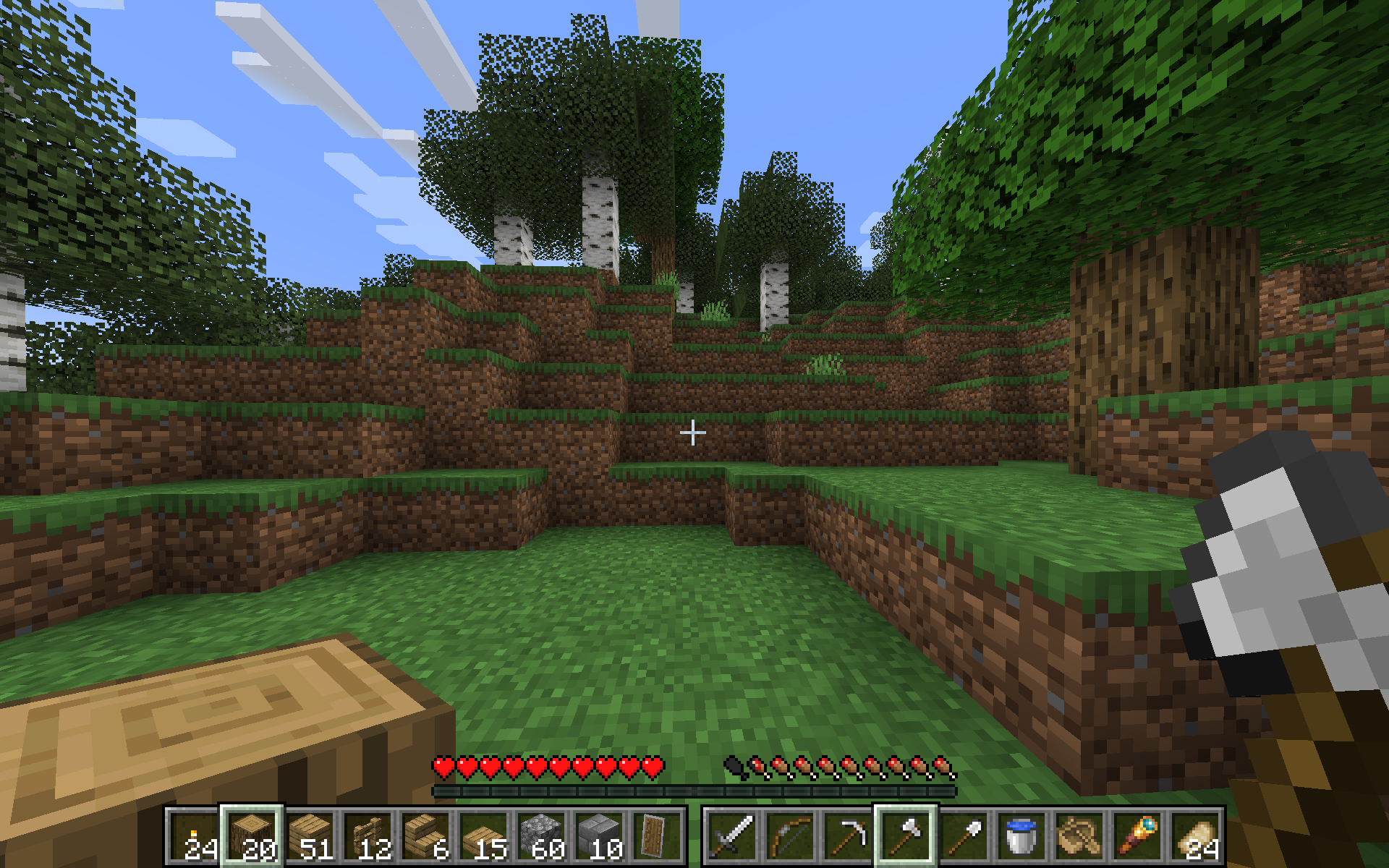 |
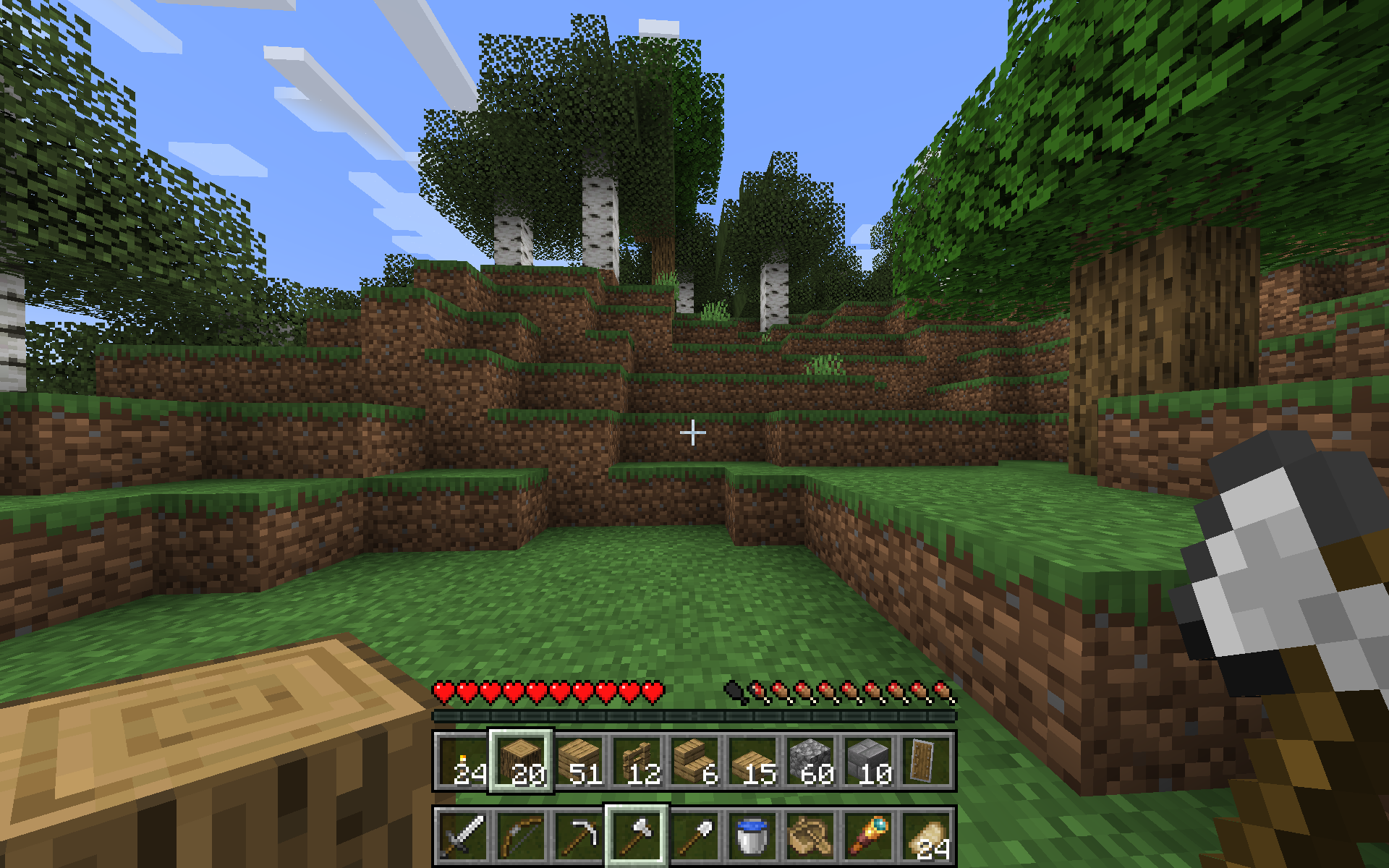 |
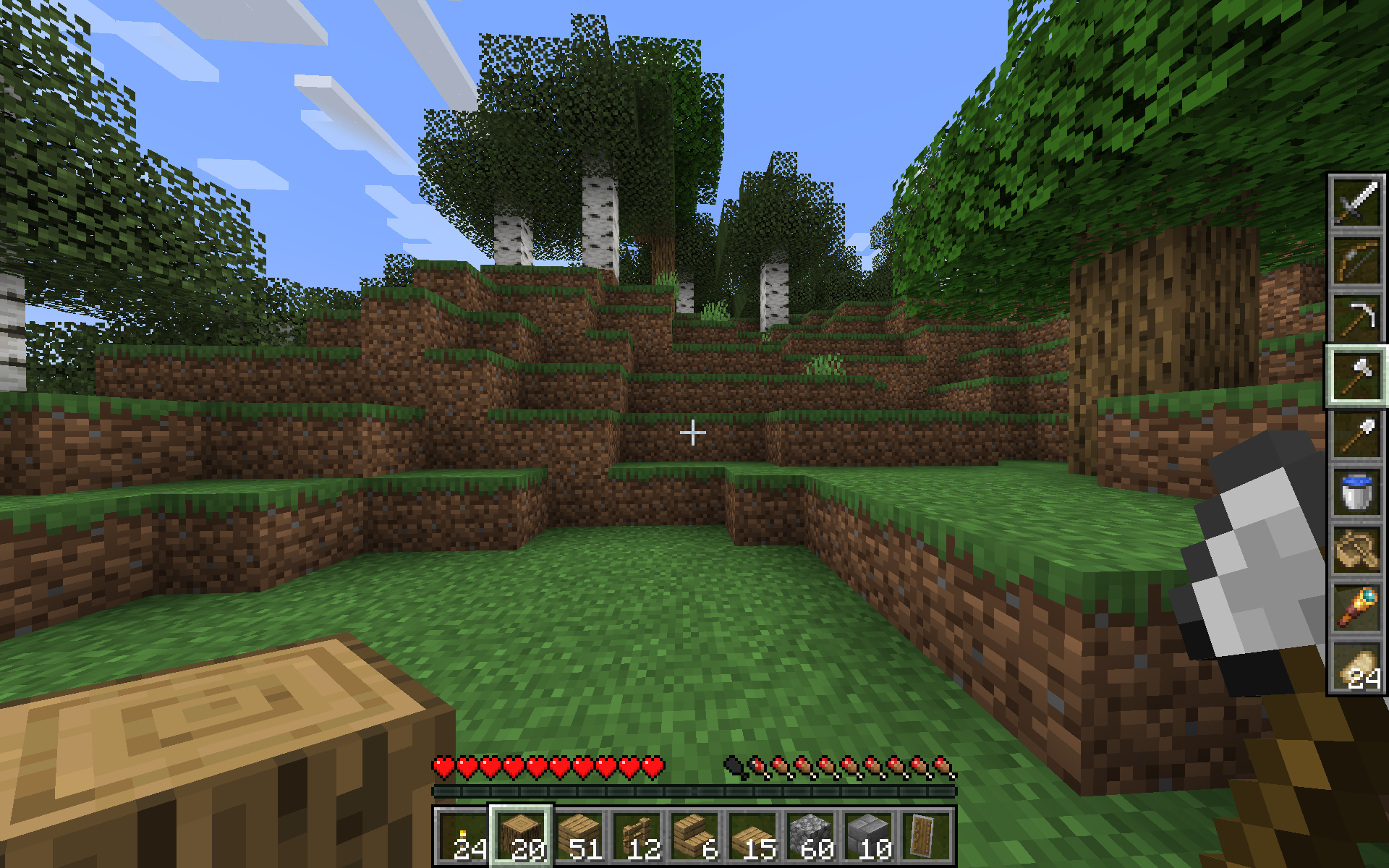 |
(如果图片在手机端太小,请参阅图库)
警告: 快速的物品移动可能会被反作弊系统标记,在公共服务器上使用时请自行承担风险。
该模组仍处于测试阶段,因此如果你有任何能提高可用性的反馈或建议,请发送到问题页面!
机制
其底层原理是在你更改选择时重新排列物品。
由于 GUI 槽位由服务器控制,在容器中将物品栏槽位替换为副手槽位并不容易,因此打开任何类型的容器或其他物品栏界面时,会交换物品以确保你物品栏的第三行保持一致。原来的副手槽位会成为打开容器时装备的“默认”副手物品。
切换双手按键绑定(默认为 F)仍然可以交换当前选中的主手和副手物品。
已知错误
如果你非正常断开连接(例如被服务器踢出),你的副手物品和选中物品可能会互换。
配置
显示模式
要使用的视觉布局。选项包括:
- Side by Side(默认)
- Stacked
- Stacked Swapped
- Vertical
- Vertical Swapped
如果你有对其他布局的建议,欢迎提交一个 GitHub 问题。
滚轮控制
鼠标滚轮应控制主手还是副手(默认:主手)
键盘控制
数字键应控制主手还是副手(默认:副手)
按键绑定
在 1.21.1 中,你必须进入 控制 > 按键绑定 部分来设置这些,但在 1.21.5+ 版本中,也可以在配置屏幕中进行设置(感谢 Motschen!)。
控制反向快捷栏
按住此键将使滚轮和键盘控制相反的快捷栏。例如,如果 Scroll Controls 设置为 mainhand,那么按住此键并滚动滚轮将改为滚动副手。 (默认:左 Alt)
滚动物品栏
按住此键并在滚动时,将循环切换你的物品栏三行,从而改变副手快捷栏中可用的物品。(默认:R)
鸣谢
这个想法灵感来源于 The Spawn Chunks 播客的一期节目
Offhand Hotbar turns the third row of your inventory into a hotbar for your offhand, making your inventory management more flexible. For example, you can hold tools and weapons in mainhand and building blocks in offhand, or you could have weapons in mainhand and various consumables in offhand.
By default, the scroll wheel controls your mainhand selection and number keys control your offhand selection, but this is configurable.
The mod contains several visual layouts to choose from:
| Side-By-Side | Stacked | Vertical |
|---|---|---|
|
|
|
(see Gallery if images are too small on mobile)
Warning: It is possible the rapid item movement may get flagged by anticheat, use on public servers at your own risk.
The mod is still in beta, so please send any feedback or suggestions you think would improve usability to the issues page!
Mechanics
Under the hood, this works by shuffling around items whenever you change selection.
Because gui slots are controlled by the server, it is not easy to replace the inventory slot with the offhand slot in containers, so opening any sort of container or other inventory screen will swap items so that the third row of your inventory is consistent. The original offhand slot becomes the "default" offhand item that is equipped when a container is opened.
The swap hands keybind (default F) still works to swap your currently selected main and offhand items.
Known bugs
Your offhand item and selected item may get swapped around if you disconnect ungracefully (e.g. the server kicks you)
Configuration
Display Mode
The visual layout to use. The options are:
- Side by Side (default)
- Stacked
- Stacked Swapped
- Vertical
- Vertical Swapped
If you have a suggestion for another layout, feel free to open a github issue.
Scroll Controls
If the scroll wheel should control the mainhand or offhand (default: mainhand)
Keyboard Controls
If the number keys should control the mainhand or offhand (default: offhand)
Keybinds
In 1.21.1 you must go to the Controls > Keybinds section to set these, but in 1.21.5+ it is also available in the config screen (thanks Motschen!).
Control Opposite Hotbar
Holding this key will make scrolling and keyboard control the opposite hotbar. For example, if Scroll Controls is set to mainhand, then holding this key and scrolling will instead scroll the offhand. (default: Left Alt)
Scroll Inventory
Holding this key will cycle the three rows of your inventory when you scroll, which changes what is available in your offhand hotbar. (default: R)
Credits
This idea was inspired by an episode of The Spawn Chunks podcast
下载 Offhand Hotbar
需要联机服务器吗?
稳定流畅、一键部署,几分钟即可和朋友联机开服
最低仅需 8 元/月 即可畅快联机
下载 Offhand Hotbar
需要联机服务器吗?
稳定流畅、一键部署,几分钟即可和朋友联机开服
最低仅需 8 元/月 即可畅快联机
下载 Offhand Hotbar
下载 Offhand Hotbar
需要联机服务器吗?
稳定流畅、一键部署,几分钟即可和朋友联机开服
最低仅需 8 元/月 即可畅快联机
下载 Offhand Hotbar
下载 Offhand Hotbar
需要联机服务器吗?
稳定流畅、一键部署,几分钟即可和朋友联机开服
最低仅需 8 元/月 即可畅快联机
下载 Offhand Hotbar
下载 Offhand Hotbar
需要联机服务器吗?
稳定流畅、一键部署,几分钟即可和朋友联机开服
最低仅需 8 元/月 即可畅快联机
下载 Offhand Hotbar
需要联机服务器吗?
稳定流畅、一键部署,几分钟即可和朋友联机开服
最低仅需 8 元/月 即可畅快联机
下载 Offhand Hotbar
- 移植到 1.21.9
- 断开连接时的取消交换似乎已损坏,或者可能一直就存在损坏?
关于这个资源的讨论、问题反馈与使用心得
还没有讨论,来发第一帖吧
你是这个资源的作者?登录后可认领此资源。
相似资源
 模组

可定制的鞘翅模组,支持装饰纹饰、旗帜图案等更多功能!
 模组

显示你正在注视的方块的信息。(适用于 Minecraft 1.16+ 的 Hwyla/Waila 分支)
 模组
使用 JavaScript 编辑配方、添加自定义物品、编写世界事件!
 模组

查看物品与配方
 模组
在游戏画面角落显示附近世界地形、玩家、生物和实体的地图。可创建路径点,帮助你找到标记过的位置。
 模组
AE2:一款流行的自动化与存储模组
评论 0
登录后参与评分
还没有评论,来抢沙发吧