该模组目前正在移植至 V26.1.2,并正在进行大规模重构。
Refined Storage 的附加模组
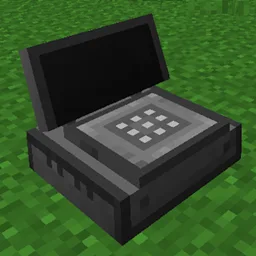
本模组添加了全能网格(Omni Grid),它是便携网格(Portable Grid)的增强版,可以通过升级来添加多种功能。当我称其为“全能(Omni)”时,我确实名副其实——它本质上是一个你可以随身携带的存储网络。
创建后,你可以访问单个 Refined Storage 2 存储磁盘的内容以及一个内置的合成网格。在此基础上,你可以制作并安装全能核心(Omni Cores),从而增加更多功能。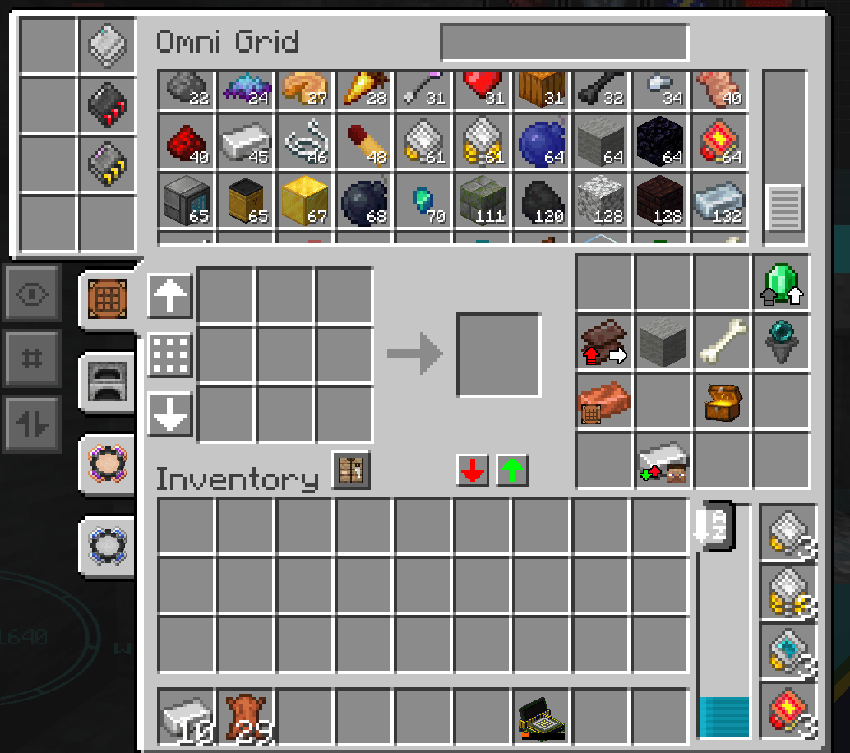
指令
每个全能网格最多可以分配 16 条指令,即全能网格定期或被动执行的操作。每个操作都需要安装相应的核心。
要配置指令,请点击合成矩阵右侧的指令槽之一。你可以将物品拖放到指令槽上以使其影响特定物品。某些指令需要配置目标,或者仅在方块或物品形态下生效。
- 提供(Provide) - 允许相邻的自动化系统从配置的接口提取此资源。
- 推送(Push)- 将资源从存储移动到相邻的容器。
- 拉取(Pull)- 从相邻容器中获取资源并将其移至存储。
- 简单合成(Simple Crafting) - 尝试在简单的合成结构(如 3x3 和 2x2)中合成物品以进行压缩,或在 3x1 结构中制作切石等。
- 收集(Collect) - 拾取一定半径内的物品
- 自动战利品(Auto Loot) - 打开容器时,立即将其内容移至存储。
- 搜索(Search) - 查找附近容器中的物品并将其移至存储。无法检查所有者无权访问的容器。
还有更多!
请注意,许多指令在运行时会对全能网格的系统造成压力,消耗 FE 能量。请确保其能源充足以保持运行。
精密核心(Precision Cores)
这些核心不添加指令,但为管理你的资源提供了一些额外功能。
- 玩家目标锁定(Player Targetting)- 允许某些操作影响携带全能网格的玩家。你可以选择影响哪些槽位,也包括饰品槽位。
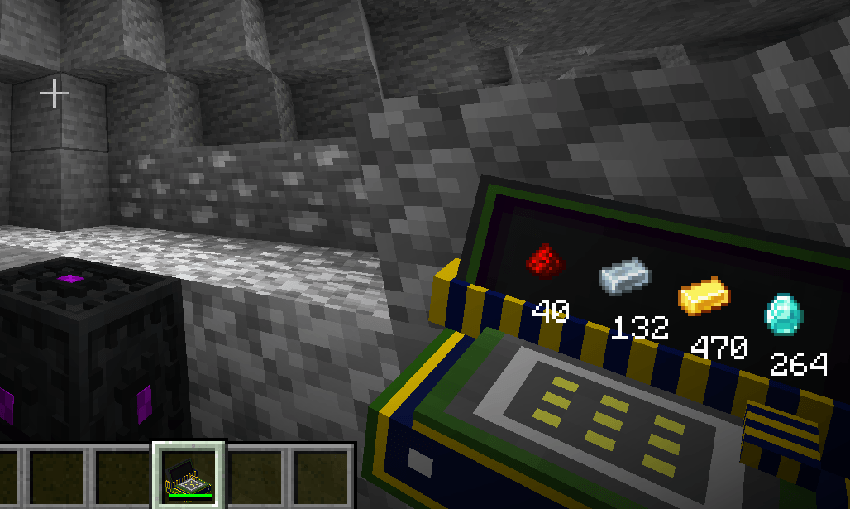
- 资源监控(Resource Monitoring) - 选择最多 4 种资源,即使手持时也能在屏幕上显示其数量。
- 存入(Depositing) - 允许在放置状态下通过自动化系统将物品/流体插入全能网格。
- 过滤(Filtering) - 指令不仅可以配置为影响特定物品,还可以配置为影响具有特定标签或来自特定模组的所有物品。
操作核心(Operation Cores)
这些核心解锁了全能网格最强大的功能,但制作成本也最高。
- 自动合成(Autocrafting) - 将 Refined Storage 2 的合成配方放入全能网格,它便可以在其存储内执行合成操作。处理配方(Processing Patterns)稍微复杂一些,并且需要核心卡带(Core Cartridges)。
- 数字熔炉(Digital Furnace) - 一个内置熔炉,其工作方式与大多数熔炉略有不同。它可以被分配从你的存储中获取物品以自动冶炼或用作燃料。
- 增强存储(Enhanced Storage)- 将磁盘槽位增加到 8 个,当放置在 RS2 网络旁边时充当磁盘驱动器。它还可以与全能代理(Omni Proxys)共享其存储。
- 远程方块目标 - 赋予你Shift+左键点击方块实体的能力,并允许部分命令在 Omni Grid 存储与该方块之间进行远程传输。请注意存在距离限制。
升级组件
Omni Grid 支持 Refined Storage 2 的升级组件以增强其部分功能。此外还有一个能量升级组件,可增加其能量容量和效率。
实用核心
与指令核心和精确核心不同,这些核心会修改现有功能、添加与特定模组的独特交互,或增加更多小众且独特的功能。有很多种类,请制作你认为有用的那些。以下是一些示例:
- 海绵模拟器- 周期性地将附近的流体吸入其存储空间中(需要安装流体磁盘)
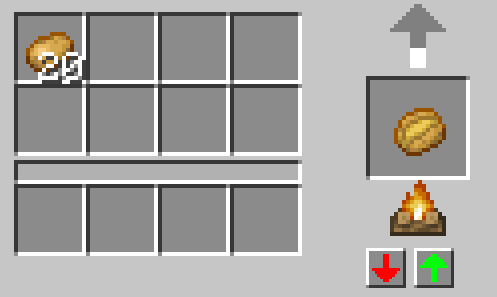
- 篝火- 数字熔炉烹饪食物不需要燃料,但不会给予经验值。
- 能量处理器 - 仅在安装了 Refined Types 模组时可制作。如果安装了能量磁盘,Omni Grid 接收到的多余能量将被存入存储中。当 Omni Grid 自身能量不足时,可以使用这些能量为其充电。
- 经验值处理器 - 某些命令在配置为使用经验液体会产生特殊交互。“收集”命令可以拾取经验球并将其作为经验液体存入存储。“推送/拉取”针对玩家时,可以在玩家与存储之间转移经验值。
- 灭火器 - 当你手持 Omni Grid 时被点燃,它会尝试从你的存储中取水来灭火。
- 圆石打印机- 使你的存储中拥有无限的圆石,但在取出圆石时会消耗 FE 能量。在圆石打印机生效前,会优先从你的存储中扣除圆石。
核心卡带
Omni Grid 拥有 21 个实用插槽,用于存放实用核心和合成配方。如果你需要更多空间,可以制作一个核心卡带来容纳多个核心,并将其放入实用插槽中。
如果你打算在 Omni Grid 中放置处理配方,你需要使用核心卡带 Shift+左键点击处理方块以记录其位置,然后将处理配方放入核心卡带中。当 Omni Grid 尝试运行该处理配方时,它会将资源发送到该方块。该处理方块必须处于远程方块目标的范围内才能完成此操作。
Omni 代理
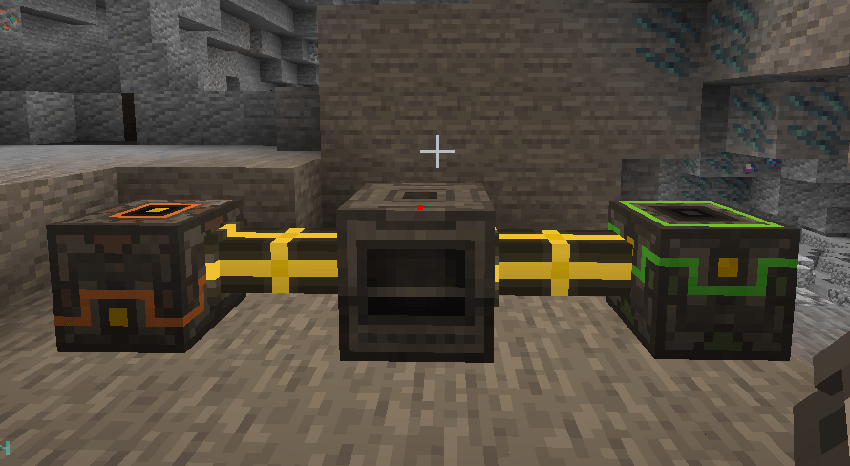
各种物品和方块可以与 Omni Grid 链接,从而为该 Omni Grid 的存储提供自动化接入、RS2 网络访问,甚至连接其他 Omni Grid。链接需要一个存储核心,并且 Omni Grid 必须在有效范围内。
- 存取器 - 可放置在标准的 Refined Storage 2 网络中,授予该网络对 Omni Grid 存储的访问权限。
- Omni 控制器 - 功能同存取器,但额外充当控制器角色,并从链接的 Omni Grid 汲取电力。
- 代理磁盘 - 将其放入 Omni Grid 的实用插槽中,然后将其放置在另一个 Omni Grid 的磁盘插槽中以共享第一个 Omni Grid 的存储。
- Omni 投入口 - 自动化系统可以向其中插入物品和流体,将其发送至链接的 Omni Grid 存储中。
- Omni 端口 - 最多容纳 9 种物品/流体。从该方块提取的自动化系统可以从 Omni Grid 的存储中获取这些内容。还有一个高级版本,可以对每个面单独配置。
- Omni 枢纽 - 投入口和端口的结合体。
自定义
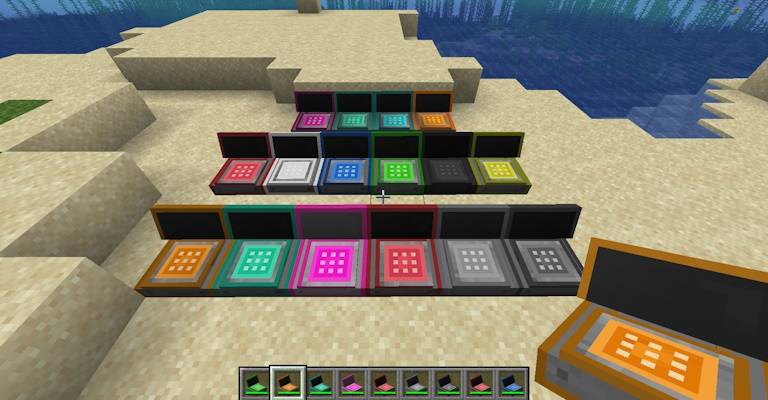
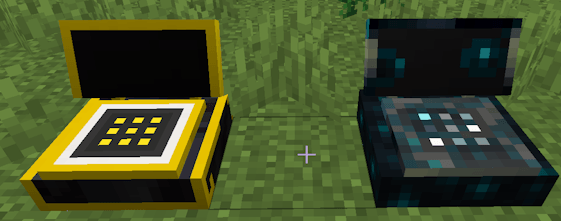
Omni Grid 可以被染成任意颜色。还有一些特殊的材质,它们不遵循标准的染色配色方案,但应用成本稍高。
染色变体
特殊材质:镀金与深暗
开发理念
在制作这个模组之前,我完全是 Minecraft 模组开发的新手。我不知道从何入手,于是决定为一个已有的模组制作插件,以便有一个框架可以依托。在玩整合包时,我发现 Portable Grid 因为没有合成界面而使用不便,所以我选择第一个模组就是一个添加该功能的插件——Portable Crafting Grid。
由于 Wireless Crafting Grid 的存在,其他人认为 Portable Crafting Grid 是多余的,而且它存在各种 bug,因此被下架并重新开发。
为了学习 Minecraft 模组开发的各个方面,并使 Portable Crafting Grid 真正有用,我添加了众多功能并将其重命名为 Omni Grid。
在添加功能时,我力求做到以下几点:
- 复刻 Refined Storage 2 中的大部分方块
- 加入我在其他模组中未曾见过且觉得有用的功能,例如自动拾取和灭火。
- 添加常见的存储模组实用工具,如熔炉、收集附近物品以及过滤器。
- 避免引入某些热门模组的独有功能(例如 Sophisticated Backpacks 的自动喂食或药水),以防止使其变得多余。
Omni Grid 实际上是 Wireless Crafting Grid 的反面:你可以将你的存储网络随身携带,而不是远程访问它。不过,如果你希望利用 Omni Grid 处理资源,可以考虑将其放置在你的基地并留在那里,让它与自动化系统交互。
我主要玩包含 Omni Grid 作为熟悉存储选项的厨房水槽式整合包,并以此为基础进行了平衡性调整,因此它可能略显超模。
目前不建议用于整合包,因为缺乏更新。请考虑禁用你认为过于强大的核心组件,或在配置文件中调整它们。
警告:模组正在进行重大重构,以解决处理大量资源时的不稳定性问题。发布后,Omni Grid 将进行大幅度的平衡性调整。
Mod is currently being ported to V26.1.2 and is being reworked heavily.
Addon Mod for Refined Storage
This mod adds the Omni Grid, an enhanced variant of the Portable Grid that can be upgraded to add a myriad of functions. When I call it "Omni" I really mean it, its essentially a storage network you can carry.
When created, you have access to the contents of a single Refined Storage 2 storage disk and a built-in crafting grid. From there you can craft and install Omni Cores, adding more capabilities.
Commands
Each Omni Grid can be assigned up to 16 commands, actions for the Omni Grid to perform periodically or passively. Each action requires their respective core installed.
To configure a command, click one of the command slots right of the crafting matrix. You can drag an item on to a command slot to make it affect a specific item. Some commands require a target configured or only work in block or item form.
- Provide - Allow adjecant automation to extract this resource from the configured face.
- Push - Move a resource from storage to an adjecant container.
- Pull - Take a resource from an adjecant container and move it to storage.
- Simple Crafting - Attempt to craft an item in simple crafting formations, such as 3x3 and 2x2 to compress them, or 3x1 to make slabs.
- Collect - Pick up items in a radius
- Auto Loot - When opening containers, instantly move the contents to storage.
- Search - Look for items in nearby containers and move them into storage. Cannot check containers the owner does not have access to.
And more!
Be aware many commands put stress on the Omni Grids system when run, draining FE. Make sure to keep its energy topped up to keep it operational.
Precision Cores
These do not add commands, but add some additional functions for managing your resources.
- Player Targetting- Allows some actions to affect the player carrying the Omni Grid. You can pick what slots to affect, and affects curio slots too.
- Resource Monitoring - Pick up to 4 resources to display the counts of on screen, even while its held.
- Depositing - Allows automation to insert items/fluid into the Omni Grid while placed.
- Filtering - Commands can be configured to not just affect an item but all items of a specific tag or mod.
Operation Cores
These unlock the Omni Grids most powerful functions but are also the most expensive to craft
- Autocrafting - Place Refined Storage 2 crafting patterns in the Omni Grid and it can perform crafting operations within its storage. Processing Patterns are a bit more complicated and require Core Cartridges
- Digital Furnace - A built in furnace that works a bit differently from most furnaces. It can be assigned to take items from your storage to automatically smelt or use as fuel.
- Enhanced Storage- Increase the number of disk slots to 8 and acts as a disk drive when placed next to a RS2 network. It can also share its storage with Omni Proxys
- Remote Block Targets - Grants the ability to shift left-click block entities and allows some commands to transfer between the Omni Grids storage and that block remotely. Be aware theres a range limit.
Upgrades
The Omni Grid accepts Refined Storage 2 upgrades to improve some of its functions. Theres also an Energy upgrade that increases its energy capacity and efficiency.
Utility Cores
Unlike command and precision cores, these modify existing functions, add unique interactions with specific mods, or add more niche and unusual functions. Theres a lot of them, craft whichever ones seem useful to you. Here are a few examples
- Sponge Simulator- Absorb nearby fluid into its storage perdically (requires a fluid disk)
- Campfire - Digital Furnace does not require fuel to cook food, but does not give XP for them.
- Energy Handler - Only craftable with the mod Refined Types installed. If an energy disk is installed, excess energy the Omni Grid recieves is placed in storage. The Omni Grid can use this energy to recharge itself if it gets low.
- XP Handler - Some commands have special interactions when configured with XP fluid. Collect can pick up XP orbs and put them in storage as XP fluid. Push/Pull targetting the player can transfer player XP to and from storage.
- Fire Extinguisher - If you get set on fire while carrying the Omni Grid, attempt to extinguish it with water from your storage.
- Cobble Printer- Have infinite cobblestone in your storage but drains FE whenever cobblestone is taken. Cobblestone in your storage is always taken before this.
Core Cartridges
The Omni Grid has 21 utility slots for holding utility cores and crafting patterns. If you need more, you can craft a Core Cartridge to hold multiple and place it in the utility slot instead.
If you plan on putting processing patterns in your Omni Grid, you will need to shift-left click the processing block with a Core Cartridge to record its location, then put the processing pattern in the Core Cartridge. When the Omni Grid attempts to run the processing pattern, it will attempt to send the resources to this block. The processing block must be within Remote Block Target range to do so.
Omni Proxys
Various items and blocks that can be linked to an Omni Grid then can provide that Omni Grids storage to automation, RS2 networks, or even other Omni Grids. Linking requires a storage core and the Omni Grid to be within range.
- Accessor - Can be placed in a standard Refined Storage 2 network to grant the network access to the Omni Grids storage.
- Omni Controller - Same as an accessor but additionally functions as a controller, drawing power from the linked Omni Grid.
- Proxy Disk - Place in an Omni Grids utility slot, then place it in another Omni Grids disk slot to share the first Omni Grids storage.
- Omni Deposit - Automation can insert items and fluid into it to send them to the linked Omni Grids storage.
- Omni Port - Pick up to 9 items/fluid. Automation extracting from this block can take those from the Omni Grids storage. Theres an advanced version that can be configured on each side individually.
- Omni Hub - A combination of a deposit and a port.
Customization
Omni Grids can be dyed any color. There are also special skins that do not follow standard dye coloring schemes but they're a bit more costly to apply.
Dyed variants
Special skins: Gilded and Sculk
Development and Philosophy
Before I made this mod, I was completely new to Minecraft modding. I did not know where to start, so I decided to make an add-on for an existing mod so Id have some framework to work off of. While playing a modpack, I found the Portable Grid inconvinient to use due to having no crafting matrix, so I opted for my first mod to be an addon that adds one in the form of the Portable Crafting Grid.
The Portable Crafting Grid was deemed by others redundant due to the Wireless Crafting Grid and had various bugs, so it was taken down and reworked.
Wanting to learn various aspects of Minecraft modding and to make the Portable Crafting Grid actually useful, I added a myriad of features and renamed it to the Omni Grid.
When adding features I tried to go for the following:
- Replicate most Refined Storage 2 blocks
- Add things I havent seen in other mods that I felt would be useful like auto-loot and fire extinguish.
- Add common storage mod utilities like the furnace, collecting nearby items, and filters.
- Avoid features that are unique to some popular mods, like Sophisticated Backpacks auto-feed or potion to prevent making them redundant.
The Omni Grid is effectively the inverse of a Wireless Crafting Grid, where you can take your storage network with you rather than having remote access to it. However if you wish to process resources in your Omni Grid, you may consider placing and leaving it at your base and letting it interact with automation.
I mostly play kitchen sink modpacks with the Omni Grid installed as a familiar storage option and balanced it around them, so it maybe a bit overpowered.
Not recommended for Modpacks at the moment due to lack of updates. Consider disabling cores you feel are too powerful or adjusting them in the config file.
Warning: The mod has a major overhaul in the works to address instability when dealing with lots of resources. When it releases the Omni Grid will be heavily re-balanced.
下载 Omni Grid
需要联机服务器吗?
稳定流畅、一键部署,几分钟即可和朋友联机开服
最低仅需 8 元/月 即可畅快联机
下载 Omni Grid
需要联机服务器吗?
稳定流畅、一键部署,几分钟即可和朋友联机开服
最低仅需 8 元/月 即可畅快联机
下载 Omni Grid
需要联机服务器吗?
稳定流畅、一键部署,几分钟即可和朋友联机开服
最低仅需 8 元/月 即可畅快联机
下载 Omni Grid
需要联机服务器吗?
稳定流畅、一键部署,几分钟即可和朋友联机开服
最低仅需 8 元/月 即可畅快联机
下载 Omni Grid
需要联机服务器吗?
稳定流畅、一键部署,几分钟即可和朋友联机开服
最低仅需 8 元/月 即可畅快联机
下载 Omni Grid
需要联机服务器吗?
稳定流畅、一键部署,几分钟即可和朋友联机开服
最低仅需 8 元/月 即可畅快联机
下载 Omni Grid
需要联机服务器吗?
稳定流畅、一键部署,几分钟即可和朋友联机开服
最低仅需 8 元/月 即可畅快联机
下载 Omni Grid
需要联机服务器吗?
稳定流畅、一键部署,几分钟即可和朋友联机开服
最低仅需 8 元/月 即可畅快联机
下载 Omni Grid
需要联机服务器吗?
稳定流畅、一键部署,几分钟即可和朋友联机开服
最低仅需 8 元/月 即可畅快联机
下载 Omni Grid
需要联机服务器吗?
稳定流畅、一键部署,几分钟即可和朋友联机开服
最低仅需 8 元/月 即可畅快联机
修复了与其他修改生物和方块掉落物的模组之间的冲突
关于这个资源的讨论、问题反馈与使用心得
还没有讨论,来发第一帖吧
你是这个资源的作者?登录后可认领此资源。
相似资源
 模组

一个用于收集生物掉落物的多区块模组。
 模组
在游戏画面角落显示附近世界地形、玩家、生物和实体的地图。可创建路径点,帮助你找到标记过的位置。
 模组
AE2:一款流行的自动化与存储模组
 模组
添加全屏世界地图,显示你在世界中已探索的区域。与 Xaero's Minimap 搭配使用效果极佳。
 模组

基于 GTCEu 1.12.2 的现代 GregTech
 模组

让你能够在世界中的任何位置定位结构。
评论 0
登录后参与评分
还没有评论,来抢沙发吧