如果您打算在 Java 19 下使用此模组,请阅读更新日志以获取操作说明
详细文档:
目前处于开发中 (WIP)
描述
Omni Ocular 是一个用于在 Waila HUD 上显示玩家自定义的特定 NBT 信息的模组。它对于极端的数据爱好者和模组测试者非常有用。
Omni Ocular 是 WailaNBT 的继任者,拥有大规模代码重写以及更多功能。
安装
依赖项
Not Enough Items、Waila 和 Omni Ocular 必须同时安装在客户端和服务端。请下载并将 jar 文件复制到 mods 文件夹中。
强烈建议使用 In-Game NBTEdit(在此下载 1.7.10 版本)来查看 NBT 数据结构,以便自定义要显示的内容。
展示 (截图)
只需安装 Omni Ocular 即可享受,无需其他操作。
自定义配置教程
Omni Ocular 使用 XML 格式的文件作为其配置文件。您可以打开 minecraft/config/OmniOcular 文件夹以查看预配置文件。
游戏内命令
“/oor”(代表 Omni Ocular Reload config):它将重新加载 minecraft/config/OmniOcular 文件夹下的所有 XML 配置文件。如果在服务端使用,它将重新加载服务端配置文件并向所有在线玩家发送新配置。运行此命令时会记录玩家名称。在多人游戏中,只有 OP 才能使用此命令。
“/ooe”(代表 Omni Ocular Entity name):它将显示您指向的实体的注册名称。
“/oon”(代表 Omni Ocular Name):它将显示您手中物品的注册名称。
编写配置文件
配置文件采用包含 JavaScript 的 XML 文件格式。文件必须符合 XML 和 JavaScript 标准才能正常工作。
建议以该配置文件所针对的模组的 Mod ID 命名文件。
请查看预配置文件以了解其实际效果。下面展示了一个示例配置。
<!--Author: EpixZhang-->
<!--Date: 2015/1/1-->
<!--Version: 1.0-->
<oo>
  <init>
    function tick2second(n){return n/20}
  </init>
  <tileentity id="Furnace">
    <line displayname="Burn Time">
      return tick2second(nbt['BurnTime'])
    </line>
  </tileentity>
  <entity id="Sheep">
    <line displayname="Until next love">
      tick2second(nbt['InLove'])
    </line>
  </entity>
  <tooltip id="minecraft:skull">
    <line displayname="OwnerName">
       return nbt['SkullOwner']
    </line>
  </tooltip>
</oo>
配置文件信息部分:
<!--Author: EpixZhang-->
<!--Date: 2015/1/1-->
<!--Version: 1.0-->
这部分不是必需的,但建议保留。它记录了有用的信息。目前版本号是指目标模组版本。未来可能会需要用于自动更新。
基础节点:
所有有效节点必须位于基础标签 “<oo></oo>” 内。
方块实体节点:
要显示 TE (tile entity) 的信息,请使用以下格式的标签。
<tileentity id="Furnace"></tileentity>
“id” 属性定义此节点将作用于哪个 TE。上述节点将作用于 id 为 “Furnace” 的 TE。
它使用正则表达式格式来匹配 TE 的 id。例如,id=”Powered.*” 将匹配所有 id 以 “Powered” 开头的 TE。如果 id 中包含特殊字符,必须使用转义字符(反斜杠“\”)。例如,id=”BC\|Engine” 可以作用于 id 为 “BC|Engine” 的 TE,而 id=”BC|Engine” 则不行。
实体节点:
要显示 Entity 的信息,请使用以下格式的标签。
<entity id="Sheep"></entity>
“id” 属性定义此节点将作用于哪个 Entity。上述节点将作用于 id 为 “Sheep” 的 Entity。
它同样使用正则表达式。
工具提示节点:
要在鼠标悬停在物品上时显示信息,请使用以下格式的标签。
<tooltip id="minecraft:skull"></tooltip>
“id” 属性定义此节点将作用于哪个 Item。上述节点将作用于 id 为 “minecraft:skull” 的 Item。
它同样使用正则表达式。
初始化节点:
要进行初始化操作,如定义常用函数,请使用以下格式的标签。
<init></init>
此标签内的脚本将在配置加载时运行。
行节点:
如需以单行形式显示信息,请使用以下格式使用该标签。
<line displayname="Foo">
    script bar
</line>
此处的“script bar”应为函数的内容。也就是说,function(){script bar} 应为一个有效的 JavaScript 函数。该函数的返回值将被显示。如果仅有一个表达式,可省略 “return” 。例如,在脚本栏中写入 “Epix” 等同于 “return 'Epix'”。
默认样式中,显示名称以白色呈现,返回值以灰色呈现,两者之间用制表符分隔。可以在返回值中使用 Minecraft 颜色代码,但不能在显示名称中使用。
<line displayname="Foo">
    "bar"
</line>
将生成如下效果:
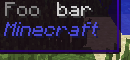
显示名称可以省略或设置为 “”(空字符串),此时仅显示返回值。这也是为整行着色的一种方式。
如果 Display name 是本地化文件中的键,它将自动被本地化。在可能的情况下请使用它进行本地化。键可以在通常位于模组 .jar 文件 assets/ModID/lang 中的本地化语言文件中查找。(可以使用 7-zip 等工具将 jar 文件作为 zip 文件打开。)强烈建议使用配置目标模组、依赖模组或 Waila/Omni Ocular 的 lang 文件中的键。如果以上都不包含所需的键,请向我报告并/或为 Omni Ocular 的 lang 源文件做出贡献(在 GitHub 上)。
“n”可用于将一个返回值拆分为多行。
如果返回 “null”/“__ERROR__”/“undefined”/“NaN”,此行将被直接忽略,不会显示在 HUD 中。这是在特定条件下隐藏行的方法。
注意:如果 line node 和 init node 中的 JavaScript 代码包含 XML 特殊字符(“&”, “<”, “>”),则无需编写转义形式(“&”, “<”, “>”。Omni Ocular 会自动转义它们。
内置特殊字符
可以使用格式化代码()和 WAILA 特殊字符,但这里提供了更方便的方式。
所有代码均预定义为大写形式,且不带引号。
例如:默认样式。以下代码产生的结果与上一张图片完全相同。
<line displayname="">
    return "Foo" + TAB + ALIGNRIGHT + WHITE + "bar"
</line>
所有特殊字符:
BLACK、DBLUE、DGREEN、DAQUA、DRED、DPURPLE、GOLD、GRAY、DGRAY、BLUE、GREEN、AQUA、RED、LPURPLE、YELLOW、WHITE、OBF、BOLD、STRIKE、UNDER、ITALIC、RESET
与 相同
TAB
制表符。
ALIGNRIGHT、 ALIGNCENTER
将文本右对齐或居中对齐
HEART、 HHEART、 EHEART
满心、半心、空心
内置 JavaScript 函数
translate(string):获取字符串的本地化文本。在可能的情况下,建议使用此方法进行本地化。
name(object):获取对象的显示名称。通过铁砝等修改后的名称也能正确显示。“object”必须是一个 NBT Compound 标签。例如,要获取原版箱子中第一个物品的名称:
return name(nbt['Items'][0])
fluidName(string):获取字符串对应的本地化流体名称。推荐使用。
holding():获取玩家手持物品的 ID。
armor(int):获取玩家穿着的护甲 ID。int=0:靴子,int=1:护腿,int=2:胸甲,int=3:头盔。
isInHotbar(string):判断玩家快捷栏中是否有 ID 为 string 的物品。
isInInv(string):判断玩家背包(包括快捷栏)中是否有 ID 为 string 的物品。
使用游戏内 NBTEdit
以一个实时示例为例。假设下方有一个熔炉。
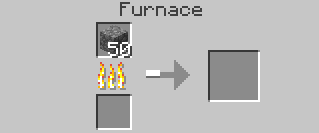
指向该熔炉并运行 “/nbtedit” 命令以打开 NBTEdit GUI。
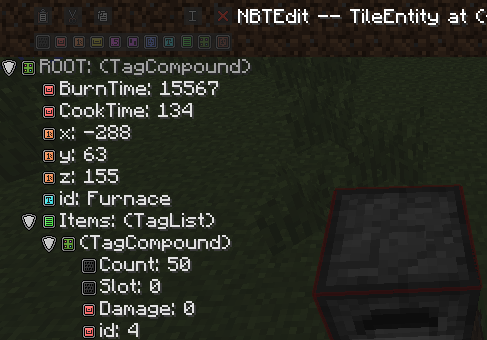
上述显示的 NBT 数据将被转换为名为 “nbt” 的 JSON 变量。
nbt={
  "BurnTime":15567,
  "CookTime":134,
  "x":-288,
  "y":63,
  "z":155,
  "id":"Furnace",
  "Items":[
    {
      "Count":50,
      "Slot":0,
      "Damage":0,
      "id":4
    }
  ]
}
当玩家指向一个方块实体时,此变量会持久化并同步。它可以在 <line></line> 节点中调用。
例如,如果你想在 HUD 中显示 “CookTime”,你可以在配置文件中这样写:
<oo>
  <tileentity id="Furnace">
    <line displayname="Cook Time">
      return nbt['CookTime']
    </line>
  </tileentity>
</oo>
注意,id=”Furnace” 可以通过 NBTEdit GUI 获取。你可以随时使用 NBTEdit GUI 来获取方块实体的 ID。至于羊等实体或物品提示框,请使用上述提到的 “/ooe” 和 “/oon” 命令。
“CookTime” 代表什么?哦,那得靠你 猜 了。
关于配置文件
客户端
位于 minecraft/config/OmniOcular/ 下且扩展名为 “.xml” 的文件将被加载为配置文件。子文件夹将被忽略。
预置配置文件将在游戏启动时根据已安装的模组 ID 自动发布。但是,已存在的文件不会被覆盖。如果你想禁用预置配置文件的某些功能,请删除配置文件的内容,而不是删除文件本身。如果你更新了 Omni Ocular 并想要更新预置配置文件,你必须删除旧文件。
服务端
配置文件的加载方式与客户端相同。但是,服务端不会发布预置配置文件。也就是说,你必须先在客户端单人游戏中准备/修改文件,然后将其复制到服务端才能生效。
在多人游戏中,所有客户端配置都将被服务端配置覆盖。这意味着所有客户端配置文件都将被忽略,而由所有客户端使用服务端配置。无需担心玩家通过自定义客户端配置窃取 NBT 数据(可能是密码)。“/oor” 命令也会使所有客户端重新加载新的服务端配置。
规划中的功能
支持地面掉落物品的检测。
允许根据配置隐藏部分信息,可能支持按键触发。
二进制文件的使用权限
你可以:
在你的整合包中使用此模组
发布此模组的截图或视频
编辑此模组并在 GitHub 上提交拉取请求 (Pull Requests)
在此处发布链接,告知我你将其包含在整合包中等
只要不违反以下规则,你可以做任何你想做的事
你必须:
如果以任何形式重新分发(如整合包、在其他网站 repost 等),请保留署名信息(作者名称、本帖链接等)
你不可以:
告诉别人是你制作了 Omni Ocular
Read changelog for instruction if you are going to use this mod with Java19
Detailed document:
Currently WIP
Description
Omni Ocular is a mod to show player defined specific NBT info on Waila HUD. Useful for extreme number fans and mod testers.
Omni Ocular is the successor of WailaNBT, with major code rewrite and much more feature.
Installation
Dependency
Not Enough Items and Waila and Omni Ocular must to be installed on both client side and server side. Download and copy jar file into mods folder.
In-Game NBTEdit (Download 1.7.10 version here) is highly recommended to look up NBT data structure, in order to customize what will show up.
Showcase (Screenshots)
Just install Omni Ocular and enjoy. No other works needed.
Tutorial of custom config
Omni Ocular use XML format file as its config files. You may open minecraft/config/OmniOcular folder to see pre-configured files.
In-Game Commands
“/oor” (stand for Omni Ocular Reload config): It will reload all XML config files under minecraft/config/OmniOcular folder. If used on server side, it will reload server side config files and send new config to all online players. Player name will be logged when run this command. Can only be used by OP if in multiplayer.
“/ooe” (stand for Omni Ocular Entity name): It will show the registry name of the entity you are pointing at.
“/oon” (stand for Omni Ocular Name): It will show the registry name of the item you are holding.
Writing a config file
Config files are in XML file format with JavaScript in it. Files must follow XML and JavaScript standard to work.
It is recommended to name the file after Mod ID of the mod this file focusing on.
Please look up pre-configs to see it in action. A demo config is shown below.
<!--Author: EpixZhang-->
<!--Date: 2015/1/1-->
<!--Version: 1.0-->
<oo>
  <init>
    function tick2second(n){return n/20}
  </init>
  <tileentity id="Furnace">
    <line displayname="Burn Time">
      return tick2second(nbt['BurnTime'])
    </line>
  </tileentity>
  <entity id="Sheep">
    <line displayname="Until next love">
      tick2second(nbt['InLove'])
    </line>
  </entity>
  <tooltip id="minecraft:skull">
    <line displayname="OwnerName">
       return nbt['SkullOwner']
    </line>
  </tooltip>
</oo>
Config file info part:
<!--Author: EpixZhang-->
<!--Date: 2015/1/1-->
<!--Version: 1.0-->
This part is not required but recommended. It records useful information. Currently version is the target mod version. Might be required in future for auto update.
Base node:
All effective node must be in base tag “<oo></oo>”.
Tile Entity Node:
To show info of a TE (tile entity), use this tag in following format.
<tileentity id="Furnace"></tileentity>
The “id” attribute defines which TE this node will work on. Above node will working on the TE which id is “Furnace”.
It uses Regular Expression format to match the TE’s id. e.g. id=”Powered.*” will match all TE which id starts with “Powered”. Escape character (backslash”\”) must be used if there are special characters in id. e.g. id=”BC\|Engine” but not id=”BC|Engine” will work on a TE which id is “BC|Engine”.
Entity Node:
To show info of an Entity, use this tag in following format.
<entity id="Sheep"></entity>
The “id” attribute defines which Entity this node will work on. Above node will working on the Entity which id is “Sheep”.
It uses Regular Expression too.
Tool Tip Node:
To show info on mouse hover an item, use this tag in following format.
<tooltip id="minecraft:skull"></tooltip>
The “id” attribute defines which Item this node will work on. Above node will working on the Item which id is “minecraft:skull”.
It uses Regular Expression too.
Initial Node:
To do initialization actions, such as common used functions, use this tag in following format.
<init></init>
Script in this tag will be run when config loaded.
Line Node:
To display info in line, use this tag in following format.
<line displayname="Foo">
    script bar
</line>
“script bar” here is supposed to be content of a function. That is to say, function(){script bar} should be a valid JavaScript function. Return value of this function will be displayed. “return” can be omitted if there are one only one expression. e.g. write “Epix” in script bar is equal to “return ‘Epix'”.
Default style is display name value in white and return value in gray with a tab between them. Minecraft color code can be used in return value but not in display name.
<line displayname="Foo">
    "bar"
</line>
will bring you this.
Display name can be omitted or set to “” (empty string), then only returned value will be shown. And that’s the way to color whole line.
If Display name is a key of localization, it will be automatically localized. Use it if possible for localization. Keys can be looked up in localization lang file which usually located in mod .jar file assets/ModID/lang. (jar files can be open as a zip file by using 7-zip, etc.) It is highly recommended to use keys inside the mod which the config file is focusing on, or the dependent mods, or Waila/Omni Ocular’s lang file. If none of above contains the wished keys. Please report to me and/or make contribute to Omni Ocular lang source file (at GitHub).
“n” can be used to split one return value to multiple lines.
If “null”/”__ERROR__”/”undefined”/”NaN” is returned, this line will be directly ignored and won’t be display in HUD. This is the way to hide lines under certain condition.
Notice: If JavaScript code in line node and init node contain XML special characters(“&”, “<“, “>”), there is no need to write escaped form(“&”, “<”, “>”). Omni Ocular will escape them.
Build-in special characters
Formatting code () and waila special chars can be used, but a more convenient way is provided.
All codes are pre-defined in upper case without quote mark.
e.g. Default style. Result of following code is exactly same as the previous picture.
<line displayname="">
    return "Foo" + TAB + ALIGNRIGHT + WHITE + "bar"
</line>
All special characters:
BLACK, DBLUE, DGREEN, DAQUA, DRED, DPURPLE, GOLD, GRAY, DGRAY, BLUE, GREEN, AQUA, RED, LPURPLE, YELLOW, WHITE, OBF, BOLD, STRIKE, UNDER, ITALIC, RESET
Same as
TAB
A tab character.
ALIGNRIGHT, ALIGNCENTER
Align text to right or center
HEART, HHEART, EHEART
Full heart, half heart, empty heart
Build-in JavaScript functions
translate(string): get localized text of string. Use it if possible for localization.
name(object): get the display name of the object. Changed name by anvil etc. can be shown correctly. “object” must be an NBT Compound tag. e.g. To get the name of first object in a vanilla chest:
return name(nbt['Items'][0])
fluidName(string): get localized fluid name of the string. Recommended.
holding(): get the id of the item that player is holding.
armor(int): get the id of the armor that player wears. int=0: boot, int=1: leggings, int=2: chest plate, int=3: helmet.
isInHotbar(string): judge whether player have an item which id is string in hot bar.
isInInv(string): judge whether player have an item which id is string in inventory(including hot bar).
Using In-Game NBTEdit
Taking a live example. Assuming a furnace below.
Point at the furnace and run “/nbtedit” command to open NBTEdit GUI.
NBT data shown above will be transformed into a JSON variable named “nbt”.
nbt={
  "BurnTime":15567,
  "CookTime":134,
  "x":-288,
  "y":63,
  "z":155,
  "id":"Furnace",
  "Items":[
    {
      "Count":50,
      "Slot":0,
      "Damage":0,
      "id":4
    }
  ]
}
This variable is persist and synced when player pointing at a tile entity. It can be called in <line></line> node.
For example, if you want to display “CookTime” in HUD, you may write this in config files.
<oo>
  <tileentity id="Furnace">
    <line displayname="Cook Time">
      return nbt['CookTime']
    </line>
  </tileentity>
</oo>
Note that id=”Furnace” can be acquired by the NBTEdit GUI. You can always use NBTEdit GUI to get the id of a tile entity. As for entities such as a sheep or item tooltip, use “/ooe” and “/oon” command mentioned above.
What does “CookTime” stand for? Oh that is what you have to GUESS.
About config files
Client side
Files only with extension name “.xml” in minecraft/config/OmniOcular/ will be loaded as config. Sub folders will be ignored.
Pre-config files will be released automatically according to installed mod IDs when game start. However, existed file will not be overwritten. If you want to disable some of feature of pre-config files, delete the content of config files instead of deleting the file. If you updated Omni Ocular and want to update pre-config files, you have to delete old files.
Server side
Config files will be loaded as same as client side. However, pre-config files will not be released. That is to say, you must prepare/modify files first in client side single player, and copy them to server side to make it work.
All client side configs will be override by server side in multiplayer. Which means all client side config files will be ignored and server side configs is using by all client. No need to worry player stealing protect NBT data (password maybe) by custom client config. “/oor” command will make all client reload new server side configs too.
Planning Feature
Support for items dropped on ground.
Allow hide part of info according to config, maybe key press.
Permission of binary file
You can:
Use this mod in your modpack
Post screenshots or videos of this mod
Edit this mod and make pull requests on GitHub
Post a link here to inform me that you include it in a modpack, etc.
Do everything you want as long as you don't break rules below
You must:
Keep credit info(Author name, link to this post, etc.) if redistribute in any form (modpacks, repost in another website, etc.)
You cannot:
Tell others that you made Omni Ocular


 模组
 模组

 模组

 模组

 模组

 模组
评论 0
登录后参与评分
还没有评论,来抢沙发吧