
一款适用于 Minecraft: Java Edition 的简洁 HUD 模组,基于 Fabric 加载器。
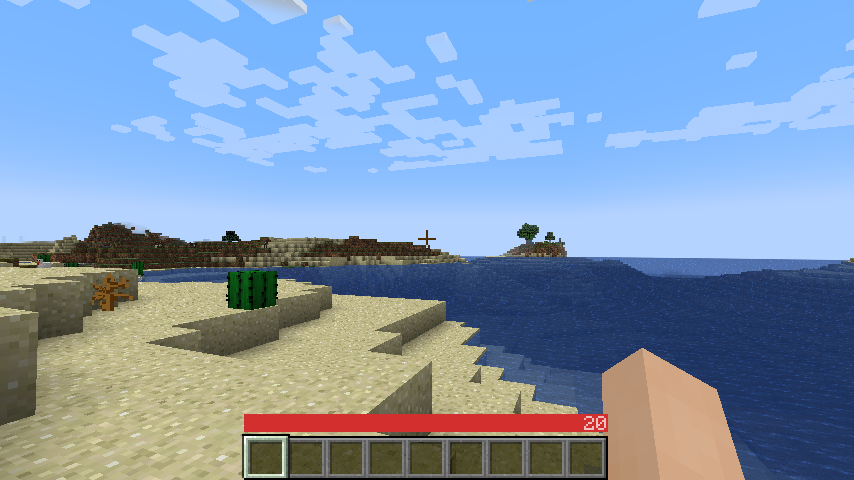
Niche Duck 的评价:主模组(v1.2.2)、配置界面(v1.2.2)。agata_m 提供的自定义 OneBar 下的 Mob Arena 玩法(v2.3.1)
工作原理
提示:
- 每个数值和进度条仅在需要时显示。
- 正面效果(包括生命值本身)从左到右排列;负面效果从右到左排列。
- 如果你饿了,饥饿覆盖层会以其数值形式叠加在生命值上。
- 如果你进食,覆盖层和数值就会消失,因为你不再需要它了。
- 如果你还在水下,水条会显示在生命值 和 饥饿值之上,因为在这种情况下它是最重要的数值。
- 生命值 始终 是第一个数字,饥饿值 几乎总是 最后一个数字(当你拥有饥饿效果时除外)。
- 中间的一切都是估算值,代表额外生命值或伤害来源(可禁用)。
- 你也可以在选项中启用“显示附加符号”以获取这些项目的图标。
- 还记得 没有饥饿和经验值的旧版 Minecraft 吗?此模组在不损失现代功能的前提下,为你提供了视觉上类似的体验。

该模组仅使用客户端数据,因此服务器端完全不需要安装。此外,还有大量设置用于配置各种元素的色彩和可见性。
颜色和图标的含义
安装方法
- 安装 Minecraft 1.16 或更高版本
- 安装 Fabric Loader
- 下载 OneBar、Fabric API、Mod Menu、Cloth Config API
- 将你下载的 JAR 文件放入 Minecraft 的 mods 文件夹中
- 运行游戏!
目前也支持 Quilt,尽管尚未专门为此提供支持。参见 #21。
模组兼容性
常见问题
问:为什么我必须单独下载 Cloth Config API?
答:因为它体积较大且更新频繁,而且你可能已经有其他模组依赖它。如果你的某个模组已经捆绑了它,你就完全不需要再下载了 :)
问:如何编辑颜色?
答:点击 Esc -> Mods -> OneBar -> config 按钮。颜色格式为透明度 + HEX 格式的 RGB,因此请从 此列表 中选择透明度,并使用 任意 HEX 颜色选择器 选择颜色。例如,如果我想在蓝色 (0000FF) 上使用 80% 的透明度 (CC),我将输入 #CC0000FF。
问:支持 Forge 吗?
答:不支持。你可以按照许可证自行分叉,或者 查看灵感来源的资源包。
问:支持低版本回溯(Backports)吗?
答:不支持,最新版才是最好的。
问:支持快照版本吗?
答:有时支持。如果此处未发布,请检查 GitHub Actions。
A sleek HUD mod for Minecraft: Java Edition using Fabric mod loader.
Reviews by Niche Duck: main mod (v1.2.2), config (v1.2.2). Mob arena gameplay with customized OneBar (v2.3.1) by agata_m
How it works
See the gallery for a tutorial image!
Tips:
- Every value and bar is displayed only when you need it.
- The positive effects, including health itself, are displayed left-to-right; negative effects are displayed right-to-left.
- If you get hungry, the hunger overlay is displayed over the health by its value.
- If you eat, you'll lose the overlay and the value, because you no longer need it.
- If you are also underwater, the water bar is displayed on top of health and hunger because it is the most important value in this case.
- Health is always the first number and hunger is almost always the last number (except when you have the hunger effect).
- Everything in between is an estimate, additional health or damage source (can be disabled).
- You can also enable "Show additional symbols" in options to get icons for those
- Remember old Minecraft without hunger and experience? This mod gives you a visually similar experience without losing modern functionality.
The mod only uses client-side data, so it is never needed on a server. There are also a lot of settings for configuring the colors and visibility of various elements.
Meanings of the colors and icons
Installation
- Install Minecraft 1.16 or later
- Install Fabric Loader
- Download OneBar, Fabric API, Mod Menu, Cloth Config API
- Place the JARs you downloaded to your Minecraft's mods folder
- Run the game!
Currently also works on Quilt, though no effort has yet been made to explicitly support it. See #21.
Mod compatibility
- Mod Menu - mod info, config GUI shortcut
- Catalogue - mod info, config GUI shortcut
- Sodium - mod version, config GUI shortcut
FAQ
Q: Why do I have to download Cloth Config API separately?
A: Because it's big, gets updated a lot and you probably have a mod or two that requires it anyway. If one of your mods already bundles it, you don't have to download it at all :)
Q: How do I edit the colors?
A: Click Esc -> Mods -> OneBar -> config button. Colors are formatted as opacity + RGB in HEX, so choose an opacity from this list and use any HEX color picker for choosing a color. For example if I want 80% opacity (CC) on blue (0000FF), I will enter #CC0000FF.
Q: Forge support?
A: No. Feel free to fork according to the license or check out my resource pack that inspired this.
Q: Backports?
A: No, latest is greatest.
Q: Snapshots?
A: Sometimes. If not published here, check GitHub Actions.
下载 OneBar
需要联机服务器吗?
稳定流畅、一键部署,几分钟即可和朋友联机开服
最低仅需 8 元/月 即可畅快联机
下载 OneBar
需要联机服务器吗?
稳定流畅、一键部署,几分钟即可和朋友联机开服
最低仅需 8 元/月 即可畅快联机
下载 OneBar
下载 OneBar
下载 OneBar
需要联机服务器吗?
稳定流畅、一键部署,几分钟即可和朋友联机开服
最低仅需 8 元/月 即可畅快联机
下载 OneBar
下载 OneBar
下载 OneBar
需要联机服务器吗?
稳定流畅、一键部署,几分钟即可和朋友联机开服
最低仅需 8 元/月 即可畅快联机
下载 OneBar
需要联机服务器吗?
稳定流畅、一键部署,几分钟即可和朋友联机开服
最低仅需 8 元/月 即可畅快联机
下载 OneBar
需要联机服务器吗?
稳定流畅、一键部署,几分钟即可和朋友联机开服
最低仅需 8 元/月 即可畅快联机
- 已在 26.3 和 26.4-snapshot.1 版本中测试
- 已重新启用 Mod Menu 和 Sodium 配置功能
关于这个资源的讨论、问题反馈与使用心得
还没有讨论,来发第一帖吧
你是这个资源的作者?登录后可认领此资源。
相似资源
 模组

可定制的鞘翅模组,支持装饰纹饰、旗帜图案等更多功能!
 模组

显示你正在注视的方块的信息。(适用于 Minecraft 1.16+ 的 Hwyla/Waila 分支)
 模组

查看物品与配方
 模组
在游戏画面角落显示附近世界地形、玩家、生物和实体的地图。可创建路径点,帮助你找到标记过的位置。
 模组

适用于 MC 1.18+ 的 Effekseer 加载器
 模组
使用 JavaScript 编辑配方、添加自定义物品、编写世界事件!
评论 0
登录后参与评分
还没有评论,来抢沙发吧