



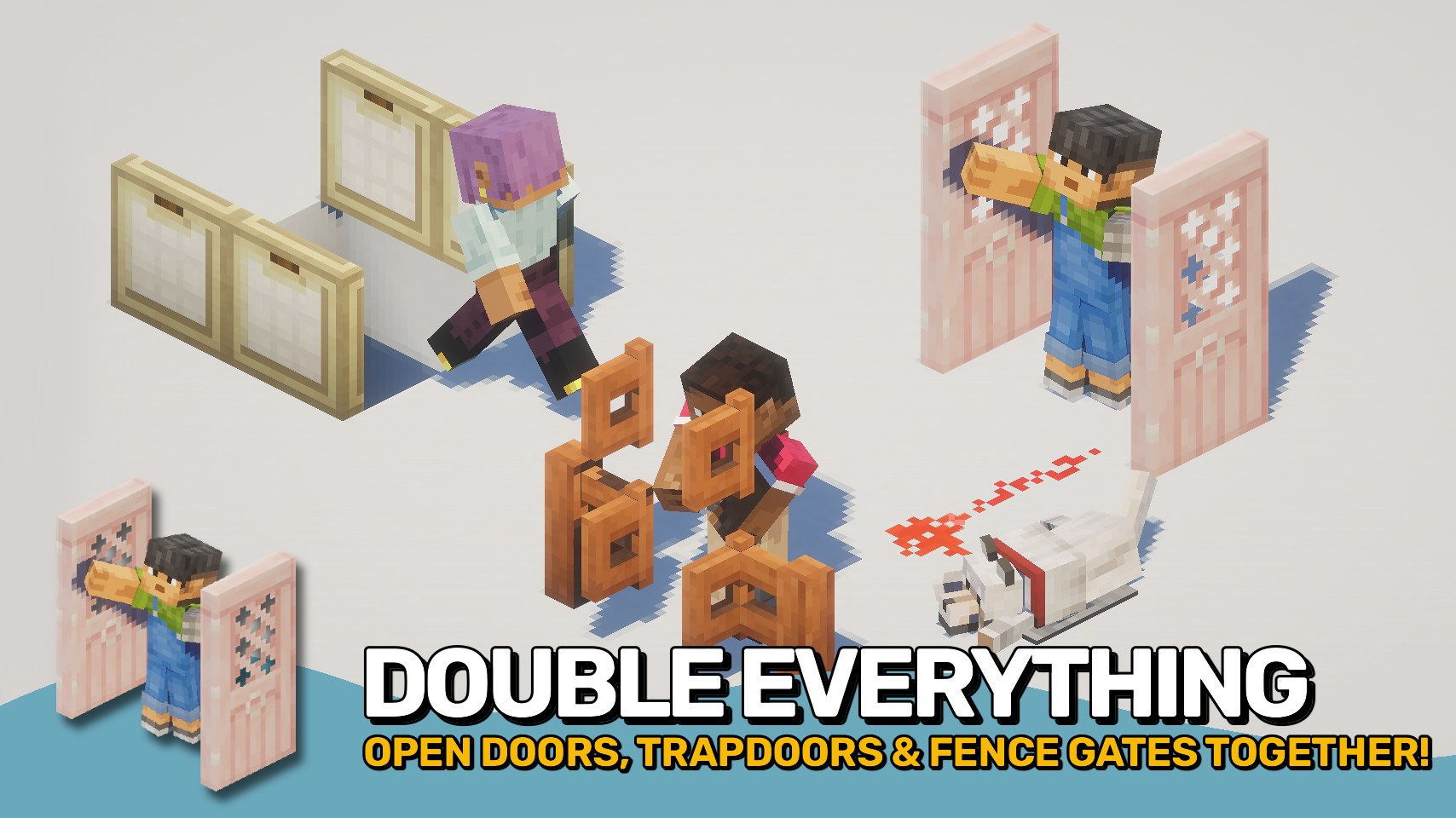
Open Together 使相邻放置的配对门、陷阱门和栅栏门作为一个组一起开启。打开一个方块,相连的邻居会自动跟随,让双门和更宽的入口使用更加自然。?
该模组在保留原版行为和建筑风格的同时,消除了日常游玩中重复点击的繁琐操作。它支持手动交互,并且在服务端安装时也能支持红石等原版机制。⚡
与大多数类似的解决方案不同,该模组可以安装在客户端、服务端或两者兼有。在服务端安装能为所有玩家提供最完整且一致的体验。仅在客户端使用时,也可以在没有安装该模组的多人服务器上使用,但仅限于你自己的手动交互,不支持如红石等服务端效果。?

- ? 双开门: 同时开启相邻匹配的门,使入口更加顺畅,建筑更加整洁。
- ? 双陷阱门: 关联的陷阱门同时开启,使地板舱口和装饰性建筑更易使用。
- ? 双栅栏门: 相邻的栅栏门可作为一个整体开启,非常适合更宽的路径、农场和牲畜围栏。
- ⚡ 红石支持: 当在服务端安装时,受支持的方块可以通过原版风格的交互(包括红石)一起开启。
- ? 灵活安装: 适用于客户端、服务端或两者,服务端安装可提供最完整的多人游戏经验。
- ? 仅客户端多人游戏使用: 即使在没有安装该模组的服务器上,也能通过开启附近匹配的方块提供帮助。
- ?️ 可配置行为: 为每种受支持的方块类型启用或禁用分组开启,并调整行为以符合你的偏好。
- ?️ 模组方块支持: 兼容的模组门、陷阱门和栅栏门可通过方块标签包含在内。
- ⌨️ 快速切换: 包含一个可选按键绑定,用于临时启用或禁用分组开启。


⏩ 客户端可选安装 & 服务端可选安装
⏩ 需要安装 PUZZLES LIB(Fabric 和 NeoForge)
⏩ 需要安装 FABRIC API(Fabric)
⏩ 需要安装 FORGE CONFIG API PORT(Fabric)

如果模组支持配置,可以通过游戏内的模组菜单直接进行配置(Fabric 端需要安装由 Prospector 开发的 Mod Menu)。
若使用外部文本编辑器手动配置,所有文件均位于 .minecraft/config 目录下,文件名分别为 MOD_ID-client.toml、MOD_ID-common.toml 或 MOD_ID-server.toml,具体取决于配置文件的类型。并非所有类型的配置文件都会存在,甚至可能完全没有。
 |
 |
|
 |
 |
|
 |
 |
|
 |
 |
|
 |
 |

© 2026 @heyitsfuzs. 保留所有权利。本页面最后编辑时间为 2026 年 9 月 11 日,06:44 (UTC)。
Open Together makes matching doors, trapdoors, and fence gates open as a group when placed next to each other. Open one block, and connected neighbours follow automatically, making double doors and wider entrances feel natural to use. ?
The mod removes repetitive clicks during everyday gameplay while preserving vanilla behaviour and building styles. It works with manual interactions and can also support vanilla mechanics such as redstone when installed on the server. ⚡
Unlike most similar solutions, the mod can be installed on the client, the server, or both. Server installation provides the most complete and consistent experience for all players. Client-only use also works on multiplayer servers without the mod, but only for your own manual interactions and not for server-side effects like redstone. ?
- ? Double Doors: Open matching neighbouring doors together for smoother entrances and cleaner builds.
- ? Double Trapdoors: Linked trapdoors open together, making floor hatches and decorative builds easier to use.
- ? Double Fence Gates: Adjacent fence gates can open as one, perfect for wider paths, farms, and animal pens.
- ⚡ Redstone Support: When installed server-side, supported blocks can open together through vanilla-style interactions, including redstone.
- ? Flexible Installation: Works on client, server, or both, with server installation providing the most complete multiplayer experience.
- ? Client-Only Multiplayer Use: Can still help on servers without the mod installed by opening nearby matching blocks.
- ?️ Configurable Behaviour: Enable or disable grouped opening for each supported block type and adjust behaviour to suit your preferences.
- ?️ Modded Block Support: Compatible modded doors, trapdoors, and fence gates can be included through block tags.
- ⌨️ Quick Toggle: Includes an optional keybind to temporarily enable or disable grouped opening.
⏩ INSTALLATION OPTIONAL ON CLIENT & OPTIONAL ON SERVER
⏩ REQUIRES PUZZLES LIB TO BE INSTALLED (FABRIC & NEOFORGE)
⏩ REQUIRES FABRIC API TO BE INSTALLED (FABRIC)
⏩ REQUIRES FORGE CONFIG API PORT TO BE INSTALLED (FABRIC)
If available for a mod, configuration is possible directly from in-game using the mod menu (requires Mod Menu by Prospector to be installed on Fabric).
For manual configuration using an external text editor all files are found at .minecraft/config, named as MOD_ID-client.toml, MOD_ID-common.toml, or MOD_ID-server.toml, depending on the type of config. Not all types might exist for a mod, if any at all.
|
|
|
|
|
|
|
|
|
|
|
|
|
|
© 2026 @heyitsfuzs. All rights reserved. This page was last edited on 11 September 2026, at 06:44 (UTC).

下载 Open Together
下载 Open Together
下载 Open Together
下载 Open Together
下载 Open Together
下载 Open Together
需要联机服务器吗?
稳定流畅、一键部署,几分钟即可和朋友联机开服
最低仅需 8 元/月 即可畅快联机
下载 Open Together
下载 Open Together
下载 Open Together
下载 Open Together
更新日志
本项目的所有重要更改都将记录在此文件中。
格式遵循 Keep a Changelog, 并且本项目遵守 语义化版本控制。
[v26.3.0-mc26.3.x] - 2026-09-23
已更改
- 更新至 Minecraft 26.3.x
关于这个资源的讨论、问题反馈与使用心得
还没有讨论,来发第一帖吧
你是这个资源的作者?登录后可认领此资源。
相似资源
 模组

显示你正在注视的方块的信息。(适用于 Minecraft 1.16+ 的 Hwyla/Waila 分支)
 模组
使用 JavaScript 编辑配方、添加自定义物品、编写世界事件!
 模组

查看物品与配方
 模组
在游戏画面角落显示附近世界地形、玩家、生物和实体的地图。可创建路径点,帮助你找到标记过的位置。
 模组
AE2:一款流行的自动化与存储模组
 模组
那是什么?一个 Waila/Hwyla 的分支。
评论 0
登录后参与评分
还没有评论,来抢沙发吧