
? 简介:
Stylish Effects 彻底重构了状态效果的显示方式。提供多种模式供选择,并拥有海量的配置选项,助你打造梦想中的效果显示界面。
? 内容:
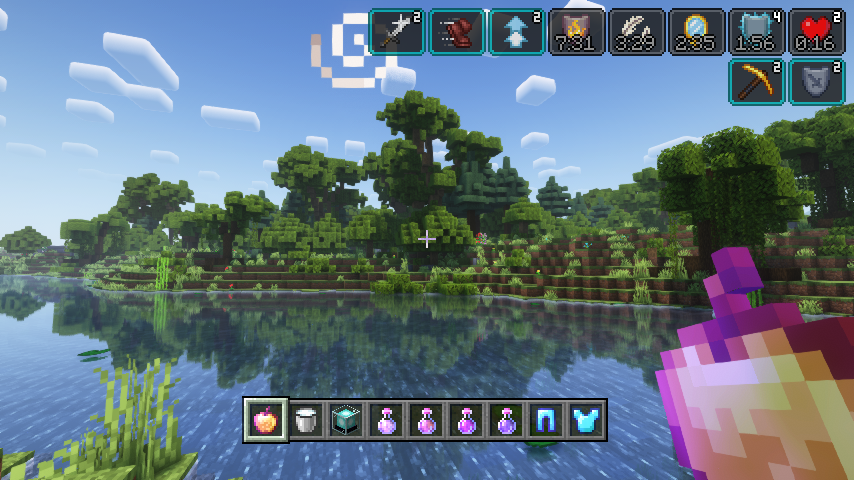
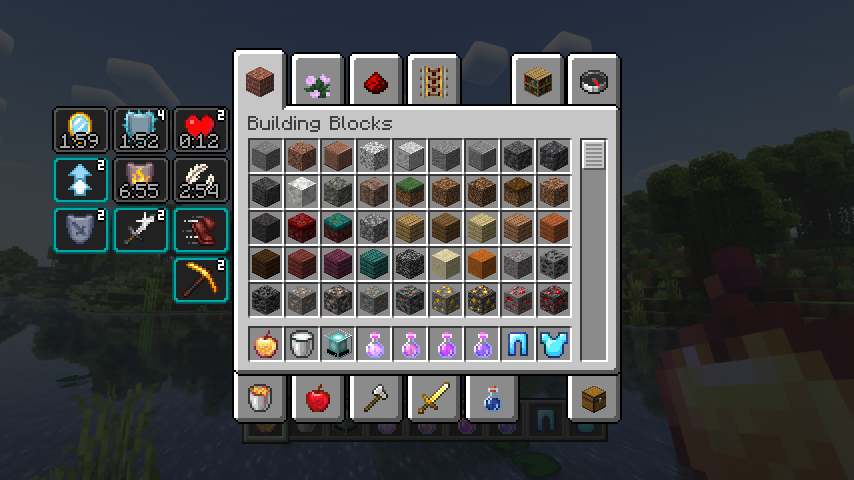
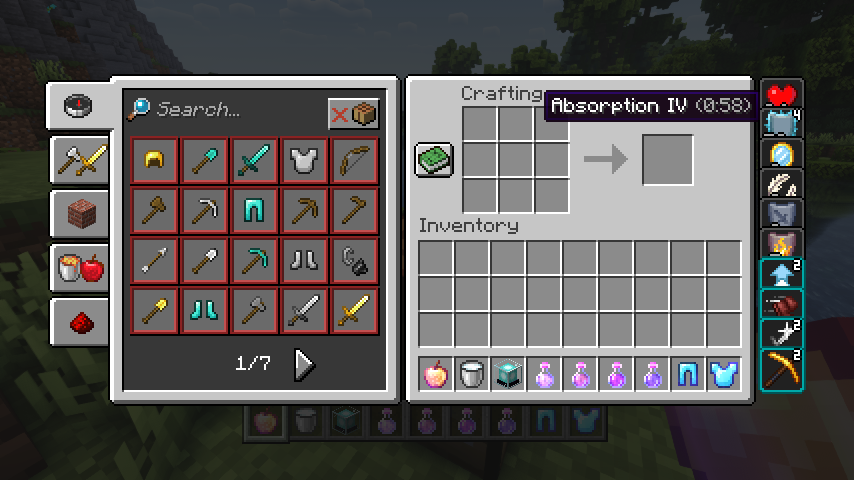
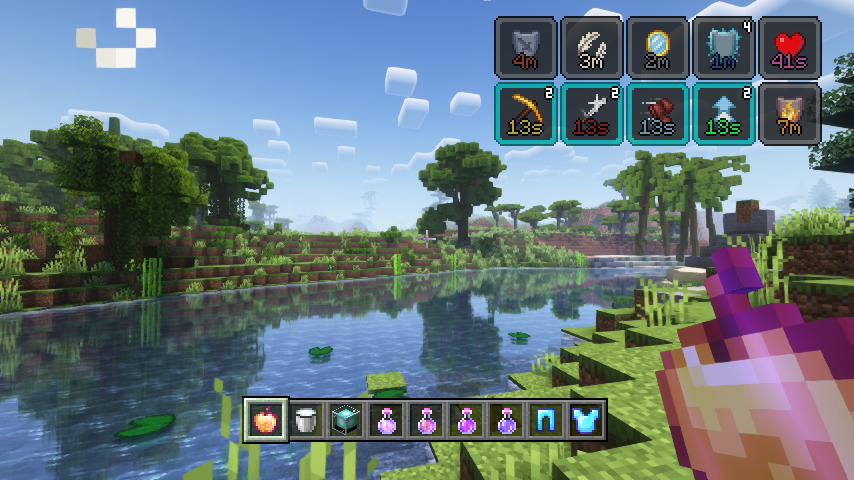
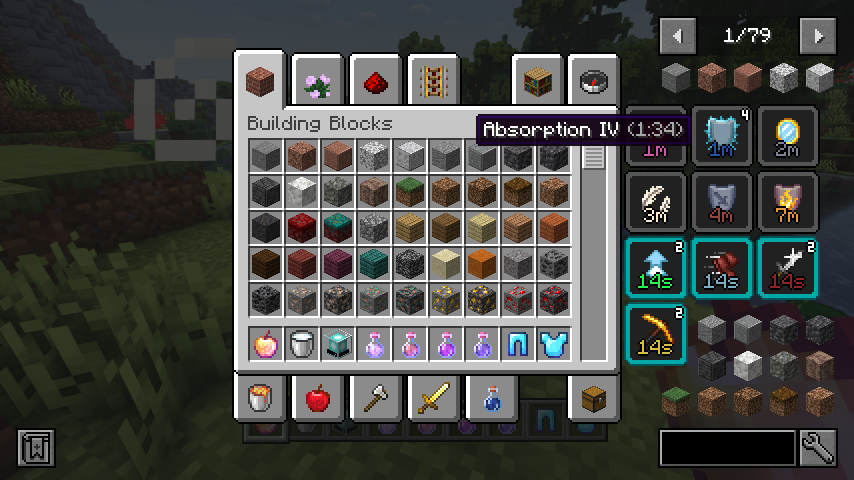
首先,原本简陋的原版 HUD 效果显示被替换为更华丽的版本,其中包含效果计时器以及当前效果等级(放大器)。该显示界面现在也用于物品栏中,因为它更加紧凑,可以在效果开始重叠之前展示更多的效果。而且这个新的物品栏显示不再局限于玩家自身的物品栏,现在你可以在任何容器中查看你的激活效果!
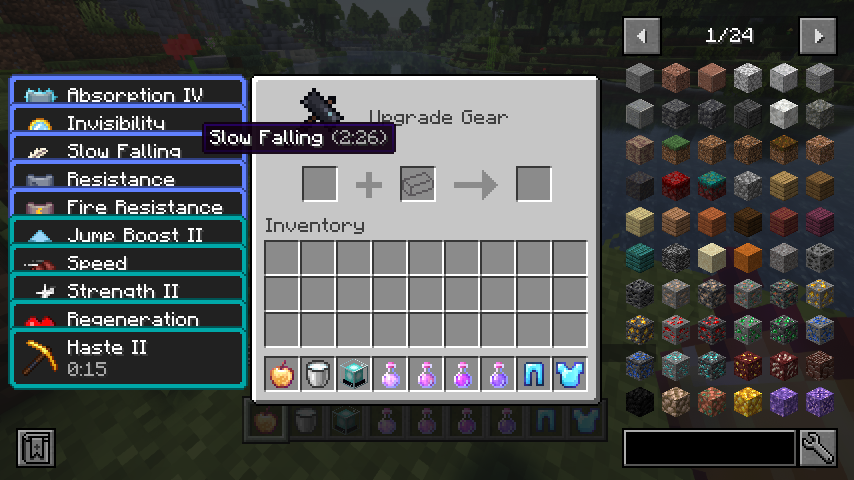
但是等等,既然状态效果以小巧紧凑的图标形式显示,你该如何知道当前激活的效果名称呢?别担心,为此添加了一个便捷的提示框(Tooltip)。当安装了 Just Enough Effect Descriptions by MehVahdJukaar 时,提示框将更加实用。
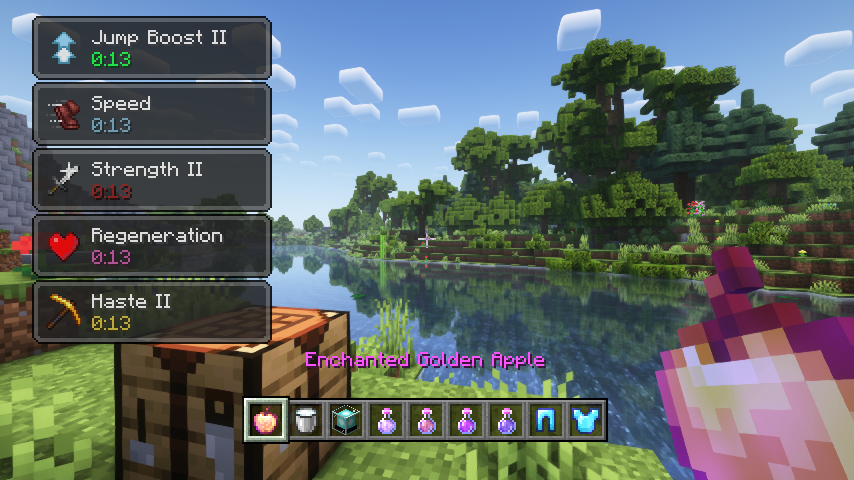
你喜欢原版的物品栏状态效果显示,并希望保留它甚至将其也用于 HUD 上?没问题!你可以选择任意你想要的部件模式,或者完全不使用。此外,还有许多可配置的设置,例如效果显示在屏幕上的位置、行数和列数、自定义透明度值、文本颜色、自定义屏幕位置等等,不胜枚举。
? 截图:
 |
 |
|
| Stylish effects 正在展现其独特的风格 | 可以选择和配置各种效果渲染类型 | |
 |
 |
|
| 紧凑的效果显示取代了原版物品栏内的显示方式 | 效果显示不仅限于物品栏,在所有容器中均可查看 | |
 |
 |
|
| 鼠标悬停在效果部件上时会显示有用的提示框 | 如此多的设置选项,打造专属你的效果显示界面 | |
 |
||
| 与 JEI 和 REI 完美兼容 | ||
? 常见问题解答:
问:我如何在 Forge 上配置此模组?
答:安装我的 Config Menus for Forge 模组,即可直接在游戏内完成配置!
问:如何在 Fabric 上配置此模组?
答:目前尚不支持在游戏内直接编辑配置文件。相反,当你在世界中时,请根据模组类型选择 CLIENT(客户端)或 SERVER(服务器),然后运行 /config showfile <modid> 命令,接着点击聊天栏中出现的文件名(以 .toml 结尾),即可在外部编辑器中手动编辑配置文件。保存文件后,配置文件将在几秒钟内在游戏内自动重新加载,因此无需重启游戏。
问:我可以在 Minecraft 1.19 之前的版本上哪里下载适用于 Fabric 的此模组?
答:旧版本的下载位于 旧项目页面。
? 鸣谢:
Stylish Effects 的开发得到了以下模组的启发和帮助:
- Deadzoke 的 Ignite HUD 模组启发了效果计时器显示功能
- Dmitrylovin 的 Inventory HUD+ 模组启发了紧凑的效果增幅器显示功能
- Snownee 的 Mini Effects 模组提供了一个用于禁用默认 JEI 库存状态效果处理的小技巧
? About:
Stylish Effects completely overhauls how status effects are displayed. There are multiple modes to choose and countless configuration options available to create the effects display of your dreams.
? Contents:
First of all, the crummy little vanilla hud effects display is replaced with a fancier version which includes an effect timer as well as the current effect amplifier. This display is also now used in the inventory, as it's way more compact and allows for many more effects to be shown before they start to overlap. And this new inventory display is no longer limited to the player inventory, now you can see your active effects in every container!
But wait, now that status effects are shown small and compact with just an icon, how will you find out how your active effects are called? Don't worry, a handy tooltip is added for that. The tooltip will be even more useful when Just Enough Effect Descriptions by MehVahdJukaar is installed.
You like the vanilla inventory status effect display and want to keep it or even use it on the hud as well? No problem! You can choose any widget mode you want, or even none. Alongside that there are many configurable settings, such as the screen side for effects, amount of rows and columns, a custom alpha value, text colors, custom screen positions, and much, much more.
? Media:
|
|
|
| Stylish effects in action being very stylish | Various effect render types can be chosen and configured | |
|
|
|
| Compact effects replace the vanilla display inside of the inventory | The effects display is shown in every container, not just the inventory | |
|
|
|
| Useful tooltips will appear when effect widgets are hovered | So many possible settings, create your very own effect display | |
|
||
| Great JEI and REI compatibility | ||
? FAQ:
Q: How do I configure this mod on Forge?
A: Install my Config Menus for Forge mod and do it directly in-game!
Q: How do I configure this mod on Fabric?
A: Editing configs directly in-game has not yet been implemented. Instead when in a world run the /config showfile <modid> command by choosing either CLIENT or SERVER (depending on the mod), then click the file name (ending with .toml) that appears in chat to be able to manually edit the config file in a separate editor. After saving the file, the config will automatically reload in-game after a couple of seconds, so no game restart required.
Q: Where can I download this mod for Fabric on versions of Minecraft before 1.19?
A: Older downloads are found on the old project page.
? Credits:
Developing Stylish Effects was helped and inspired by:
- Deadzoke for inspiring the effect timer display from their Ignite HUD mod
- Dmitrylovin for inspiring the compact effect amplifier display from their Inventory HUD+ mod
- Snownee for a small hack for disabling the default JEI inventory status effect handling from their Mini Effects mod

下载 Stylish Effects
下载 Stylish Effects
下载 Stylish Effects
下载 Stylish Effects
下载 Stylish Effects
需要联机服务器吗?
稳定流畅、一键部署,几分钟即可和朋友联机开服
最低仅需 8 元/月 即可畅快联机
下载 Stylish Effects
下载 Stylish Effects
下载 Stylish Effects
下载 Stylish Effects
下载 Stylish Effects
更新日志
本项目的所有重要变更都将记录在此文件中。
格式遵循 Keep a Changelog, 并且本项目遵循 语义化版本控制。
[v26.3.1-mc26.3.x] - 2026-09-29
已更改
- 重新启用 Roughly Enough Items (REI) 集成
[v26.3.0-mc26.3.x] - 2026-09-22
已更改
- 更新至 Minecraft 26.3.x
关于这个资源的讨论、问题反馈与使用心得
还没有讨论,来发第一帖吧
你是这个资源的作者?登录后可认领此资源。
相似资源
 模组

显示你正在注视的方块的信息。(适用于 Minecraft 1.16+ 的 Hwyla/Waila 分支)
 模组
使用 JavaScript 编辑配方、添加自定义物品、编写世界事件!
 模组

查看物品与配方
 模组
在游戏画面角落显示附近世界地形、玩家、生物和实体的地图。可创建路径点,帮助你找到标记过的位置。
 模组
AE2:一款流行的自动化与存储模组
 模组
那是什么?一个 Waila/Hwyla 的分支。
评论 0
登录后参与评分
还没有评论,来抢沙发吧