
将 OpenBlocks 中的电梯移植到 Minecraft 1.8+。
合成
默认配方与 OpenBlocks 相同。
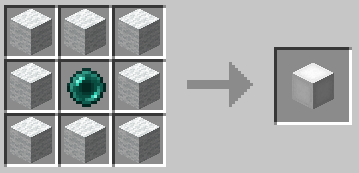
白色电梯配方的示例:
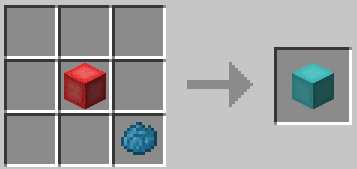
您还可以为任意电梯重新染色:
用法
要使用它们,请将两个或更多电梯放置在相同的 X 和 Z 坐标上。在它们之间移动时,只需跳跃即可前往上方的
电梯,或潜行以前往下方的电梯。
您可以在配置文件中设置电梯的范围,以及是否需要在传送时消耗经验值。
选项界面
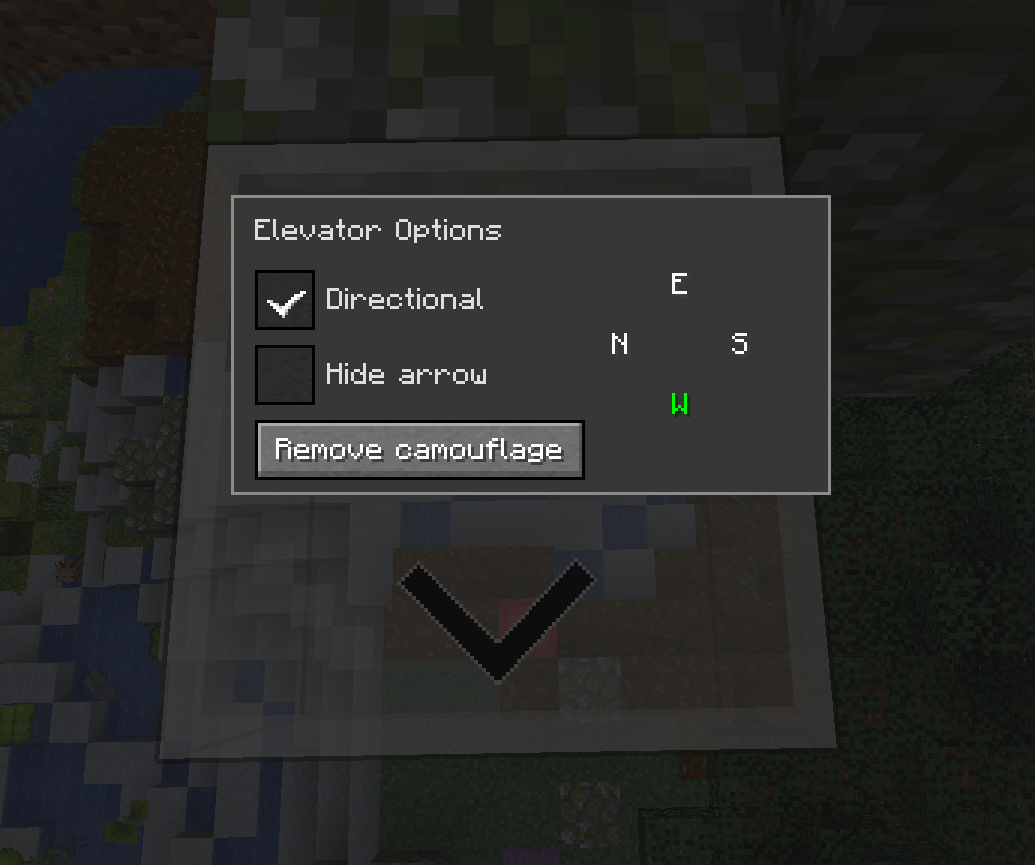
你可以用空手右键点击电梯来打开选项界面。
方向性
启用 `Directional` 复选框后,电梯将根据配置的方向调整传送到其上的玩家的偏航旋转。
您可以通过点击所需的方向按钮来更改方向。按钮的显示顺序将与玩家当前面向的方向一致。
电梯上还会显示一个箭头,指示其朝向。你可以通过勾选“隐藏箭头”复选框来隐藏它。
注意:这与水平移动无关,它仅改变玩家面朝的方向。
伪装
您可以使用任意固体方块来伪装电梯,只需在手中持有所需方块并右键点击电梯即可。
大多数方块都可以用作伪装,但有一些例外。例如,你无法使用箱子,因为它使用了不同的渲染方式。
配置
配置文件是每世界独立的,位于 `<world-directory>/serverconfig/elevatorid-server.toml`。
以下是默认值:
[General] #电梯是否需要颜色相同才能传送? sameColor = false电梯范围
范围:3 ~ 4064
range = 384
是否将玩家重新对齐到电梯中心?
precisionTarget = true
生物能否在电梯上生成?
mobSpawn = false
传送到普通电梯时是否将视角重置为 0?
resetPitchNormal = false
传送到方向性电梯时是否将视角重置为 0?
resetPitchDirectional = true
传送是否需要经验值?
useXP = false
启用 useXP 时消耗的经验值点数
注意:这不是经验等级
范围:> 1
XPPointsAmount = 1
鸣谢
- OpenBlocks 团队
- GitHub 上的所有贡献者
整合包
欢迎在任何整合包中使用此模组。
Port of the elevator from OpenBlocks to Minecraft 1.8+.
Crafting
The default recipe is the same as in OpenBlocks.
Example of the white elevator recipe:
You can also re-dye any elevator:
Usage
To use them place two or more elevators in the same X and Z coordinates, to move between them simply jump to go to the
elevator above or sneak to go to the one below.
You can configure the range of the elevators and if they should require XP to teleport in
the configuration file.
Options Interface
You can access the options interface by right-clicking on the elevator with an empty hand.
Directional
When the `Directional` checkbox is enabled, the elevator will adjust the yaw rotation of players who teleport to it
based on the configured direction.
You can change the direction by clicking on the desired direction button. The display order of the buttons will match
the current direction the player is facing.
It will also show an arrow on the elevator to indicate the direction it is facing. You can hide it by selecting
the `Hide arrow` checkbox.
Note: This has nothing to do with horizontal movement, it only changes the direction the player is facing.
Camouflage
You can use any solid block to camouflage the elevator, just right-click on the elevator with the desired block on your
hand.
Most blocks can be used as camouflage with some exceptions. For example, you can't use a chest because it uses a
different rendering method.
Configuration
The configuration file is per-world and is located at `<world-directory>/serverconfig/elevatorid-server.toml`.
Here are the default values:
[General] #Should elevators have the same color in order to teleport ? sameColor = false#Elevator range #Range: 3 ~ 4064 range = 384
#Realign players to the center of elevator ? precisionTarget = true
#Can mobs spawn on elevators ? mobSpawn = false
#Reset pitch to 0 when teleporting to normal elevators ? resetPitchNormal = false
#Reset pitch to 0 when teleporting to directional elevators ? resetPitchDirectional = true
#Should teleporting require XP ? useXP = false
#Amount of XP points to use when useXP is enabled #Note this is NOT experience levels #Range: > 1 XPPointsAmount = 1
Thanks
- OpenBlocks Team
- All contributors on GitHub
Modpacks
Feel free to use this in any modpack.

下载 OpenBlocks Elevator
需要联机服务器吗?
稳定流畅、一键部署,几分钟即可和朋友联机开服
最低仅需 8 元/月 即可畅快联机
下载 OpenBlocks Elevator
需要联机服务器吗?
稳定流畅、一键部署,几分钟即可和朋友联机开服
最低仅需 8 元/月 即可畅快联机
下载 OpenBlocks Elevator
需要联机服务器吗?
稳定流畅、一键部署,几分钟即可和朋友联机开服
最低仅需 8 元/月 即可畅快联机
下载 OpenBlocks Elevator
需要联机服务器吗?
稳定流畅、一键部署,几分钟即可和朋友联机开服
最低仅需 8 元/月 即可畅快联机
下载 OpenBlocks Elevator
需要联机服务器吗?
稳定流畅、一键部署,几分钟即可和朋友联机开服
最低仅需 8 元/月 即可畅快联机
下载 OpenBlocks Elevator
需要联机服务器吗?
稳定流畅、一键部署,几分钟即可和朋友联机开服
最低仅需 8 元/月 即可畅快联机
下载 OpenBlocks Elevator
需要联机服务器吗?
稳定流畅、一键部署,几分钟即可和朋友联机开服
最低仅需 8 元/月 即可畅快联机
下载 OpenBlocks Elevator
需要联机服务器吗?
稳定流畅、一键部署,几分钟即可和朋友联机开服
最低仅需 8 元/月 即可畅快联机
下载 OpenBlocks Elevator
需要联机服务器吗?
稳定流畅、一键部署,几分钟即可和朋友联机开服
最低仅需 8 元/月 即可畅快联机
下载 OpenBlocks Elevator
需要联机服务器吗?
稳定流畅、一键部署,几分钟即可和朋友联机开服
最低仅需 8 元/月 即可畅快联机
更新内容
修复:适配 NeoForge SERVER -> SYNCED 配置重命名 #158
修复:使用手持方块的色调为伪装电梯粒子着色
构建依赖
NeoForge 26.3.0.64-beta
Fabric 0.19.5,API 0.162.0+26.3
FCAP 26.3.1
完整更新日志:
关于这个资源的讨论、问题反馈与使用心得
还没有讨论,来发第一帖吧
你是这个资源的作者?登录后可认领此资源。
相似资源
 模组

可定制的鞘翅模组,支持装饰纹饰、旗帜图案等更多功能!
 模组

一个用于收集生物掉落物的多区块模组。
 模组
在游戏画面角落显示附近世界地形、玩家、生物和实体的地图。可创建路径点,帮助你找到标记过的位置。
 模组
AE2:一款流行的自动化与存储模组
 模组

适用于 MC 1.18+ 的 Effekseer 加载器
 模组

新增 50+ 个独特生物群系,为你的世界增添新树木、花卉等更多元素!
评论 0
登录后参与评分
还没有评论,来抢沙发吧