
注意:此模组不会更新到 1.19 之后的版本。
这是由于 Minecraft 严苛且专制的举报系统所致,该系统容易被欺骗和滥用,并可能导致用户无法在自己的私人服务器上游戏。
从原则上讲,我反对这种糟糕的系统。只要我不在 1.19 之后运行我的游戏,我就不会让我的账号面临被污染的风险。
幸运的是,Options Enforcer 的代码托管在 ,因此你可以自行将其移植到更高版本!
对于由此带来的不便,深表歉意。
Options Enforcer (OE) 是一个仅客户端模组,主要设计用于整合包。它具备两项功能。
功能 1—配置/选项强制生效(主要针对整合包作者)
注意: 此功能与 Default Options 和 More Default Options 非常相似。具体是否完全相同取决于你的具体需求——我并未深入研究过这些模组。当我发现它们存在时,我已经在这个项目上投入了大量精力。OE 采用不同的配置方式,因此在其他条件相同的情况下,你可能会更偏好 OE 的配置语法。
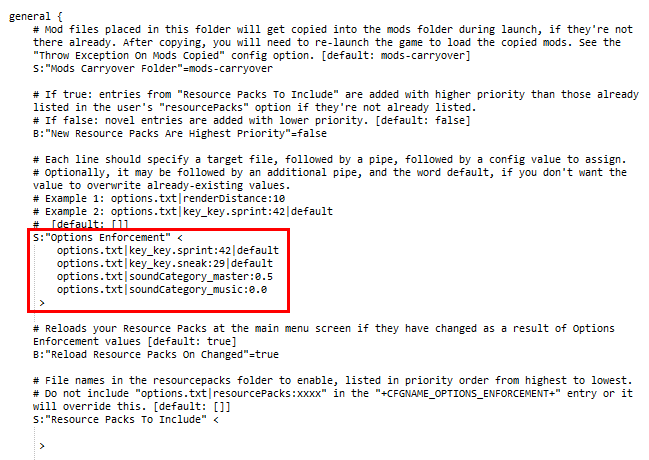
OE 允许你覆盖 options.txt 和其他配置文件中的值,这样你就无需在每个整合包更新中捆绑这些文件。这为什么很重要?
问题 1.1:如果你在整合包中包含完整的 options.txt,它会覆盖用户的副本,将所有值(键位绑定、声音、渲染等)重置为整合包的默认值。
问题 1.2:如果你包含一个仅含部分值的 options.txt,它会覆盖用户的副本,将所有未包含的值重置为 Minecraft 的默认值。
问题 1.3:如果你不在整合包中包含 options.txt,则用户的值永远不会被覆盖,但用户需要自行解决键位冲突、应用资源包并设置重要值等。
使用 Options Enforcer,首先,整合包作者只需将希望强制生效的值添加到 optionsenforcer.cfg 文件中,例如:
options.txt|renderDistance:10
其次,作者只需不在整合包中包含 options.txt。
现在,每当用户更新或启动整合包时,值 renderDistance:10 将被插入到 options.txt 文件中,而所有其他值将保持为用户上次离开时的状态。
或者,从 OE 版本 1.4 开始,你可以在强制条目末尾添加 |default:这样做仅在首次启动时设置该值,但如果已存在该值则永不修改!
OE 旨在与位于根 Minecraft 目录中的 options.txt、optionsof.txt、smart_moving_options.txt 等文件配合使用,但甚至可以修改其他模组的配置文件,例如 config/VillageNames4/general.cfg。
重要提示: 确保不要将你正在强制生效值的配置文件(如 options.txt)捆绑在整合包中,否则就失去了意义!
此模组是为我自己的整合包 Galaxy Odyssey 的 Technic 版本 创建的,但也可能适用于多个整合包平台。
功能 2—模组保留(主要针对整合包用户)
注意: 此功能类似于 Mod Director,后者实际上通过在下载和加载模组方面做得更好;以及 MCInstance Loader。然而,这些模组依赖于启动时可访问的下载链接,如果链接不可用,启动时会崩溃。
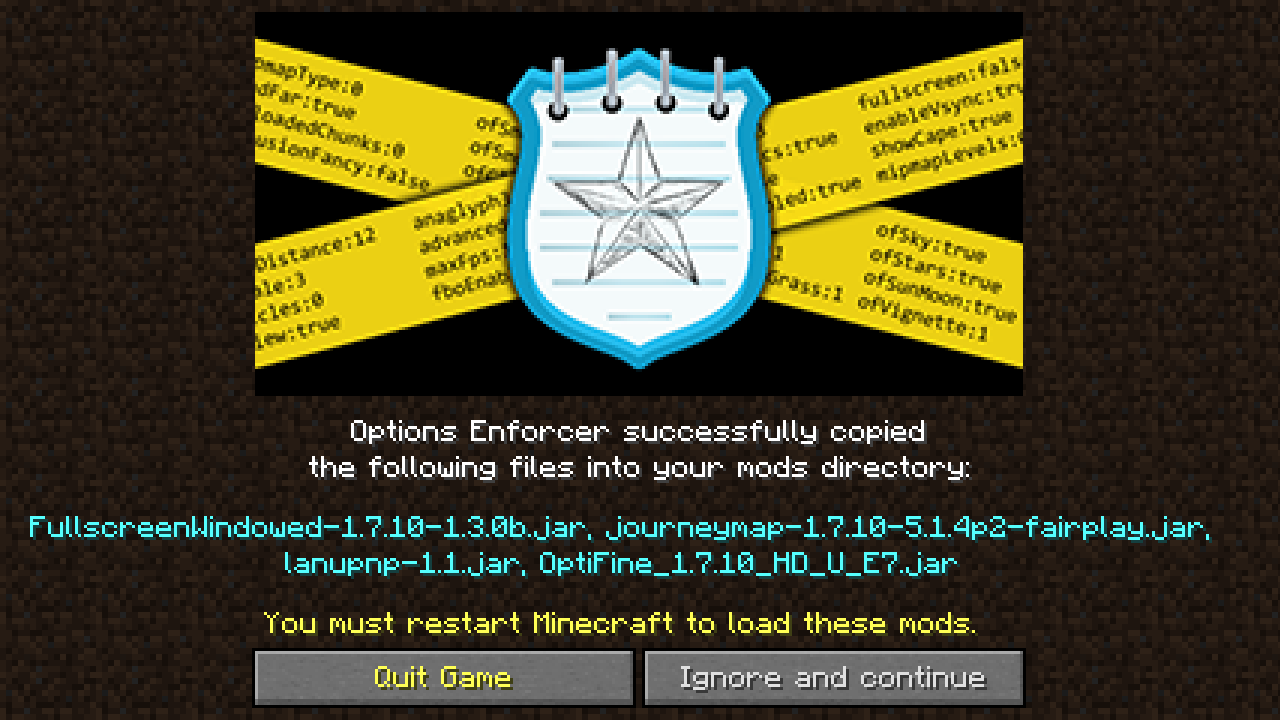
也许你,作为整合包用户,希望使用诸如 OptiFine、WAILA、Fullscreen Windowed、Real First Person 2 等未包含在整合包中的模组。然而,每次你更新整合包时,它都会清除并替换 mods 文件夹中的所有模组,迫使你再次下载这些辅助模组。
在启动时,OE 会将 mods-carryover 文件夹中的所有 .jar 和 .zip 文件(如果不存在,OE 会创建该文件夹)复制到常规的 mods 文件夹中,前提是该文件尚不存在于其中。
通常,整合包作者无需对此配置值做任何操作,除了将其重命名为其他文件夹名称。管理希望在整合包更新之间复制的模组的责任在于用户。除非整合包平台或启动器特别严格并删除了它不识别的所有文件夹名称,否则 mods-carryover 文件夹及其内容应在整合包更新之间得以保留。
整合包作者不应清空此新增文件夹名的配置值,因为这将阻止模组被复制,从而实质上使此功能失效,导致用户在整合包更新后不得不重新获取或复制模组。在这种情况下,你不如直接使用 Default Options 或 More Default Options 而不是 OE。
备注:
- 此模组的灵感来源于解决更新我的 Technic 整合包 Galaxy Odyssey 时的上述两个局限性。去看看吧!
- 你可以在整合包中使用此模组。毕竟,这就是它的目的所在!
- 如果你有疑问或想聊天,可以加入我的 Discord 服务器。
NOTE: This mod will not be updating past 1.19.
This is due to Minecraft's draconic and overbearing report system, which can be tricked and exploited, and can result in the user being unable to play on their own private servers.
I am against this awful system on principle, and so long as I never run my game past 1.19, I will taint my account with the possibility.
Luckily, Option Enforcer's code is , and so you can port it forward yourself!
Sorry for any inconvenience.
Options Enforcer (OE) is a client-side only mod, and is designed primarily with modpacks in mind. It does two things.
Thing 1—config/options enforcement (primarily for the modpack owner)
Note: This functionality is very similar to Default Options and More Default Options. It may be identical, depending on what you're trying to do—I haven't looked into those mods in detail. By the time I discovered that they existed, I was already well along on this project. OE does its configuration differently so all other things equal, you may prefer OE's config syntax.
OE allows you to overwrite values in options.txt and other configuration files so that you don't have to bundle those files with every pack update. Why does that matter?
Problem 1.1: If you include the full options.txt in your modpack, then it overwrites the user's copy, resetting all of their values (keybinds, sound, rendering, etc.) to the modpack defaults.
Problem 1.2: If you include an **options.txt*8 with only some values, then it overwrites the user's copy, resetting all non-included values to the Minecraft defaults.
Problem 1.3: If you do not include options.txt in your modpack, then the user's values will never be overwritten, but it will be up to them to resolve keybind conflicts and apply resourcepacks and set important values, etc.
With Options Enforcer, first, the modpack owner simply adds values he wishes to enforce to the optionsenforcer.cfg file such as:
options.txt|renderDistance:10
Second, the owner simply does not include options.txt in the modpack.
Now, every time the user updates or launches the pack, the value renderDistance:10 will be inserted into file options.txt, leaving all other values exactly as the user last left them.
Alternately, as of OE version 1.4, you can append |default to the end of the enforcement entry: doing so will ONLY set that value on first launch, but never when there is already a value!
OE is designed for use with options.txt, optionsof.txt, smart_moving_options.txt, etc. located in the root minecraft directory, but can even modify other mod config files such as, e.g. config/VillageNames4/general.cfg
Important: Make sure not to bundle the config file you're enforcing values into, such e.g. options.txt, or else that defeats the purpose!
This mod was created with the Technic version of my modpack, Galaxy Odyssey in mind, but may be useful for multiple pack platforms.
Thing 2—mods carryover (primarily for the modpack user)
Note: This functionality is similar to Mod Director, which actually does this job better by downloading and loading the mods during startup; and MCInstance Loader. However, these mods rely on the download link being accessible on launch, and will crash on launch if it's not.
Perhaps you, the modpack user, would like to use mods such as OptiFine, WAILA, Fullscreen Windowed, Real First Person 2 etc. which aren't included in the modpack. However, every time you update the modpack, it wipes and replaces all the mods in the mods folder, forcing you to download those ancillary mods again.
On launch, OE will copy all .jar and .zip files from the mods-carryover folder (will be created by OE if it's not there) into the regular mods folder, if they're not present there already.
Generally, the modpack owner does not need to do anything with this config value, apart from renaming it to another folder name. It will be up to the user to manage the mods they'd like copied over between pack updates. Unless the modpack platform or launcher is especially strict and deletes all folder names it doesn't recognize, then the mods-carryover folder and its contents should survive between pack updates.
The modpack owner should not blank the config value for this added folder name, because that would prevent mods from being copied over, essentially nullifying this feature and causing the user to have to obtain or copy the mods again after a pack update. At that point you might as well just use Default Options or More Default Options instead of OE.
Notes:
- This mod was inspired to solve the two above limitations when updating my technic pack, Galaxy Odyssey. Go check it out!
- You may use this in modpacks. That is the point, after all!
- You can come by my Discord server if you have questions or want to hang out and chat.

下载 Options Enforcer
下载 Options Enforcer
下载 Options Enforcer
下载 Options Enforcer
下载 Options Enforcer
下载 Options Enforcer
下载 Options Enforcer
下载 Options Enforcer
下载 Options Enforcer
下载 Options Enforcer
首次发布至 Modrinth
关于这个资源的讨论、问题反馈与使用心得
还没有讨论,来发第一帖吧
你是这个资源的作者?登录后可认领此资源。
相似资源
 模组
缓冲的原始输入和线程化的事件轮询
 模组

可定制的鞘翅模组,支持装饰纹饰、旗帜图案等更多功能!
 模组

一个用于收集生物掉落物的多区块模组。
 模组

显示你正在注视的方块的信息。(适用于 Minecraft 1.16+ 的 Hwyla/Waila 分支)
 模组

原版世界生成优化模组
 模组
使用 JavaScript 编辑配方、添加自定义物品、编写世界事件!
评论 0
登录后参与评分
还没有评论,来抢沙发吧