

OptionSync 允许你在一台计算机上同步不同 Minecraft 实例之间的多个选项配置文件,同时保存视频设置以及原版和模组的按键绑定!
它的工作原理很简单:进入你的选项菜单,你会在左下角看到一个 OptionSync 按钮。点击后,OptionSync 菜单就会打开。
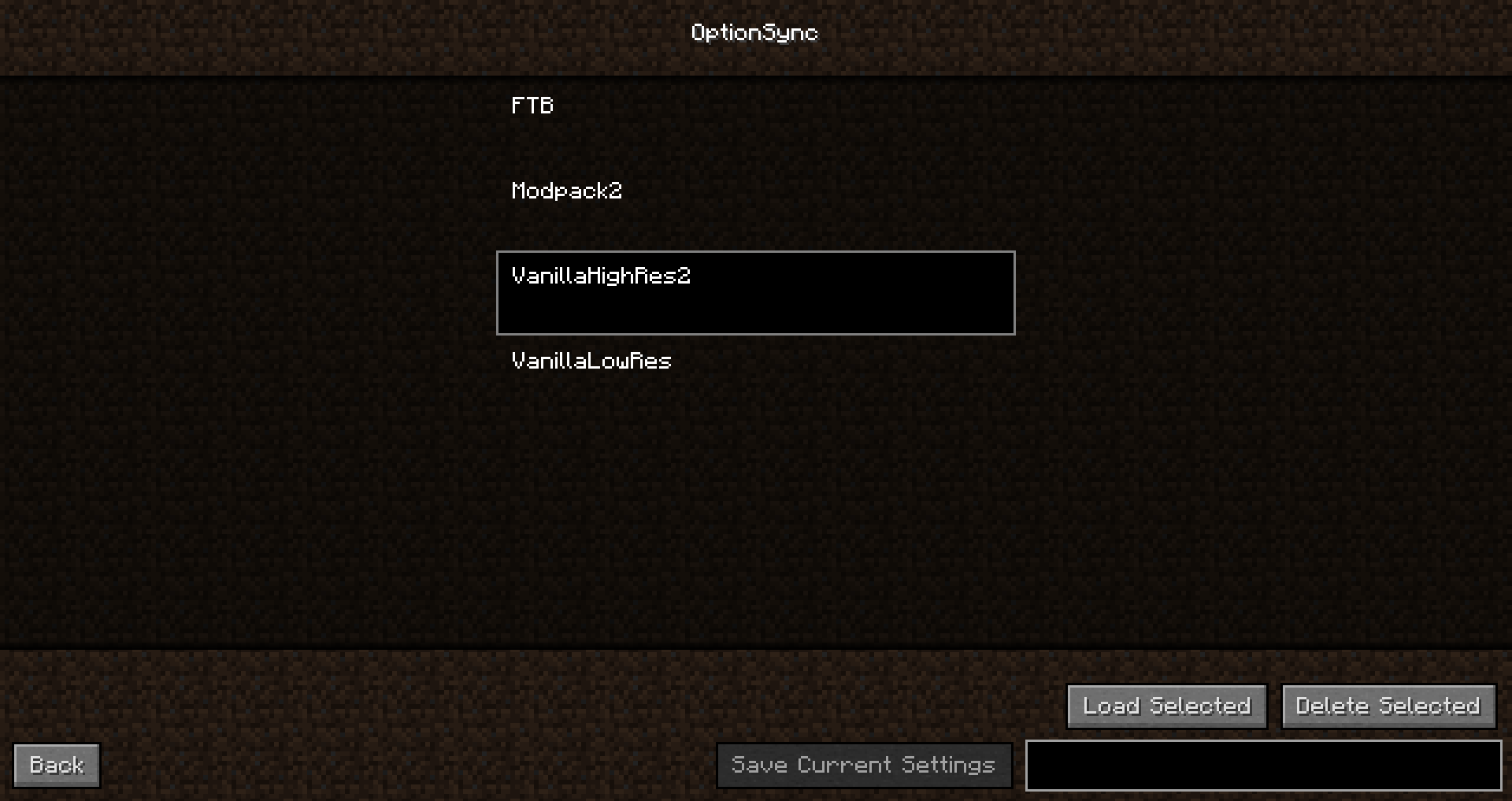
在菜单中,你可以输入一个名称然后点击保存按钮来保存当前的配置。
如果你想加载某个配置,请在菜单中选择它然后点击加载按钮。
如果你好奇的话,无论你的 Minecraft 实例存储在哪里,不同的选项文件都会被保存在 .minecraft/OptionSync 目录下。
超级简单,对吧?
而且如果你有多个整合包或 Minecraft 实例,并且它们拥有大量通常需要反复重新设置的按键绑定,这个模组会非常有用。
喜欢这个模组吗?为什么不通过 Patreon 支持我呢?

OptionSync allows you to synchronize multiple Options profiles between different Minecraft instances on one Computer saving both Video Settings and both vanilla and modded Keybindings!
The way it works is simple: Go to your options menu and you will find an OptionSync button at the bottom left. Once clicking it, the OptionSync menu will open.
Inside the menu, you can save your current configuration by typing in a name and then clicking the save button.
If you want to load a configuration, select it in the menu and click the load button.
And if you were wondering, the different option files are being saved in .minecraft/OptionSync no matter where your Minecraft instance is stored.
Super simple, right?
And really useful if you have multiple Modpacks or Minecraft instances that have lots of Keybindings you would normally have to rebind all the time.
Like the mod? Why don't support me on Patreon?
下载 OptionSync
下载 OptionSync
下载 OptionSync
下载 OptionSync
下载 OptionSync
1.10.2 初始版本发布。
关于这个资源的讨论、问题反馈与使用心得
还没有讨论,来发第一帖吧
你是这个资源的作者?登录后可认领此资源。
相似资源
模组
缓冲的原始输入和线程化的事件轮询
模组
可定制的鞘翅模组,支持装饰纹饰、旗帜图案等更多功能!
模组
一个用于收集生物掉落物的多区块模组。
模组
显示你正在注视的方块的信息。(适用于 Minecraft 1.16+ 的 Hwyla/Waila 分支)
模组
原版世界生成优化模组
模组
在游戏画面角落显示附近世界地形、玩家、生物和实体的地图。可创建路径点,帮助你找到标记过的位置。
评论 0
登录后参与评分
还没有评论,来抢沙发吧
