
简易手持式矿石探测器,适用于游戏前期和中期。制作一个,右键点击一个表面,它会扫描该表面背后的方块以查找特定矿石。一声短促的蜂鸣声和操作栏消息会告诉你是否有该矿石以及确切的数量。这是一种轻量级、无作弊的方式来决定从哪里开始挖掘,没有透视(x-ray)也没有路标。
探测器
十一种始终可用的探测器,每种针对一种矿石:
- 煤炭,铜,铁
- 红石,青金石
- 金(主世界和下界),钻石,绿宝石
- 下界石英
- 紫水晶(寻找晶洞)
- 下界合金(远古残骸)
当安装其对应的模组时,会自动出现更多探测器:
- 锌,配合 Create、Create Fabric 和 Create Fly 使用
- 锡,铅,锇,萤石和铀,配合 Mekanism 使用
- ** Inferium**,Prosperity 和 Soulium,配合 Mystical Agriculture 使用
每个探测器都由其对应矿石提供的材料制作,并用相同的材料进行修复。下表显示了这些模组覆盖的 Minecraft 版本。
工作原理
- 右键点击一个表面以扫描其背后的方块。
- 指向地面可以探测更深(16个方块),或者指向墙壁或天花板以获得较短范围(8个方块),在3x3的列中。
- 结果显示在操作栏中,带有矿石颜色的色调,并显示确切数量。例如:检测到附近4个铁矿石。
- 探测器会随着使用而磨损(每次扫描消耗1点耐久,每发现一种矿石额外消耗1点耐久)。稀有矿石会使探测器更快磨损,以保持平衡。你可以在铁砧上用其材料修复它们,或者使用经验修补(Mending)。
- 每个探测器都有自己的冷却时间。使用其中一个不会使其他探测器进入冷却状态。
- 蜂鸣声是真实的声音:潜影贝传感器会对它做出反应。如果希望在配置文件中将音量设置为0,以实现静音且对潜影贝安全的探测器。
寻找更多?
Ore Detector Reborn 是下一步:一种适用于所有矿石的探测器。你用想要的矿石酿造液体,倒入其中,探测器就能找到那种矿石,并配有X射线护目镜,可以在岩石中绘制出所找到的内容。它已经涵盖了多种模组矿石,并且随着发展将涵盖大多数模组矿石,因此对于拥有许多矿石的模组(如 Mythic Metals 或 Silent's Gems),这是它们的职责而不是这个模组的职责。
这两个是独立的模组,并排安装而不会产生冲突。第一次加入世界时,聊天栏中的简短提示会指向它。
支持的版本
| Minecraft | Fabric | NeoForge | Forge |
|---|---|---|---|
| 26.1 to 26.3 | Yes | Yes | n/a |
| 1.21.11 | Yes | Yes | Yes |
| 1.21 to 1.21.1 | Yes | Yes | Yes |
| 1.20 to 1.20.1 | Yes | Yes | Yes |
每一行代表每个加载器的单个下载文件。26.x 文件覆盖 26.1, 26.1.1, 26.1.2, 26.2 和 26.3。
在 1.20.x 版本中,有一个 Forge 文件也可以在 NeoForge 上运行。在该 Minecraft 版本中,NeoForge 仍然使用 Forge 的模组 ID,因此 Forge 下载文件也是 NeoForge 下载文件(Cloth Config 也是如此:安装其 Forge 构建版)。
可选模组
所有集成都是自动的:安装另一个模组即可正常工作。无需任何配置,如果没有它们也不会破坏任何东西。
Seamless Ores 和 Universal Ores 让探测器也能找到它们的矿石变体。石头变体如安山岩、闪长岩、花岗岩、凝灰岩、玄武岩和黑曜石矿石与原版矿石一起计算,Mekanism 探测器也计算 Dense Mekanism 矿石。
你可以使用哪些取决于你的 Minecraft 版本,因为这些模组并不为每个版本和加载器提供:
| Minecraft | Zinc (Create) | Mekanism | Mystical Agriculture | Universal Ores |
|---|---|---|---|---|
| 26.1 to 26.3 | Create Fly (Fabric) | no build | NeoForge, 26.1.2 | Fabric, up to 26.2 |
| 1.21.11 | Create Fly (Fabric) | no build | no build | Fabric |
| 1.21 to 1.21.1 | Create (NeoForge, 1.21.1) | NeoForge | NeoForge | Fabric |
| 1.20 to 1.20.1 | Create (Forge/NeoForge) or Create Fabric (Fabric) | Forge/NeoForge | Forge/NeoForge | Fabric |
Seamless Ores 为上述每一行都有一个构建版本。所有这些支持都内置在每个版本的 Ore Detector Legacy 中,因此任何标记为“no build”的内容只需那些模组添加一个构建即可开始工作,无需在此处更新。
合成配方
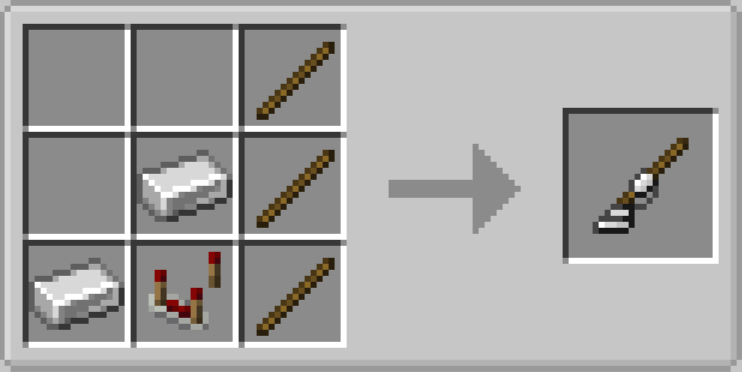
每个探测器都由其匹配的材料、一个红石比较器和一些木棍制成。
游戏内配置
一个配置屏幕允许你调整扫描距离、列大小、冷却时间、耐久度乘数和蜂鸣音量。
在 Fabric 上,按钮来自 Mod Menu;在 NeoForge 和 Forge 上,它在模组列表中。每个构建版都使用 Cloth Config,有两个例外:1.21.11 上的 Forge 有自己的内置屏幕,不需要任何额外内容,而在 NeoForge 26.x 上,Cloth Config 是可选的(没有它,探测器使用默认设置,没有配置屏幕)。
依赖关系
| Mod | Fabric | NeoForge | Forge | Notes |
|---|---|---|---|---|
| Fabric API | Required | n/a | n/a | |
| Cloth Config | Required | Required, optional on 26.x | Required, except on 1.21.11 | Powers the config screen |
| Mod Menu | Optional | n/a | n/a | Adds the Fabric config button |
| Create / Create Fly / Create Fabric | Optional | Optional | Optional | Adds the Zinc Detector |
| Mekanism | n/a | Optional | Optional | Adds five detectors |
| Mystical Agriculture | n/a | Optional | Optional | Adds three detectors |
| Seamless Ores | Optional | Optional | Optional | Its ore variants get detected too |
| Universal Ores | Optional | n/a | n/a | Its ore variants get detected too |
已知问题
右键点击红石矿石会使其发光,而在 Minecraft 中,方块交互的优先级高于手中物品,因此当 Redstone Detector(红石探测器)正对着裸露的红石矿石时不会触发。请瞄准其旁边的方块,或在右键点击时潜行。其他所有探测器均不受影响。修复计划将在未来更新中推出。
致谢
本整合包是 Ore Detector 的非官方社区移植与扩展版本,由 restonic4 制作。非原作者制作或 affiliated。采用 MIT 许可证授权。
Simple handheld ore detectors for the early and mid game. Craft one, right-click a surface, and it scans the blocks behind that surface for a specific ore. A short beep and an action bar message tell you whether the ore is there and exactly how much. A lightweight, no-cheats way to decide where to start digging, with no x-ray and no waypoints.
Detectors
Eleven always-available detectors, each tuned to one ore:
- Coal, Copper, Iron
- Redstone, Lapis Lazuli
- Gold (overworld and nether), Diamond, Emerald
- Nether Quartz
- Amethyst (finds geodes)
- Netherite (Ancient Debris)
More appear automatically when their mod is installed:
- Zinc, with Create, Create Fabric, and Create Fly
- Tin, Lead, Osmium, Fluorite and Uranium, with Mekanism
- Inferium, Prosperity and Soulium, with Mystical Agriculture
Each one is crafted from the material its ore gives and repaired with that same material. The tables below show which Minecraft versions each of these mods covers.
How it works
- Right-click a surface to scan the blocks behind it.
- Point at the ground to reach deep (16 blocks), or at a wall or ceiling for a shorter range (8 blocks), across a 3x3 column.
- The result shows in the action bar, tinted to the ore's color, with the exact count. For example: Detected 4 Iron Ore nearby.
- Detectors wear down as you use them (1 per scan, plus 1 per ore found). Rarer ores wear the detector faster, so it stays balanced. Repair them in an anvil with their material, or use Mending.
- Each detector has its own cooldown. Using one does not put the rest of your detectors on cooldown.
- The beep is a real noise: sculk sensors will react to it. Set the volume to 0 in the config for a silent, sculk-safe detector.
Looking for more?
Ore Detector Reborn is the next step: one detector for every ore. You brew a liquid from the ore you want, pour it in, and the detector finds that ore, with X-Ray Goggles that draw what it found through the rock. It already covers several modded ores and will cover most of them as it grows, so mods with many ores, like Mythic Metals or Silent's Gems, are its job rather than this one's.
The two are separate mods and install side by side without conflicting. The first time you join a world, a short notice in chat points to it.
Supported versions
| Minecraft | Fabric | NeoForge | Forge |
|---|---|---|---|
| 26.1 to 26.3 | Yes | Yes | n/a |
| 1.21.11 | Yes | Yes | Yes |
| 1.21 to 1.21.1 | Yes | Yes | Yes |
| 1.20 to 1.20.1 | Yes | Yes | Yes |
Each line is a single download per loader. The 26.x file covers 26.1, 26.1.1, 26.1.2, 26.2 and 26.3.
On 1.20.x there is one Forge file that also runs on NeoForge. At that Minecraft version NeoForge still uses Forge's mod ids, so the Forge download is the NeoForge download (the same is true of Cloth Config: install its Forge build).
Optional mods
Every integration is automatic: install the other mod and it just works. There is nothing to configure, and nothing breaks if you don't have them.
Seamless Ores and Universal Ores make the detectors find their ore variants too. Stone variants such as andesite, diorite, granite, tuff, basalt and blackstone ores are counted right alongside the vanilla ones, and the Mekanism detectors also count Dense Mekanism ores.
Which of these you can use depends on your Minecraft version, because those mods do not ship for every version and loader:
| Minecraft | Zinc (Create) | Mekanism | Mystical Agriculture | Universal Ores |
|---|---|---|---|---|
| 26.1 to 26.3 | Create Fly (Fabric) | no build | NeoForge, 26.1.2 | Fabric, up to 26.2 |
| 1.21.11 | Create Fly (Fabric) | no build | no build | Fabric |
| 1.21 to 1.21.1 | Create (NeoForge, 1.21.1) | NeoForge | NeoForge | Fabric |
| 1.20 to 1.20.1 | Create (Forge/NeoForge) or Create Fabric (Fabric) | Forge/NeoForge | Forge/NeoForge | Fabric |
Seamless Ores has a build for every line above. Support for all of these is built into every version of Ore Detector Legacy, so anything marked "no build" will simply start working if those mods add one, with no update needed here.
Crafting
Each detector is made from its matching material, a redstone comparator, and a few sticks.
In-game config
A config screen lets you tune scan reach, column size, cooldown, a durability multiplier, and beep volume.
On Fabric the button comes from Mod Menu; on NeoForge and Forge it is in the mods list. Every build uses Cloth Config, with two exceptions: Forge on 1.21.11 has its own built-in screen and needs nothing extra, and on NeoForge 26.x Cloth Config is optional (without it the detectors use their default settings and there is no config screen).
Dependencies
| Mod | Fabric | NeoForge | Forge | Notes |
|---|---|---|---|---|
| Fabric API | Required | n/a | n/a | |
| Cloth Config | Required | Required, optional on 26.x | Required, except on 1.21.11 | Powers the config screen |
| Mod Menu | Optional | n/a | n/a | Adds the Fabric config button |
| Create / Create Fly / Create Fabric | Optional | Optional | Optional | Adds the Zinc Detector |
| Mekanism | n/a | Optional | Optional | Adds five detectors |
| Mystical Agriculture | n/a | Optional | Optional | Adds three detectors |
| Seamless Ores | Optional | Optional | Optional | Its ore variants get detected too |
| Universal Ores | Optional | n/a | n/a | Its ore variants get detected too |
Known quirk
Right-clicking redstone ore makes it light up, and in Minecraft that block reaction takes priority over the item in your hand, so the Redstone Detector will not fire when you aim it straight at exposed redstone ore. Aim at a block next to it instead, or sneak while right-clicking. Every other detector is unaffected. A fix is planned for a future update.
Credits
Unofficial community port and expansion of Ore Detector by restonic4. Not made by or affiliated with the original author. Licensed under MIT.

下载 Ore Detector Legacy
需要联机服务器吗?
稳定流畅、一键部署,几分钟即可和朋友联机开服
最低仅需 8 元/月 即可畅快联机
下载 Ore Detector Legacy
需要联机服务器吗?
稳定流畅、一键部署,几分钟即可和朋友联机开服
最低仅需 8 元/月 即可畅快联机
下载 Ore Detector Legacy
需要联机服务器吗?
稳定流畅、一键部署,几分钟即可和朋友联机开服
最低仅需 8 元/月 即可畅快联机
下载 Ore Detector Legacy
需要联机服务器吗?
稳定流畅、一键部署,几分钟即可和朋友联机开服
最低仅需 8 元/月 即可畅快联机
下载 Ore Detector Legacy
需要联机服务器吗?
稳定流畅、一键部署,几分钟即可和朋友联机开服
最低仅需 8 元/月 即可畅快联机
下载 Ore Detector Legacy
需要联机服务器吗?
稳定流畅、一键部署,几分钟即可和朋友联机开服
最低仅需 8 元/月 即可畅快联机
下载 Ore Detector Legacy
需要联机服务器吗?
稳定流畅、一键部署,几分钟即可和朋友联机开服
最低仅需 8 元/月 即可畅快联机
下载 Ore Detector Legacy
需要联机服务器吗?
稳定流畅、一键部署,几分钟即可和朋友联机开服
最低仅需 8 元/月 即可畅快联机
下载 Ore Detector Legacy
需要联机服务器吗?
稳定流畅、一键部署,几分钟即可和朋友联机开服
最低仅需 8 元/月 即可畅快联机
下载 Ore Detector Legacy
需要联机服务器吗?
稳定流畅、一键部署,几分钟即可和朋友联机开服
最低仅需 8 元/月 即可畅快联机
该模组现已更名为 Ore Detector Legacy,并为 Mekanism 和 Mystical Agriculture 新增了八款探测器。
新增探测器
五款用于 Mekanism:锡、铅、锇、萤石和铀,耐久度分别为 240、220、220、180 和 150。 三款用于 Mystical Agriculture:下界合金、繁荣和灵魂,耐久度分别为 220、180 和 160。
当安装了相应模组时,它们才会出现在创造模式标签页和合成书中。每款探测器均由其矿石提供的材料制作而成,并可在铁砧中使用相同材料进行修复。Mekanism 探测器还会统计 Dense Mekanism 矿石。
无缝矿石
现在,每款探测器都会统计其对应矿石的 Seamless Ores 变体(即安山岩、闪长岩、花岗岩、凝灰岩、玄武岩和黑曜石版本),统计方式与之前统计 Universal Ores 的方式相同。
新名称
在模组列表、创造模式标签页和配置界面中,模组名称均显示为 Ore Detector Legacy,并配有新图标。模组 ID 仍为 oredetector,因此世界存档和配置文件可直接沿用。
Ore Detector Reborn
首次加入世界时,会有一条简短提示说明 2.0 版本的更新内容,并介绍 Ore Detector Reborn:这是一款针对所有矿石的探测器,随着更新将覆盖大多数模组矿石。两者可并列安装。该提示中包含指向 Reborn 的链接,且每个世界仅显示一次。
其他变更
- 在 26.3 版本中,冷却时间仅适用于探测器的第一次扫描。现在每次扫描都需等待配置的冷却时间。
- 每个加载器对应一个文件,涵盖 26.1 至 26.3 版本。
Mekanism 和 Mystical Agriculture 的探测器将在 1.20.1 版本推出,其文件也兼容 NeoForge。 1.21.11 版本无需 Cloth Config。
关于这个资源的讨论、问题反馈与使用心得
还没有讨论,来发第一帖吧
你是这个资源的作者?登录后可认领此资源。
相似资源
 模组

可定制的鞘翅模组,支持装饰纹饰、旗帜图案等更多功能!
 模组

一个用于收集生物掉落物的多区块模组。
 模组

显示你正在注视的方块的信息。(适用于 Minecraft 1.16+ 的 Hwyla/Waila 分支)
 模组
在游戏画面角落显示附近世界地形、玩家、生物和实体的地图。可创建路径点,帮助你找到标记过的位置。
 模组

查看物品与配方
 模组
使用 JavaScript 编辑配方、添加自定义物品、编写世界事件!
评论 0
登录后参与评分
还没有评论,来抢沙发吧