
一个用于 Minecraft 的简单库模组,最初是为了方便我开发自己的模组而制作,但任何人都可以使用它! 目前支持的加载器:Fabric、Spigot 和 Paper
在你的项目中使用!?️
想在你的项目中使用 OtterLib 吗?你可以将其作为依赖项添加到 build.gradle 文件中:
repositories {
    maven {
        name "oth3rMavenSnapshots"
        url "https://maven.oth3r.one/snapshots"
    }
}
在各个加载器上实现,其中 ${project.otterlib_version} 是当前加载器对应的 OtterLib 版本(例如 0.2.0.0+1.21.6、0.2.0.0+1.20-1.21.6)
// fabric
modImplementation "one.oth3r:otterlib:${project.otterlib_version}-fabric"
// spigot
implementation "one.oth3r:otterlib:${project.otterlib_version}-spigot"
// paper
implementation "one.oth3r:otterlib:${project.otterlib_version}-paper"
访问 maven 仓库 以查看有关该库的更详细信息,包括最新版本。
功能特性
? 简易聊天构建器
示例用法:
player.sendMessage(new CTxT("Hello").color(Color.BLUE).bold(true).strikethrough(true)
    .append(new CTxT("World!!!!!!!!!").rainbow(new Rainbow(true)).underline(true).italic(true)).b());
游戏内示例:

? 自定义语言读取器
OtterLib 提供了一个自定义语言读取器,使你在所有支持的加载器上轻松实现服务器端本地化。还支持为区域设置提供次要位置,以便玩家轻松覆盖。
?️ 强大的文件保存与加载功能
添加了一个接口,支持轻松创建配置文件,并能够方便地保存、加载和更新版本。
从 JSON 中的旧条目更新到新版本的示例:
@Override
public void update(JsonElement jsonElement) {
    JsonObject file = jsonElement.getAsJsonObject();
    if (file.get("version").getAsDouble() == 1.0) {
        this.version = 1.1;
        this.test = file.get("test-bool").getAsBoolean();
    }
}
⚙️ 自定义配置界面
OtterLib 提供了一个可定制的自定义配置界面,可用于编辑多个配置文件、链接到社交媒体,甚至打开不同的界面。
创建界面的代码:
client.setScreen(new ConfigScreen(client.currentScreen, Text.of("test"),
    new CustomImage(Identifier.of(FabricTest.MOD_ID, "textures/gui/banner.png"),240, 60),
    // 中间显示的按钮列表
    List.of(
            SimpleButton.Templates.fileEditor(new CTxT("Test File"), FabricTest.testFile, new CustomImage(Identifier.of(FabricTest.MOD_ID, "button/server_button"),246,26)).build(),
            SimpleButton.Templates.fileEditor(new CTxT("Test File No Image"), FabricTest.testFile).build(),
            SimpleButton.Templates.wiki(new CTxT("Help")).openLink("https://oth3r.one").size(30,30).build(),
            SimpleButton.Templates.wiki(new CTxT("Help")).openLink("https://oth3r.one").size(30,30).build(),
            SimpleButton.Templates.warning(new CTxT("Help")).openLink("https://oth3r.one").size(150,15).hideText(false).build()
    ),
    // 底部按钮可以自定义!
    List.of(
            new SimpleButton.Builder(new CTxT("Donate"))
                    .miniIcon(new CustomImage(Identifier.of(Assets.ID, "icon/donate"),15,15)).build(),
            SimpleButton.Templates.donate(new CTxT("Donate")).openLink(URI.create("https://ko-fi.com/oth3r")).build(),
            SimpleButton.Templates.done(new CTxT("Done")).build(),
            SimpleButton.Templates.wiki(new CTxT("Wiki")).openLink("https://oth3r.one").build()
    )));
游戏内的主配置界面:
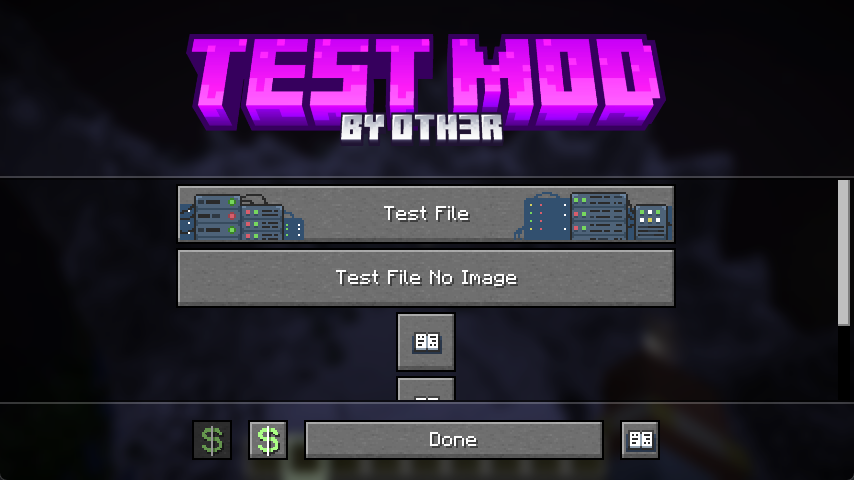
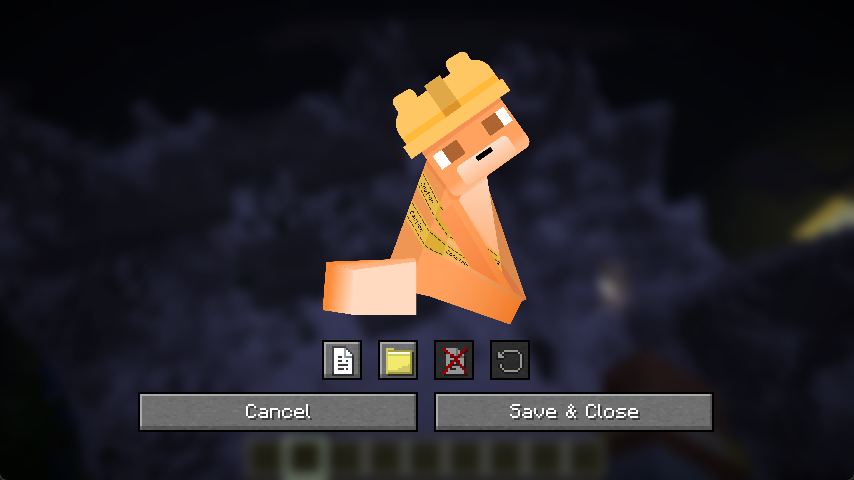
游戏内的文件编辑器:(单个条目编辑器正在计划中,此处仅为简单的占位符)
A simple library mod for minecraft, made mostly to develop my mods easier, but can be used by anyone! Currently supported loaders: Fabric, Spigot, & Paper
Use in your projects! ?️
Want to use OtterLib in your project? You can add it as a dependency in your build.gradle file:
repositories {
    maven {
        name "oth3rMavenSnapshots"
        url "https://maven.oth3r.one/snapshots"
    }
}
Implementing on each loader, where ${project.otterlib_version} is the current version of OtterLib for the loader (e.g. 0.2.0.0+1.21.6, 0.2.0.0+1.20-1.21.6)
// fabric
modImplementation "one.oth3r:otterlib:${project.otterlib_version}-fabric"
// spigot
implementation "one.oth3r:otterlib:${project.otterlib_version}-spigot"
// paper
implementation "one.oth3r:otterlib:${project.otterlib_version}-paper"
Visit the maven repository to see more indepth information about the library, including the latest versions.
Features
? Simple Chat Builder
sample usage:
player.sendMessage(new CTxT("Hello").color(Color.BLUE).bold(true).strikethrough(true)
    .append(new CTxT("World!!!!!!!!!").rainbow(new Rainbow(true)).underline(true).italic(true)).b());
in game example:
? Custom Language Reader
OtterLib provides a custom language reader that allows you to easily have server-side localization on all supported loaders. There is also support for a secondary location for locales for easy player overrides.
?️ Robust file saving and loading
Adds an interface that enables easy config file creation with support for saving, loading, and updating versions easily.
updating an old entry from the json to the new version:
@Override
public void update(JsonElement jsonElement) {
    JsonObject file = jsonElement.getAsJsonObject();
    if (file.get("version").getAsDouble() == 1.0) {
        this.version = 1.1;
        this.test = file.get("test-bool").getAsBoolean();
    }
}
⚙️ Custom config screen
OtterLib offers a custom config screen that can be cuztomized to offer a way to edit multiple config files, link to social media, or even open different screens.
creating the screen:
client.setScreen(new ConfigScreen(client.currentScreen, Text.of("test"),
    new CustomImage(Identifier.of(FabricTest.MOD_ID, "textures/gui/banner.png"),240, 60),
    // the list of buttons to be displayed in the middle
    List.of(
            SimpleButton.Templates.fileEditor(new CTxT("Test File"), FabricTest.testFile, new CustomImage(Identifier.of(FabricTest.MOD_ID, "button/server_button"),246,26)).build(),
            SimpleButton.Templates.fileEditor(new CTxT("Test File No Image"), FabricTest.testFile).build(),
            SimpleButton.Templates.wiki(new CTxT("Help")).openLink("https://oth3r.one").size(30,30).build(),
            SimpleButton.Templates.wiki(new CTxT("Help")).openLink("https://oth3r.one").size(30,30).build(),
            SimpleButton.Templates.warning(new CTxT("Help")).openLink("https://oth3r.one").size(150,15).hideText(false).build()
    ),
    // the bottom buttons can be customized!
    List.of(
            new SimpleButton.Builder(new CTxT("Donate"))
                    .miniIcon(new CustomImage(Identifier.of(Assets.ID, "icon/donate"),15,15)).build(),
            SimpleButton.Templates.donate(new CTxT("Donate")).openLink(URI.create("https://ko-fi.com/oth3r")).build(),
            SimpleButton.Templates.done(new CTxT("Done")).build(),
            SimpleButton.Templates.wiki(new CTxT("Wiki")).openLink("https://oth3r.one").build()
    )));
main config screen in game:
file editor in game: (individual entry editor is planned, this is just a simple placeholder)

下载 OtterLib
下载 OtterLib
下载 OtterLib
需要联机服务器吗?
稳定流畅、一键部署,几分钟即可和朋友联机开服
最低仅需 8 元/月 即可畅快联机
下载 OtterLib
需要联机服务器吗?
稳定流畅、一键部署,几分钟即可和朋友联机开服
最低仅需 8 元/月 即可畅快联机
下载 OtterLib
下载 OtterLib
下载 OtterLib
下载 OtterLib
需要联机服务器吗?
稳定流畅、一键部署,几分钟即可和朋友联机开服
最低仅需 8 元/月 即可畅快联机
下载 OtterLib
需要联机服务器吗?
稳定流畅、一键部署,几分钟即可和朋友联机开服
最低仅需 8 元/月 即可畅快联机
下载 OtterLib
b0.4.0.2
- 修复了 OtterLib 配置按钮列表的按钮悬停问题
之前的更改
b0.4.0.1
- 修复了 Spigot 和 Paper 版本的文件名令人困惑的问题
b0.4.0.0
- 改进了自定义加载器文本和语言翻译支持
- 更新了 Paper 和 Spigot API/构建配置
关于这个资源的讨论、问题反馈与使用心得
还没有讨论,来发第一帖吧
你是这个资源的作者?登录后可认领此资源。
相似资源
 模组

一个用于收集生物掉落物的多区块模组。
 模组

显示你正在注视的方块的信息。(适用于 Minecraft 1.16+ 的 Hwyla/Waila 分支)
 模组

查看物品与配方
 模组
在游戏画面角落显示附近世界地形、玩家、生物和实体的地图。可创建路径点,帮助你找到标记过的位置。
 模组
使用 JavaScript 编辑配方、添加自定义物品、编写世界事件!
 模组

适用于 MC 1.18+ 的 Effekseer 加载器
评论 0
登录后参与评分
还没有评论,来抢沙发吧