
一个用于 Minecraft 的简单库模组,最初是为了方便我开发自己的模组而制作,但任何人都可以使用它! 目前支持的加载器:Fabric、Spigot 和 Paper
在你的项目中使用!?️
想在你的项目中使用 OtterLib 吗?你可以将其作为依赖项添加到 build.gradle 文件中:
repositories {
    maven {
        name "oth3rMavenSnapshots"
        url "https://maven.oth3r.one/snapshots"
    }
}
在各个加载器上实现,其中 ${project.otterlib_version} 是当前加载器对应的 OtterLib 版本(例如 0.2.0.0+1.21.6、0.2.0.0+1.20-1.21.6)
// fabric
modImplementation "one.oth3r:otterlib:${project.otterlib_version}-fabric"
// spigot
implementation "one.oth3r:otterlib:${project.otterlib_version}-spigot"
// paper
implementation "one.oth3r:otterlib:${project.otterlib_version}-paper"
访问 maven 仓库 以查看有关该库的更详细信息,包括最新版本。
功能特性
? 简易聊天构建器
示例用法:
player.sendMessage(new CTxT("Hello").color(Color.BLUE).bold(true).strikethrough(true)
    .append(new CTxT("World!!!!!!!!!").rainbow(new Rainbow(true)).underline(true).italic(true)).b());
游戏内示例:

? 自定义语言读取器
OtterLib 提供了一个自定义语言读取器,使你在所有支持的加载器上轻松实现服务器端本地化。还支持为区域设置提供次要位置,以便玩家轻松覆盖。
?️ 强大的文件保存与加载功能
添加了一个接口,支持轻松创建配置文件,并能够方便地保存、加载和更新版本。
从 JSON 中的旧条目更新到新版本的示例:
@Override
public void update(JsonElement jsonElement) {
    JsonObject file = jsonElement.getAsJsonObject();
    if (file.get("version").getAsDouble() == 1.0) {
        this.version = 1.1;
        this.test = file.get("test-bool").getAsBoolean();
    }
}
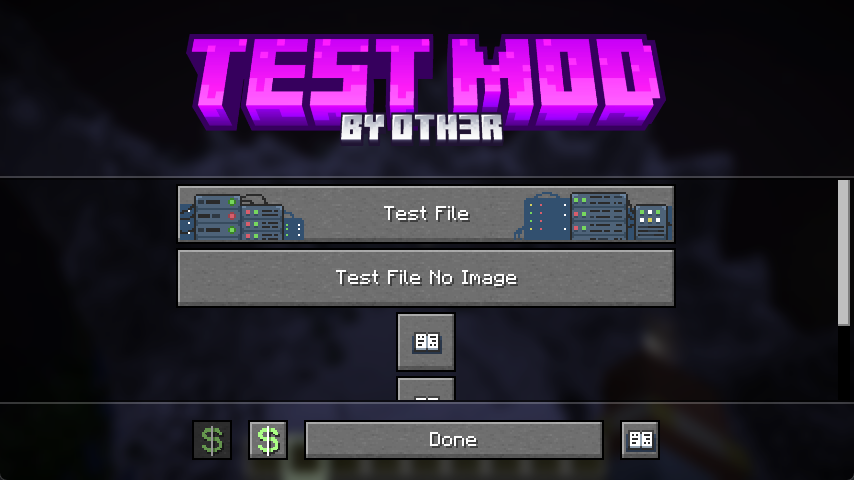
⚙️ 自定义配置界面
OtterLib 提供了一个可定制的自定义配置界面,可用于编辑多个配置文件、链接到社交媒体,甚至打开不同的界面。
创建界面的代码:
client.setScreen(new ConfigScreen(client.currentScreen, Text.of("test"),
    new CustomImage(Identifier.of(FabricTest.MOD_ID, "textures/gui/banner.png"),240, 60),
    // 中间显示的按钮列表
    List.of(
            SimpleButton.Templates.fileEditor(new CTxT("Test File"), FabricTest.testFile, new CustomImage(Identifier.of(FabricTest.MOD_ID, "button/server_button"),246,26)).build(),
            SimpleButton.Templates.fileEditor(new CTxT("Test File No Image"), FabricTest.testFile).build(),
            SimpleButton.Templates.wiki(new CTxT("Help")).openLink("https://oth3r.one").size(30,30).build(),
            SimpleButton.Templates.wiki(new CTxT("Help")).openLink("https://oth3r.one").size(30,30).build(),
            SimpleButton.Templates.warning(new CTxT("Help")).openLink("https://oth3r.one").size(150,15).hideText(false).build()
    ),
    // 底部按钮可以自定义!
    List.of(
            new SimpleButton.Builder(new CTxT("Donate"))
                    .miniIcon(new CustomImage(Identifier.of(Assets.ID, "icon/donate"),15,15)).build(),
            SimpleButton.Templates.donate(new CTxT("Donate")).openLink(URI.create("https://ko-fi.com/oth3r")).build(),
            SimpleButton.Templates.done(new CTxT("Done")).build(),
            SimpleButton.Templates.wiki(new CTxT("Wiki")).openLink("https://oth3r.one").build()
    )));
游戏内的主配置界面:
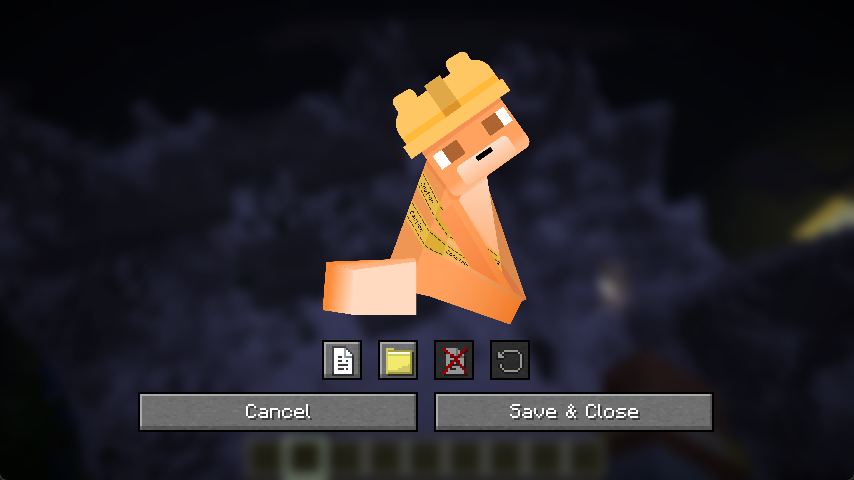
游戏内的文件编辑器:(单个条目编辑器正在计划中,此处仅为简单的占位符)

你是这个资源的作者?登录后可认领此资源。
相似资源
 模组

Woot Revived
pharuxtan
一个用于收集生物掉落物的多区块模组。
生物科技
349
 模组

玉Jade ?
Snownee
显示你正在注视的方块的信息。(适用于 Minecraft 1.16+ 的 Hwyla/Waila 分支)
实用前置
341
 模组
Xaero的小地图
thexaero
在游戏画面角落显示附近世界地形、玩家、生物和实体的地图。可创建路径点,帮助你找到标记过的位置。
冒险交通
241
 模组

物品管理器Just Enough Items (JEI)
mezz
查看物品与配方
前置实用
240
 模组
KubeJS
Lat
使用 JavaScript 编辑配方、添加自定义物品、编写世界事件!
前置实用
239
 模组
Applied Energistics 2
shartte
AE2:一款流行的自动化与存储模组
存储科技
217
评论 0
登录后参与评分
还没有评论,来抢沙发吧