


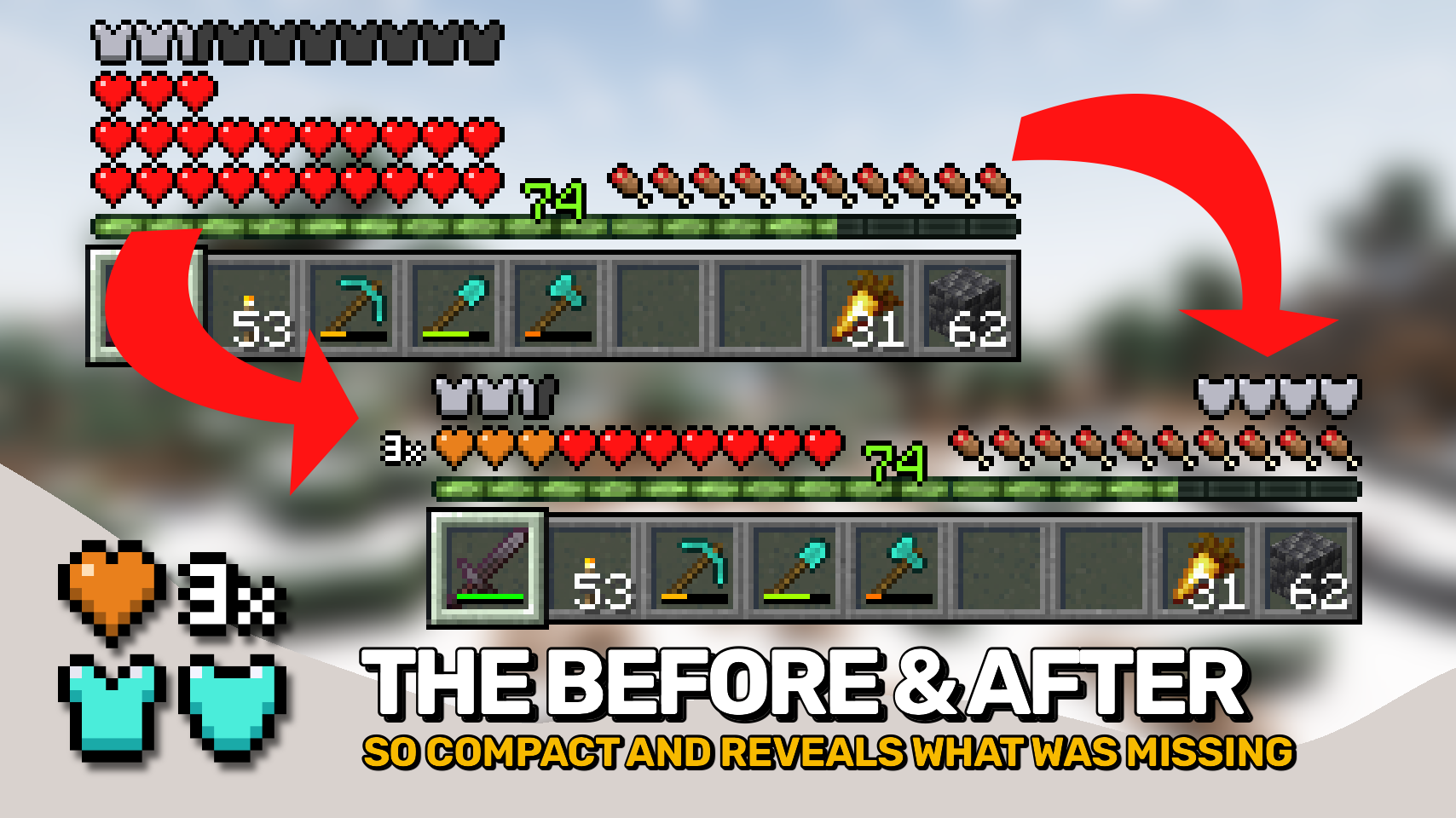
Overflowing Bars 将《Minecraft》的生命值、护甲值和护甲韧性条扩展到原版限制之外,同时保持紧凑且易于阅读。该模组不会添加额外的图标行,而是将条形图堆叠为清晰的层次,占用空间大大减少。?
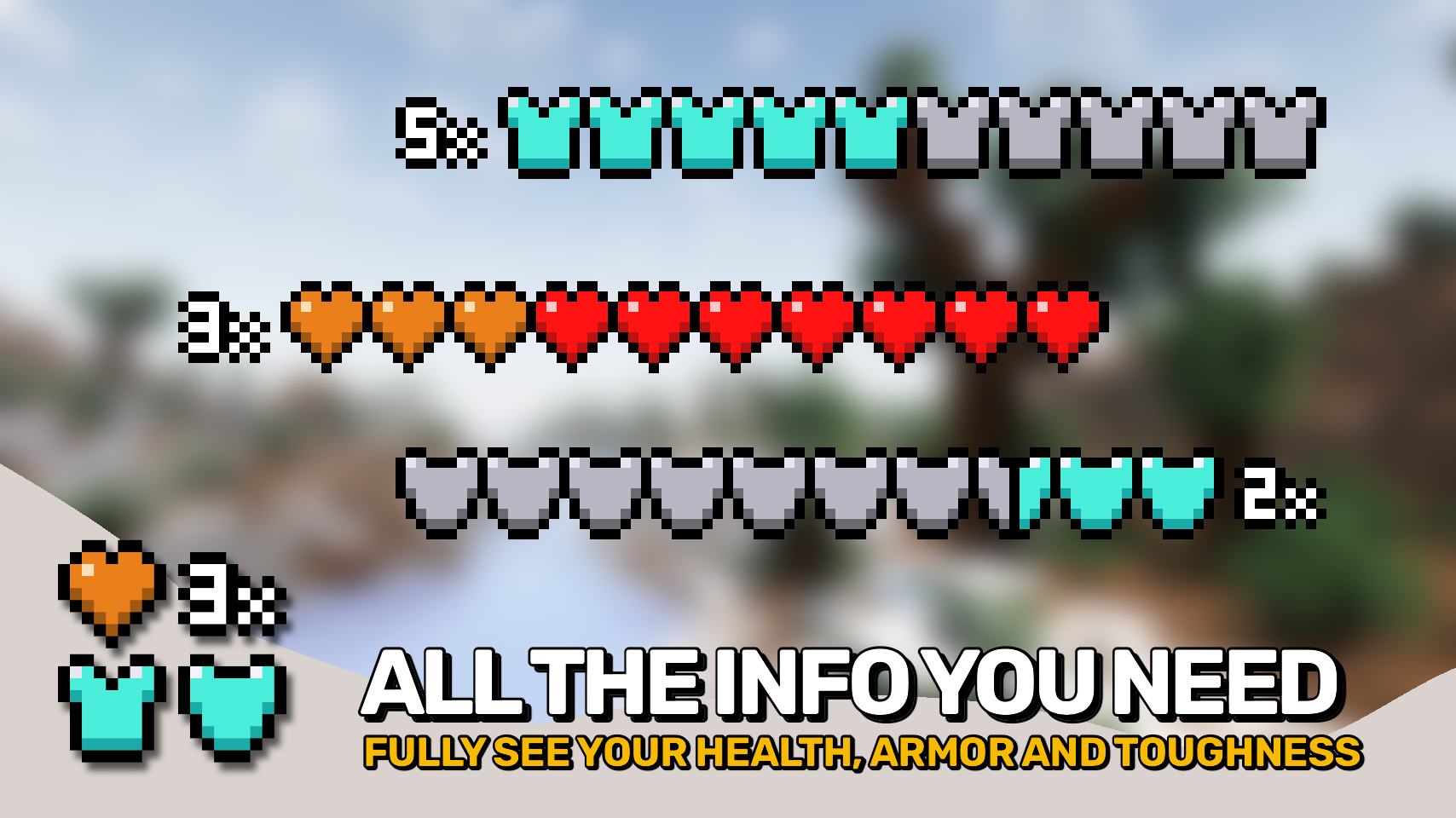
当你的属性超出原版上限时,行数计数器会精确显示你拥有多少层生命值、护甲值或护甲韧性。无需记忆配色方案或猜测当前查看的是哪一层。?
该模组还添加了专用的护甲韧性条,将一项重要的防御属性带入 HUD,而原版并未显示此属性。?️
为了正确支持超出原版限制的护甲和韧性值,请安装 AttributeFix(作者:)DarkhaxDev。?

- ❤️ 紧凑的生命值显示: 在不超过十个心的情况下堆叠生命值,无需在 HUD 中添加额外行。
- ?️ 超越原版限制的护甲值: 显示高护甲值,同时仅使用必要的空间。
- ? 护甲韧性条: 添加专用的韧性显示,让你随时能看到这一重要的防御属性。
- ? 清晰的层数计数器: 每个堆叠的条形图都可以显示数字指示器,精确显示存在的层数。
- ? 易读的配色: 以原版颜色作为基础层,堆叠层使用单一高亮色,避免令人困惑的彩虹式显示。
- ? 节省空间的 HUD: 即使生命值、护甲值或韧性值非常高,也能保持紧凑。
- ? 聊天兼容性修复: 防止聊天消息遮挡与护甲相关的 HUD 元素。
- ⚙️ 可自定义布局: 调整位置、堆叠行为、计数器和显示选项,以适应你偏好的 HUD 设置。


⏩ 客户端必须安装
⏩ 需要安装 PUZZLES LIB(Fabric & NeoForge)
⏩ 需要安装 FABRIC API(Fabric)
⏩ 需要安装 FORGE CONFIG API PORT(NeoForge)

如果模组支持配置,可以直接在游戏内使用模组菜单进行配置(Fabric 版需要安装由 Prospector 开发的 Mod Menu)。
若要使用外部文本编辑器手动配置,所有文件均位于 .minecraft/config 目录下,文件名分别为 MOD_ID-client.toml、MOD_ID-common.toml 或 MOD_ID-server.toml,具体取决于配置文件类型。并非所有类型的配置文件都会存在,甚至可能完全没有。

? 感谢 LocusWay 及其 Overpowered Armor Bar 模组,为分层护甲条提供了灵感。
? 感谢 Vazkii 及其 Quark 模组,为护甲与坚韧度叠加图标提供了灵感。
? 感谢 cadaverous_queen 及其 Rustic 模组,提供了护甲坚韧度图标以及该条形显示的最初构想。
? 感谢 mDiyo 及其 Mantle 模组,最初提出了堆叠生命值的显示方式。
 |
|
 |
| |
|
|
 |
|
<td><a href="https://modrinth.com/mod/enchanting-infuser"><img src="https://raw.githubusercontent.com/Fuzss/modresources/main/pages/data/enchantinginfuser/banner.png" width="410" height="115" /></a></td>
</tr>
<tr>
<td> </td>
<td> </td>
<td> </td>
</tr>
<tr>
<td><a href="https://modrinth.com/mod/stylish-effects"><img src="https://raw.githubusercontent.com/Fuzss/modresources/main/pages/data/stylisheffects/banner.png" width="410" height="115" /></a></td>
<td>  </td>
<td><a href="https://modrinth.com/mod/trading-post"><img src="https://raw.githubusercontent.com/Fuzss/modresources/main/pages/data/tradingpost/banner.png" width="410" height="115" /></a></td>
</tr>
<tr>
<td> </td>
<td> </td>
<td> </td>
</tr>
<tr>
<td><a href="https://modrinth.com/mod/stoneworks"><img src="https://raw.githubusercontent.com/Fuzss/modresources/main/pages/data/stoneworks/banner.png" width="410" height="115" /></a></td>
<td>  </td>
<td><a href="https://modrinth.com/mod/magnum-torch"><img src="https://raw.githubusercontent.com/Fuzss/modresources/main/pages/data/magnumtorch/banner.png" width="410" height="115" /></a></td>
</tr>
<tr>
<td> </td>
<td> </td>
<td> </td>
</tr>
<tr>
<td><a href="https://modrinth.com/mod/sea-life"><img src="https://raw.githubusercontent.com/Fuzss/modresources/main/pages/data/sealife/banner.png" width="410" height="115" /></a></td>
<td>  </td>
<td><a href="https://modrinth.com/mod/natural-waters"><img src="https://raw.githubusercontent.com/Fuzss/modresources/main/pages/data/naturalwaters/banner.png" width="410" height="115" /></a></td>
</tr>
</tbody>
</table>
<p><img src="https://raw.githubusercontent.com/Fuzss/modresources/main/pages/data/overflowingbars/strip.png" width="854" height="14" /></p>
<p><a href="https://lunapixel.studio/discord"><img src="https://raw.githubusercontent.com/Fuzss/modresources/main/pages/commons/studio.png" width="854" height="240" /></a></p>
<p><img src="https://raw.githubusercontent.com/Fuzss/modresources/main/pages/data/overflowingbars/strip.png" width="854" height="14" /></p>
<p><span style="font-size: 14px;">© 2026 @heyitsfuzs. All rights reserved. This page was last edited on 11 September 2026, at 06:44 (UTC).</span></p>
Overflowing Bars expands Minecraft's health, armor, and armor toughness bars beyond vanilla while keeping them compact and easy to read. Instead of adding extra rows of icons, the mod stacks bars into clear layers that take up far less space. ?
When your stats exceed vanilla limits, a row counter shows exactly how many layers of health, armor, or toughness you have. No memorizing color schemes or guessing which layer you're viewing. ?
The mod also adds a dedicated armor toughness bar, bringing an important defensive stat into the HUD that vanilla doesn't display. ?️
For proper support of armor and toughness values beyond vanilla limits, install AttributeFix by DarkhaxDev. ?
- ❤️ Compact Health Display: Stack health beyond ten hearts without adding extra rows to the HUD.
- ?️ Armor Beyond Vanilla Limits: Display high armor values while using only as much space as necessary.
- ? Armor Toughness Bar: Adds a dedicated toughness display so you can always see this important defensive stat.
- ? Clear Layer Counters: Every stacked bar can display a numeric indicator showing exactly how many layers are present.
- ? Easy to Read Colors: Uses vanilla colors as the base layer and a single highlight color for stacked layers, avoiding confusing rainbow style displays.
- ? Space Efficient HUD: Stays compact even with very high health, armor, or toughness values.
- ? Chat Compatibility Fix: Prevents chat messages from covering armor related HUD elements.
- ⚙️ Customizable Layout: Adjust positioning, stacking behavior, counters, and display options to suit your preferred HUD setup.
⏩ INSTALLATION REQUIRED ON CLIENT
⏩ REQUIRES PUZZLES LIB TO BE INSTALLED (FABRIC & NEOFORGE)
⏩ REQUIRES FABRIC API TO BE INSTALLED (FABRIC)
⏩ REQUIRES FORGE CONFIG API PORT TO BE INSTALLED (FABRIC)
If available for a mod, configuration is possible directly from in-game using the mod menu (requires Mod Menu by Prospector to be installed on Fabric).
For manual configuration using an external text editor all files are found at .minecraft/config, named as MOD_ID-client.toml, MOD_ID-common.toml, or MOD_ID-server.toml, depending on the type of config. Not all types might exist for a mod, if any at all.
? Thanks to LocusWay and their Overpowered Armor Bar mod for inspiring the layered armor bar.
? Thanks to Vazkii and their Quark mod for inspiring the armor and toughness overlay icon.
? Thanks to cadaverous_queen and their Rustic mod for the armor toughness icon and the original idea for that bar.
? Thanks to mDiyo and their Mantle mod for originally coming up with the stacking hearts display.

© 2026 @heyitsfuzs. All rights reserved. This page was last edited on 11 September 2026, at 06:44 (UTC).









 模组

 模组
 模组

 模组
 模组
 模组
评论 0
登录后参与评分
还没有评论,来抢沙发吧