如果你发现了一个严重的漏洞,且我尚未在问题追踪器或评论区注意到它,欢迎通过 Twitter 联系我。
版本 2.0.0 是对该模组的重写与全面重构。它与旧版完全不同。截图主要展示的是仍受支持且有效的 1.x 版本。(版本 2 只是一个可选升级,且仅适用于 Minecraft 1.8)
- 与其他所有模组完全兼容,使用独立的物品栏界面
- 更多细节请参见截图
- 重要提示:如果屏幕对于你的游戏画面来说太大,你有两种选择。
-- 将 GUI 缩放设置为:正常或更大。
-- 打开 powerinventory.cfg 配置文件,并将 is_large=false 设为 true(即取消大尺寸模式)以缩小界面。
- 重要提示:如果你是**从旧版本模组升级的用户**
-> 删除你的配置文件
-> 清空你整个玩家的物品栏,将其存入箱子以保存物品。请记住,这是 2.0 版本的完全重做,旧版的物品栏已不复存在
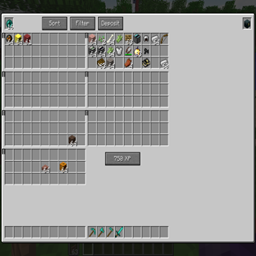
- 按下快捷键 (B) 或点击物品栏上方渲染的按钮来打开 Overpowered Inventory
- 换句话说,它能与 Baubles、自定义 NPC、物品栏控制键、Thaumcraft、Balkins Weapons 等模组协同工作。
- 使用经验值逐步解锁功能
- 可通过配置文件控制经验消耗
- 对原版物品栏没有任何改动
- 依然保留双快捷栏功能
- 此物品栏中额外槽位内的物品不受“keepInventory”游戏规则的保留影响
- 不再包含指南针、时钟、反合成、3x3 合成台或经验瓶。部分功能可能会根据用户需求回归。我已将反合成功能移至独立模组“Uncrafting Grinder”,并进行了大量修复和更新。
- 仍然支持所有屏幕分辨率,因此对于“GUI 缩放:小”或“自动”选项,你可以使用配置文件来缩小界面。
- 请提供你的 Bug 报告、功能建议及评论!
- 在新物品栏中添加了排序、存入和合并过滤按钮(其工作方式与 1.x 版本相同)
1.10.2 - 2.3.0 的新增内容
- 数据现在存储在 /saves/worldname/playerdata/_PlayerName.opi 文件中,而不仅仅是 NBT 数据
- 还有一个 .opibk 备份文件,如果出现问题,请立即用此文件替换原始文件。
- 你也可以通过移动这些文件来在世界之间转移物品
请将 1.10.2 版本的任何 Bug 报告至 GitHub 问题追踪器(链接见上文)。
正常大小视频:
小尺寸版本视频:
[以下是 1.x.x 及更早版本的内容]
基本功能
(滚动到底部查看更新日志/最新功能)
- 将你的物品栏空间扩展到三种不同的大小,默认的“普通”大小为 15 行 x 25 列 = 共 375 个槽位。
- 增加了四个特殊槽位,用于存放末影珍珠、末影箱、时钟和指南针。
- 还包含一个 3x3 合成网格,替代原来的 2x2。因此,这算是我之前的 Inventory Crafting 模组的续作,但在此基础上增加了大量功能。(我将继续单独支持这两个模组。此外,特别感谢 Funwayguy,本模组的部分灵感/影响来源于 InfiniteInvo1.7.10)
- 添加了一个按键绑定,用于从该槽位中使用末影珍珠(无论快捷栏中有什么)。
- 在该槽位持有时钟/指南针时潜行,会在屏幕上显示它们(与我 Power Apples 模组中的导航增益效果方式相同)
- 物品栏内有一个小按钮,可以在不放置末影箱的情况下打开末影箱物品栏(前提是该槽位中有末影箱)
- 你可以通过将空瓶子放入最右侧的特殊槽位中来存储经验(填充“附魔之瓶 Bottles o Enchanting”)。右上角的两个按钮会自动将你的物品存入附近的箱子。这不是 100% 无损转换,因为“附魔之瓶”会随机给予 3-11 点经验。默认情况下,填充一个瓶子需要消耗 10 点经验;你可以在配置文件中更改此设置。
- 箭头按钮可左右切换物品栏,或将所有物品推到一个角落。当打开箱子或其他容器时,你只能看到第一行,并且稍微挤压在一起,就像正常的组合物品栏一样。
- 右上角有两个特殊按钮,只需单击一次即可将所有物品存入所有附近的箱子。“Merge”(合并)只会添加到现有的物品堆叠中(例如,一个只有一个圆石且其他为空的箱子,会将该圆石填满至 64 个,箱子中的空槽和其他物品会被忽略)。“Deposit all”(全部存入)则会尽可能倾倒所有物品。默认情况下,这仅使用距离 12 格以内的箱子;这可以在配置文件中调整。它会使用陷阱箱和普通箱,但不包括其他容器。
- 打开任何其他原版容器时,右上角有两个按钮,第一个是返回你的物品栏,“X”是关闭。
- 移除了“Crafting”(合成)文字
- 添加了一个配置文件选项,可以移除物品栏中的角色模型(但这仍然会留下黑色空白区域,我知道这有点傻)
- 默认情况下,末影珍珠已被增强至可堆叠 64 个;你可以在配置文件中将其恢复为 16 个。
- 已在 SSP(单人游戏)、SMP(多人游戏)以及启用和禁用 keepInventory 游戏规则的情况下进行测试。尽管如此,安装前请务必备份你的世界(这对所有模组都适用,不仅限于此模组)。
警告:在选项 > 视频设置 > GUI 比例中使用自动或大可能会导致画面缩放过大,从而超出屏幕显示范围。建议使用小或正常。
- 在创造模式(CREATIVE)下使用此模组会出现一些奇怪的问题,护甲栏位和其他许多功能会混乱,本模组旨在用于生存模式(SURVIVAL)。
# 配置文件位于 powerinventory.cfg 中。部分选项也可通过游戏内“模组”->“配置”按钮进行设置(在 Forge 列表中找到该模组)
如果您对本模组的添加有任何想法,或者遇到崩溃或其他错误,请告诉我。
更新日志:
1.0.13 新增内容
- 修复了一系列漏洞
- 在配置文件中添加了黑名单,以便您可以阻止某些物品使用“拆解”功能。同样适用于来自其他模组的物品
版本 1.0.12 存在几个漏洞,因此我已将其从下载列表中移除。例如,它在“拆解”某些物品时会导致游戏崩溃。
1.0.11 新增内容
- 快捷栏旁边增加了一个新的快捷栏。可通过按键绑定切换快捷栏,默认键为 'H'
- 这对于存放被合并、排序和存入功能忽略的物品也很有用
1.0.10 修复内容
- 修复在某些配置设置下部分槽位显示在图形界面之外的情况
1.0.9 新增内容
- “合并”和“存入”按钮兼容通用容器,包括来自其他模组的容器(只要它们使用了实现 IInventory 的 Tile Entity)
- 新增游戏内配置 GUI(仅限 MC1.8),在主菜单的“模组”按钮内部使用“配置”按钮。
- 新增选项允许各类物品堆叠数量达到 64 - 船只、门、蛋糕等。可在配置文件中禁用此功能。
- 默认情况下,骑乘时玩家饥饿条仍会显示 - 请使用配置文件将其恢复为正常状态
1.0.8 新增内容
- 新增了大型屏幕选项,之前配置文件中仅有正常和小两种选项。大型尺寸为 16x28 = 448。比正常尺寸强大得多!旧的 "normal_small" 配置项现在改为 "size",可选 normal、small 或 large。
- 可配置隐藏空槽位的轮廓 - 部分用户会遇到黑方块或其他图形伪影问题。
- 可分别禁用经验瓶槽位或拆解槽位的配置项
- 兼容性模式的配置项 - 供存在模组冲突的用户使用。目前此功能非常有限,如果足够多的人实际使用它,希望能进一步扩展。
版本 1.0.7 因缺失纹理已被移除 抱歉大家,是我的失误。
1.0.6 新增内容
- 新增拆解槽位和按钮 - 可即时查找配方。但不适用于工作台等情况,因为无法知道使用了何种木材。
- 修复了较小 UI 版本的某些视觉问题。
- 提供 1.7.10 和 1.8 版本
1.0.5 新增内容
- 右下角新增排序按钮。将在两种排序类型之间切换。
- 在容器叠加层上添加了导航按钮,这样您可以在翻找箱子时移动巨大的背包界面
- 移植回 1.7.10 版本
1.0.4 新增内容
- 针对较小 GUI 比例/显示器的配置选项:
# 有效值仅为 exactly normal/small。警告:更改前请备份您的世界。这将改变背包大小,适用于 GUI 比例需求不同的情况。normal = 常规 15x25 背包大小,small = 6x18 [默认: normal]
S:normal_small=normal
1.0.3 新增内容:
- 打开末影箱的按键绑定,默认为 'I'
- 如果不可用,则隐藏填充和末影箱按钮。
- 更多配置文件选项
- 修复了从某些槽位(如合成/结果槽)按住 Shift 点击取出的问题
提醒:请务必定期备份世界!
1.0.2 修复内容:旧版本中的“全部存入”按钮存在缺陷,有时会删除物品。*
If you have a major bug and i didnt notice it on the issue tracker or on the comments section feel free to poke me on twitter.
Version 2.0.0 is a complete rewrite and overhaul of the mod. It is completely different. Screenshots are mostly showing the 1.x version which is still supported and valid. (Version 2 is just an optional upgrade. Version 2 will only be for 1.8)
- Full compatibility with all other mods, uses a standalone inventory screen
- See the screenshots for more details
- IMPORTANT : If the screen is too big for your game screen, you have two options.
-- change to GUI SCALE: NORMAL or bigger.
-- Go to the powerinventory.cfg and make it smaller using is_large=false
- IMPORTANT : IF YOU ARE UPGRADING FROM AN OLD VERSION OF THE MOD
-> Delete your configs
-> EMPTY YOUR ENTIRE PLAYER INVENTORY into chests to save it. Remember, this is 2.0 a whole remake, the old inventory is gone
- Open the Overpowered Inventory with a hotkey (B) or a button that renders above your inventory
- In other words, it works with baubles, custom npcs, inventory control keys, thaumcraft, balkins weapons, etc etc.
- Unlock features step by step using experience points
- Config control over exp costs
- it has zero changes to the vanilla inventory
- Still has the dual hotbars feature
- Contents of the extra slots in this inventory is ignored by 'keepInventory' gamerule
- No more compass, clock, uncrafting, 3x3 crafting, or exp bottles. Some of these may return depending on user demand. I moved the Uncrafting feature to a standalone mod "Uncrafting Grinder" and made tons of fixes and updates.
- Still works with all screen resolutions, so for GUI Scale Small or Auto you can use the config file to make the screen smaller.
- Please give me your bugs, features, and comments !
- Added the Sort, Deposit, and Merge filter buttons into the new inventory (they work the same as in 1.x)
New stuff for 1.10.2 - 2.3.0
- Data is now stored in /saves/worldname/playerdata/_PlayerName.opi instead of just NBT data
- There is also a .opibk bakup file, replace the original with this file RIGHT AWAY if there is a problem.
- You can also use these files to transfer items between worlds, by moving them around
Please report any bugs for the 1.10.2 version to the github issue tracker (link above).
Video of normal size:
Video of small version:
[Below is everything for 1.x.x and previous]
Basic Features
(scroll to bottom for changelog / newest features)
- Expands your inventory space to three different larger sizes, the default 'normal' is 15 rows by 25 columns = 375 total slots.
- Adds four special slots to hold ender pearls, ender chest, clock, and compass.
- Also includes a 3x3 crafting grid instead of 2x2. So, this is kind of a sequel to my Inventory Crafting mod, but with tons more features added on top. (I will still be supporting both mods in individually. Also, special thanks to Funwayguy, I this was partly inspired/influenced by InfiniteInvo1.7.10)
-A keybinding is added to use the ender pearl from this slot (regardless of what is in your hotbar).
- Sneaking with a clock/compass in the slot will show them on the screen (same way as the navigation buff in my Power Apples mod)
- Small button in your inventory to open your ender chest inventory without placing one down (if its in the slot)
- You can store experience by filling Bottles o Enchanting by putting empty bottles in a special slot in the far right. The two buttons on the top right deposit your items into nearby chests automatically. This is not a 100% lossless conversion, since Bottles o Enchanting give randomly 3-11 exp. By default, it costs 10 exp to fill a bottle; change this in the config file.
- Arrow buttons cycle inventory left and right, or push them all to one corner. When a chest or other container is open, you only see the first row and a bit squished in just like the normal combined inventory.
- Two special buttons in the top right will deposit your items into all nearby chests all at once with a single click. 'Merge' will only add to existing item stacks (for example, a chest with one cobblestone and nothing else will get that cobble filled up with 63 more, empty slots in the chest are ignored and other items are ignored). Deposit all will dump everything possible. By default this only uses chests up to 12 blocks away; this can be tweaked in the config file. It does use both trapped and regular chests, but no other containers.
- When opening any other vanilla container, the top right has two buttons, the first to go to your inventory, and the "X" to close.
- The text 'Crafting' is removed
- Added a config file to remove your character model from the inventory (but this still has the black space there, kind of silly I know)
- By default, ender pearls have been buffed to stack to 64; you can revert this in the config file to send it back to 16.
- Tested in SSP, SMP, with and without keepInventory gamerule. Even so, please BACK UP your worlds before installing (goes for every mod, not just this one).
WARNING: Playing with Options > Video Settings > GUI Scale: Auto or Large may zoom everything in too much so it goes way off the screen. Suggested to use Small or Normal.
- Using this while in CREATIVE mode will have some weird issues, the armor slots and lots of other stuff gets messed around, it is intended for SURVIVAL.
# Configuration file: is in powerinventory.cfg . Some options also available using the ingame Mods -> Config button (find the mod in the forge list)
Please let me know if you have any ideas for additions to the mod, or if anything crashes or goes wrong.
Change Log:
New in 1.0.13
- Fixed a bunch of bugs
- Added a blacklist in the config file in case you want to block any items from the 'uncrafting' feature. Also works with items from other mods
Version 1.0.12 had a few bugs so I removed it from download. For example, it crashed your game when 'Uncrafting" certain items.
New in 1.0.11
- Second hotbar in your inventory. Swap hotbars with a keybinding, default is 'H'
- Also useful to stash items that get ignored by the merge, sort, and deposit features
Fixed 1.0.10
- Fix some slots showing up outside of the graphic in some config settings
New in 1.0.9
- Merge and deposit buttons compatible with generic containers including ones from other mods (as long they use a Tile Entity that implements IInventory)
- New in game configuration GUI (MC1.8 only) use the 'config' button inside the 'mods' button on the main menu.
- New options to allow all sorts of items stack up to 64 - boats, doors, cakes, and more. Can be disabled in the config.
- By default the player hunger bar shows even when mounted - use the config file to set back to normal
New in 1.0.8
- Large size screen option is new, before was only normal and small in the config file. Large is 16x28 = 448. Way more overpowered than normal! The old "normal_small" config entry is now just "size" and it can be normal, small, or large.
- Config to hide outlines of empty slots - some users get black squares or other graphic artifacting.
- Config entries to disable either the exp bottle slot or the uncrafting slot individually
- Config entry for Compatibility mode - for users with mod conflicts. Currently this is very limited, it will hopefully get expanded on if enough people are actually using it.
Version 1.0.7 had a missing texture and was removed sorry everyone my bad.
New in 1.0.6
- New uncrafting slot and button - looks up recipes on the fly. Does not work with things like crafting tables, because there is no way to know what kind of wood was used.
- Fixed some visual issues with the smaller version of the ui.
- Out for both 1.7.10 and 1.8
New in 1.0.5
- New sort button added in the lower right. Will toggle between two sort types.
- Added navigation buttons to the container overlay, so you can move your giant inventory around while a rummaging in a chest
-Ported back to 1.7.10
New in 1.0.4
- Config option for smaller sized GUI Scale / monitors:
# Valid values are only exactly normal/small. WARNING: BACKUP YOUR WORLD BEFORE CHANGING THIS. Changes your inventory size, for use if your GUI Scale requirements are different. normal = regular 15x25 inventory size, small = 6x18 [default: normal]
S:normal_small=normal
New in 1.0.3:
- Keybinding to open ender chest default 'I'
- The Fill and Ender chest buttons are hidden if not useable.
- more config file options
- changes to fix shift clicking out of some slots like the crafting / results
Reminder: always make world backups!
Fixed in 1.0.2: The Deposit All button is bugged in older versions, sometimes deleting items. *

 模组
 模组
 模组

 模组
 模组

 模组

评论 0
登录后参与评分
还没有评论,来抢沙发吧