
Packdev Toolkit
一套用于构建整合包和数据包的开发者工具集合。无需离开游戏即可从资源包中提取纹理/模型、导出语言文件条目、搜索数据包以及复制物品 ID。
要求
- YetAnotherConfigLib (YACL)。
- EMI(可选)。
- 当安装后,在 EMI 中悬停任意物品/配方时均可进行导出和复制翻译键操作。
- Fabric API(Fabric)。
功能
导出悬停资产/配方 (O)
按下导出键(默认:O)可将当前查看的内容提取到清单界面,从中选择要复制到导出文件夹的文件:
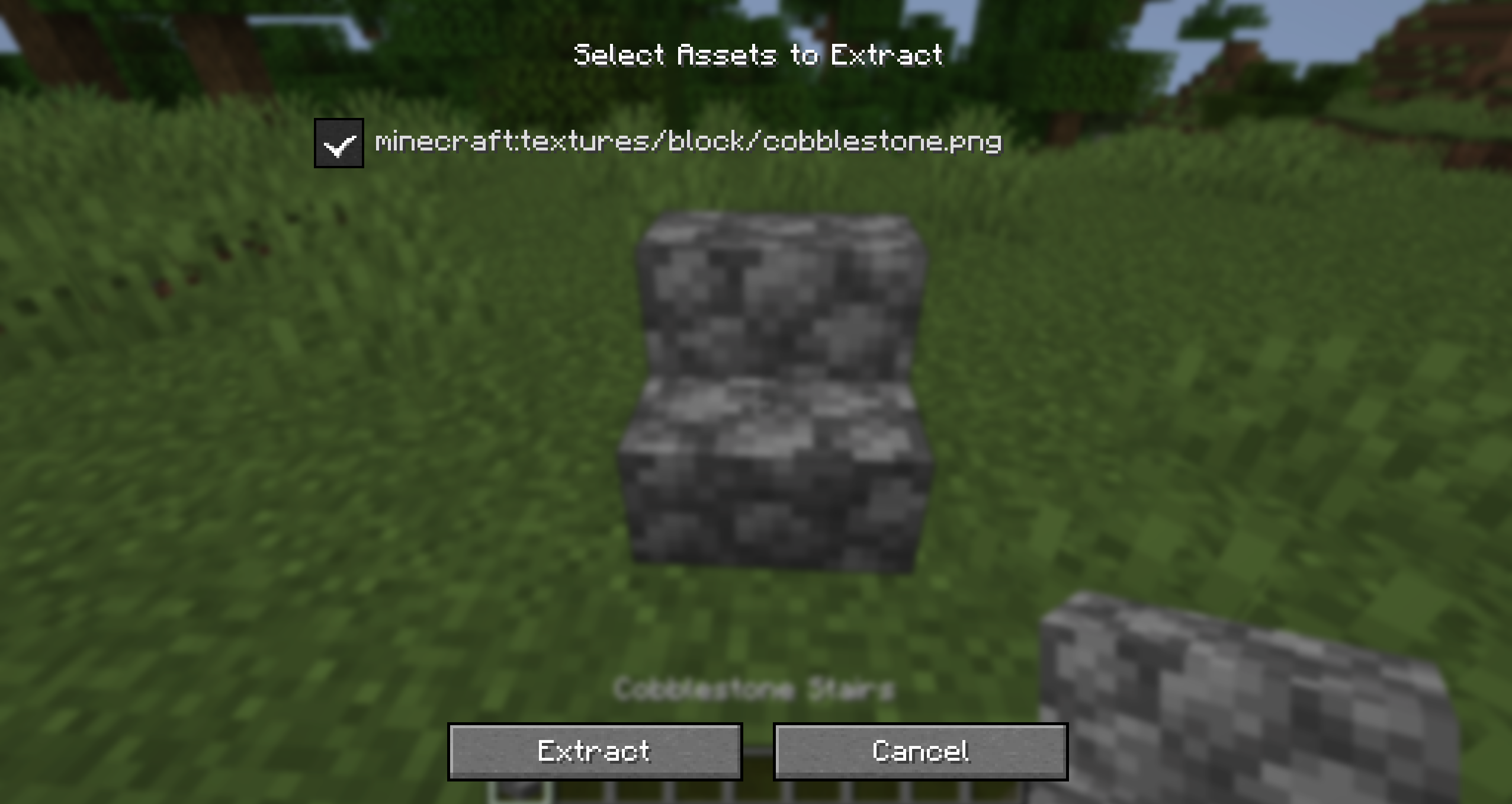
- 查看方块:获取其当前方块模型使用的所有纹理(包括箱子等方块实体)。
- 查看实体:获取其纹理。
- 手持物品:获取该物品的纹理。
- 在 EMI 中悬停物品:与手持效果相同。
- 在 EMI 配方查看器中悬停配方:将配方直接保存为数据包的 JSON 文件(仅限单人游戏)。
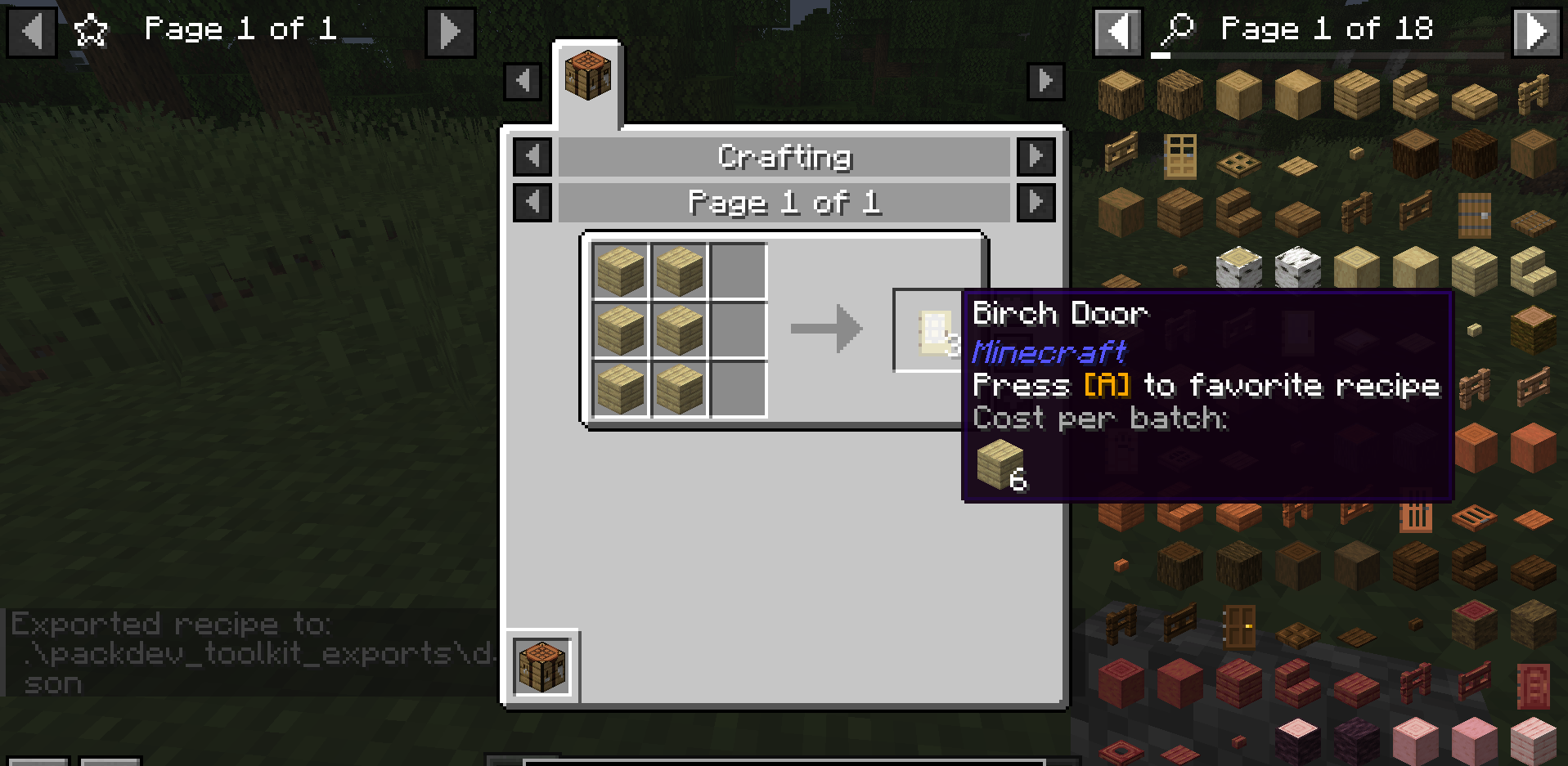
按住 Shift 键并按下导出键,改为获取原始 JSON 定义(方块状态 + 方块模型,或物品模型),而非 PNG 纹理。
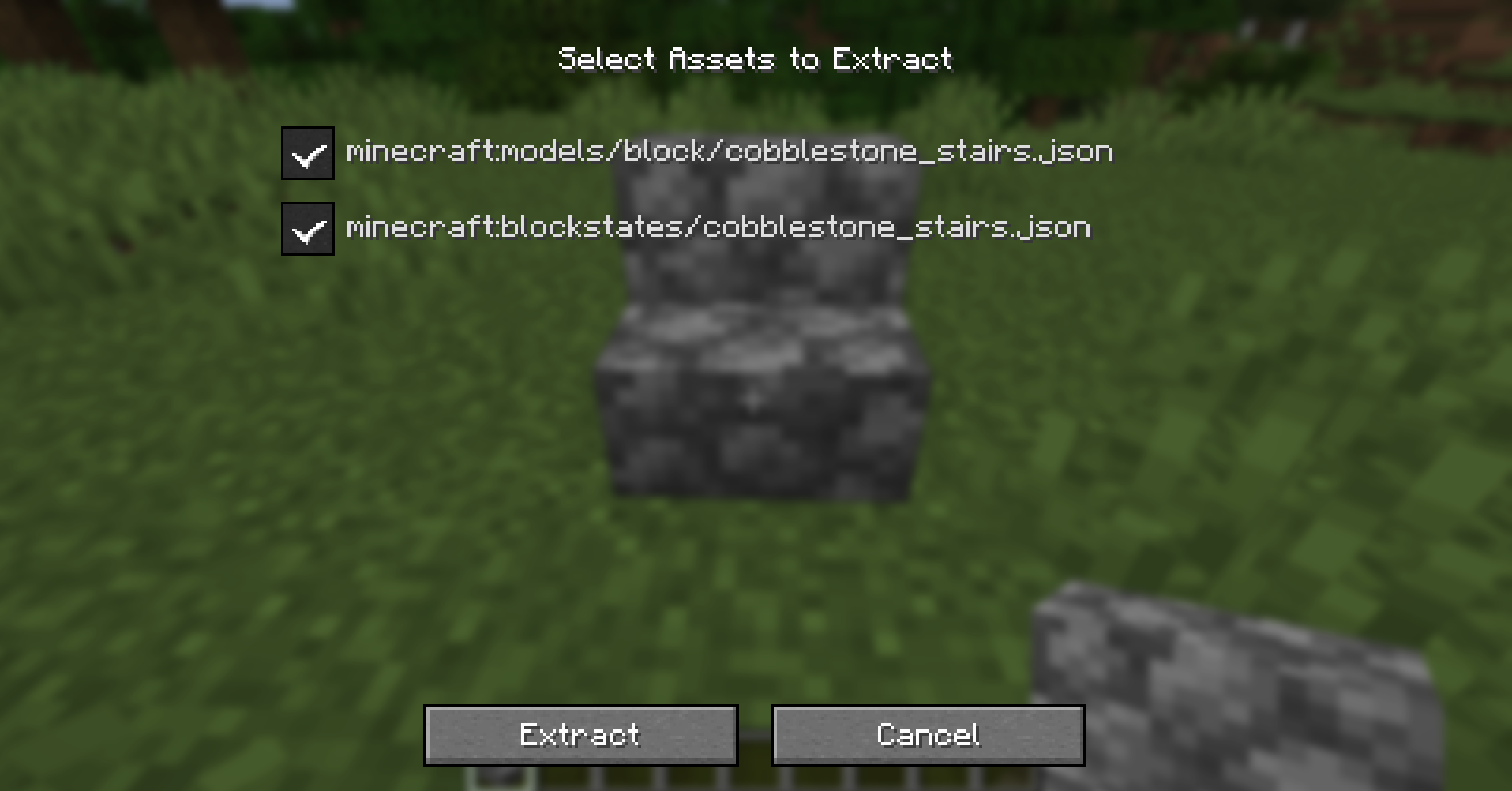
选定的文件将被复制到已配置的导出目录(见 配置),并自动为您打开包含该文件的文件夹。
复制翻译键 (J)
在查看方块/实体、手持物品或在 EMI 中悬停物品时,按下复制键(默认:J)可将其语言文件条目复制到剪贴板:
"item.minecraft.diamond": "Diamond"
这对于快速构建整合包重命名的 en_us.json 条目非常有用。
物品描述导出 (Z)
加载 Item Descriptions 后,您可以直接以预期格式获取描述信息。
在查看方块/实体、手持物品或在 EMI 中悬停物品/标签时,按下导出描述键(默认:Z)会自动将其描述语言键追加到资源包的 en_us.json 文件中。
如果文件已存在,这将自动合并到您的现有 en_us.json 中,而不会覆盖其他条目。
浏览原版/模组资源 (/packdev browse)
这将打开一个界面,允许您从已加载的模组中选择文件,并将其导出到已配置的 data 和 assets 目录。
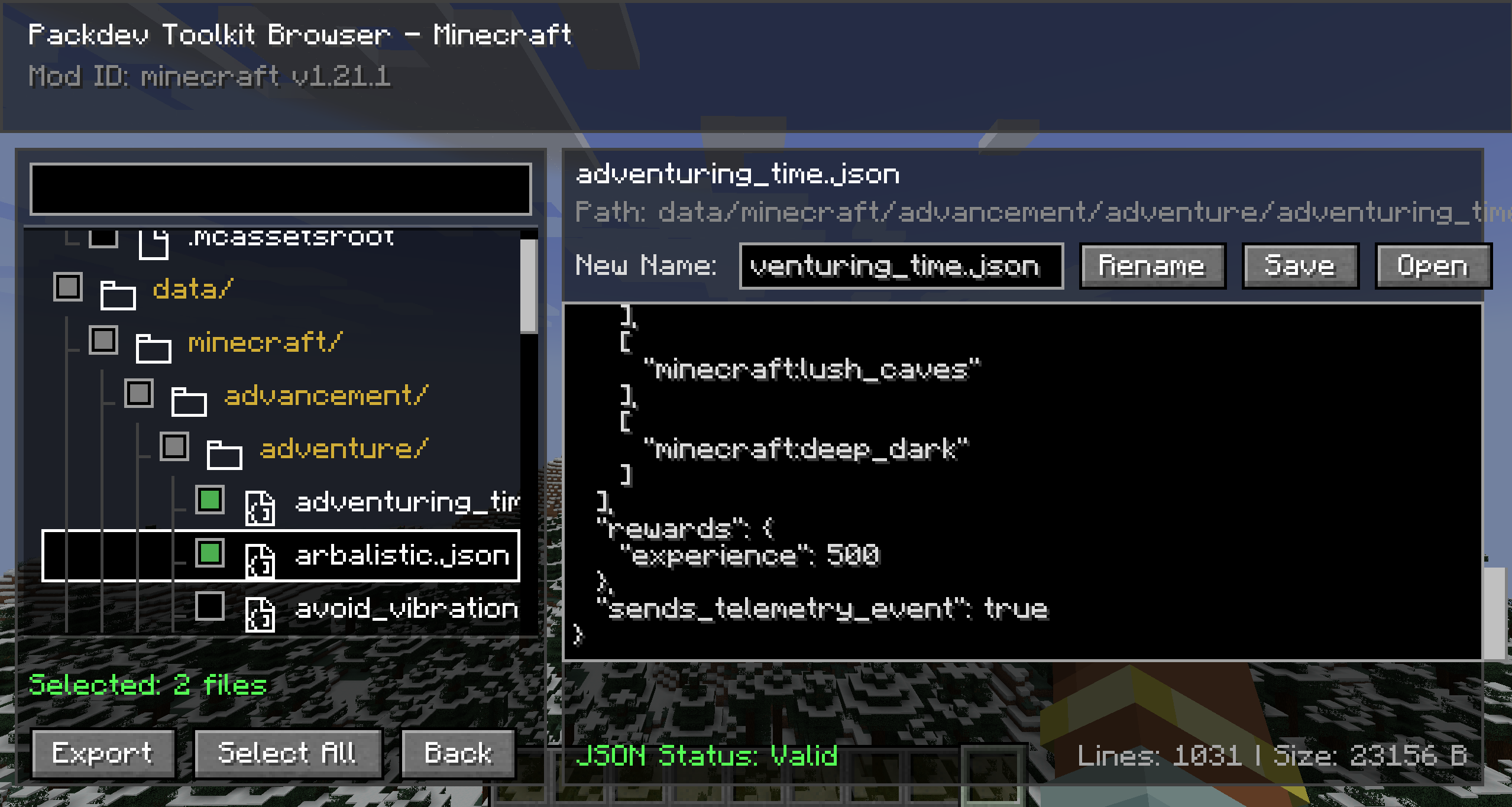
导出物品 ID 和注册表 (/export)
获取物品 ID、注册表或标签条目并保存它们。点击聊天消息可将其复制到剪贴板,或在 queries 文件夹中打开导出的 JSON 文件。
| 命令 | 导出/导出内容 |
|---|---|
/export hand |
主手物品(作为可复制的聊天数组) |
/export hotbar |
全部 9 个快捷栏槽位 + 副手(作为可复制的聊天数组) |
/export inventory |
整个背包(作为可复制的聊天数组) |
/export biomes |
所有已注册的生物群系(作为查询文件夹中的 JSON 文件) |
/export structures |
所有已注册的结构(作为 JSON 文件) |
/export configured_features |
所有已注册的已配置特性(作为 JSON 文件) |
/export placed_features |
所有已注册的已放置特性(作为 JSON 文件) |
/export registry <registry_id> |
任何注册表中的所有条目(作为 JSON 文件) |
/export tag <registry_id> <tag_id> |
特定标签内的所有条目(作为 JSON 文件) |
/export tags_of <registry> <entry> |
属于特定条目的所有标签(作为 JSON 文件) |
搜索数据包中的物品/方块使用情况 (/query)
需要 OP 权限。扫描每个加载的数据包以查找对给定物品或方块的引用,并将匹配的文件 ID 写入导出文件夹(queries/ 子文件夹)中的 JSON 文件,然后在聊天中链接该文件。
| 命令 | 搜索内容 |
|---|---|
/query find_item_in_loot <item> |
该物品 ID 的 loot_table 和 loot_modifiers JSON |
/query find_block_in_features <block> |
该方块 ID 的 worldgen/configured_feature JSON |
/query find_block_in_structures <block> |
方块调色板中包含该方块的 .nbt 结构文件 |
这有助于回答“哪些战利品表包含这个?”或“哪些结构使用了这个方块?”等问题,而无需手动搜索数据包文件。
配置
可通过游戏内 YACL 配置屏幕访问,或编辑配置文件文件夹中的 packdev_toolkit.json
导出目录
您可以为不同类型的输出配置三个独立的目标文件夹。这些路径可以是相对于游戏/服务器目录的相对路径,也可以是绝对路径:
- 资源包导出目录:用于写入客户端资产(如纹理、方块状态和模型)的文件夹(默认值:
packdev_toolkit_resource_pack)。 - 数据包导出目录:用于写入服务器数据(如配方)的文件夹(默认值:
packdev_toolkit_data_pack)。 - 查询导出目录:用于写入
/query和/export列表文件的文件夹(默认值:packdev_toolkit_queries)。
键位绑定
键位可以通过“控制”屏幕中“Packdev Toolkit”类别下的选项进行重新绑定。
鸣谢
感谢 Cassian 提供翻译键复制功能的想法和基本实现!
许可证
Packdev Toolkit
A collection of developer tools for building modpacks and datapacks. Pull textures/models out of resource packs, dump lang entries, search datapacks, and copy item IDs: all without leaving the game!
Requirements
- YetAnotherConfigLib (YACL).
- EMI (optional).
- When present, exporting and translation-key-copying work on any hovered item/recipe in EMI.
- Fabric API (Fabric).
Features
Export hovered asset/recipe (O)
Press the export key (default: O) to pull whatever you're looking at into a checklist screen, where you pick which
files to copy into your export folder:
- Looking at a block: grabs every texture used by its current block model (including block entities like chests).
- Looking at an entity: grabs its texture.
- Holding an item: grabs the item's texture(s).
- Hovering an item in EMI: same as holding it.
- Hovering a recipe in EMI's recipe viewer: saves the recipe straight to a datapack JSON file (singleplayer only).
Hold Shift while pressing the export key to instead grab the raw JSON definitions (blockstate + block model, or item model) instead of the PNG textures.
Selected files are copied into your configured export directory (see Configuration) and the containing folder is opened for you automatically.
Copy translation key (J)
Press the copy key (default: J) while looking at a block/entity, holding an item, or hovering an item in EMI to
copy its lang entry to your clipboard:
"item.minecraft.diamond": "Diamond"
Handy for quickly building en_us.json entries for modpack renames.
Item Descriptions exports (Z)
With Item Descriptions loaded, you can grab descriptions directly in their expected format.
Press the export description key (default: Z) while looking at a block/entity, holding an item, or hovering an
item/tag in EMI to automatically append its description lang key to your resource pack's en_us.json file.
This automatically merges with your existing en_us.json if it exists, without overwriting other entries.
Browse vanilla/mod resource (/packdev browse)
This will open up a screen where you can select files from loaded mods to export to your configured data and assets
directories.
Dump item IDs and registries (/export)
Grabs item IDs, registries, or tag entries and saves them. Click the chat message to copy to your clipboard or
open the exported JSON file in your queries folder.
| Command | Dumps / Exports |
|---|---|
/export hand |
The item in your main hand (as copyable chat array) |
/export hotbar |
All 9 hotbar slots + offhand (as copyable chat array) |
/export inventory |
Your entire inventory (as copyable chat array) |
/export biomes |
All registered biomes (as a JSON file in your queries folder) |
/export structures |
All registered structures (as a JSON file) |
/export configured_features |
All registered configured features (as a JSON file) |
/export placed_features |
All registered placed features (as a JSON file) |
/export registry <registry_id> |
All entries in any registry (as a JSON file) |
/export tag <registry_id> <tag_id> |
All entries inside a specific tag (as a JSON file) |
/export tags_of <registry> <entry> |
All tags that a specific entry belongs to (as a JSON file) |
Search datapacks for item/block usage (/query)
Requires OP. Scans every loaded datapack for references to a given item or block and writes
the matching file IDs to a JSON file in your export folder (queries/ subfolder), then links the file in chat.
| Command | Searches |
|---|---|
/query find_item_in_loot <item> |
loot_table and loot_modifiers JSON for the item ID |
/query find_block_in_features <block> |
worldgen/configured_feature JSON for the block ID |
/query find_block_in_structures <block> |
.nbt structure files whose block palette contains the block |
Useful for answering "which loot tables have this?" or "which structures use this block?" without manually searching through datapack files.
Configuration
Accessible from the config screen in-game using YACL, or packdev_toolkit.json in your config folder
Export Directories
You can configure three separate destination folders for different types of output. These can be relative to the game/server directory or absolute paths:
- Resource Pack Export Directory: The folder that client assets like textures, blockstates, and models are written
to (default:
packdev_toolkit_resource_pack). - Data Pack Export Directory: The folder that server data like recipes are written to (default:
packdev_toolkit_data_pack). - Queries Export Directory: The folder that
/queryand/exportlist files are written to (default:packdev_toolkit_queries).
Keybinds
Keybinds are rebindable through the Controls screen under the "Packdev Toolkit" category.
Credits
Thanks to Cassian for the idea and basic implementation of translation key copying!
License

下载 Packdev Toolkit
需要联机服务器吗?
稳定流畅、一键部署,几分钟即可和朋友联机开服
最低仅需 8 元/月 即可畅快联机
下载 Packdev Toolkit
需要联机服务器吗?
稳定流畅、一键部署,几分钟即可和朋友联机开服
最低仅需 8 元/月 即可畅快联机
下载 Packdev Toolkit
需要联机服务器吗?
稳定流畅、一键部署,几分钟即可和朋友联机开服
最低仅需 8 元/月 即可畅快联机
下载 Packdev Toolkit
需要联机服务器吗?
稳定流畅、一键部署,几分钟即可和朋友联机开服
最低仅需 8 元/月 即可畅快联机
下载 Packdev Toolkit
需要联机服务器吗?
稳定流畅、一键部署,几分钟即可和朋友联机开服
最低仅需 8 元/月 即可畅快联机
下载 Packdev Toolkit
需要联机服务器吗?
稳定流畅、一键部署,几分钟即可和朋友联机开服
最低仅需 8 元/月 即可畅快联机
下载 Packdev Toolkit
需要联机服务器吗?
稳定流畅、一键部署,几分钟即可和朋友联机开服
最低仅需 8 元/月 即可畅快联机
下载 Packdev Toolkit
需要联机服务器吗?
稳定流畅、一键部署,几分钟即可和朋友联机开服
最低仅需 8 元/月 即可畅快联机
下载 Packdev Toolkit
需要联机服务器吗?
稳定流畅、一键部署,几分钟即可和朋友联机开服
最低仅需 8 元/月 即可畅快联机
下载 Packdev Toolkit
需要联机服务器吗?
稳定流畅、一键部署,几分钟即可和朋友联机开服
最低仅需 8 元/月 即可畅快联机
新增
- 导出到多个文件夹时,现在会打开所有这些文件夹。
- 可通过新的“导出后打开每个文件夹”配置选项关闭此功能。
修复
- 当“导出后打开每个文件夹”选项关闭时,导出到多个文件夹将改为打开它们共有的最深层级文件夹,而非整合包根目录。
已更改
- 使用原版风格的面板、文本字段和滚动条,对模组选择、整合包浏览器和资源提取界面进行了全面重构。
- 资源提取界面现在以可滚动的列表形式展示资源,包含纹理缩略图、大小和文件夹信息,并提供全选/全不选切换按钮以及选中数量计数器。
- 无法找到的资源会显示为灰色。
- 整合包浏览器的布局现在会根据窗口大小和 GUI 缩放比例进行自适应调整,而不再使用固定位置。
- 图像预览现在在透明度棋盘格背景上使用整数倍缩放,动画纹理仅预览其第一帧。
- 整合包浏览器中的搜索结果优先显示文件名,并在旁边显示其所属文件夹;对于过长的文件名,悬停时会显示完整路径。
- 当深层文件夹导致内容超出范围时,整合包浏览器的文件树支持横向滚动,可通过底部滚动条或 Shift + 滚轮进行操作。
- 整合包浏览器中各面板之间的分隔线可以通过拖拽来调整大小。
已修复
- 整合包浏览器中长文件路径不再被面板边缘截断。
- 导出箱子、告示牌、床和其他方块实体时,现在会包含其纹理,而不仅仅是方块的粒子纹理。
新增
- 新增选项,可在导出后禁用打开文件浏览器。
关于这个资源的讨论、问题反馈与使用心得
还没有讨论,来发第一帖吧
你是这个资源的作者?登录后可认领此资源。
相似资源
 模组

显示你正在注视的方块的信息。(适用于 Minecraft 1.16+ 的 Hwyla/Waila 分支)
 模组

查看物品与配方
 模组
在游戏画面角落显示附近世界地形、玩家、生物和实体的地图。可创建路径点,帮助你找到标记过的位置。
 模组
使用 JavaScript 编辑配方、添加自定义物品、编写世界事件!
 模组
添加区块认领和玩家组队功能,并与 Xaero's Minimap 和 World Map 集成
 模组
添加全屏世界地图,显示你在世界中已探索的区域。与 Xaero's Minimap 搭配使用效果极佳。
评论 0
登录后参与评分
还没有评论,来抢沙发吧