
Particle Visor
根据距离移除或淡化粒子效果
功能特性
- 隐藏紧贴镜头的粒子(这样在战斗中药水粒子就不会遮挡视线)
- 高度可自定义
配置说明
Particle Visor 使用 ukulib 进行配置。
你可以选择以下任一方式:
- 进入选项菜单,点击“Credits and Attribution”右侧的小方块按钮,然后进入 Particle Visor 设置界面。
- 打开 Mod Menu,并从其中打开配置菜单。
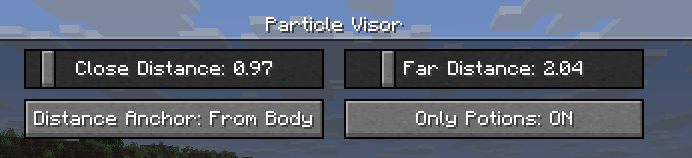
Close Distance(近距离阈值):粒子仍可完全可见的最远距离。比此距离更近的粒子将完全不渲染。Far Distance(远距离阈值):粒子开始淡化的最近距离。介于该值与Close Distance之间的粒子将呈现渐变淡化效果。(你可以将其设置为与Close Distance相同,以实现粒子“突然弹出”的效果)Mod Enabled(模组启用):模组的总开关。Distance Anchor(距离参照点):决定距离计算的玩家模型位置。From Eyes(从眼睛):基于“视线高度”计算距离。From Body(从身体):无论粒子位于眼睛还是脚部,距离保持一致,如同一个圆柱体(但高于或低于该水平线的粒子仍会被单独处理)。From Feet(从脚部):基于角色脚部位置计算距离。On Camera(从相机):基于实际相机位置计算距离(这样你可以在第三人称视角下透过粒子观察)。
Only Potions(仅药水粒子):未被认定为“法术粒子”的其他粒子将不受此模组影响。Third Person Particles(第三人称粒子):如果开启,本模组在第三人称视角下将不执行任何操作。
兼容性
我已验证该模组可与 Sodium 和 Particle Core 兼容(以及 uku's pvp modpack 中的其他内容),因此预计不会出现太多兼容性问题。如果你发现任何冲突,欢迎 提交 Issue!
许可协议
本模组采用 MIT License 授权。欢迎将其包含在你的整合包中!
Particle Visor
Removes/fades particles based on distance
Features
- Hides particles very close to the camera (so potion particles won't get in your way in fights)
- Lots of customization
Configuration
Particle Visor uses ukulib for its configuration.
You can either:
- Go to the Options menu, click the small, square button to the right of Credits and Attribution, and go into Particle Visor.
- Open Mod Menu and open the configuration menu from there
Close Distance: The farthest distance at which particles will still be visible. Anything closer than this won't render at all.Far Distance: The closest distance at which particles will be faded. Anything in between this value andClose Distancewill be faded. (you can set this to be the same asClose Distanceto make particles "pop in")Mod Enabled: General global toggle for the modDistance Anchor: The point on your player model where the distance will be determined-
From Eyes: Distance determined from the "eye level"
-
From Body: Distance will be the same regardless of whether the particle is at your eyes or your feet, like a cylinder (though anything above or below that will be accounted for)
-
From Feet: Distance determined from the character's feet
-
On Camera: Distance determined from the actual camera position (so you can look through particles in third person)
Only Potions: Anything not considered a "spell particle" will be unaffected by the mod.Third Person Particles: If this is ON, the mod will do nothing in third person.
Compatibility
I've verified that the mod works with Sodium and Particle Core (and whatever else is in uku's pvp modpack), so I don't think there will be many incompatibilities. Feel free to make an issue if you find any!
License
This mod is under the MIT License. Feel free to include this mod in your modpack!

下载 Particle Visor
下载 Particle Visor
下载 Particle Visor
下载 Particle Visor
下载 Particle Visor
下载 Particle Visor
下载 Particle Visor
- 更新至 26.1
关于这个资源的讨论、问题反馈与使用心得
还没有讨论,来发第一帖吧
你是这个资源的作者?登录后可认领此资源。
相似资源
 模组
缓冲的原始输入和线程化的事件轮询
 模组

显示你正在注视的方块的信息。(适用于 Minecraft 1.16+ 的 Hwyla/Waila 分支)
 模组

原版世界生成优化模组
 模组
使用 JavaScript 编辑配方、添加自定义物品、编写世界事件!
 模组

查看物品与配方
 模组
在游戏画面角落显示附近世界地形、玩家、生物和实体的地图。可创建路径点,帮助你找到标记过的位置。
评论 0
登录后参与评分
还没有评论,来抢沙发吧