
关于
ParticleGenerator 是一款主要为建筑者和地图制作者打造的 Minecraft 模组。它在游戏中添加了粒子生成器方块。
粒子生成器方块高度可定制,其使用方式比命令方块更加便捷高效。它允许你从一个方块生成多种粒子,或设置生成粒子的位置和速度随机化。
用法
命令
/pgen show - 显示粒子生成器的边缘
/pgen hide - 隐藏粒子生成器的边缘
/pgen info - 显示模组信息
/pgen help - 显示帮助消息
粒子生成器方块状态
position=[center(默认)/top/bottom] - 决定粒子生成的位置
粒子生成器 NBT 标签
Particles:[{...}] - 复合体列表:
  id:"" - 粒子 ID
  Motion:[x,y,z] - 粒子速度 [格/刻](在大多数情况下)
  MotionRand:[x,y,z] - "Motion" 值的随机化
  PositionOffset:[x,y,z] - 粒子位置的偏移量
  PositionRand:[x,y,z] - 粒子位置的随机化
  Interval:int - 粒子之间的间隔 [刻]
  Probability:double - 粒子生成的概率
  ParticleCount:int - 生成时的粒子数量
  ParticleMaxCount:int - 最大粒子数量
  SignalMin:int - 激活粒子所需的最小红石信号
  SignalMax:int - 激活粒子所需的最大红石信号
  AdditionalTags:{} - 额外标签(如方块 ID)
UseAnimateTick:bool - 在 animateTick 时生成粒子
*对于位置和运动,随机值范围为 val-(rand/2) 到 val+(rand/2)。
*对于粒子数量,随机值范围为从 ParticleCount 到 ParticleMaxCount。
*默认情况下,UseAnimateTick 标签设置为 false。这意味着粒子会尝试每刻生成一次,其生成率可以通过 Interval 和 Probability 标签进行操控。当设置为 true 时,粒子将在调用 animateTick 方法时尝试生成。这将允许你重现例如火把和使用 animateTick 生成粒子的许多其他方块的粒子生成率。
*如果你想生成需要额外方块或物品 ID 的粒子(例如 block 粒子),请添加标签 AdditionalTags:{id:"some_block_id"}。
实用的 Minecraft 方块物品 NBT 标签 (1.20.5 之前)
BlockStateTag:{...} - 指定方块状态
BlockEntityTag:{...} - 指定方块 NBT 标签
实用的 Minecraft 方块物品数据组件 (1.20.5+)
block_state:{...} - 指定方块状态
block_entity_data:{id:"pgen:particle_generator",...} - 指定方块 NBT 标签
提示
你可以在 找到包含其 ID 的粒子列表。
如果你想复制粒子生成器方块(带有 NBT 数据),请在按下鼠标中键时按住 Control 键。
示例
简单的烟雾粒子生成器

使用 /setblock: /setblock ~ ~ ~ pgen:particle_generator{Particles:[{id:"smoke"}],UseAnimateTick:true}
使用 /give (1.20.5 之前): /give @p pgen:particle_generator{BlockEntityTag:{Particles:[{id:"smoke"}],UseAnimateTick:true}}
使用 /give (1.20.5+): /give @p pgen:particle_generator[block_entity_data={id:"pgen:particle_generator",Particles:[{id:"smoke"}],UseAnimateTick:true}]
类似营火的粒子生成器
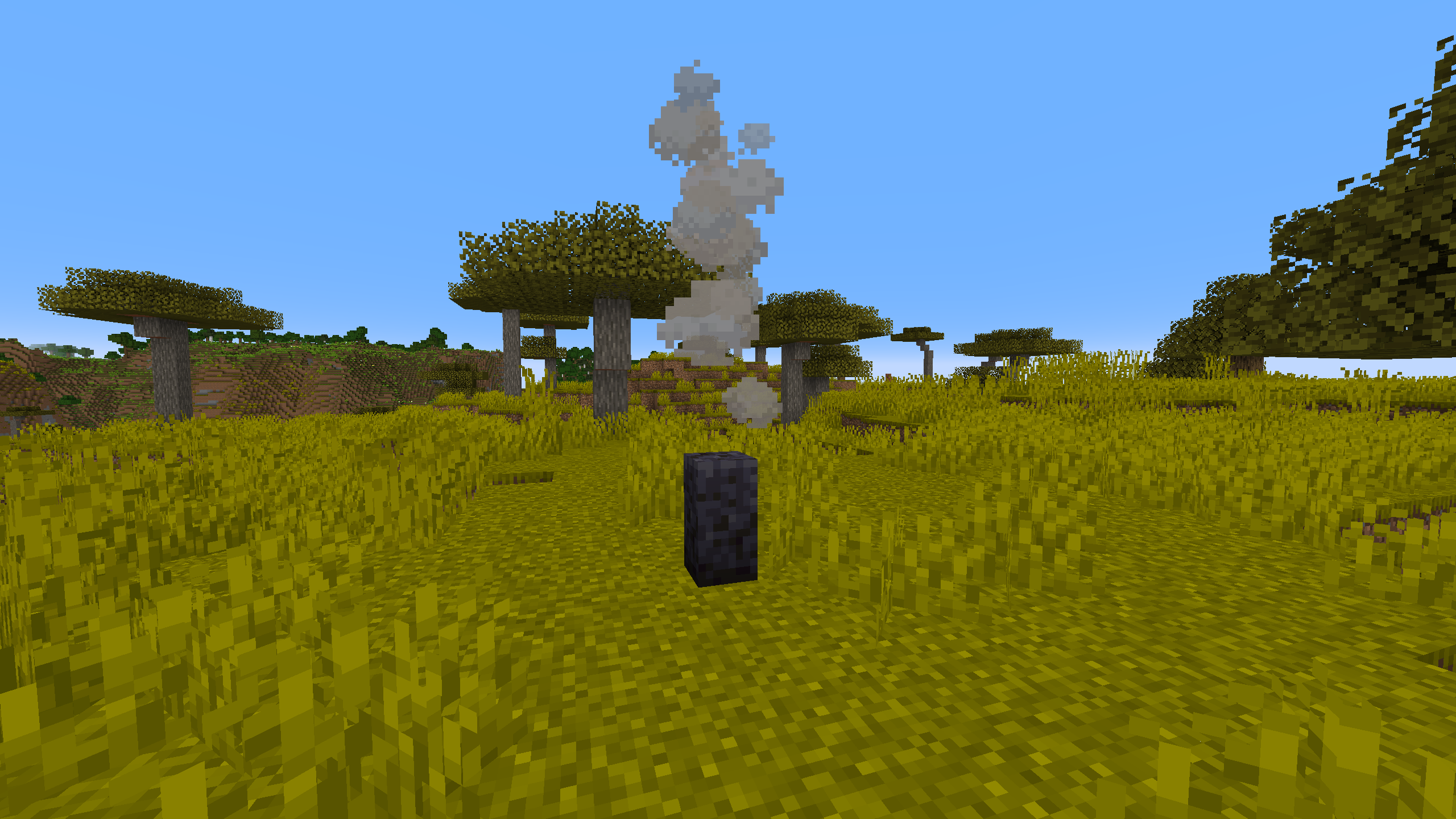
使用 /setblock: /setblock ~ ~ ~ pgen:particle_generator[position=bottom]{Particles:[{id:"campfire_cosy_smoke",Motion:[0.0,0.07,0.0],PositionRand:[0.67,0.0,0.67],ParticleCount:2,ParticleMaxCount:3,Probability:0.11}]}
使用 /give (1.20.5 之前): /give @p pgen:particle_generator{BlockStateTag:{position:"bottom"},BlockEntityTag:{Particles:[{id:"campfire_cosy_smoke",Motion:[0.0,0.07,0.0],PositionRand:[0.67,0.0,0.67],ParticleCount:2,ParticleMaxCount:3,Probability:0.11}]}}
使用 /give (1.20.5+): /give @p pgen:particle_generator[block_state={position:bottom},block_entity_data={id:"pgen:particle_generator",Particles:[{id:"campfire_cosy_smoke",Motion:[0.0,0.07,0.0],PositionRand:[0.67,0.0,0.67],ParticleCount:2,ParticleMaxCount:3,Probability:0.11}]}]
你可以轻松通过使用 /pgen help 获取这些命令,并将其用作模板。
About
ParticleGenerator is a Minecraft mod created mainly for builders and mapmakers. It adds Particle Generator block into the game.
Particle Generator block is highly customisable and using it is much more convenient and efficient than using command blocks. It allows you to generate multiple particles from one block or set generated particles position and speed randomization.
Usage
Commands
/pgen show - Shows edges of Particle Generators
/pgen hide - Hides edges of Particle Generators
/pgen info - Displays information about mod
/pgen help - Displays the help message with
Particle Generator block states
position=[center(default)/top/bottom] - determines position of particles generation
Particle Generator NBT tags
Particles:[{...}] - list of compounds:
  id:"" - particle id
  Motion:[x,y,z] - particle velocities [blocks/tick] (in most cases)
  MotionRand:[x,y,z] - randomization of "Motion" values
  PositionOffset:[x,y,z] - offset of particle positions
  PositionRand:[x,y,z] - randomization of particle positions
  Interval:int - interval between particles [ticks]
  Probability:double - probability of particle spawning
  ParticleCount:int - number of particles when spawned
  ParticleMaxCount:int - maximum number of particles
  SignalMin:int - minimal redstone signal to activate particle
  SignalMax:int - maximal redstone signal to activate particle
  AdditionalTags:{} - additional tags (like block id)
UseAnimateTick:bool - spawn particles on animateTick
*For position and motion, random value is in range from val-(rand/2) to val+(rand/2).
*For particle count, random value is in range from ParticleCount to ParticleMaxCount.
*By default UseAnimateTick tag is set to false. That means particles will try to spawn every tick and their spawn rate can be manipulated using Interval and Propability tags. When set to true particles will try to spawn when animateTick method is called. This will allow you to recreate particle spawn rate of for example torches and many other blocks that uses animateTick to spawn particles.
*If you want to spawn particles that require additional block or item ID (like block particle) add tag AdditionalTags:{id:"some_block_id"}.
Useful Minecraft BlockItem NBT tags (pre-1.20.5)
BlockStateTag:{...} - specifies block states
BlockEntityTag:{...} - specifies block NBT tags
Useful Minecraft BlockItem data components (1.20.5+)
block_state:{...} - specifies block states
block_entity_data:{id:"pgen:particle_generator",...} - specifies block NBT tags
Tips
You can find list of particles with its IDs on
If you want to copy Particle Generator block (with NBT data) hold control key when pressing MMB.
Examples
Simple smoke Particle Generator
Using /setblock: /setblock ~ ~ ~ pgen:particle_generator{Particles:[{id:"smoke"}],UseAnimateTick:true}
Using /give (pre-1.20.5): /give @p pgen:particle_generator{BlockEntityTag:{Particles:[{id:"smoke"}],UseAnimateTick:true}}
Using /give (1.20.5+): /give @p pgen:particle_generator[block_entity_data={id:"pgen:particle_generator",Particles:[{id:"smoke"}],UseAnimateTick:true}]
Particle Generator like campfire
Using /setblock: /setblock ~ ~ ~ pgen:particle_generator[position=bottom]{Particles:[{id:"campfire_cosy_smoke",Motion:[0.0,0.07,0.0],PositionRand:[0.67,0.0,0.67],ParticleCount:2,ParticleMaxCount:3,Probability:0.11}]}
Using /give (pre-1.20.5): /give @p pgen:particle_generator{BlockStateTag:{position:"bottom"},BlockEntityTag:{Particles:[{id:"campfire_cosy_smoke",Motion:[0.0,0.07,0.0],PositionRand:[0.67,0.0,0.67],ParticleCount:2,ParticleMaxCount:3,Probability:0.11}]}}
Using /give (1.20.5+): /give @p pgen:particle_generator[block_state={position:bottom},block_entity_data={id:"pgen:particle_generator",Particles:[{id:"campfire_cosy_smoke",Motion:[0.0,0.07,0.0],PositionRand:[0.67,0.0,0.67],ParticleCount:2,ParticleMaxCount:3,Probability:0.11}]}]
You can easily get these commands by using /pgen help and use them as a template.
下载 ParticleGenerator
下载 ParticleGenerator
需要联机服务器吗?
稳定流畅、一键部署,几分钟即可和朋友联机开服
最低仅需 8 元/月 即可畅快联机
下载 ParticleGenerator
下载 ParticleGenerator
下载 ParticleGenerator
需要联机服务器吗?
稳定流畅、一键部署,几分钟即可和朋友联机开服
最低仅需 8 元/月 即可畅快联机
下载 ParticleGenerator
需要联机服务器吗?
稳定流畅、一键部署,几分钟即可和朋友联机开服
最低仅需 8 元/月 即可畅快联机
下载 ParticleGenerator
需要联机服务器吗?
稳定流畅、一键部署,几分钟即可和朋友联机开服
最低仅需 8 元/月 即可畅快联机
下载 ParticleGenerator
需要联机服务器吗?
稳定流畅、一键部署,几分钟即可和朋友联机开服
最低仅需 8 元/月 即可畅快联机
下载 ParticleGenerator
需要联机服务器吗?
稳定流畅、一键部署,几分钟即可和朋友联机开服
最低仅需 8 元/月 即可畅快联机
下载 ParticleGenerator
需要联机服务器吗?
稳定流畅、一键部署,几分钟即可和朋友联机开服
最低仅需 8 元/月 即可畅快联机
-
将源代码和问题追踪器的 URL 从 github.com 更新为 codeberg.org。
-
版本号现在包含目标 Minecraft 版本。
-
JAR 文件现在包含简短的 LGPL-3.0 许可证声明。
关于这个资源的讨论、问题反馈与使用心得
还没有讨论,来发第一帖吧
你是这个资源的作者?登录后可认领此资源。
相似资源
 模组

可定制的鞘翅模组,支持装饰纹饰、旗帜图案等更多功能!
 模组

显示你正在注视的方块的信息。(适用于 Minecraft 1.16+ 的 Hwyla/Waila 分支)
 模组
在游戏画面角落显示附近世界地形、玩家、生物和实体的地图。可创建路径点,帮助你找到标记过的位置。
 模组

查看物品与配方
 模组
使用 JavaScript 编辑配方、添加自定义物品、编写世界事件!
 模组
AE2:一款流行的自动化与存储模组
评论 0
登录后参与评分
还没有评论,来抢沙发吧