PathTracker 是一款 Minecraft Fabric 模组,通过在不同维度中可视化追踪你的移动轨迹,从而增强你的探索体验。它会在玩家身后叠加半透明的彩色线条,让你能够看到自己走过的路径。无论你是穿梭于主世界、探索下界还是深入末地,PathTracker 都能确保你不会迷失方向。
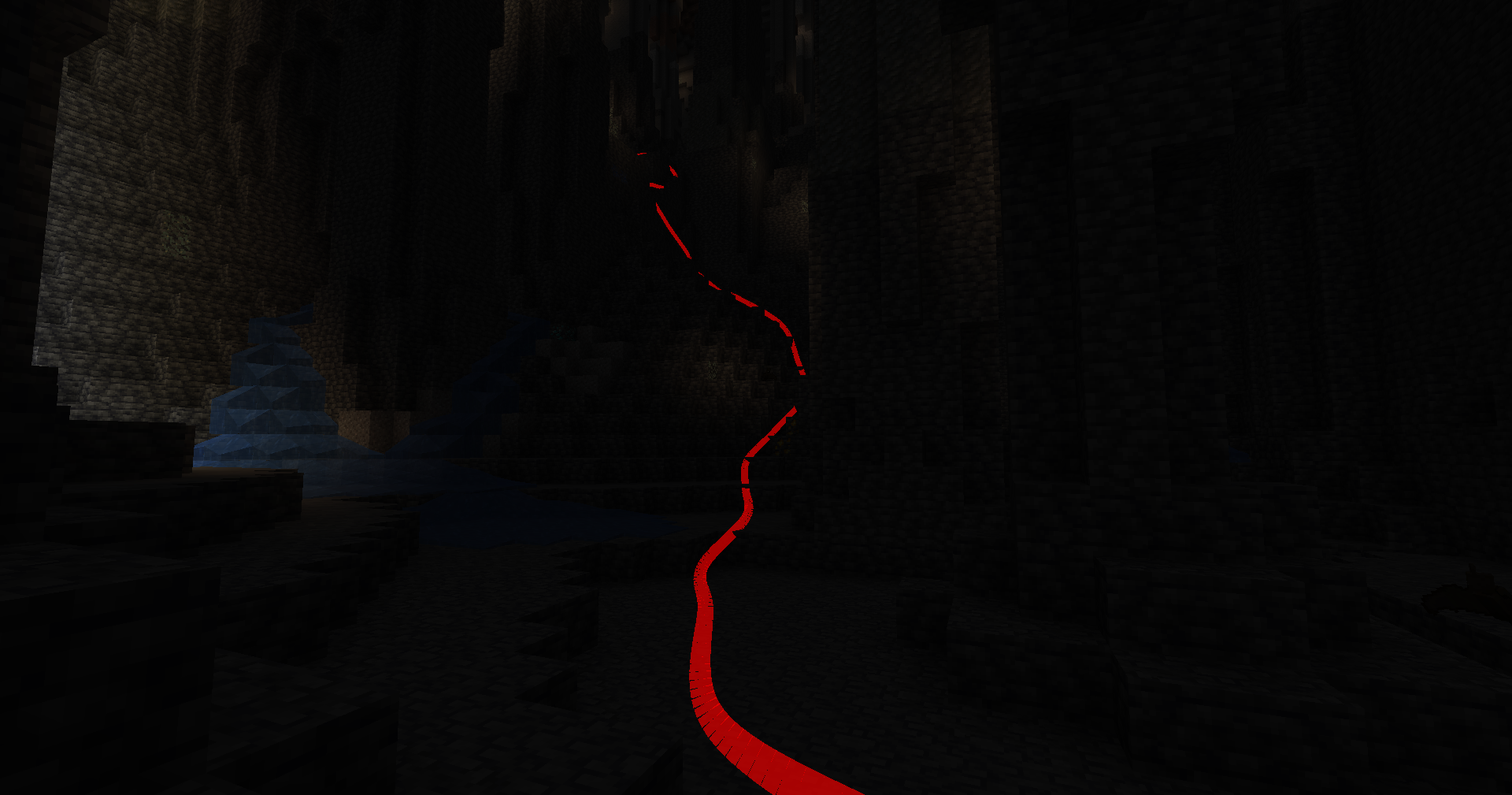
功能特性
- 多维度追踪:无缝追踪你在主世界、下界和末地的路径,每个维度拥有独立的追踪数据。
- 多追踪会话:创建、列出并在多个追踪会话之间切换,以管理不同的探索活动。
- 自定义选项:选择你喜欢的颜色、细分程度、线条粗细等等!
- 深度覆盖:切换深度测试,控制追踪线条是渲染在透明方块后面还是前面。
- 手动保存命令:随时保存已追踪的路径,无需退出游戏。
- 按键绑定:使用可自定义的按键绑定快速启用或禁用追踪和渲染。
按键绑定
命令 (所有命令均以 /pathtracker 为前缀)
-
追踪控制
- 启用追踪:
/pathtracker track on
- 禁用追踪:
/pathtracker track off
-
渲染控制
- 启用渲染:
/pathtracker render on
- 禁用渲染:
/pathtracker render off
-
线条自定义
- 设置线条颜色:
/pathtracker color <hex>
- <hex>: 十六进制颜色代码(例如 FF0000 代表红色)
- 示例:
/pathtracker color 00FF00 (将线条设置为绿色)
-
保存路径数据
-
会话管理
- 列出当前会话:
/pathtracker session current
- 列出所有会话:
/pathtracker session list
- 创建新会话:
/pathtracker session create <name>
- <name>: 新会话的名称
- 示例:
/pathtracker session create Exploration1
- 切换会话:
/pathtracker session switch <name>
- <name>: 现有会话的名称
- 示例:
/pathtracker session switch Exploration1
-
深度覆盖控制
- 启用深度覆盖:
/pathtracker depth on
- 禁用深度覆盖:
/pathtracker depth off
-
透明度
- 设置透明度:
/pathtracker transparency <value>
- <value>: 透明度值(例如 1000 代表 10%)
- 示例:
/pathtracker transparency 1000 (将透明度设置为 10%)
-
线条模式
- 设置模式:
/pathtracker mode <value>
- <value>: 模式值("grouped" 或 "default")
- 示例:
/pathtracker mode default (将模式设置为默认)
-
线条粗细
- 设置粗细:
/pathtracker thickness <value>
- <value>: 粗细值(例如 10 代表方块大小的 10%)
- 示例:
/pathtracker thickness 10 (将粗细设置为 10%)
-
渲染距离
- 设置线条渲染距离:
/pathtracker renderdistance <value>
- <value>: 渲染距离值(例如 256 代表 256 个方块)
- 示例:
/pathtracker renderdistance 256 (将渲染距离设置为 256 个方块)
-
线条细分
- 设置线条细分数量:
/pathtracker subdivisions <value>
- <value>: 细分值(例如 8 代表每个方块的 8 个细分)
- 示例:
/pathtracker subdivisions 256 (将细分设置为每个方块 8 个)
PathTracker is a Minecraft Fabric mod that enhances your exploration experience by visually tracking your movements across different dimensions. It overlays translucent colored lines behind your player, allowing you to see the paths you've taken. Whether you're navigating the Overworld, exploring the Nether, or venturing into the End, PathTracker ensures you never lose your way.

Features
- Multi-Dimension Tracking: Seamlessly track your paths across the Overworld, Nether, and End with separate tracking data for each dimension.
- Multiple Tracking Sessions: Create, list, and switch between multiple tracking sessions to manage different exploration endeavors.
- Customizable Options: Choose your preferred color, subdivision, line thickness and much more!
- Depth Override: Toggle depth testing to control whether tracking lines are rendered behind or on top of opaque blocks.
- Manual Save Command: Save your tracked paths at any time without needing to exit the game.
- Key Bindings: Quickly enable or disable tracking and rendering using customizable key bindings.
Key Bindings
-
Toggle Tracking
- Key:
K
- Function: Enable/disable path tracking.
-
Toggle Rendering
- Key:
L
- Function: Show/hide tracking lines.
Commands (All prefixed with /pathtracker)
-
Tracking Control
- Enable Tracking:
/pathtracker track on
- Disable Tracking:
/pathtracker track off
-
Rendering Control
- Enable Rendering:
/pathtracker render on
- Disable Rendering:
/pathtracker render off
-
Line Customization
- Set Line Color:
/pathtracker color <hex>
- <hex>: Hex color code (e.g., FF0000 for red)
- Example:
/pathtracker color 00FF00 (Sets lines to green)
-
Save Path Data
- Manual Save:
/pathtracker save
- Saves all tracked paths across dimensions and sessions.
-
Session Management
- List Current Session:
/pathtracker session current
- List All Sessions:
/pathtracker session list
- Create New Session:
/pathtracker session create <name>
- <name>: Name for the new session
- Example:
/pathtracker session create Exploration1
- Switch Session:
/pathtracker session switch <name>
- <name>: Existing session name
- Example:
/pathtracker session switch Exploration1
-
Depth Override Control
- Enable Depth Override:
/pathtracker depth on
- Lines render on top of all blocks.
- Disable Depth Override:
/pathtracker depth off
- Lines respect block depth and can be occluded.
-
Transparency
- Set Transparency:
/pathtracker transparency <value>
- <value>: The transparency value (e.g., 1000 for 10%)
- Example:
/pathtracker transparency 1000 (Sets transparency to 10%)
-
Line Mode
- Set Mode:
/pathtracker mode <value>
- <value>: The transparency value ("grouped" or "default")
- Example:
/pathtracker mode default (Sets mode to default)
-
Line Thickness
- Set thickness:
/pathtracker thickness <value>
- <value>: The transparency value (e.g., 10 for 10% block size)
- Example:
/pathtracker thickness 10 (Sets thickness to 10%)
-
Render Distance
- Set the Line Render Distance:
/pathtracker renderdistance <value>
- <value>: The renderdistance value (e.g., 256 for 256 blocks)
- Example:
/pathtracker renderdistance 256 (Sets render distance to 256 blocks)
- Line Subdivisions
- Set the Line Subdivision count:
/pathtracker subdivisions <value>
- <value>: The subdivisions value (e.g., 8 for 8 subdivisions per block)
- Example:
/pathtracker subdivisions 256 (Sets subdivisions to 8 per block)
评论 0
登录后参与评分
还没有评论,来抢沙发吧