
描述
此模组允许地图制作者/服务器管理员更改维度的重生点与维度。
要使用此模组,请在主 Minecraft/服务器目录或(在单人环境中)存档的主目录中放置一个名为 perfectspawn.json 的文件。该文件必须具有如下基本结构:
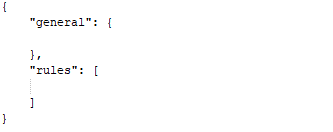
在 general(常规)部分,目前只有一个可设置的属性,即 "initialSpawnDimension"。它设定从未登录过的玩家首次加入时的初始生成维度。
此配置将导致玩家在首次加入游戏时在地狱(Nether)生成。
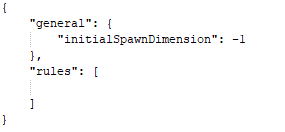
rules(规则)数组可以包含多条规则,用于控制不同维度的设置。
每条规则具有以下属性:
- appliesTo:一个数组,包含维度 ID、维度类型名称或世界提供程序(WorldProvider)的完整类名。这控制此规则应用于哪些维度。可以使用 "*" 作为 appliesTo 的特殊元素,表示将此规则应用于所有维度。
- canRespawnHere:玩家是否可以在此规则适用的维度中重生。
- canSleepHere:玩家是否可以在此规则适用的维度中睡觉。(如果 canRespawnHere 设置为 false,则此项无效)。这也允许在通常无法睡觉的维度(如地狱/末地)中睡觉。
- spawnPoint:玩家在此维度生成的位置。
- respawnDimension:当玩家在此维度死亡时重生的维度(如果 canRespawnHere 设置为 false)。
位于 rules 数组后面的规则会覆盖前面规则的数值。
以下是一些示例:
这将把所有维度的初始生成维度与重生维度更改为地狱。它还将地狱的生成点移动到 "x: 5, y: 84, z: 10",并允许玩家通过在地狱睡觉来改变自己的生成点。

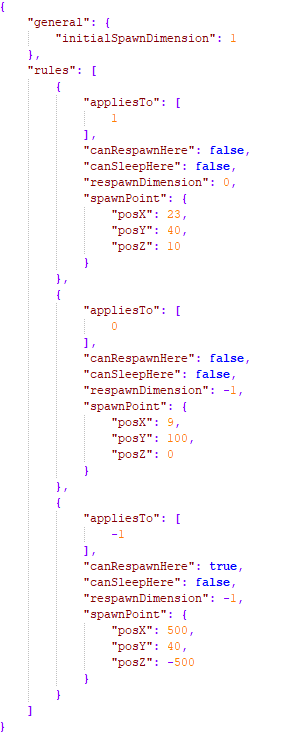
使用此配置,玩家将在末地的 "x: 23, y: 40, z: 10" 处初始生成。一旦他们死亡,他们将在世界的 "x: 9, y: 100, z: 0" 处重生。当他们在那里死亡时,他们将在地狱的 "x: 500, y: 40, z: -500" 处重生。在地狱死亡只会让他们重新回到 "x: 500, y: 40, z: -500"。在地狱/末地/世界(Overworld)中无法睡觉。
问题反馈
请将关于 Bug 的报告发布到 GitHub Issue Tracker,而不是 CurseForge 帖子页面。此外,在提交 Bug 报告之前,请确保您的 JSON 格式有效。
旧版本信息( 1.12.2):
此模组允许地图制作者/服务器管理员设置世界的精确生成点。您还可以指定起始维度。
要使用此模组,请在主 Minecraft/服务器目录或(在单人环境中)存档的主目录中放置一个名为 PerfectSpawn.json 的文件。该文件必须具有以下格式:
{
"spawnDimension": 1,
"spawnX": 50,
"spawnY": 70,
"spawnZ": 60,
"exactSpawn": true,
"forceBed": true,
"spawnProtection": true
}
此配置文件将生成点设置为末地的 X:50,Y:70,Z:60,启用床铺、生成保护并强制精确生成。
如果您创建文件,您必须始终指定 spawnX、spawnY、spawnZ 和 spawnDimension。exactSpawn、spawnProtection 和 forceBed 是可选的,默认值为 true。
- "exactSpawn":指定玩家是否将精确地在指定的生成点重生。
- "forceBed":指定 PerfectSpawn 是否应强制在 spawnDimension 中允许使用床。
- "spawnProtection":允许在更改后的生成维度中使用生成保护。
世界目录中的 PerfectSpawn.json 会覆盖主目录中的那个。
您可以使用命令 "/ps reload" 重新加载所有配置文件并立即应用它们。
此模组类转换它找到的所有 WorldProvider,如果您遇到仅在运行 PerfectSpawn 时发生的崩溃,请先联系我!
除了手动创建 JSON 文件外,您还可以使用 /ps set 命令在游戏中更改生成点。
如果您想将 Perfect Spawn 添加到整合包中或与地图一起分发,请随意操作。
Description
This mod allows map makers / server owners to change the respawn point & dimension of dimensions.
To use this mod you place a file called perfectspawn.json in the main minecraft / server directory or (in a singleplayer environment) in the main directory of a save. The file has to have this basic structure:
In the general section there is currently only one property you can set which is "initialSpawnDimension". This sets the dimension where a player who has never logged in before spawns initially.
This config would cause players to initially spawn in the nether when first joining the game.
The rules array can contain multiple rules which control the settings for different dimensions.
Each rule has these properties:
- appliesTo: An array containing either dimension ids / names of dimensions types / full class names of world providers. This controls what dimensions this rule is applied to. "*" can be used as a special element of appliesTo which will apply this rule to all dimensions.
- canRespawnHere: Whether players can respawn in the dimensions this rule applies to.
- canSleepHere: Whether players can sleep in the dimensions this rule applies to. (If canRespawnHere is set to false this has no effect). This also allows sleeping in dimensions where you generally can't sleep (Like the Nether / End).
- spawnPoint: The position at which players will spawn in this dimension.
- respawnDimension: The dimension players will respawn in when dying in this dimension (If canRespawnHere is set to false)
Rules that come later in the rules array override values of rules that come earlier.
Here are some examples:
This changes the initial spawn dimension & the respawn dimension of all dimensions to the nether. It also moves the spawn point of the nether to "x: 5, y: 84, z: 10" and allows players to change their spawn point in the nether by sleeping.
With this players will initially spawn in the end at "x: 23, y: 40, z: 10". Once they die they will respawn in the overworld at "x: 9, y: 100, z: 0". When they die there they will respawn in the nether at "x: 500, y: 40, z: -500". Dying in the nether will just respawn them back at "x: 500, y: 40, z: -500". It isn't possible to sleep in the nether / end / overworld.
Issues
Please post about bugs on the github issue tracker and not on the curseforge post. Also make sure your json is valid before creating a bug report.
Info for older versions ( < 1.12.2):
This mod allows map makers / server owners to set the exact spawn point of a world. You can also specify the start dimension.
To use this mod you place a file called PerfectSpawn.json in the main minecraft / server directory or (in a singleplayer environment) in the main directory of a save. The file has to have the following format:
{
"spawnDimension": 1,
"spawnX": 50,
"spawnY": 70,
"spawnZ": 60,
"exactSpawn": true,
"forceBed": true,
"spawnProtection": true
}
This config file sets the spawn point to X:50,Y:70,Z:60 in the end, enables beds, spawn protection and forces an exact spawn.
If you create a file you always have to specify spawnX,spawnY,spawnZ and spawnDimension. exactSpawn, spawnProtection and forceBed are optional and default to true.
- "exactSpawn" : Specifys whether players will respawn exactly at the specified spawn point.
- "forceBed": Specifys whether PerfectSpawn should force beds to be possible in the spawnDimension
- "spawnProtection" : Allows Spawn Protection in changed spawn dimensions.
A PerfectSpawn.json in a world directory overrides the one in the main dictionary.
You can use the command "/ps reload" to reload all config files and apply them instantly.
This mod class transforms all WorldProviders it finds, if you get a crash that only happens while using PerfectSpawn come to me first!
Instead of creating the json files manually you can also use the /ps set command to change the spawn ingame.
If you wanna add Perfect Spawn to a modpack / ship it with a map feel free to do so.

下载 Perfect Spawn
需要联机服务器吗?
稳定流畅、一键部署,几分钟即可和朋友联机开服
最低仅需 8 元/月 即可畅快联机
下载 Perfect Spawn
需要联机服务器吗?
稳定流畅、一键部署,几分钟即可和朋友联机开服
最低仅需 8 元/月 即可畅快联机
下载 Perfect Spawn
需要联机服务器吗?
稳定流畅、一键部署,几分钟即可和朋友联机开服
最低仅需 8 元/月 即可畅快联机
下载 Perfect Spawn
下载 Perfect Spawn
下载 Perfect Spawn
下载 Perfect Spawn
下载 Perfect Spawn
下载 Perfect Spawn
下载 Perfect Spawn
- 修复:在进入/离开其他模组的维度时崩溃的问题
关于这个资源的讨论、问题反馈与使用心得
还没有讨论,来发第一帖吧
你是这个资源的作者?登录后可认领此资源。
相似资源
 模组

显示你正在注视的方块的信息。(适用于 Minecraft 1.16+ 的 Hwyla/Waila 分支)
 模组

查看物品与配方
 模组
在游戏画面角落显示附近世界地形、玩家、生物和实体的地图。可创建路径点,帮助你找到标记过的位置。
 模组
使用 JavaScript 编辑配方、添加自定义物品、编写世界事件!
 模组
添加区块认领和玩家组队功能,并与 Xaero's Minimap 和 World Map 集成
 模组
添加全屏世界地图,显示你在世界中已探索的区域。与 Xaero's Minimap 搭配使用效果极佳。
评论 0
登录后参与评分
还没有评论,来抢沙发吧