
一个轻量级的客户端性能 HUD,以简洁的单角覆盖层显示 FPS、RAM、实体数量、已加载区块、延迟和 CPU 使用率。不再需要截图里堆砌三个不同的模组——只需一个可切换的面板,一个热键,搞定。
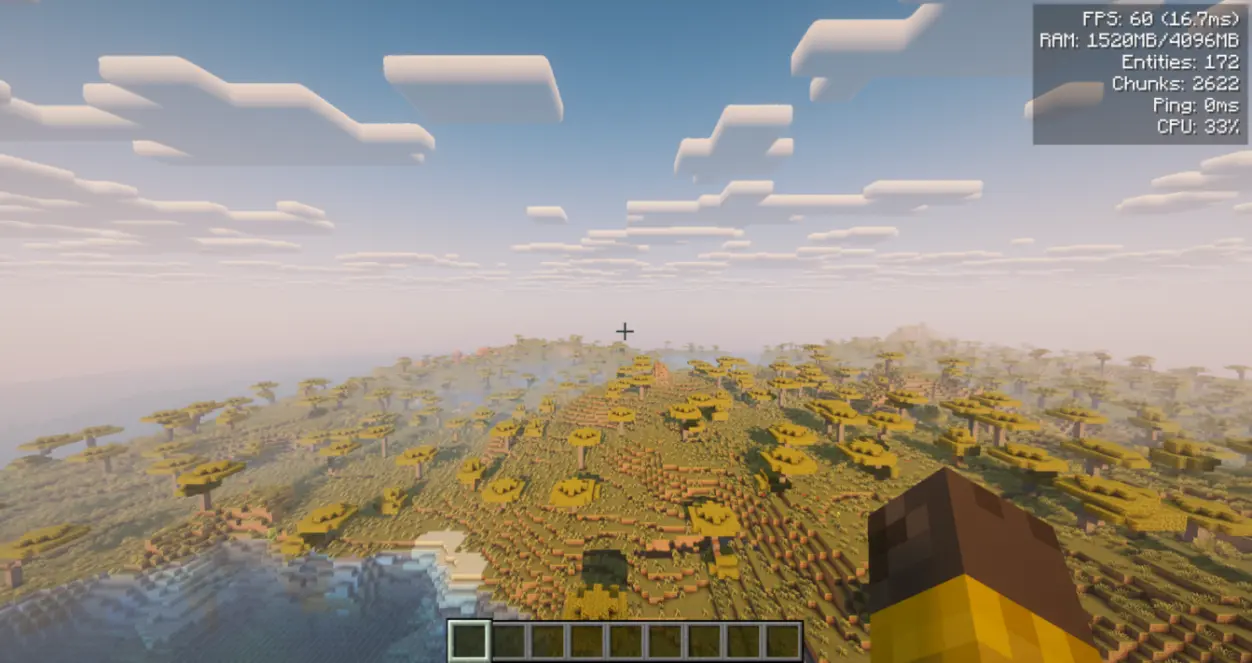
仅限客户端 — 请勿安装在服务器上。专用服务器不需要此模组,即使 jar 文件存在也不会写入 config/performancehud.json。支持单人游戏 — 只需将其放入你的 mods 文件夹即可。
Fabric 需要 Fabric API 和 Architectury API。NeoForge 需要 Architectury API。Forge 无需额外依赖。
免费用于任何整合包 — 无论是公开还是私有,均无需许可。
功能介绍
- 单一覆盖层 — 右上角紧凑的 HUD,最多显示 6 项实时指标。
- 按
F8切换 — 通过一个按键绑定(可在控制设置中更改)隐藏或显示整个面板。当按下F1隐藏其他界面时,HUD 也会自动隐藏。 - 独立指标开关 — 可以单独开启或关闭各行数据,只查看你关心的内容。
- 与其他 HUD 兼容 — 仅作为客户端覆盖层;不改变世界或服务器逻辑,可随时安全移除。
显示的指标
- FPS — 当前帧率及每帧时间(毫秒),例如
120 (8.3ms)。 - RAM — 已用 / 最大堆内存(MB)。
- Entities — 世界中实体的数量。
- Chunks — 当前客户端已加载的区块数。
- Ping — 可用时的网络延迟(毫秒);否则显示
-。 - CPU — 系统 CPU 负载百分比(可用时)。
- 如果无法读取某值,该行将显示
-,并在日志中记录一次原因。
配置
- 游戏内屏幕:
/phud open或/performancehud open。在 Forge/NeoForge 上也可从模组菜单访问。 - 自定义选项: 背景透明度、屏幕边距(X/Y)、行间距。
- 配置文件:
config/performancehud.json。如果配置文件存在拼写错误,会在写入默认值之前将其保留为config/performancehud.json.bak,因此设置不会无声丢失。 - 按键绑定: 默认
F8切换,位于原版控制菜单中。
命令
使用 /performancehud 或其短别名 /phud。
/phud open— 打开配置屏幕/phud status— 向聊天栏打印当前设置/phud reload//phud reset— 管理配置文件/phud <setting> <value>— 从聊天栏切换指标或调整视觉效果(例如/phud showFps false、/phud xMargin 10、/phud textColor 16777215)
详情
提供英文、俄文、德文、西班牙文、法文、意大利文、日文、韩文、巴西葡萄牙文和简体中文。
反馈
请在 Discord 上报告任何错误、问题或功能建议:
更多由 Nikrecs 制作的模组: DynamicRenderDistance · CropGrowthHUD
我推荐的其他模组。
A lightweight client-side performance HUD that shows FPS, RAM, entities, loaded chunks, ping, and CPU usage in a single clean corner overlay. No more screenshots cluttered with three different mods — one toggleable panel, one hotkey, done.
Client-side only — do not install on the server. A dedicated server does not need this mod and will not write config/performancehud.json if the jar is present anyway. Works in singleplayer — just drop it in your mods folder.
Fabric needs Fabric API and Architectury API. NeoForge needs Architectury API. Forge needs no additional dependencies.
Free to use in any modpack — public or private, no permission needed.
What it does
- One overlay — a compact HUD in the top-right corner with up to 6 live metrics.
- Toggle with
F8— hide or show the whole panel with one keybind (changeable in Controls). The HUD also hides whenF1hides the rest of the interface. - Per-metric switches — turn individual lines on or off so you only see what you care about.
- Safe with other HUDs — client overlay only; does not change world or server logic, and is safe to remove at any time.
Metrics shown
- FPS — current frame rate with frame time in ms (e.g.
120 (8.3ms)). - RAM — used / max heap in MB.
- Entities — entity count in the loaded world.
- Chunks — currently loaded client chunks.
- Ping — your latency in ms when available; otherwise
-. - CPU — system CPU load percentage when available.
- If a value cannot be read, that line shows
-and the reason is logged once.
Configuration
- In-game screen:
/phud openor/performancehud open. On Forge/NeoForge it is also available from the Mods menu. - Customization: background opacity, screen margins (X/Y), and line spacing.
- File:
config/performancehud.json. A typo’d file is kept asconfig/performancehud.json.bakbefore defaults are written, so settings are not silently lost. - Keybind: default
F8toggle in the vanilla Controls menu.
Commands
Use /performancehud or the short alias /phud.
/phud open— open the config screen/phud status— print current settings to chat/phud reload//phud reset— manage the config file/phud <setting> <value>— toggle metrics or adjust visuals from chat (e.g./phud showFps false,/phud xMargin 10,/phud textColor 16777215)
Details
- Available in English, Russian, German, Spanish, French, Italian, Japanese, Korean, Brazilian Portuguese, and Simplified Chinese.
Feedback
Please report any bugs, errors, or feature suggestions on Discord:
More mods by Nikrecs: DynamicRenderDistance · CropGrowthHUD
My other mods that I recommend.

下载 PerformanceHUD
下载 PerformanceHUD
下载 PerformanceHUD
下载 PerformanceHUD
下载 PerformanceHUD
下载 PerformanceHUD
下载 PerformanceHUD
下载 PerformanceHUD
下载 PerformanceHUD
下载 PerformanceHUD
1.2.0
移植版本
- 新增:Fabric 1.19.2、Forge 1.21.1、Forge 1.21.11
- HUD、
F8、/performancehud和/phud命令、设置界面以及config/performancehud.json与其他构建版本保持一致
修复
- NeoForge 26.2 和 26.3:当按下
F1隐藏其他界面时,HUD 也会随之隐藏 - 若存在拼写错误的
config/performancehud.json,在写入默认配置前会将其保留为config/performancehud.json.bak(避免设置被无声丢失) - 如果无法读取某个 HUD 数值(实体、区块、延迟、CPU),则会记录一次原因;该行仍显示为短横线
- 安装了该模组的专用服务器不再创建
config/performancehud.json
兼容性
- 仅限客户端;服务器端无需安装该模组
- Fabric:需要 Fabric API + Architectury API(Architectury 为新依赖)
- NeoForge:需要 Architectury API(新依赖)
- Forge:仅需 Forge 本身
- 每个 jar 文件仅针对单个 Minecraft 版本
未更改
- HUD 行内容与格式、绘制位置、
F8快捷键、命令及数值范围、设置界面、配置键名与默认值、翻译内容
关于这个资源的讨论、问题反馈与使用心得
还没有讨论,来发第一帖吧
你是这个资源的作者?登录后可认领此资源。
相似资源
 模组

显示你正在注视的方块的信息。(适用于 Minecraft 1.16+ 的 Hwyla/Waila 分支)
 模组

查看物品与配方
 模组

原版世界生成优化模组
 模组
在游戏画面角落显示附近世界地形、玩家、生物和实体的地图。可创建路径点,帮助你找到标记过的位置。
 模组
使用 JavaScript 编辑配方、添加自定义物品、编写世界事件!
 模组
缓冲的原始输入和线程化的事件轮询
评论 0
登录后参与评分
还没有评论,来抢沙发吧