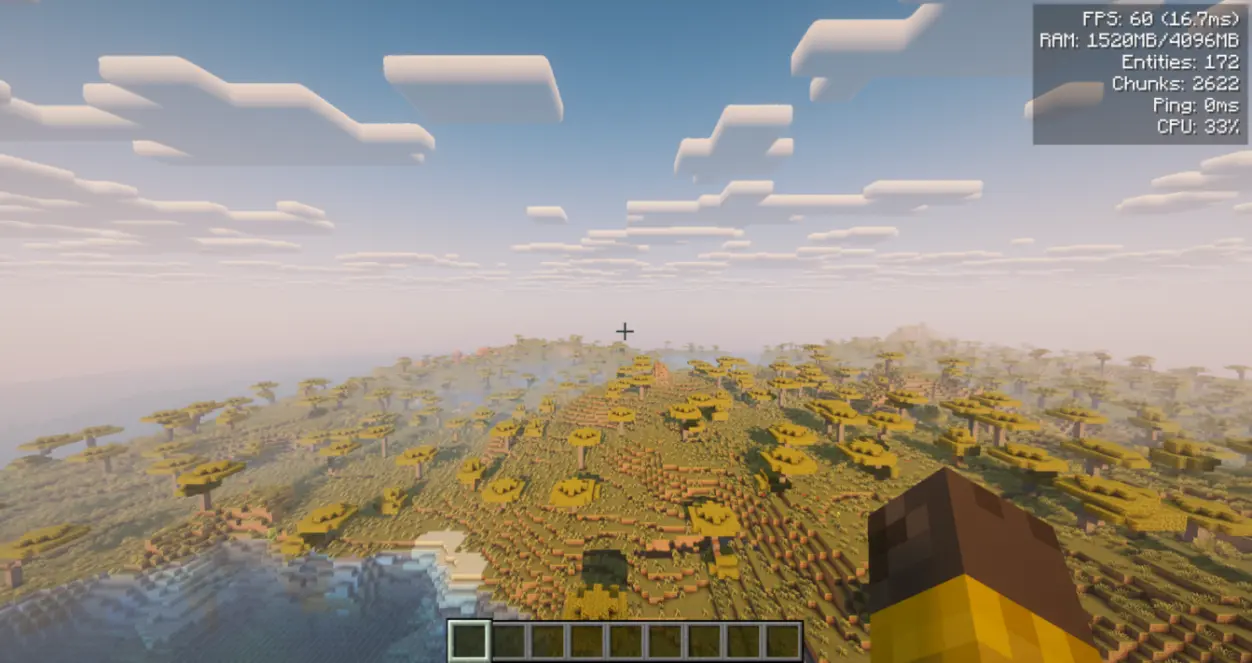
一个轻量级的客户端性能 HUD,以简洁的单角覆盖层显示 FPS、RAM、实体数量、已加载区块、延迟和 CPU 使用率。不再需要截图里堆砌三个不同的模组——只需一个可切换的面板,一个热键,搞定。
仅限客户端 — 请勿安装在服务器上。专用服务器不需要此模组,即使 jar 文件存在也不会写入 config/performancehud.json。支持单人游戏 — 只需将其放入你的 mods 文件夹即可。
Fabric 需要 Fabric API 和 Architectury API。NeoForge 需要 Architectury API。Forge 无需额外依赖。
免费用于任何整合包 — 无论是公开还是私有,均无需许可。
功能介绍
- 单一覆盖层 — 右上角紧凑的 HUD,最多显示 6 项实时指标。
- 按
F8 切换 — 通过一个按键绑定(可在控制设置中更改)隐藏或显示整个面板。当按下 F1 隐藏其他界面时,HUD 也会自动隐藏。
- 独立指标开关 — 可以单独开启或关闭各行数据,只查看你关心的内容。
- 与其他 HUD 兼容 — 仅作为客户端覆盖层;不改变世界或服务器逻辑,可随时安全移除。
显示的指标
- FPS — 当前帧率及每帧时间(毫秒),例如
120 (8.3ms)。
- RAM — 已用 / 最大堆内存(MB)。
- Entities — 世界中实体的数量。
- Chunks — 当前客户端已加载的区块数。
- Ping — 可用时的网络延迟(毫秒);否则显示
-。
- CPU — 系统 CPU 负载百分比(可用时)。
- 如果无法读取某值,该行将显示
-,并在日志中记录一次原因。
配置
- 游戏内屏幕:
/phud open 或 /performancehud open。在 Forge/NeoForge 上也可从模组菜单访问。
- 自定义选项: 背景透明度、屏幕边距(X/Y)、行间距。
- 配置文件:
config/performancehud.json。如果配置文件存在拼写错误,会在写入默认值之前将其保留为 config/performancehud.json.bak,因此设置不会无声丢失。
- 按键绑定: 默认
F8 切换,位于原版控制菜单中。
命令
使用 /performancehud 或其短别名 /phud。
/phud open — 打开配置屏幕
/phud status — 向聊天栏打印当前设置
/phud reload / /phud reset — 管理配置文件
/phud <setting> <value> — 从聊天栏切换指标或调整视觉效果(例如 /phud showFps false、/phud xMargin 10、/phud textColor 16777215)
详情
提供英文、俄文、德文、西班牙文、法文、意大利文、日文、韩文、巴西葡萄牙文和简体中文。
反馈
请在 Discord 上报告任何错误、问题或功能建议:
我推荐的其他模组。
A lightweight client-side performance HUD that shows FPS, RAM, entities, loaded chunks, ping, and CPU usage in a single clean corner overlay. No more screenshots cluttered with three different mods — one toggleable panel, one hotkey, done.

Client-side only — do not install on the server. A dedicated server does not need this mod and will not write config/performancehud.json if the jar is present anyway. Works in singleplayer — just drop it in your mods folder.
Fabric needs Fabric API and Architectury API. NeoForge needs Architectury API. Forge needs no additional dependencies.
Free to use in any modpack — public or private, no permission needed.
What it does
- One overlay — a compact HUD in the top-right corner with up to 6 live metrics.
- Toggle with
F8 — hide or show the whole panel with one keybind (changeable in Controls). The HUD also hides when F1 hides the rest of the interface.
- Per-metric switches — turn individual lines on or off so you only see what you care about.
- Safe with other HUDs — client overlay only; does not change world or server logic, and is safe to remove at any time.
Metrics shown
- FPS — current frame rate with frame time in ms (e.g.
120 (8.3ms)).
- RAM — used / max heap in MB.
- Entities — entity count in the loaded world.
- Chunks — currently loaded client chunks.
- Ping — your latency in ms when available; otherwise
-.
- CPU — system CPU load percentage when available.
- If a value cannot be read, that line shows
- and the reason is logged once.
Configuration
- In-game screen:
/phud open or /performancehud open. On Forge/NeoForge it is also available from the Mods menu.
- Customization: background opacity, screen margins (X/Y), and line spacing.
- File:
config/performancehud.json. A typo’d file is kept as config/performancehud.json.bak before defaults are written, so settings are not silently lost.
- Keybind: default
F8 toggle in the vanilla Controls menu.
Commands
Use /performancehud or the short alias /phud.
/phud open — open the config screen
/phud status — print current settings to chat
/phud reload / /phud reset — manage the config file
/phud <setting> <value> — toggle metrics or adjust visuals from chat (e.g. /phud showFps false, /phud xMargin 10, /phud textColor 16777215)
Details
- Available in English, Russian, German, Spanish, French, Italian, Japanese, Korean, Brazilian Portuguese, and Simplified Chinese.
Feedback
Please report any bugs, errors, or feature suggestions on Discord:
My other mods that I recommend.
评论 0
登录后参与评分
还没有评论,来抢沙发吧

