
描述
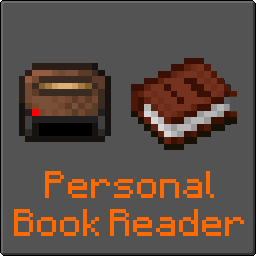
你是否曾希望在 Minecraft 中拥有有声读物?此模组添加了“个人书籍阅读器”物品和“解说者方块”,两者均可为你朗读《已书写的书》的内容!如果你想独自收听,请使用个人书籍阅读器;如果你想向范围内的所有玩家广播,请使用解说者方块!
功能:
- 个人书籍阅读器:由任意 8 个木板台阶和 1 个望远镜合成
- 《已书写的书》的插入和移除方式类似于背包(Bundle)
- 插入书籍后,从快捷栏使用个人书籍阅读器即可开始或重新开始朗读
- 在快捷栏中使用个人书籍阅读器并潜行可停止朗读
- 正在朗读时,个人书籍阅读器可以在用户背包内移动而不会中断朗读
- 当个人书籍阅读器被丢弃或放入其他容器(包括背包)时,朗读将停止
- 玩家的背包中可以同时有多个个人书籍阅读器进行朗读
- 插入书籍后,个人书籍阅读器的纹理和提示文本会更新
- 解说者方块:由任意 8 个木板和 1 个望远镜合成
- 《已书写的书》的插入和移除方式类似于唱片机(Jukebox)
- 区域内可以有多个解说者方块同时朗读(朗读大混乱!)
- 解说者方块兼容红石系统和漏斗
- 朗读时输出强度为 15 的红石信号,不朗读时输出强度为 0
- 输出与书中页数相匹配的红石比较器信号强度(最高不超过比较器信号强度 15)
- 如果方块被破坏或书籍被移除,解说者方块将停止朗读
- 个人书籍阅读器和解说者方块的朗读音量受 Minecraft 声音选项中的“语音/对白”音量滑块控制(目前 Mac 系统不支持音量调整)
- 解说者方块的朗读范围可配置,并可调整多种数值以微调方块的朗读持续时间,使其与书籍内容的朗读节奏匹配
- 如果安装了 Mod Menu,可通过游戏内配置进行修改
重要信息
- 在客户端世界中,某些操作(如打开《已书写的书》界面)会暂停游戏。但这不会暂停朗读,这可能导致解说者方块的计时和朗读不同步。
- 解说者方块通过将《已书写的书》的内容拆分为“短语”来工作。如果玩家离开广播区域后稍后再次进入,他们将在下一个短语开始时听到朗读。这可能会导致感知上的音频同步延迟,或者如果解说者方块已经在朗读书中的最后一个短语,则可能听不到任何声音。
- 解说者方块的朗读没有距离音量衰减。如果你离开广播区域,朗读将会中断。
- 对于解说者方块,音量调整仅在下一个 spoken phrase(口语化短语)生效。
- 对于个人书籍阅读器,音量调整仅在下次“播放”使用时生效。
配置:
配置文件允许你更改解说者方块的朗读范围和计时值。
默认 .minecraft/config/personalreader.json:
{
  "narratorBlockNarrationRange": 64,
  "narrationPhraseMaxCharacterLength": 200,
  "narrationPhraseMinimumDurationMilliseconds": 1500,
  "narrationPhraseSpaceDurationMilliseconds": 20,
  "narrationPhrasePausePunctuationDurationMilliseconds": 800,
  "narrationPhraseEndPunctuationDurationMilliseconds": 1000,
  "narrationPhraseOtherCharacterDurationMilliseconds": 80,
  "narrationPhraseNewLineDurationMilliseconds": 1000,
  "internalNarrationPhraseNewLineString": "§"
}
支持
如果你有错误报告、功能请求或其他类型的问题,请在我们的 GitHub issues 页面 发帖。这是所有模组的统一问题页面,因此请确保在帖子中包含模组名称和版本。我们感谢所有的反馈!
如果你想支持开发,可以在我们的 BuyMeACoffee 留言打赏。当然,这仅在你力所能及的情况下进行——否则,使用、分享并享受此模组就是对我们最大的支持。谢谢!
致谢
灵感来源于 The-Fireplace 制作的 Audiobook。
Description
Have you ever wanted audiobooks in Minecraft? This mod adds a Personal Book Reader item and a Narrator block that both narrate a Written Book's content for you! Use a Personal Book Reader if you want to listen by yourself, and use a Narrator block if you want to broadcast to all players in range!
Features:
- Personal Book Reader item, crafted with 8 of any wooden slabs and 1 Spyglass
- Written Books can be inserted and removed similar to the Bundle
- Once a book is inserted, use the Personal Book Reader from your hotbar to begin or restart the narration
- Use the Personal Book Reader from your hotbar while sneaking to stop the narration
- Once narrating, the Personal Book Reader can be moved around within the user's inventory without stopping the narration
- Narration will stop when Personal Book Reader is dropped or placed into another inventory (this includes Bundles)
- Multiple Personal Book Readers can be narrating in the player's inventory at the same time
- Personal Book Reader texture and tooltip update when a book is inserted
- Narrator block, crafted with 8 of any wooden planks and 1 Spyglass
- Written books can be inserted and removed similar to the Jukebox
- Multiple Narrator blocks can be narrating in an area at the same time (narration chaos!)
- Narrator block is Redstone-compatible and Hopper-compatible
- Outputs a Redstone signal strength of 15 when narrating, 0 when not narrating
- Outputs a Redstone Comparator signal strength that matches the number of pages in the book (up to a comparator signal strength of 15)
- Narrator block stops narrating if the block is broken or if the book is removed
- Personal Book Reader and Narrator block narration volume is controlled by the "Voice/Speech" volume slider in Minecraft's sound options (volume adjustment currently not supported on Mac)
- Narrator block narration range is configurable, as well as several values for tweaking the block's narration duration timing to match a book's narrated content
- In-game configuration is available via Mod Menu if installed
Important Information
- In a client world, certain actions (such as opening the Written Book screen) pause the game. This will not pause narration, which can desynchronize Narrator block timing and narration.
- The Narrator block works by breaking Written Book content into "phrases". If a player leaves the broadcast area and then re-enters at a later time, they will start hearing narration once the next phrase begins. This can result in a perceived delay in synchronizing audio, or no audio if the Narrator block is already narrating the last phrase in the book.
- There is no distance volume fade for Narrator block narration. Narration will cut off if you leave the broadcast area.
- For the Narrator block, volume adjustments only take effect during the next spoken phrase.
- For the Personal Book Reader, volume adjustments only take effect during the next "play" use.
Config:
The config allows you to change the Narrator block's narration range and timing values.
Default .minecraft/config/personalreader.json:
{
  "narratorBlockNarrationRange": 64,
  "narrationPhraseMaxCharacterLength": 200,
  "narrationPhraseMinimumDurationMilliseconds": 1500,
  "narrationPhraseSpaceDurationMilliseconds": 20,
  "narrationPhrasePausePunctuationDurationMilliseconds": 800,
  "narrationPhraseEndPunctuationDurationMilliseconds": 1000,
  "narrationPhraseOtherCharacterDurationMilliseconds": 80,
  "narrationPhraseNewLineDurationMilliseconds": 1000,
  "internalNarrationPhraseNewLineString": "§"
}
Support
If you have a bug report, feature request, or any other type of issue, please post on our GitHub issues page. This is an issues page for all of our mods, so be sure to include the mod's name and version in your post. We appreciate all feedback!
If you'd like to support development, you can leave a tip at our BuyMeACoffee. Only if it's within your means- otherwise, using, sharing, and enjoying the mod is support enough. Thank you!
Credits
Inspired by Audiobook by The-Fireplace.

 模组

 模组

 模组

 模组
 模组

 模组
评论 0
登录后参与评分
还没有评论,来抢沙发吧