Phoenix Chromatic Colors
Phoenix Chromatic Colors 是一个模组,通过简单的颜色代码提供高级文本着色和动画文本效果。
它允许告示牌、书籍、聊天消息、物品名称、流体名称以及任何支持 Minecraft 语言文件文本格式化的内容使用以下功能:
- 自定义十六进制颜色
- 动画渐变
- 波浪效果
- 脉冲效果
- 故障(Glitch)效果
- 抖动效果
- 彩虹文本
等等更多功能
该模组使用 & 符号在游戏中激活颜色/效果代码,并使用 § 符号在语言文件中调用它们。
基本用法
使用颜色代码
要使用自定义颜色:
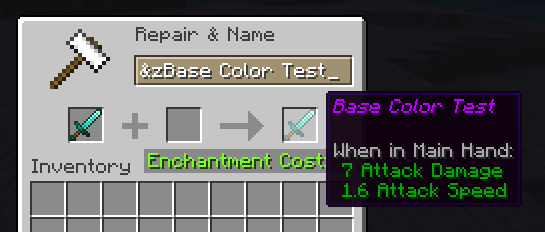
&zHello World
如果 z 映射为电光紫(Electric Violet),文本将变为紫色。
默认包含的代码
| Code |
Description |
&z |
Electric Violet |
&s |
Chili Red |
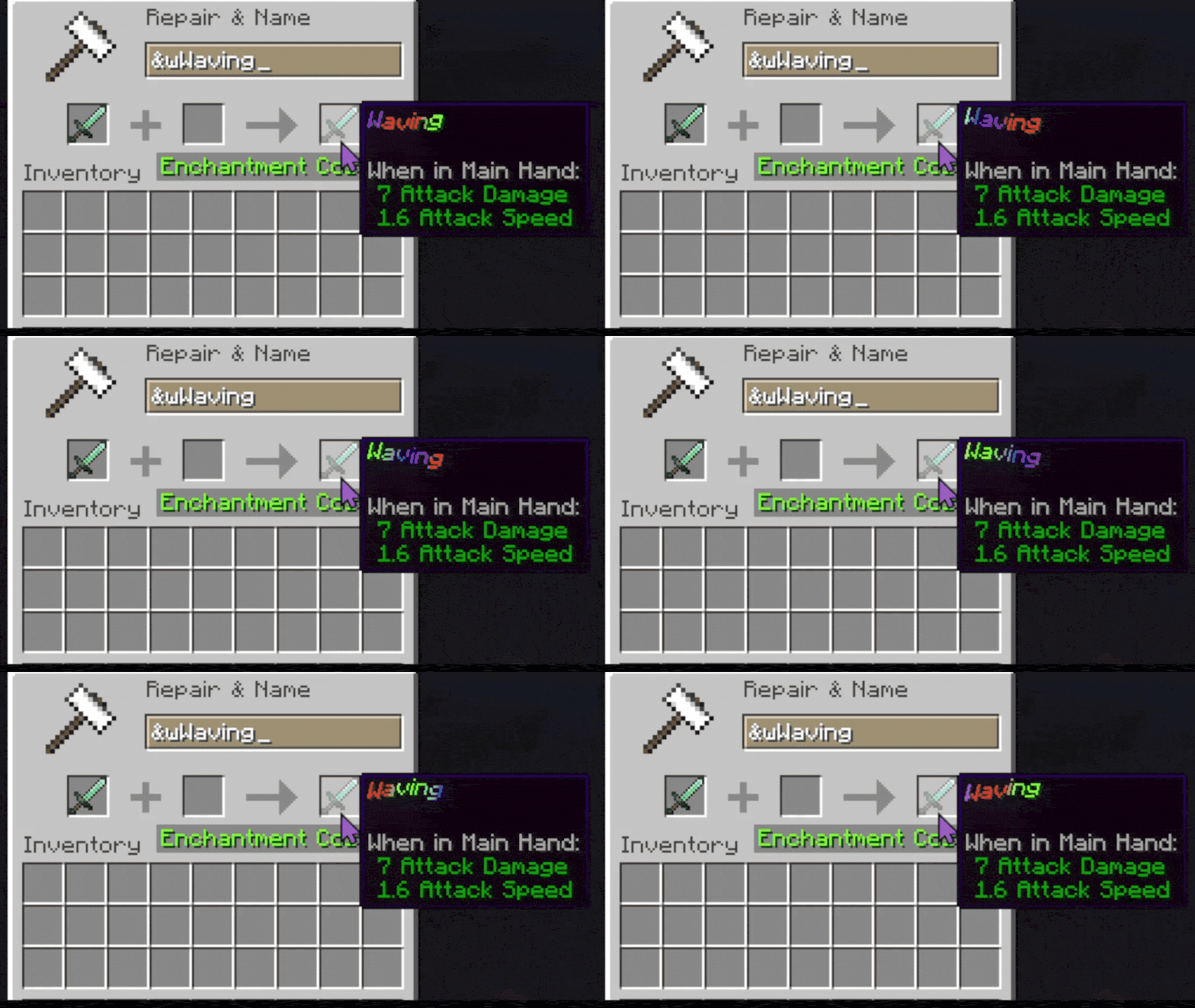
&w |
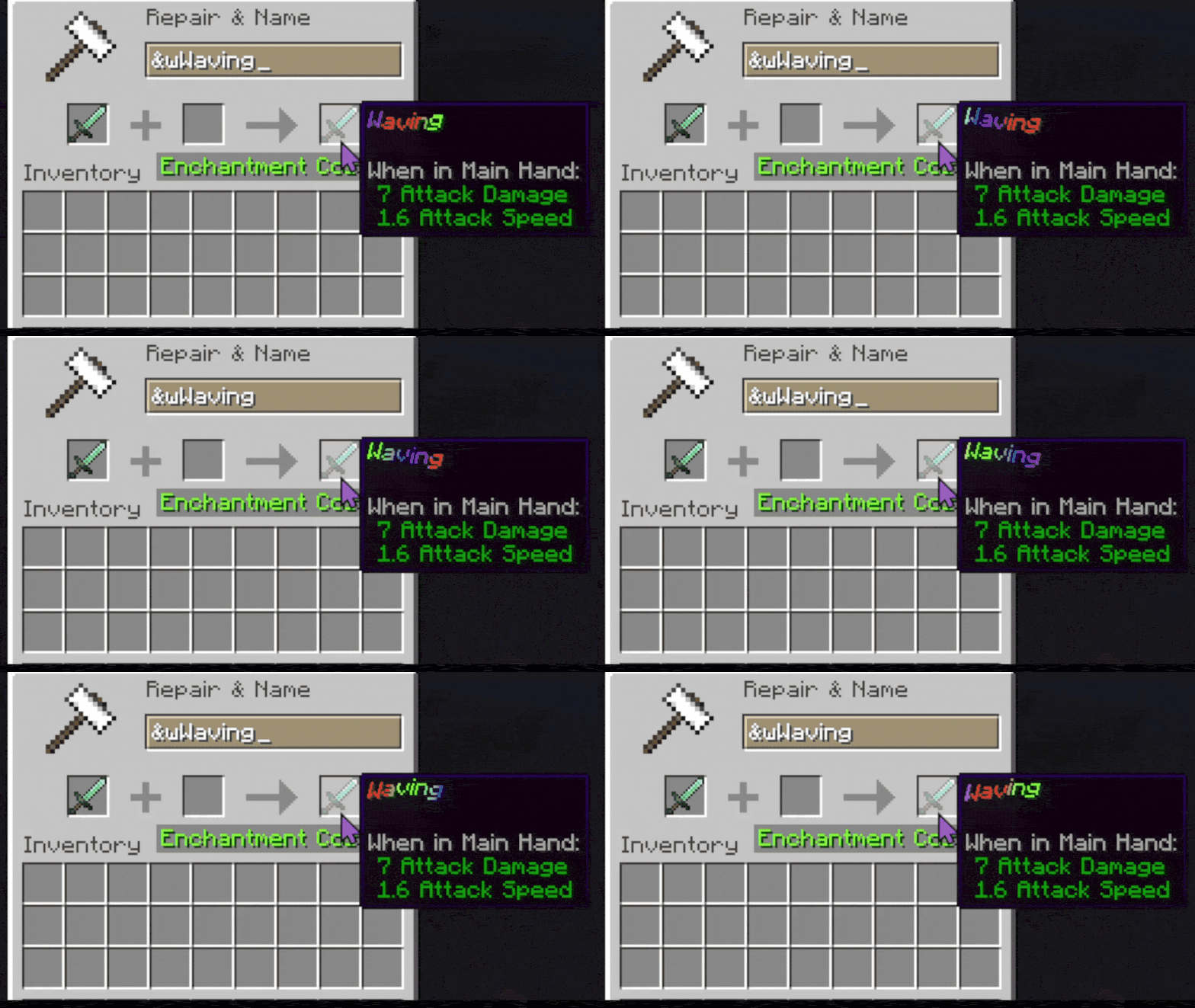
Animated wave effect |
&p |
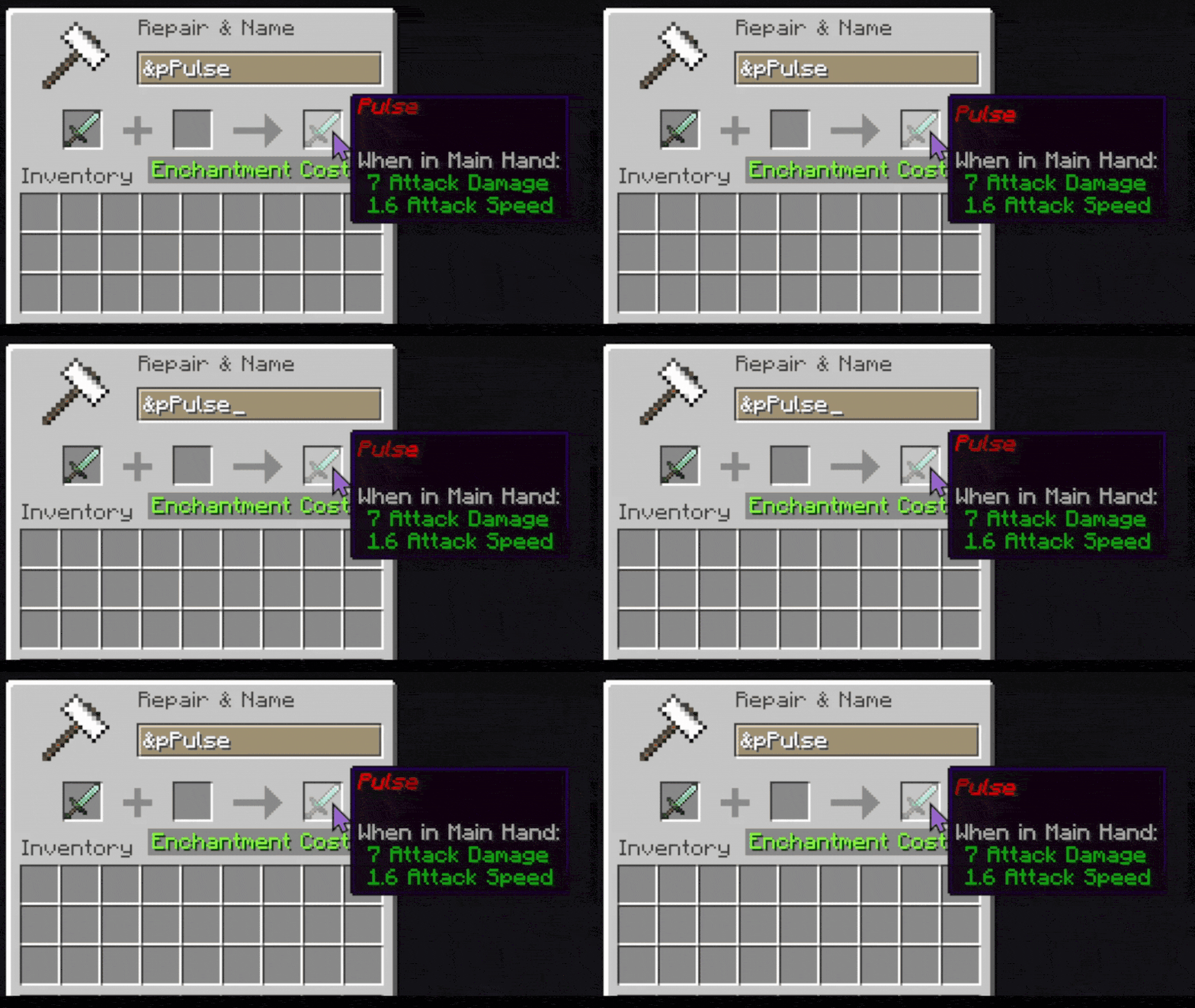
Pulsing color |
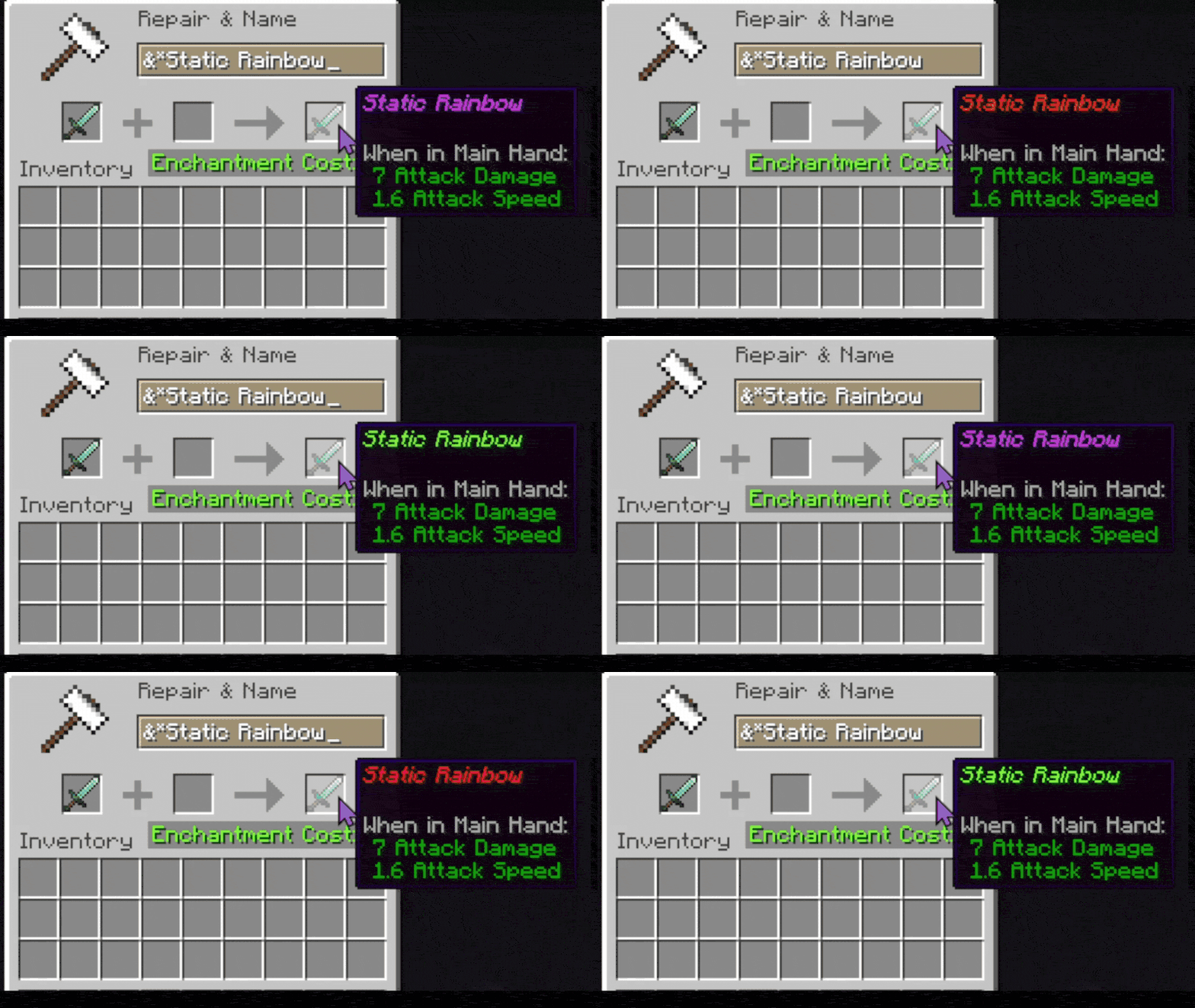
&* |
Static rainbow |
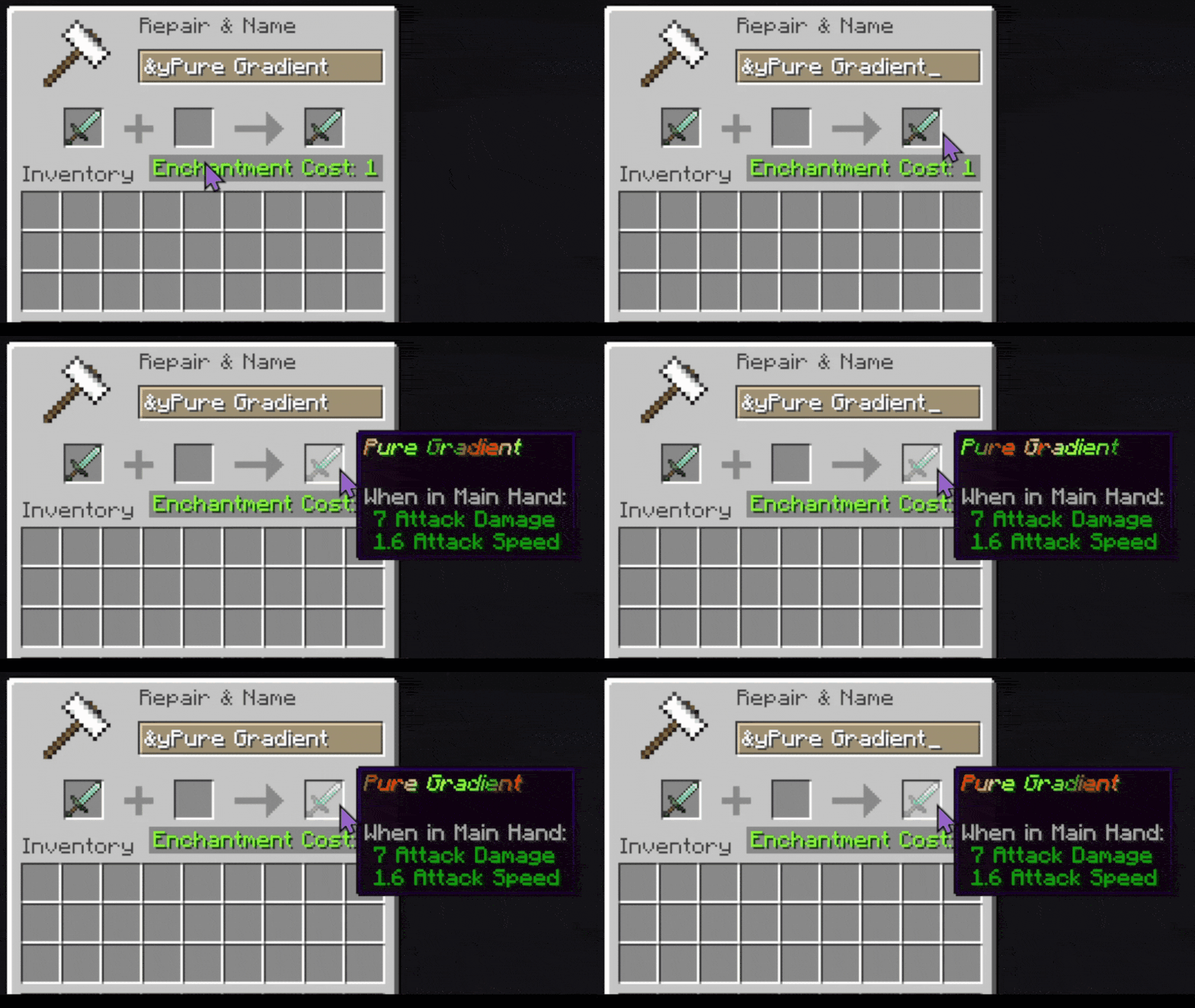
&y |
Smooth gradient |
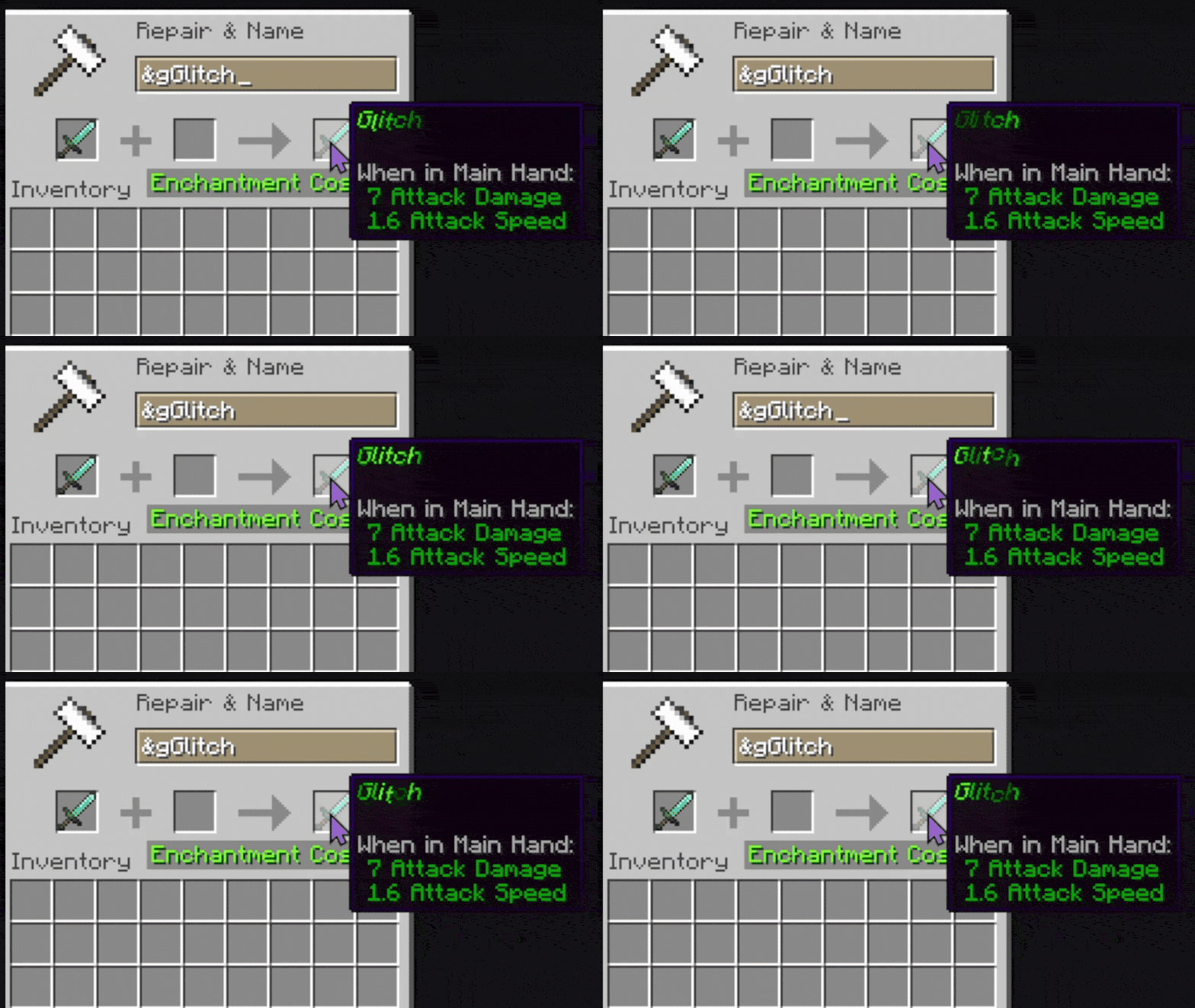
&g |
Glitching text |
&$ |
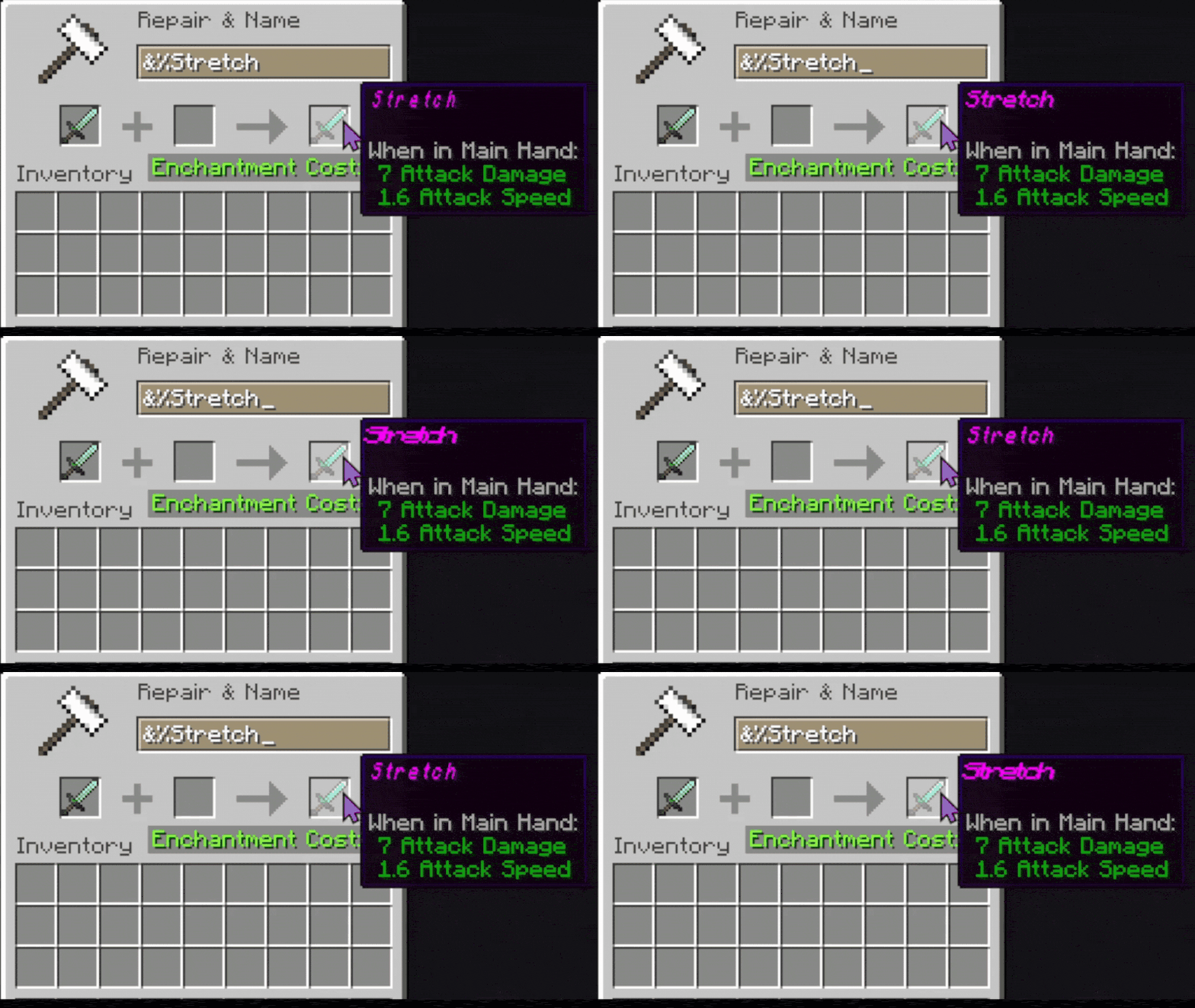
Stretching text |
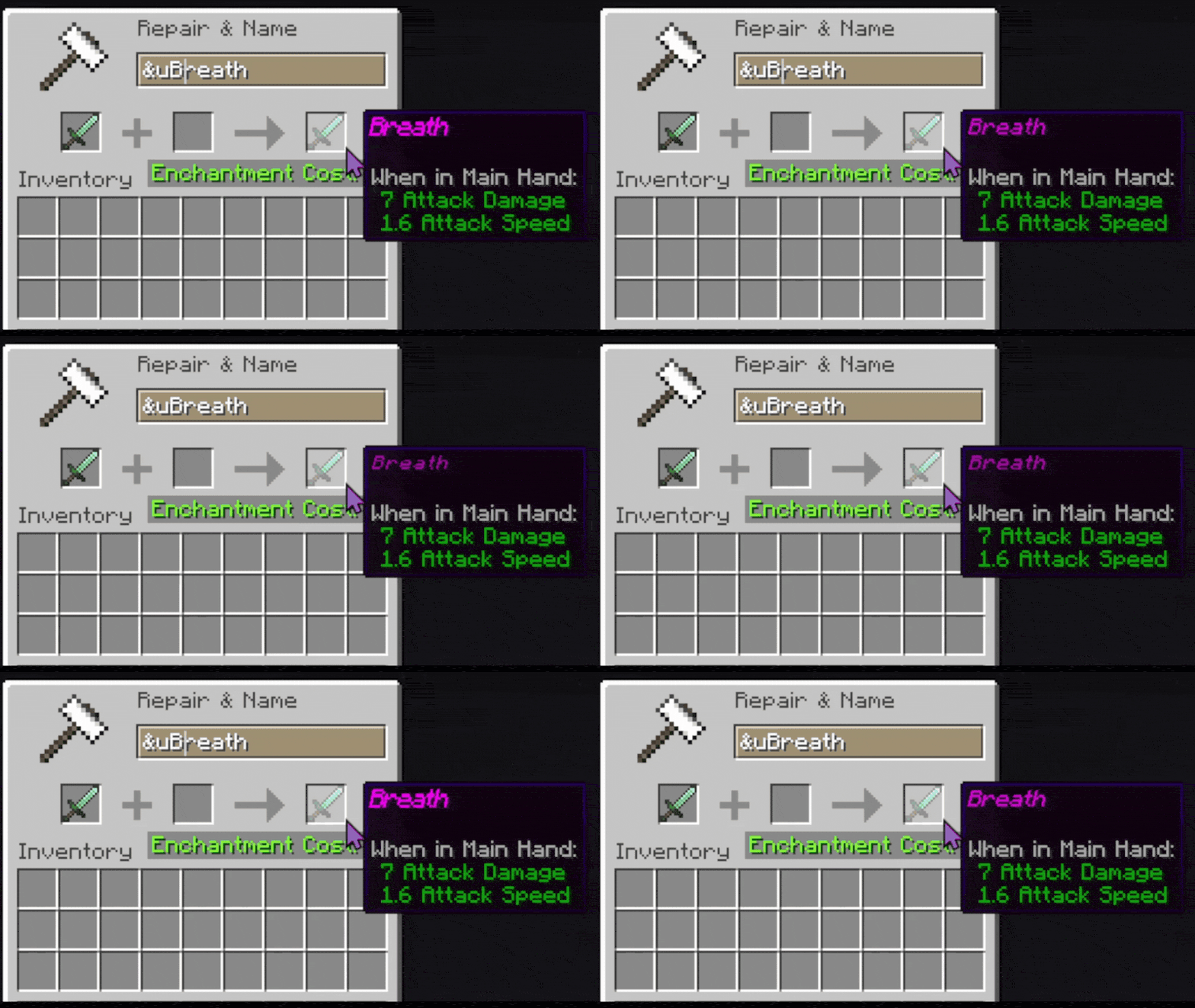
&- |
Breathing text |
Unicode 支持
任何 Unicode 字符都可以用作代码符号。
示例:
&★Hello
&☀Gold Text
&❤Love
这意味着你不仅限于使用普通字母。
配置文件
所有自定义代码都存储在:
phoenix_chromatic_colors_codes.yaml
你可以自由添加自己的颜色和效果。
创建简单颜色代码
语法
symbol:hexcode
示例
p:ff2100
这将创建:
&pHello
该文本将显示为以下颜色:
#ff2100
十六进制代码注意事项
十六进制代码不应包含 # 符号。
正确写法:
ff2100
错误写法:
#ff2100
创建效果代码
效果允许文本进行动画或移动。
语法
symbol:colorSpeed,movementSpeed,movementID,hexCode,hexCode...
效果参数
| Parameter |
Description |
symbol |
游戏中使用的代码 |
colorSpeed |
颜色变化速度 |
movementSpeed |
动画移动速度 |
movementID |
效果类型 |
hexCode... |
一个或多个颜色 |
可用的内置效果
| Effect ID |
Description |
wave |
波浪形移动渐变 |
pulse |
脉冲颜色 |
shake |
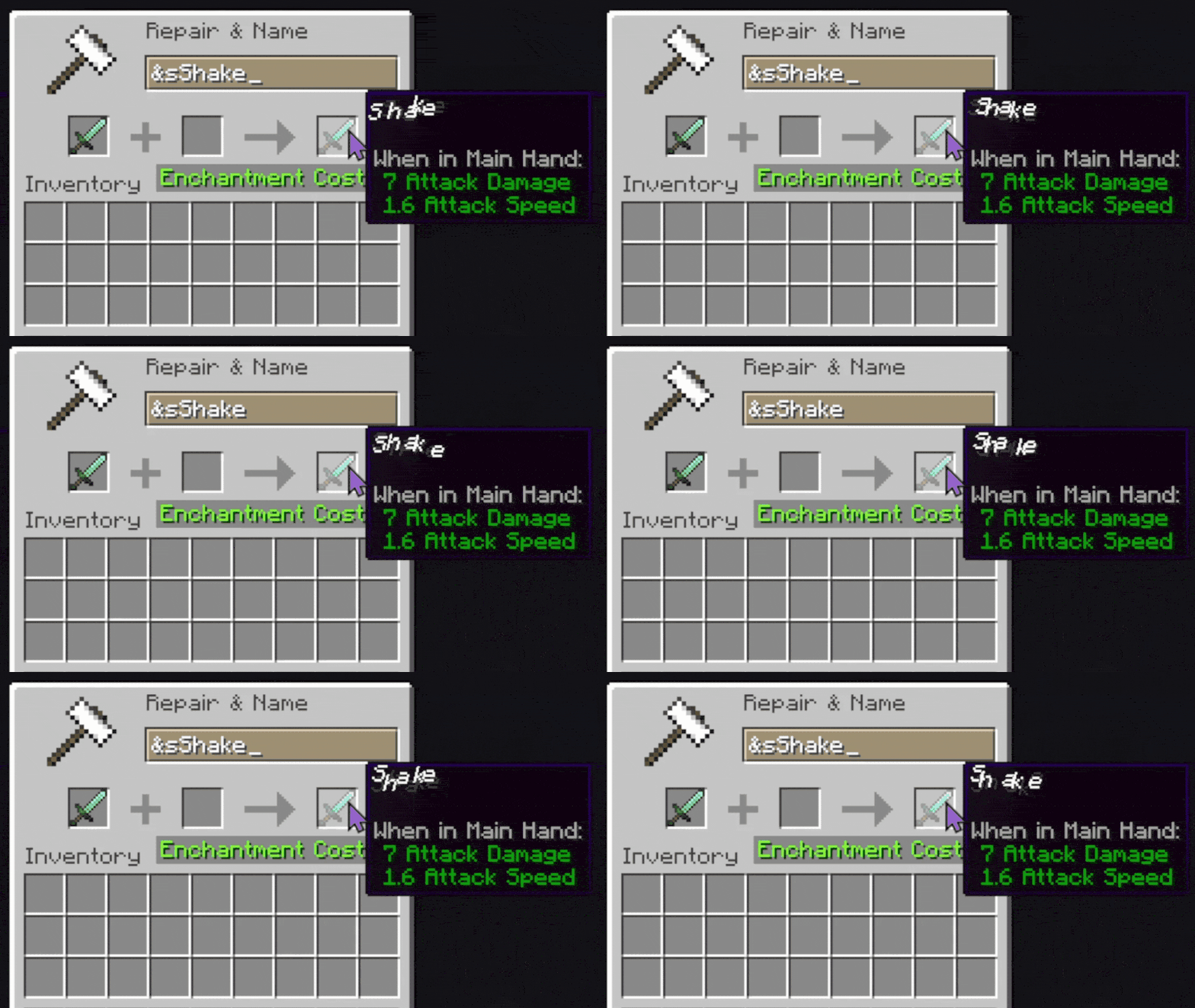
随机抖动移动 |
glitch |
扭曲的故障动画 |
none |
纯渐变 |
breath |
呼吸文本 |
stretching |
拉伸 |
rainbow |
静态彩虹循环 |
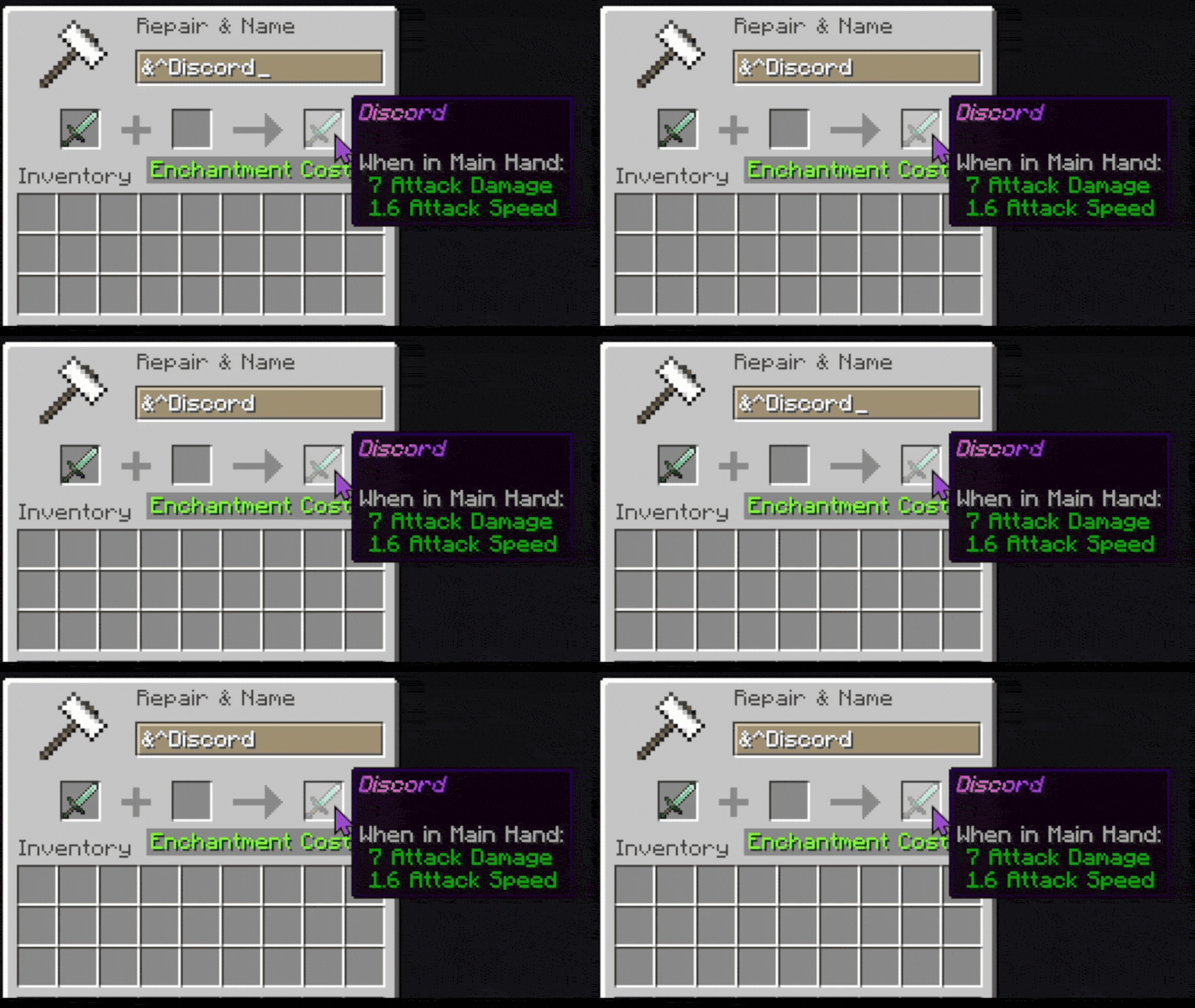
discord |
Discord 升级风格渐变 |
示例:波浪效果
w:1.0,1.0,wave,ff2100,f2c300
用法:
&wHello
这将创建一个动态的橙色/黄色波浪渐变。
示例:脉冲效果
u:0.8,0.5,pulse,ff0000,ffffff
这将在红色和白色之间脉冲。
示例:纯渐变
g:0.0,0.0,none,ff0000,00ff00,0000ff
创建一个平滑的静态 RGB 渐变。
彩虹支持
你可以使用关键字:
rainbow
来代替十六进制代码。
示例:
r:1.0,1.0,wave,rainbow
多色渐变
效果支持多种颜色。
示例:
m:1.0,0.8,wave,ff0000,00ff00,0000ff,ff00ff
这将创建一个四色动画渐变。
游戏内示例
告示牌
&wWelcome!
书籍
&pChapter One
物品名称
&gLegendary Sword
模组化语言文件支持
该模组对于仅支持语言文件文本格式化的模组特别有用。
示例包括:
物品
流体
工具提示 (Tooltips)
GUI 标签
模组名称
描述
Discord 效果
discord 效果重现了 Discord 服务器升级风格的渐变。
示例:
d:1.0,1.0,discord,5865f2,eb459e
ChromaticAPI 支持
其他模组可以使用以下 API 添加自己的自定义效果:
ChromaticAPI
这允许开发人员注册全新的移动/效果类型。
更多信息可在 GitHub 页面上找到。
小贴士
良好的渐变实践
通常使用 2–4 种颜色效果最佳。
颜色过多可能导致难以阅读。
性能
过快的移动速度在聊天或告示牌中可能显得混乱。
推荐数值:
0.5 - 2.0
故障排除
颜色无效
请确保:
使用了 & 或 §
代码存在于配置文件中
十六进制代码有效
未包含 #
效果无效
请确保:
移动 ID 存在
至少提供了一种颜色
语法正确使用了逗号
完整配置示例
# Simple Colors
z:9400ff
p:ff2100

# Wave Gradient
w:1.0,1.0,wave,ff2100,f2c300

# Pulse
u:0.8,0.5,pulse,ff0000,ffffff

# Static Gradient
g:0.0,0.0,none,ff0000,00ff00,0000ff

# Rainbow
r:1.0,1.0,wave,rainbow

# Discord Style
d:1.0,1.0,discord,5865f2,eb459e
最后说明
Phoenix Chromatic Colors 旨在让 Minecraft 文本样式更加丰富,同时保持轻量级和易于配置。
尝试组合渐变、Unicode 符号和动画,为你的世界或整合包创建独特的风格。
命名代码
Phoenix Chromatic Colors 还支持命名颜色/效果代码。
命名代码的工作方式与普通符号代码完全相同,只不过不是使用单个字符,而是在方括号内使用可读的名称。
这使得配置文件更易于组织和记忆。
默认情况下,命名代码区分大小写。
在游戏中使用命名代码
语法
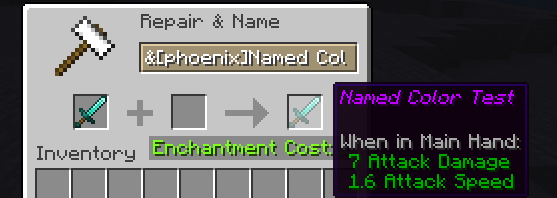
&[name]Text Here
示例
如果你的配置中包含:
electric_violet:9400ff
你可以使用:
&[electric_violet]Hello
而不是:
&zHello
为什么要使用命名代码?
当出现以下情况时,命名代码非常有用:
- 你拥有许多自定义颜色
- 你希望配置文件具有可读性
- 多人编辑配置文件
- 你忘记了符号的含义
- 你希望组织主题名称
命名颜色代码
语法
name:hexcode
示例
electric_violet:9400ff
chili_red:ff2100
golden_sun:f2c300
用法:
&[electric_violet]Magic
&[golden_sun]Legendary
命名效果代码
命名效果的工作方式与普通效果相同。
语法
name:colorSpeed,movementSpeed,movementID,hexCode,hexCode...
示例:命名波浪
sunset_wave:1.0,1.0,wave,ff5500,ffcc00
用法:
&[sunset_wave]Animated Text
示例:命名脉冲
danger_pulse:0.7,0.5,pulse,ff0000,ffffff
用法:
&[danger_pulse]WARNING
示例:命名渐变
ocean_gradient:0.0,0.0,none,0044ff,00ffee
用法:
&[ocean_gradient]Ocean Text
混合使用命名代码与符号代码
你可以自由结合这两种系统。
配置示例:
# Symbol Codes
z:9400ff
p:ff2100

# Named Codes
electric_violet:9400ff
sunset_wave:1.0,1.0,wave,ff5500,ffcc00
两者均可生效:
&zHello
&[electric_violet]Hello
&[sunset_wave]Animated
命名技巧
良好的命名示例:
electric_violet
deep_ocean
gold_pulse
discord_boost
toxic_glitch
避免使用:
a
thing
cool
test123
可读的命名能让大型配置文件更易于维护。
推荐的命名风格
推荐使用蛇形命名法(snake case):
my_gradient_name
这有助于提高可读性并避免格式问题。
带命名代码的完整配置示例
# Basic Colors
electric_violet:9400ff
chili_red:ff2100

# Effects
sunset_wave:1.0,1.0,wave,ff5500,ffcc00
danger_pulse:0.7,0.5,pulse,ff0000,ffffff
ocean_gradient:0.0,0.0,none,0044ff,00ffee

# Discord Style
discord_boost:1.0,1.0,discord,5865f2,eb459e
用法:
&[electric_violet]Magic
&[sunset_wave]Animated
&[discord_boost]Boosted
最后说明
命名代码完全是可选的,但对于大型整合包、服务器或高度定制的配置文件而言,强烈建议使用。
默认情况下,命名代码区分大小写。
它们提供了一种更整洁且更具扩展性的方式来组织颜色和效果。
Phoenix Chromatic Colors
Phoenix Chromatic Colors is a mod that adds advanced text coloring and animated text effects using simple color codes.
It allows signs, books, chat messages, item names, fluid names, and anything that supports Minecraft lang text formatting to use:
- Custom hex colors
- Animated gradients
- Wave effects
- Pulse effects
- Glitch effects
- Shake effects
- Rainbow text
And more
The mod uses the & symbol to activate color/effect codes in-game and the § symbol to use them in lang.
Basic Usage
Using a Color Code
To use a custom color:
&zHello World
If z is mapped to electric violet, the text becomes violet.
Default Included Codes
| Code |
Description |
&z |
Electric Violet |
&s |
Chili Red |
&w |
Animated wave effect |
&p |
Pulsing color |
&* |
Static rainbow |
&y |
Smooth gradient |
&g |
Glitching text |
&$ |
Stretching text |
&- |
Breathing text |
Unicode Support
Any Unicode character can be used as a code symbol.
Examples:
&★Hello
&☀Gold Text
&❤Love
This means you are not limited to normal letters.
Config File
All custom codes are stored in:
phoenix_chromatic_colors_codes.yaml
You can freely add your own colors and effects.
Creating Simple Color Codes
Syntax
symbol:hexcode
Example
p:ff2100
This creates:
&pHello
Which displays text using the color:
#ff2100
Hex Code Notes
Hex codes should NOT include the #.
Correct:
ff2100
Incorrect:
#ff2100
Creating Effect Codes
Effects allow animated or moving text.
Syntax
symbol:colorSpeed,movementSpeed,movementID,hexCode,hexCode...
Effect Parameters
| Parameter |
Description |
symbol |
The code used in-game |
colorSpeed |
Speed of color changing |
movementSpeed |
Speed of animation movement |
movementID |
Type of effect |
hexCode... |
One or more colors |
Available Built-In Effects
| Effect ID |
Description |
wave |
Wavy moving gradient |
pulse |
Pulsing colors |
shake |
Random shaking movement |
glitch |
Distorted glitch animation |
none |
Pure gradient only |
breath |
Breathing text |
stretching |
Stretching |
rainbow |
Static rainbow cycling |
discord |
Discord boost style gradient |
Example: Wave Effect
w:1.0,1.0,wave,ff2100,f2c300
Usage:
&wHello
This creates an animated orange/yellow wave gradient.
Example: Pulse Effect
u:0.8,0.5,pulse,ff0000,ffffff
This pulses between red and white.
Example: Pure Gradient
g:0.0,0.0,none,ff0000,00ff00,0000ff
Creates a smooth static RGB gradient.
Rainbow Support
You can use the keyword:
rainbow
Instead of a hex code.
Example:
r:1.0,1.0,wave,rainbow
Multiple Gradient Colors
Effects support multiple colors.
Example:
m:1.0,0.8,wave,ff0000,00ff00,0000ff,ff00ff
This creates a 4-color animated gradient.
In-Game Examples
Signs
&wWelcome!
Books
&pChapter One
Item Names
&gLegendary Sword
Modded Lang Support
The mod is especially useful for mods that only support lang text formatting.
Examples include:
Items
Fluids
Tooltips
GUI labels
Modded names
Descriptions
Discord Effect
The discord effect recreates the boosted Discord server gradient style.
Example:
d:1.0,1.0,discord,5865f2,eb459e
ChromaticAPI Support
Other mods can add their own custom effects using:
ChromaticAPI
This allows developers to register entirely new movement/effect types.
More information is available on the GitHub page.
Tips
Good Gradient Practice
Using 2–4 colors usually looks best.
Too many colors can become difficult to read.
Performance
Very fast movement speeds may appear chaotic in chat or signs.
Recommended values:
0.5 - 2.0
Troubleshooting
Colors Not Working
Make sure:
You used & or §
The code exists in the config
The hex code is valid
No # is included
Effect Not Working
Make sure:
The movement ID exists
At least one color is provided
The syntax uses commas correctly
Example Full Config
# Simple Colors
z:9400ff
p:ff2100

# Wave Gradient
w:1.0,1.0,wave,ff2100,f2c300

# Pulse
u:0.8,0.5,pulse,ff0000,ffffff

# Static Gradient
g:0.0,0.0,none,ff0000,00ff00,0000ff

# Rainbow
r:1.0,1.0,wave,rainbow

# Discord Style
d:1.0,1.0,discord,5865f2,eb459e
Final Notes
Phoenix Chromatic Colors is designed to make Minecraft text styling far more expressive while remaining lightweight and easy to configure.
Experiment with gradients, unicode symbols, and animation combinations to create unique styles for your world or modpack.
Named Codes
Phoenix Chromatic Colors also supports named color/effect codes.
Named codes work exactly like normal symbol codes, but instead of using a single character, you use a readable name inside brackets.
This makes configs easier to organize and remember.
By default named codes are case sensitive.
Using Named Codes In-Game
Syntax
&[name]Text Here
Example
If your config contains:
electric_violet:9400ff
You can use:
&[electric_violet]Hello
Instead of:
&zHello
Why Use Named Codes?
Named codes are useful when:
- You have many custom colors
- You want readable configs
- Multiple people edit the config
- You forget what symbols mean
- You want organized theme names
Named Color Codes
Syntax
name:hexcode
Example
electric_violet:9400ff
chili_red:ff2100
golden_sun:f2c300
Usage:
&[electric_violet]Magic
&[golden_sun]Legendary
Named Effect Codes
Named effects work the same way as normal effects.
Syntax
name:colorSpeed,movementSpeed,movementID,hexCode,hexCode...
Example: Named Wave
sunset_wave:1.0,1.0,wave,ff5500,ffcc00
Usage:
&[sunset_wave]Animated Text
Example: Named Pulse
danger_pulse:0.7,0.5,pulse,ff0000,ffffff
Usage:
&[danger_pulse]WARNING
Example: Named Gradient
ocean_gradient:0.0,0.0,none,0044ff,00ffee
Usage:
&[ocean_gradient]Ocean Text
Mixing Named and Symbol Codes
You can freely combine both systems.
Example config:
# Symbol Codes
z:9400ff
p:ff2100

# Named Codes
electric_violet:9400ff
sunset_wave:1.0,1.0,wave,ff5500,ffcc00
Both will work:
&zHello
&[electric_violet]Hello
&[sunset_wave]Animated
Naming Tips
Good naming examples:
electric_violet
deep_ocean
gold_pulse
discord_boost
toxic_glitch
Avoid:
a
thing
cool
test123
Readable names make large configs much easier to maintain.
Recommended Naming Style
Snake case is recommended:
my_gradient_name
This improves readability and avoids formatting issues.
Example Full Config With Named Codes
# Basic Colors
electric_violet:9400ff
chili_red:ff2100

# Effects
sunset_wave:1.0,1.0,wave,ff5500,ffcc00
danger_pulse:0.7,0.5,pulse,ff0000,ffffff
ocean_gradient:0.0,0.0,none,0044ff,00ffee

# Discord Style
discord_boost:1.0,1.0,discord,5865f2,eb459e
Usage:
&[electric_violet]Magic
&[sunset_wave]Animated
&[discord_boost]Boosted
Final Notes
Named codes are fully optional, but highly recommended for large modpacks, servers, or heavily customized configs.
Named codes are by default case sensitive.
They provide a cleaner and more scalable way to organize your colors and effects.


 模组

 模组

 模组
 模组

 模组
 模组
评论 0
登录后参与评分
还没有评论,来抢沙发吧