
用来自网络的任何图片装饰你的世界!
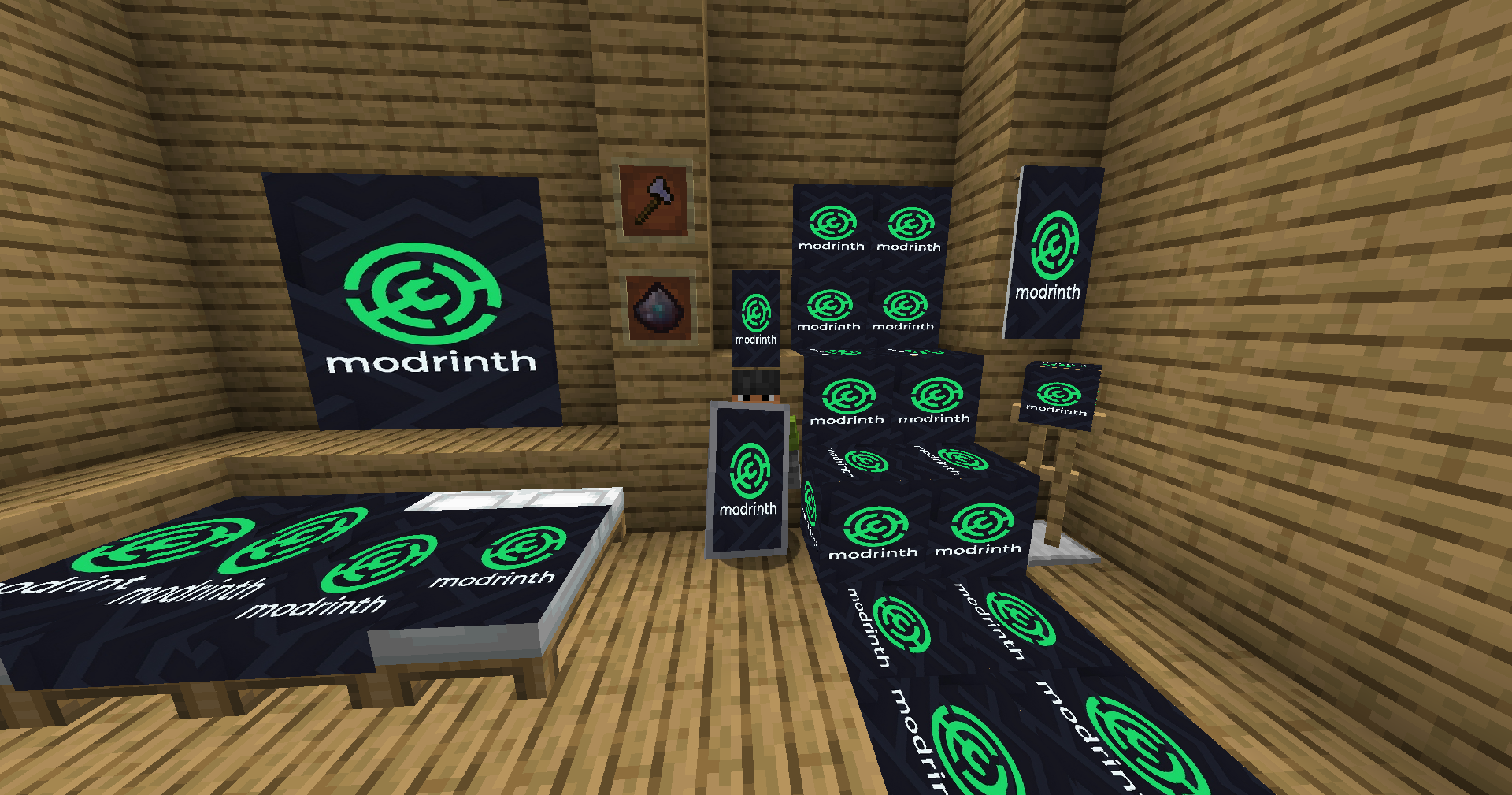
PicAxe 是终极装饰模组,赋予你将互联网上的任何图片直接带入 Minecraft 世界的力量。通过为床、旗帜、盾牌以及多种新颖且用途广泛的方块应用自定义纹理,以前所未有的方式个性化你的基地。让你的世界独一无二!
功能特性
- PicAxe 工具:一种用于复制和粘贴图片 URL 的特殊工具。潜行 + 右键点击空气以打开简单的用户界面并存储链接。
- 图片床:将任何原版床转化为画布!应用你的图片并在不同风格之间切换,从全幅覆盖到简单的床单图案。
- 图片旗帜与盾牌:将旗帜变成随风飘扬的超高清图片。在合成网格中将其与盾牌组合,让你的艺术走向战场!
- 六面图片方块:一个创意方块,其六个面均可应用不同且独特的图片。非常适合精细展示和隐藏的艺术创作。
- 可调整大小的图片框架:一种动态框架方块,大小可从 1x1 调整至 6x6。配置为拉伸图片以适应框架或保持原始纵横比。
- 简单易用:单一统一的系统控制一切。只需使用 PicAxe 右键点击即可应用图片并配置你的方块。
使用方法
- 复制图片 URL:在网上找到一张图片并复制其 URL。(小技巧:使用以 .png 或 .jpg 结尾的 URL 可获得最佳效果!)
- 存储 URL:手持 PicAxe 并在空气中 潜行 + 右键点击 以打开 URL 输入屏幕。粘贴链接并点击“确认”。
- 应用图片:
- 右键点击任何原版床、旗帜或新方块(图片框架、六面方块)以应用存储的图片。这将把原版方块转换为其“图片”版本。
- 配置方块:
- 图片床:再次使用 PicAxe 上带有 相同 URL 的物品右键点击图片床,以循环切换其不同的渲染样式。
- 六面方块:若要向特定面应用图片,只需用 PicAxe 右键点击该面即可。
- 图片框架:应用图片后,再次右键点击框架以打开其配置屏幕,你可以在其中设置其尺寸(宽度/高度)并切换拉伸模式。
合成配方
像素粉尘 (x16)
一种驱动所有基于图片合成的神秘粉末。
无序合成配方:
- 4x 红石
- 4x 青金石
- 1x 钻石
PicAxe 工具
一把用于存储和应用图片 URL 的神奇斧头。
 P
PAP
 P
- P = 像素粉尘
- A = 铁斧
图片框架
用于你照片的可调整大小框架。
GPG
PLP
GPG
- G = 玻璃板
- P = 像素粉尘
- L = 任意原木
六面图片方块
每个面都有画布的方块。
GPG
PLP
GPG
- G = 玻璃
- P = 像素粉尘
- L = 任意原木
图片盾牌
在防御自己的同时展示你的艺术。
无序合成配方:
- 1x 盾牌
- 1x 图片旗帜
灵感来源
本模组受原版 Images 模组启发。
安装说明
此模组需要 Architectury API 或 Balm API。 请确保为你当前的游戏版本安装正确的 API!
For Fabric 1.20-1.21:
- 下载并安装 Fabric Loader。
- 下载 Fabric API。
- 下载 Architectury API。
- 将 PicAxe 模组 .jar 文件 和下载的 API 放入你的
mods文件夹中。
For NeoForge 1.20-1.21:
- 下载并安装最新版本的 NeoForge。
- 下载 Architectury API。
- 将 PicAxe 模组 .jar 文件 和 Architectury API 放入你的
mods文件夹中。
For Fabric 1.21.5+:
- 下载并安装 Fabric Loader。
- 下载 Fabric API。
- 下载 Balm API。
- 将 PicAxe 模组 .jar 文件 和下载的 API 放入你的
mods文件夹中。
For NeoForge 1.21.5+:
Decorate your world with any image from the web!
PicAxe is the ultimate decoration mod that gives you the power to bring any image from the internet directly into your Minecraft world. Personalize your base like never before by applying custom textures to beds, banners, shields, and a variety of new, versatile blocks. Make your world uniquely yours!
Features
- The PicAxe Tool: A special tool used to copy and paste image URLs. Sneak + Right-Click in the air to open a simple UI and store your link.
- Image Beds: Convert any vanilla bed into a canvas! Apply your image and cycle through different styles, from a full drape to a simple sheet pattern.
- Image Banners & Shields: Turn a banner into a high-definition picture that waves in the wind. Combine it with a shield in a crafting grid to take your art into battle!
- 6-Sided Image Block: A creative block that can have a different, unique image applied to each of its six faces. Perfect for detailed displays and hidden art.
- Resizable Image Frame: A dynamic frame block that can be resized from 1x1 up to 6x6. Configure it to either stretch the image to fit or keep its original aspect ratio.
- Simple to Use: A single, unified system controls everything. Just Right-Click with the PicAxe to apply images and configure your blocks.
How to Use
- Copy an Image URL: Find an image on the web and copy its URL. (Pro-tip: Use URLs that end in .png or .jpg for best results!)
- Store the URL: Hold your PicAxe and Sneak + Right-Click in the air to open the URL input screen. Paste your link and click "Confirm".
- Apply the Image:
- Right-click on any vanilla Bed, Banner, or one of the new blocks (Image Frame, 6-Sided Block) to apply the stored image. This will convert the vanilla block into its "Image" version.
- Configure Blocks:
- Image Beds: Right-click an Image Bed again with the same URL on your PicAxe to cycle through its different rendering styles.
- 6-Sided Block: To apply an image to a specific face, simply right-click on that face with the PicAxe.
- Image Frame: After applying an image, right-click the frame again to open its config screen where you can set its size (Width/Height) and toggle the stretch mode.
Crafting Recipes
Pixel Dust (x16)
A mystical powder that fuels all image-based crafting.
Shapeless Recipe:
- 4x Redstone
- 4x Lapis Lazuli
- 1x Diamond
PicAxe Tool
A magical axe used to store and apply image URLs.
 P
PAP
 P
- P = Pixel Dust
- A = Iron Axe
Image Frame
A resizable frame for your pictures.
GPG
PLP
GPG
- G = Glass Pane
- P = Pixel Dust
- L = Any Log
6-Sided Image Block
A block with a canvas on every face.
GPG
PLP
GPG
- G = Glass
- P = Pixel Dust
- L = Any Log
Image Shield
Display your art while defending yourself.
Shapeless Recipe:
- 1x Shield
- 1x Image Banner
Inspiration
This mod was inspired by the original Images mod.
Installation
This mod requires the Architectury API or Balm API. Please make sure to install the right one for your version!
For Fabric 1.20-1.21:
- Download and install the Fabric Loader.
- Download the Fabric API.
- Download the Architectury API.
- Place the PicAxe mod .jar and the downloaded APIs into your
modsfolder.
For NeoForge 1.20-1.21:
- Download and install the latest version of NeoForge.
- Download the Architectury API.
- Place the PicAxe mod .jar and Architectury API into your
modsfolder.
For Fabric 1.21.5+:
- Download and install the Fabric Loader.
- Download the Fabric API.
- Download the Balm API.
- Place the PicAxe mod .jar and the downloaded APIs into your
modsfolder.
For NeoForge 1.21.5+:

下载 Picture Axe
需要联机服务器吗?
稳定流畅、一键部署,几分钟即可和朋友联机开服
最低仅需 8 元/月 即可畅快联机
下载 Picture Axe
需要联机服务器吗?
稳定流畅、一键部署,几分钟即可和朋友联机开服
最低仅需 8 元/月 即可畅快联机
下载 Picture Axe
下载 Picture Axe
下载 Picture Axe
下载 Picture Axe
下载 Picture Axe
下载 Picture Axe
下载 Picture Axe
需要联机服务器吗?
稳定流畅、一键部署,几分钟即可和朋友联机开服
最低仅需 8 元/月 即可畅快联机
下载 Picture Axe
需要联机服务器吗?
稳定流畅、一键部署,几分钟即可和朋友联机开服
最低仅需 8 元/月 即可畅快联机
添加了更改图像帧对齐方式并为图像应用偏移量的功能。
关于这个资源的讨论、问题反馈与使用心得
还没有讨论,来发第一帖吧
你是这个资源的作者?登录后可认领此资源。
相似资源
 模组

一个用于收集生物掉落物的多区块模组。
 模组

可定制的鞘翅模组,支持装饰纹饰、旗帜图案等更多功能!
 模组

显示你正在注视的方块的信息。(适用于 Minecraft 1.16+ 的 Hwyla/Waila 分支)
 模组

查看物品与配方
 模组
在游戏画面角落显示附近世界地形、玩家、生物和实体的地图。可创建路径点,帮助你找到标记过的位置。
 模组
使用 JavaScript 编辑配方、添加自定义物品、编写世界事件!
评论 0
登录后参与评分
还没有评论,来抢沙发吧