
Pin Tooltips ?
此模组添加了将工具提示钉在屏幕上并从中查看更多信息(如附魔和生物效果描述)的功能。
默认情况下,当你在工具提示上停留一段时间后,它将被临时固定,直到光标离开。
注意:退出游戏后,固定的工具提示不会保留。
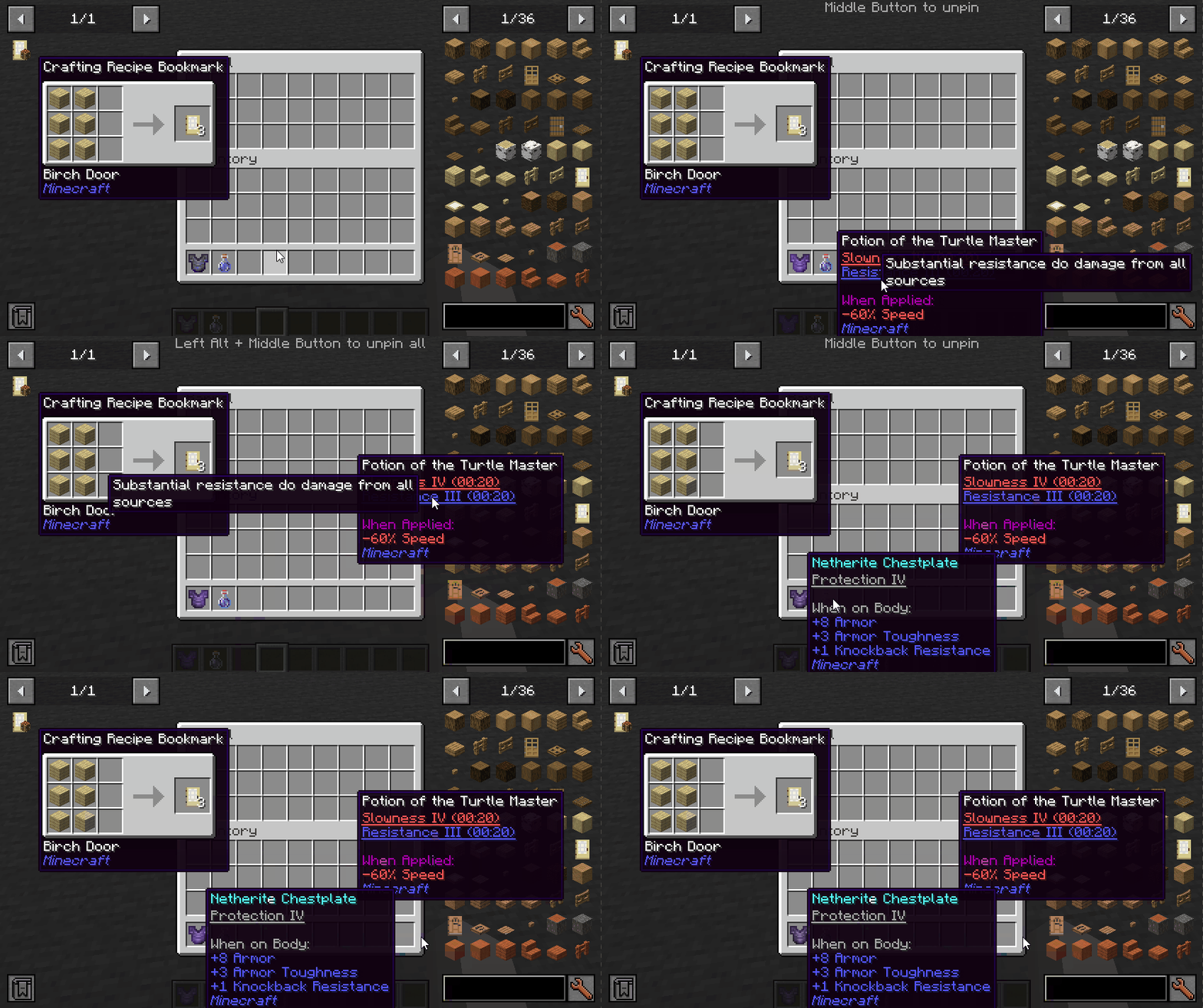
按键(默认):
- 左 ALT:固定当前工具提示
- 中键:取消固定工具提示
- 左 ALT + 中键:取消所有工具提示的固定
模组集成:
安装 Jade 时,你可以看到附魔/效果来自哪个模组。
安装 More Enchantment Info 时,你可以点击附魔文本以打开配方 GUI。
安装 Just Enough Effect Descriptions (JEED) 时,你可以点击效果文本以打开配方 GUI。
安装 Tinkers Construct 时,你可以在工具提示上查看特性的描述。
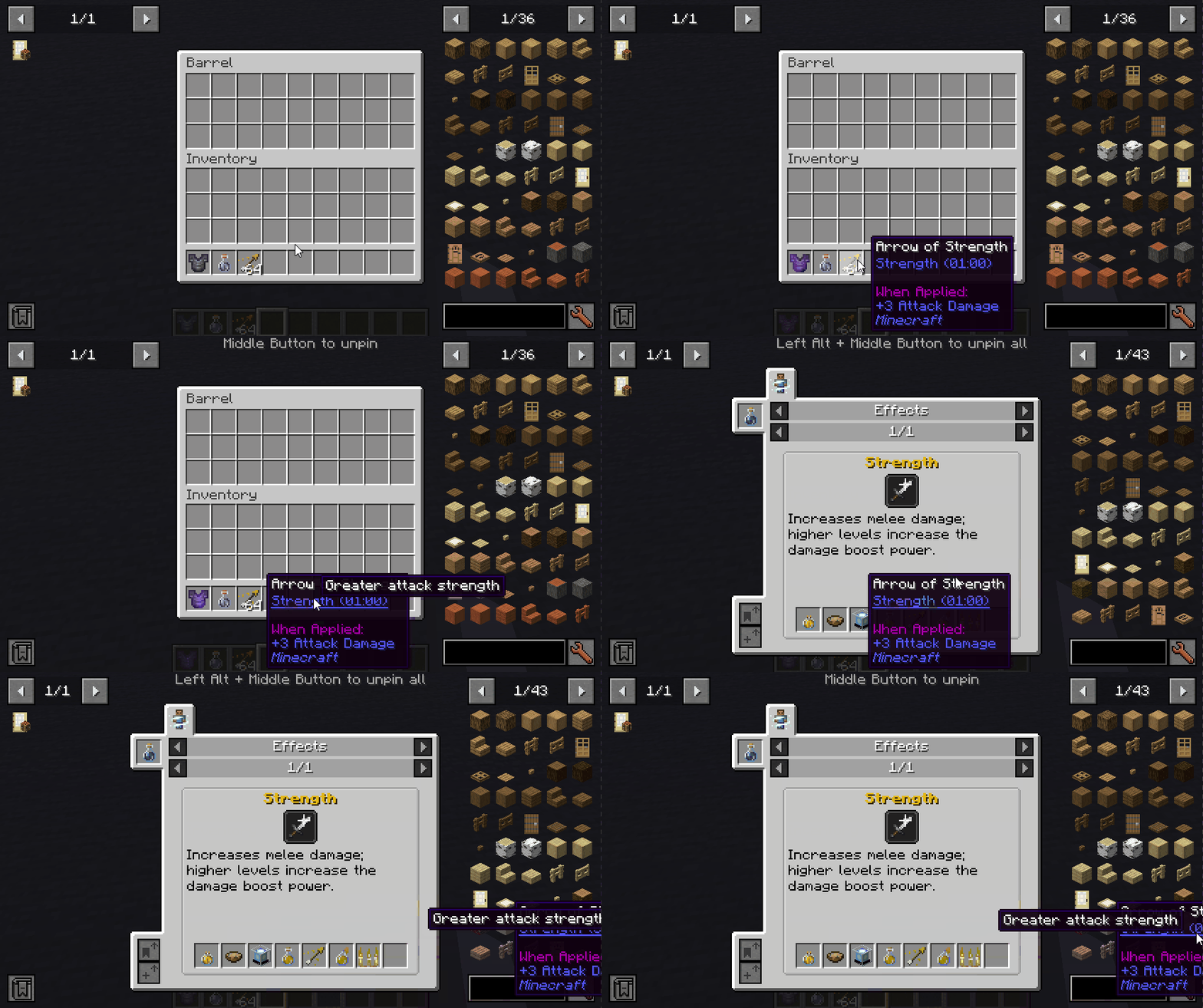
兼容性
| Mod | Status | Note |
|---|---|---|
| Equipment Compare | ✔️ Supported | |
| Obscure Tooltips | ✔️ Partially supported | Components are not interactable |
| Legendary Tooltips | ✔️ Partially supported | Title's interacting position is incorrect |
| Tooltips Reforged | ❌ Not supported | |
| Immersive:Tooltip | ❌ Not supported | |
| Tooltips Reforged | ❌ Not supported | |
| EnhancedTooltips | ❌ Not supported | |
| ModernUI | ❌ Not supported |

Pin Tooltips ?
This mod adds the ability to pin tooltips to the screen and view more information from them such as enchantment and mob effect descriptions.
By default, when you stay on a tooltip for a while, it will be temporarily pinned until the cursor leaves.
Note: Pinned tooltips do not persist when you leave the game.
Keys (default):
- Left ALT: Pin the current tooltip
- Middle Button: Unpin the tooltip
- Left ALT + Middle Button: Unpin all tooltips
Mod Integration:
When Jade installed, you can see which mod is the enchantment/effect from.
When More Enchantment Info installed, you can click on the enchantment text to open the recipe GUI.
When Just Enough Effect Descriptions (JEED) installed, you can click on the effect text to open the recipe GUI.
When Tinkers Construct installed, you can view the description of the traits on tooltips.
Compatibility
| Mod | Status | Note |
|---|---|---|
| Equipment Compare | ✔️ Supported | |
| Obscure Tooltips | ✔️ Partially supported | Components are not interactable |
| Legendary Tooltips | ✔️ Partially supported | Title's interacting position is incorrect |
| Tooltips Reforged | ❌ Not supported | |
| Immersive:Tooltip | ❌ Not supported | |
| Tooltips Reforged | ❌ Not supported | |
| EnhancedTooltips | ❌ Not supported | |
| ModernUI | ❌ Not supported |

下载 Pin Tooltips ?
下载 Pin Tooltips ?
需要联机服务器吗?
稳定流畅、一键部署,几分钟即可和朋友联机开服
最低仅需 8 元/月 即可畅快联机
下载 Pin Tooltips ?
需要联机服务器吗?
稳定流畅、一键部署,几分钟即可和朋友联机开服
最低仅需 8 元/月 即可畅快联机
下载 Pin Tooltips ?
需要联机服务器吗?
稳定流畅、一键部署,几分钟即可和朋友联机开服
最低仅需 8 元/月 即可畅快联机
下载 Pin Tooltips ?
需要联机服务器吗?
稳定流畅、一键部署,几分钟即可和朋友联机开服
最低仅需 8 元/月 即可畅快联机
下载 Pin Tooltips ?
下载 Pin Tooltips ?
下载 Pin Tooltips ?
下载 Pin Tooltips ?
下载 Pin Tooltips ?
2.3.1
- fix: 配置文件未生成
- Update build.gradle for 1.21-fabric
2.3.0
- feat: obscure tooltips 兼容性支持
- chore: 上传 Logo
2.2.0
- Merge pull request #15 from SettingDust/1.21-fabric
- fix: 修复提示行位置顺序不一致,修复提示闪烁问题。
- refactor: 添加
TooltipStyle以提供进一步的兼容性支持 - fix: 创意模式物品栏搜索栏避免按键按下事件,从而避免固定提示
2.1.1
- fix: 聚焦时避免自动固定的提示被取消固定
- feat: 按键按下时取消自动固定的提示
- feat: 点击时取消自动固定的提示
2.1.0
- turn out it is neoforge-exclusive
- fix: 配置界面
- feat: 当光标位于提示上时避免渲染物品高亮
- fix: 添加对 neoforge 屏幕层的支持
- fix: 附魔台不显示附魔描述
- chore: 移除未使用的变量
- feat: 添加缺失的描述。添加验证
2.0.2
- feat: 自动固定指示器
- fix: 提示在不预期的时间被固定
26.0.2
- 改进:使固定的工具提示在当前工具提示之前渲染
- 修复:保持固定工具提示在槽位上可拖动
- 重构:将事件迁移至 Forgified Fabric API
- 修复:渲染高亮边框
- 重构:移植至 NeoForge API
- 重构:从 26.1 Fabric 版本同步
- 构建:升级依赖项
2.3.0
- 合并来自 Snownee/feature/neoforge-port 的拉取请求 #17
- 构建:升级 NeoForge 版本
- 功能:支持 Obscure Tooltips 兼容性
- 维护:上传 Logo
2.2.0
- 合并来自 SettingDust/1.21-neoforge 的拉取请求 #16
- 修复:确保工具提示行的位置顺序一致,修复工具提示闪烁问题。
- 重构:添加
TooltipStyle以支持后续兼容 - 修复:创意模式物品栏搜索栏避免按键按下事件,从而避免取消固定
2.1.1
- 修复:避免在聚焦时自动重新固定已取消固定的工具提示
- 功能:按键按下时取消固定自动固定的工具提示
- 功能:点击时取消固定自动固定的工具提示
- 结果证实这是 NeoForge 独占特性
- 维护:移除未使用的变量
2.1.0
- 修复:配置界面
- 功能:当光标位于工具提示上时避免渲染物品高亮
- 修复:添加对 NeoForge 屏幕层的支持
- 修复:附魔台不显示附魔描述的问题
- 功能:添加缺失的描述。添加验证逻辑
2.0.2
- 功能:自动固定指示器
- 修复:工具提示在不预期时间被固定的问题
关于这个资源的讨论、问题反馈与使用心得
还没有讨论,来发第一帖吧
你是这个资源的作者?登录后可认领此资源。
相似资源
 模组

可定制的鞘翅模组,支持装饰纹饰、旗帜图案等更多功能!
 模组

显示你正在注视的方块的信息。(适用于 Minecraft 1.16+ 的 Hwyla/Waila 分支)
 模组
使用 JavaScript 编辑配方、添加自定义物品、编写世界事件!
 模组

查看物品与配方
 模组
在游戏画面角落显示附近世界地形、玩家、生物和实体的地图。可创建路径点,帮助你找到标记过的位置。
 模组
AE2:一款流行的自动化与存储模组
评论 0
登录后参与评分
还没有评论,来抢沙发吧