
适用于所有主流平台
Paper、Folia、Fabric、Forge 和 NeoForge 服务器完全兼容 Fabric 和 Forge 客户端。
要使用语音聊天,玩家必须为 Fabric、Forge 或 NeoForge 安装客户端模组。 未安装模组的玩家仍可加入服务器并正常游戏——只是无法使用语音聊天功能。
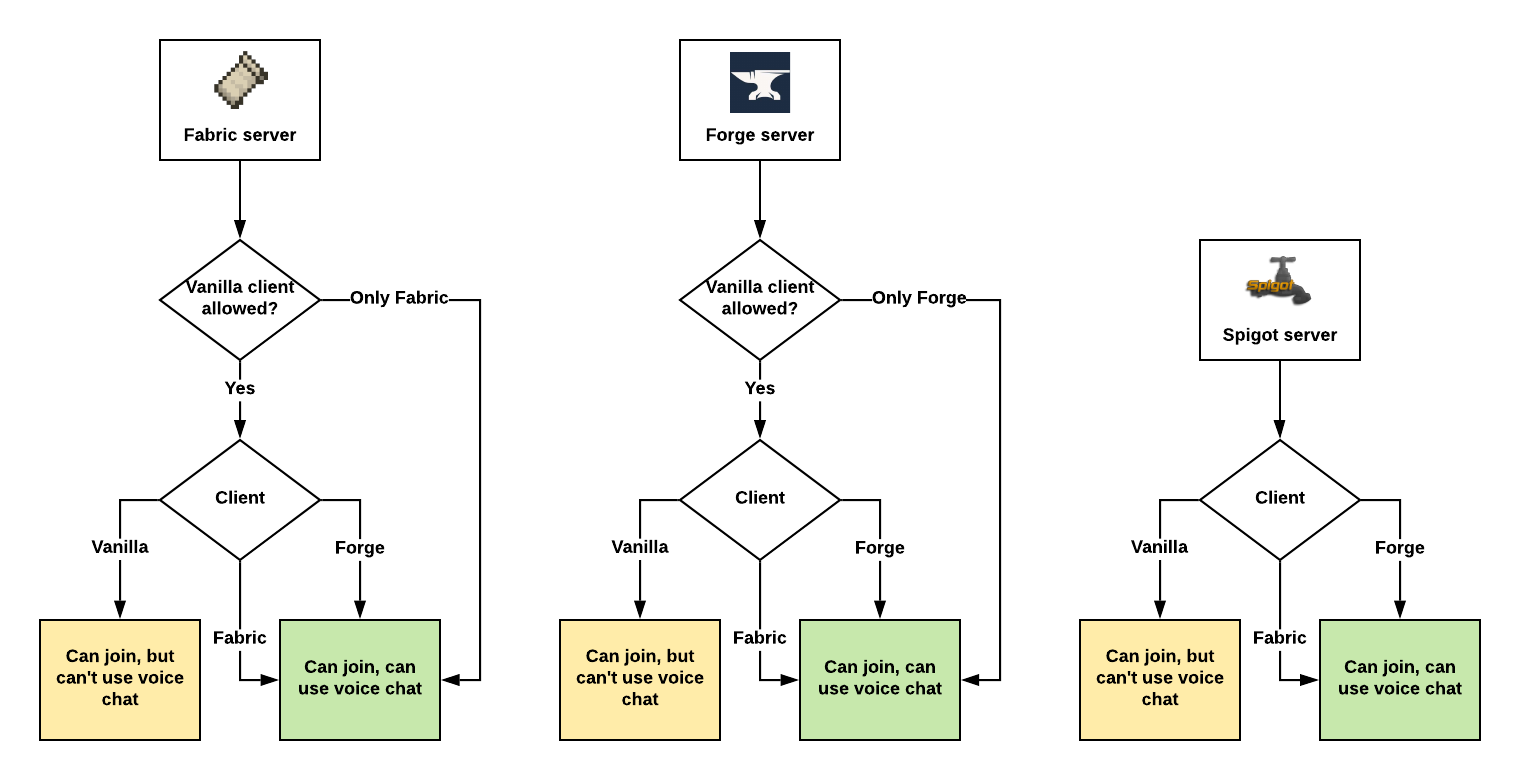
假设 Plasmo Voice 已安装在客户端和服务端上。
功能特性
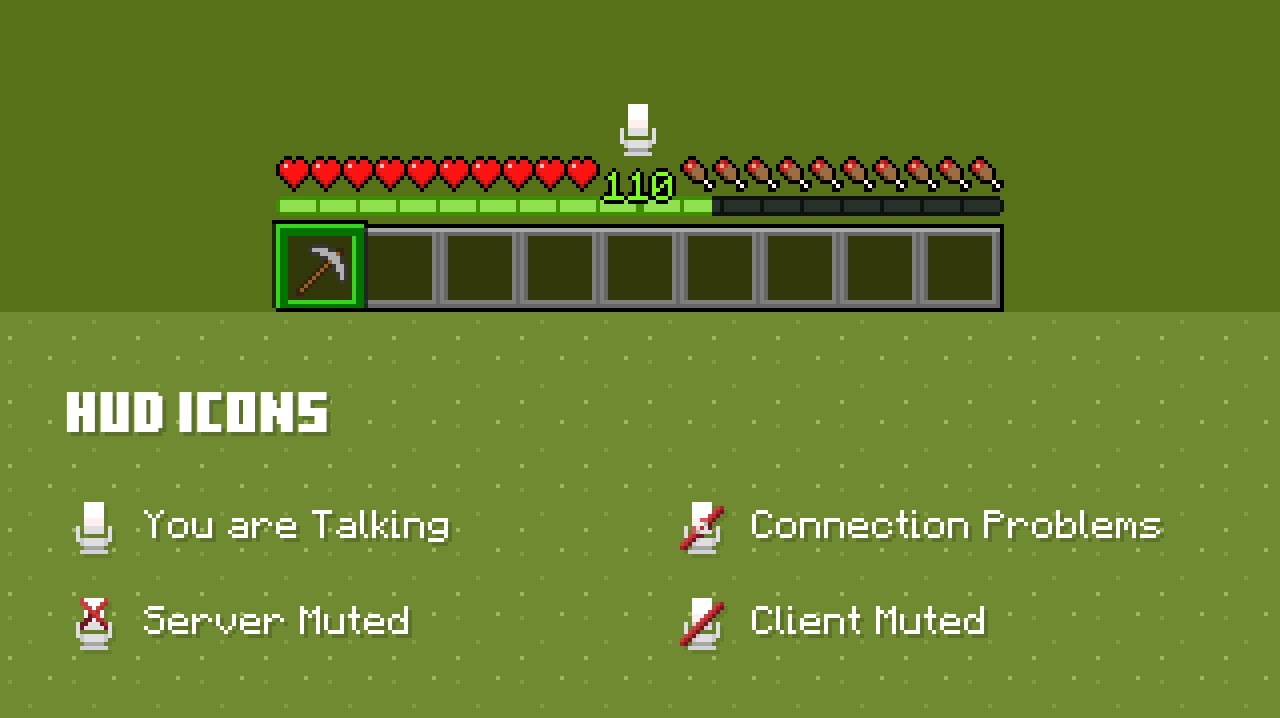
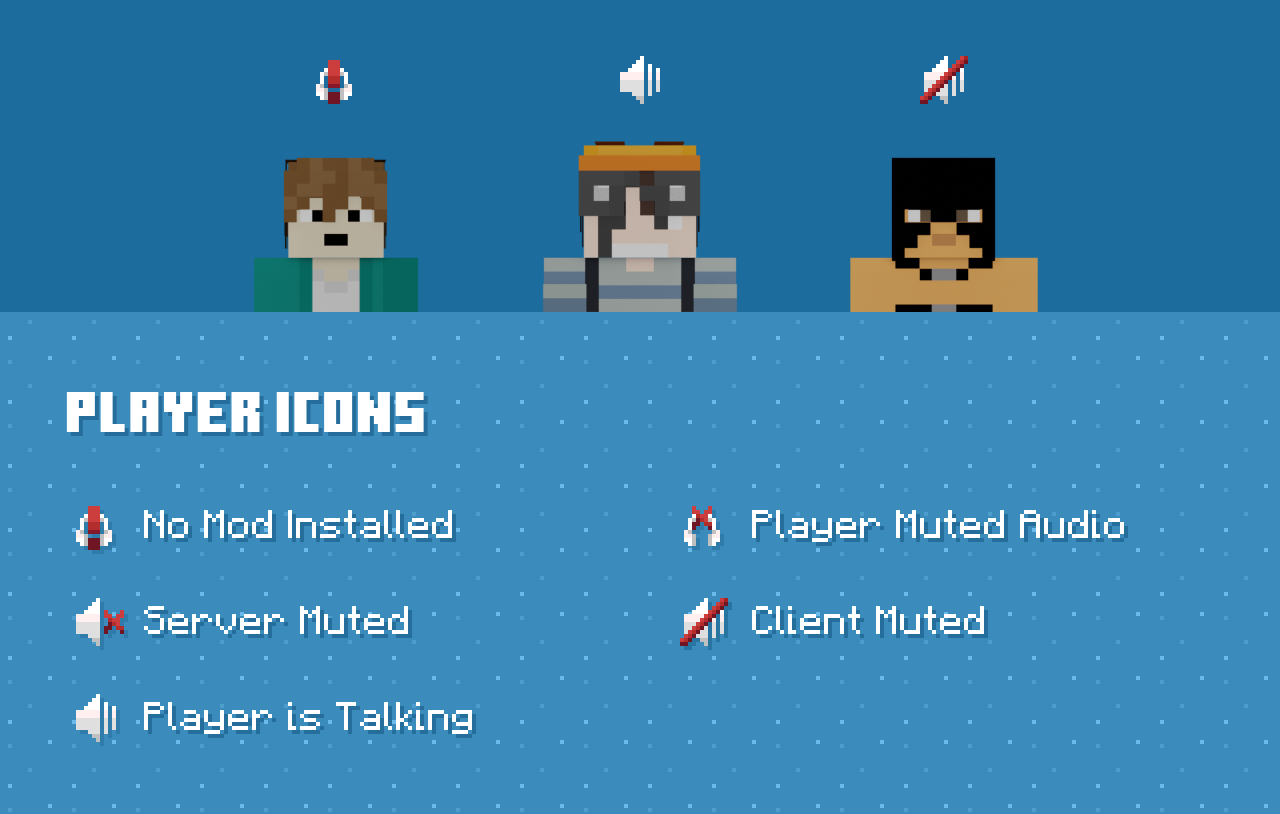
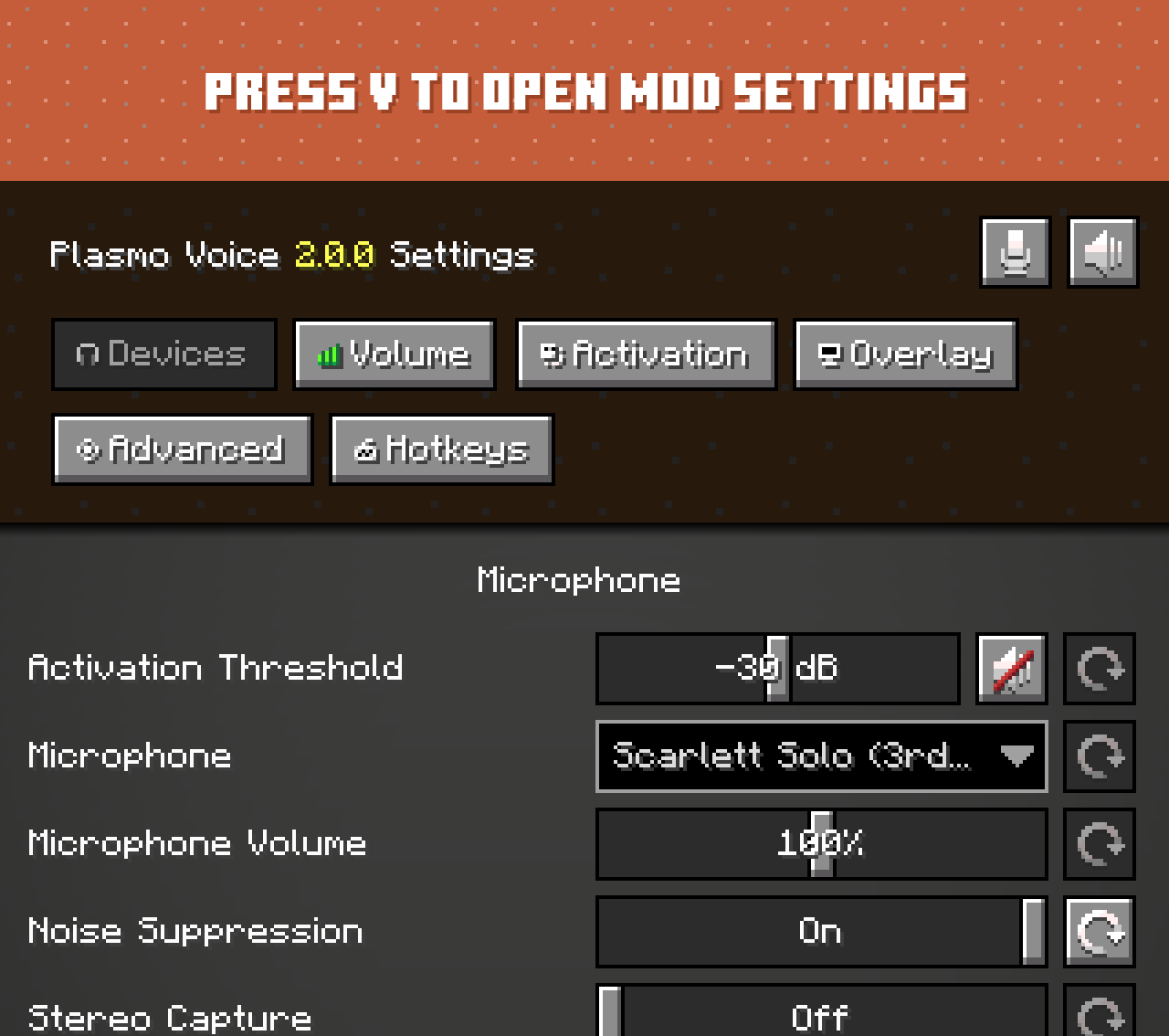
客户端功能
音频质量与处理
- RNNoise 降噪
- OpenAL 声音引擎,提供出色的 3D 定位效果
- 立体声音源
- 平滑的音量过渡
沉浸感与真实感
- 可选的声音遮挡(透过方块时声音会减弱)
- 可选的方向性声源(当说话者背对你时声音会更小)
- 与 Sound Physics Remastered 兼容,需搭配 pv-addon-soundphysics
控制与交互
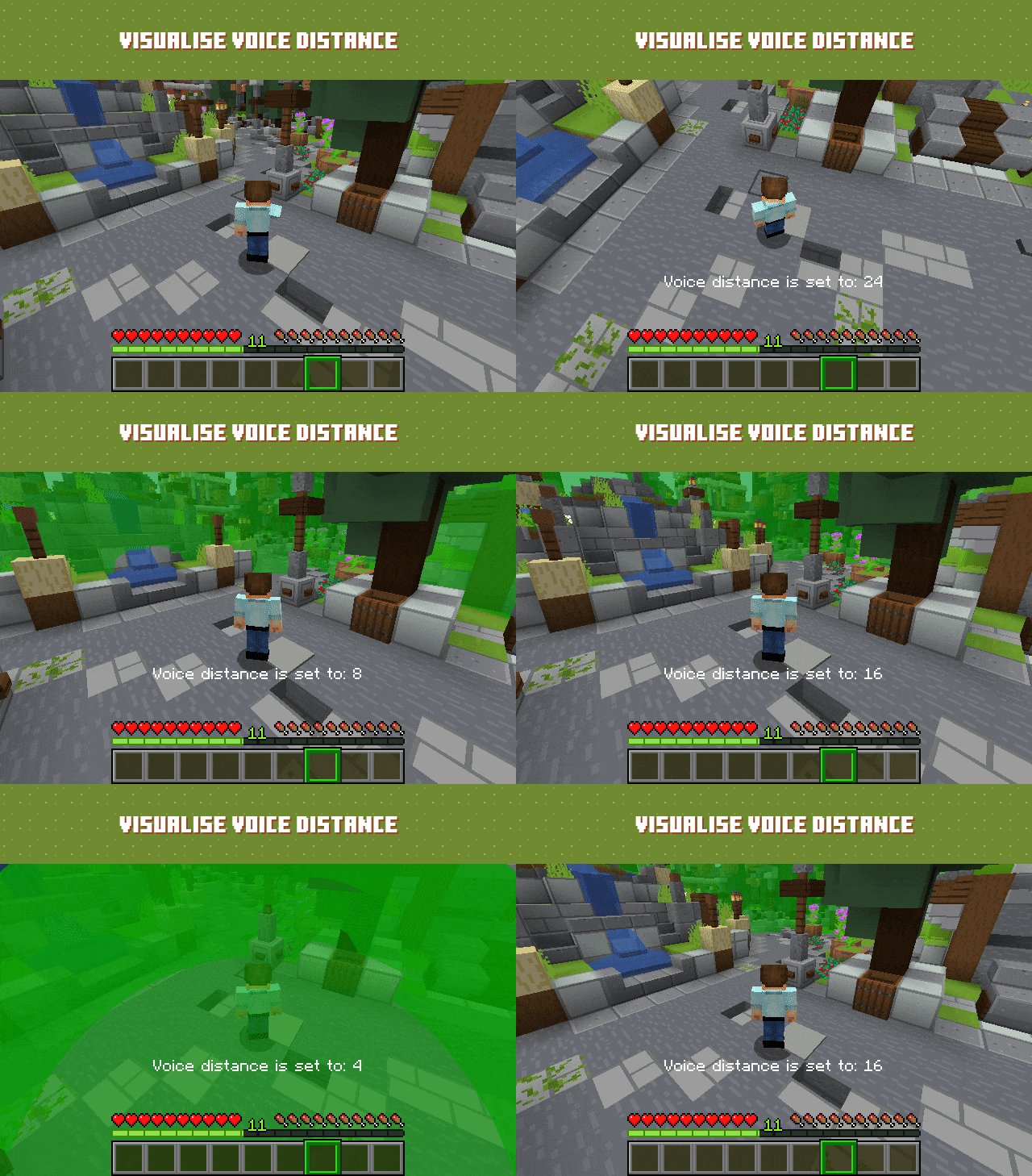
- 可调节语音聊天距离
- 支持按住按键说话(Push to Talk)或语音激活模式
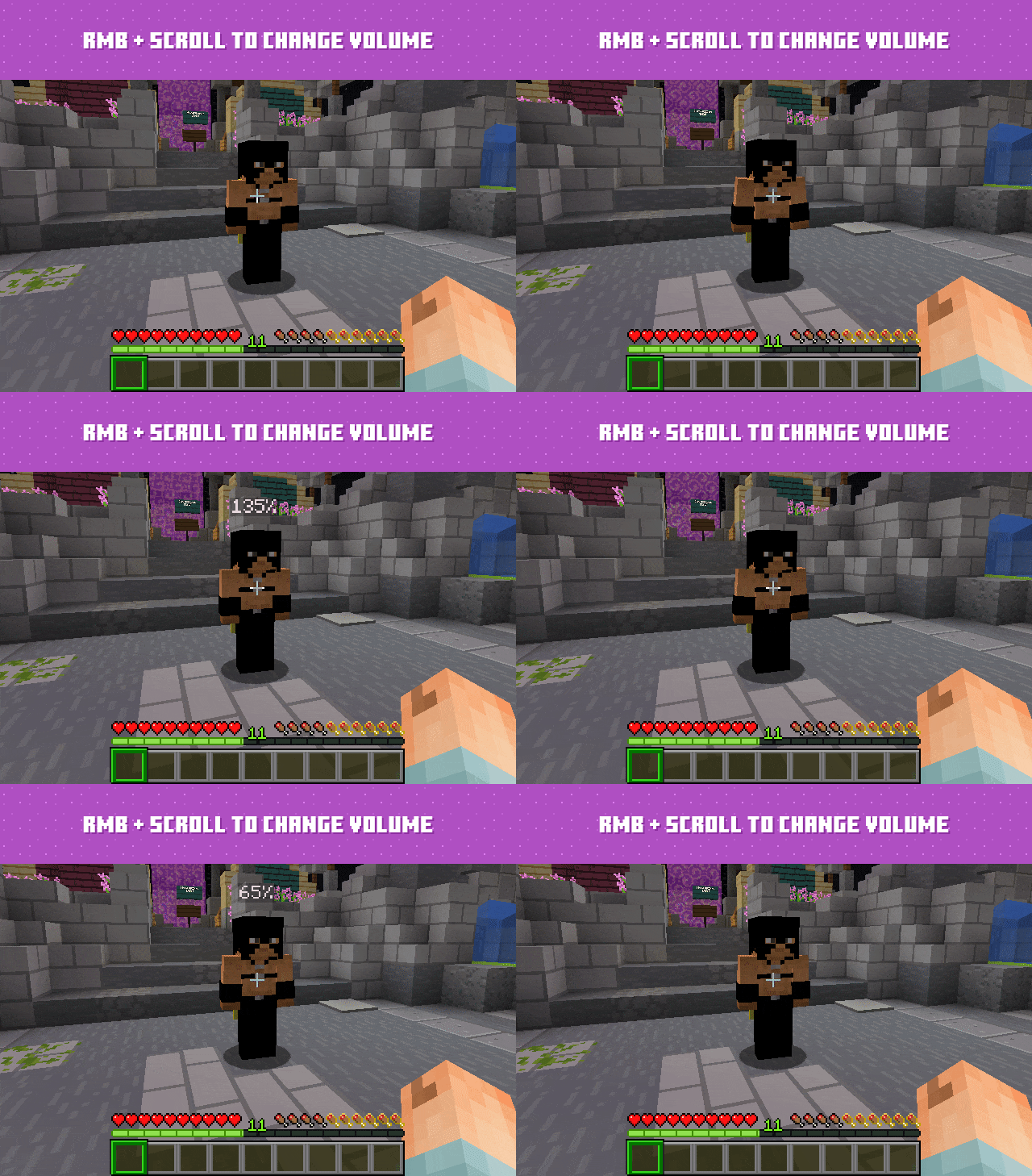
- 按住 鼠标右键 看向某名玩家并使用滚轮调整其音量
设备与界面
- 选择输入和输出音频设备
- 可配置 GUI 图标位置
- 切换玩家图标可见性
- 类似 Discord 的游戏内覆盖层
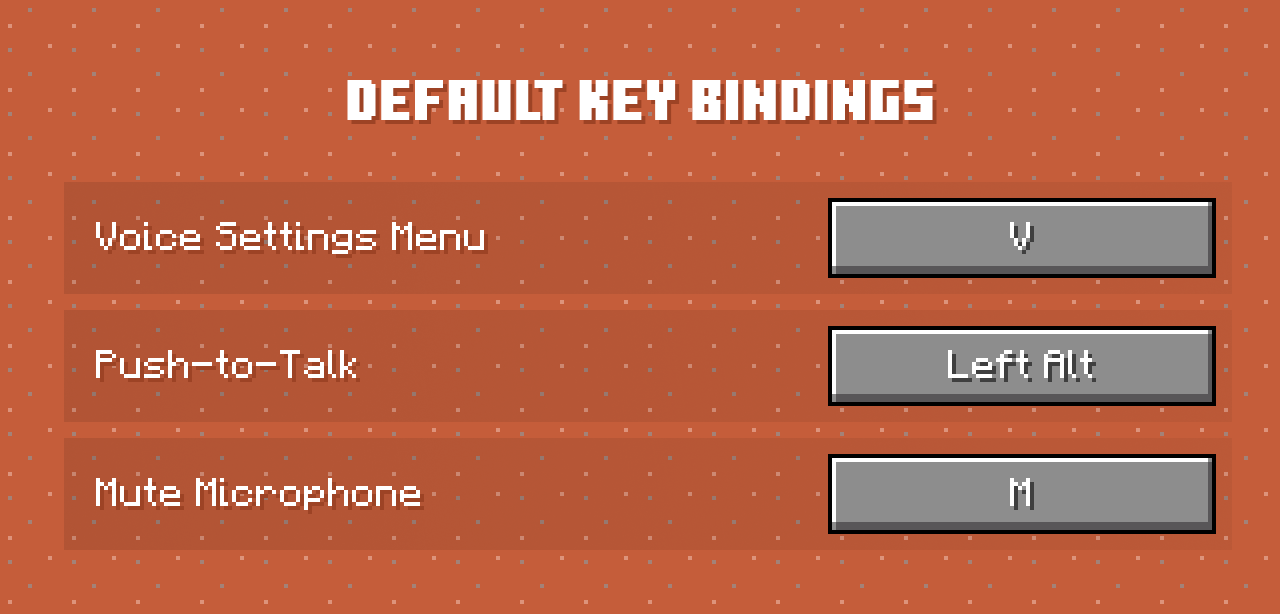
按 V 键查看语音设置。请确保选择了正确的设备且麦克风正常工作。
服务端功能
音频与性能
- Opus 编解码器,低带宽占用且高音频质量
- 可配置的语音距离
管理与控制
- 通过聊天命令在服务端静音玩家
- 可选择踢出未安装客户端模组的玩家
- 权限支持
- Vanish(隐身)支持
兼容性与网络
- 支持单人游戏和局域网开放(Open to LAN)
- 支持 BungeeCord 和 Velocity
集成与扩展性
- PlaceholderAPI 支持
- 高级 API
安全性
- 加密的语音通信
服务端插件
通用插件可在 Fabric、Forge、NeoForge 和 Paper 上运行。
另请参阅:插件类型。
| 图标 | 附加组件 | 描述 |
|---|---|---|
 |
pv-addon-groups | 创建群组语音聊天频道。与远处的玩家保持通话 |
 |
pv-addon-sculk | 通过此附加组件,潜行者和监听器将通过近距离语音聊天触发 |
 |
pv-addon-broadcast | 将你的声音广播到半径、世界、服务器或代理中的所有玩家 |
 |
pv-addon-spectator | 通过此附加组件,所有玩家都可以听到旁观者 |
 |
pv-addon-whisper | 默认情况下,耳语距离是当前近距离距离的一半 |
 |
pv-addon-priority | 语音激活具有更大且可配置的距离 |
 |
pv-addon-lavaplayer-lib | 捆绑的附加组件,包含某些 Plasmo Voice 附加组件所需的 LavaPlayer 分支库 |
 |
Voiceless Survival | 生物会对你的声音做出反应。敌对生物会循声而来,动物则会逃跑 第三方附加组件。问题应在 Voiceless Survival GitHub 上报告。 |
 |
pv-addon-discs | 使用音乐唱片在 Minecraft 中播放来自 YouTube 和其他来源的音频。支持流媒体和直播(YouTube、Twitch) |
 |
Simple Voice Radio | 添加一个无线电方块,让玩家可以在远距离进行通信 第三方附加组件。问题应在 Simple Voice Radio GitHub 上报告。 |
客户端附加组件
| 图标 | 附加组件 | 描述 |
|---|---|---|
 |
pv-addon-soundphysics | 增加与 Sound Physics Remastered 的兼容性。Plasmo Voice 受声音物理效果影响 |
 |
pv-addon-replaymod | Replay Voice Chat 的分支版本,可与 Plasmo Voice 配合使用,并允许使用 ReplayMod 录制语音聊天 |
 |
pv-addon-flashback | 通过此附加组件,Plasmo Voice 将被记录在 Flashback 回放中 |
 |
Talking Heads | 说话时缩放玩家头部模型 第三方附加组件。问题应在 Talking Heads GitHub 上报告。 |
 |
Let Them Talk (LTT) | 当有人说话时降低背景音乐和其他应用程序的音量 第三方附加组件。问题应在 Let Them Talk (LTT) GitHub 上报告。 |
 |
Talking Huds | 用具有多种风格的新覆盖层替换语音覆盖层 第三方附加组件。问题应在 Talking Huds GitHub 上报告。 |
下载
文档
Available for all popular platforms
Paper, Folia, Fabric, Forge, and NeoForge servers are fully compatible with both Fabric and Forge clients.
To use voice chat, players must install the client-side mod for Fabric, Forge or NeoForge. Players without the mod can still join the server and play as usual – they just won't have access to voice chat features.
Assuming Plasmo Voice is installed on both client and the server.
Features
Client features
Audio Quality & Processing
- RNNoise noise reduction
- OpenAL sound engine with great 3D positioning
- Stereo audio sources
- Smooth volume transitions
Immersion & Realism
- Optional sound occlusion (muffles voices through blocks)
- Optional directional audio sources (quieter if the speaker is not facing you)
- Sound Physics Remastered compatibility with pv-addon-soundphysics
Controls & Interaction
- Adjustable voice chat distance
- Choose between Push to Talk or Voice Activation
- Hold RMB while looking at a player and use the scroll wheel to adjust their volume
Devices & UI
- Select input and output audio devices
- Configurable GUI icon positions
- Toggle player icon visibility
- Discord-like in-game overlay
Check out voice settings by pressing V. Make sure you have the right devices selected and your microphone is
working.
Server features
Audio & Performance
- Opus codec for low bandwidth usage and high audio quality
- Configurable voice distance
Moderation & Control
- Server-side muting via chat commands
- Option to kick players without the client mod installed
- Permissions support
- Vanish support
Compatibility & Networking
- Works in singleplayer and Open to LAN
- BungeeCord and Velocity support
Integration & Extensibility
- PlaceholderAPI support
- Advanced API
Security
- Encrypted voice communication
Server-side add-ons
Universal add-ons work on Fabric, Forge, NeoForge and Paper.
Also read: Types of Add-ons.
| Icon | Add-on | Description |
|---|---|---|
|
pv-addon-groups | Create group voice chat channels. Keep talking with players far away |
|
pv-addon-sculk | With this add-on, warden and sculk sensors are triggered with proximity voice chat |
|
pv-addon-broadcast | Broadcast your voice to all players in the radius, world, server, or proxy |
|
pv-addon-spectator | With this add-on, all players can hear spectators |
|
pv-addon-whisper | By default, the whisper distance is half the current proximity distance |
|
pv-addon-priority | Voice activation with a greater and configurable distance |
|
pv-addon-lavaplayer-lib | Add-on bundled with LavaPlayer fork library required for some Plasmo Voice add-ons |
|
Voiceless Survival | Mobs react to your voice. Hostile mobs follow the sound, animals run away Third-party add-on. Issues should be reported on the Voiceless Survival GitHub. |
|
pv-addon-discs | Play audio from YouTube and other sources in Minecraft using music discs. Supports streaming and live streams (YouTube, Twitch) |
|
Simple Voice Radio | Adds a radio block that lets players communicate over distances Third-party add-on. Issues should be reported on the Simple Voice Radio GitHub. |
Client add-ons
| Icon | Add-on | Description |
|---|---|---|
|
pv-addon-soundphysics | Adds compatibility with Sound Physics Remastered. Plasmo Voice is affected by sound physics |
|
pv-addon-replaymod | Fork of Replay Voice Chat that works with Plasmo Voice and allows recording voice chat with ReplayMod |
|
pv-addon-flashback | With this add-on Plasmo Voice will be recorded in Flashback replays |
|
Talking Heads | Scales player heads when they’re talking Third-party add-on. Issues should be reported on the Talking Heads GitHub. |
|
Let Them Talk (LTT) | Lowers your music and other apps while someone is talking Third-party add-on. Issues should be reported on the Let Them Talk (LTT) GitHub. |
|
Talking Huds | Replaces voice overlay with a new one that has several styles Third-party add-on. Issues should be reported on the Talking Huds GitHub. |
Download
Documentation

下载 Plasmo Voice
需要联机服务器吗?
稳定流畅、一键部署,几分钟即可和朋友联机开服
最低仅需 8 元/月 即可畅快联机
下载 Plasmo Voice
需要联机服务器吗?
稳定流畅、一键部署,几分钟即可和朋友联机开服
最低仅需 8 元/月 即可畅快联机
下载 Plasmo Voice
需要联机服务器吗?
稳定流畅、一键部署,几分钟即可和朋友联机开服
最低仅需 8 元/月 即可畅快联机
下载 Plasmo Voice
需要联机服务器吗?
稳定流畅、一键部署,几分钟即可和朋友联机开服
最低仅需 8 元/月 即可畅快联机
下载 Plasmo Voice
需要联机服务器吗?
稳定流畅、一键部署,几分钟即可和朋友联机开服
最低仅需 8 元/月 即可畅快联机
下载 Plasmo Voice
需要联机服务器吗?
稳定流畅、一键部署,几分钟即可和朋友联机开服
最低仅需 8 元/月 即可畅快联机
下载 Plasmo Voice
需要联机服务器吗?
稳定流畅、一键部署,几分钟即可和朋友联机开服
最低仅需 8 元/月 即可畅快联机
下载 Plasmo Voice
需要联机服务器吗?
稳定流畅、一键部署,几分钟即可和朋友联机开服
最低仅需 8 元/月 即可畅快联机
下载 Plasmo Voice
需要联机服务器吗?
稳定流畅、一键部署,几分钟即可和朋友联机开服
最低仅需 8 元/月 即可畅快联机
下载 Plasmo Voice
需要联机服务器吗?
稳定流畅、一键部署,几分钟即可和朋友联机开服
最低仅需 8 元/月 即可畅快联机
Beta
这是一个测试版本,仍需进行测试,特别是语音播放方面的改动。 如果您遇到任何问题,请在 GitHub 或 Discord 上报告。
2.1.x 和 2.2.x 版本在协议上是兼容的,因此如果服务器或客户端尚未更新至 2.2.x,您无需担心。
客户端
- 修复了当您在一种激活方式(例如组队与近距离)中停止说话而在另一种方式中仍在说话时,其他玩家听到的您的音频出现杂音的问题。
- 修复了当玩家在组队中停止说话后,其近距离音频恢复时出现的杂音问题,前提是
Source Types Overlap设置为Mute Proximity(默认)。对于使用Mute Direct的组队情况同样适用。
服务器
Beta
这是一个测试版本,仍需进行测试,尤其是语音播放相关的更改。 如果遇到任何问题,请在 GitHub 或 Discord 上报告。
2.1.x 和 2.2.x 版本在协议上是兼容的, 因此如果服务端或客户端尚未更新至 2.2.x,也无需担心。
客户端
- 麦克风现在可以在无法请求麦克风权限的启动器(例如官方 Minecraft 启动器)上的 macOS 系统中正常工作。#527
- 对于此类启动器,Plasmo Voice 会通过内置的
Plasmo Voice Microphone辅助应用自行请求权限。 - 非常感谢 @arnodoelinger 的实现与测试!
- 对于此类启动器,Plasmo Voice 会通过内置的
- 麦克风和输出设备现在在单独的线程中打开,因此在设备打开时(例如切换设备或加入服务器时)游戏不会卡死。
- “继承”激活类型现在会在下拉菜单的工具提示中显示是通过哪种激活方式触发的:
- 设置选项卡中的元素间距现在保持一致。
- 渲染部分进行了大量内部重构。
- 修复了在 NeoForge 1.21 下的启动崩溃(1.21.1 未受影响)。#544
- 修复了在 26.3 版本中启用
Improved Transparency并渲染距离球体时的崩溃问题。 - 修复了启用 Iris 光影时距离球体无法渲染的问题。
- 修复了在拖动滚动条时 GUI 元素仍显示悬停效果的问题。
- 修复了玩家头顶的覆盖层和音量百分比未遵循“文本背景不透明度”设置的问题。
- 修复了 GUI、工具提示和覆盖层中文本丢失格式的问题(例如来源名称中的十六进制颜色或组合样式如
§k§l)。 - 修复了玩家头顶的音量百分比与名字标签亮度不一致的问题。
- 修复了在绑定热键或从 HUD 位置屏幕返回后,按第一次
Esc键未能关闭设置界面的问题。 - 修复了 UDP 连接成功后,“正在连接到 UDP 服务器...”界面有时未切换到设置界面的问题。
服务端
关于这个资源的讨论、问题反馈与使用心得
还没有讨论,来发第一帖吧
你是这个资源的作者?登录后可认领此资源。
相似资源
 模组

显示你正在注视的方块的信息。(适用于 Minecraft 1.16+ 的 Hwyla/Waila 分支)
 模组
在游戏画面角落显示附近世界地形、玩家、生物和实体的地图。可创建路径点,帮助你找到标记过的位置。
 模组

查看物品与配方
 模组
使用 JavaScript 编辑配方、添加自定义物品、编写世界事件!
 模组
AE2:一款流行的自动化与存储模组
 模组
那是什么?一个 Waila/Hwyla 的分支。
评论 0
登录后参与评分
还没有评论,来抢沙发吧