
Simple Voice Radio
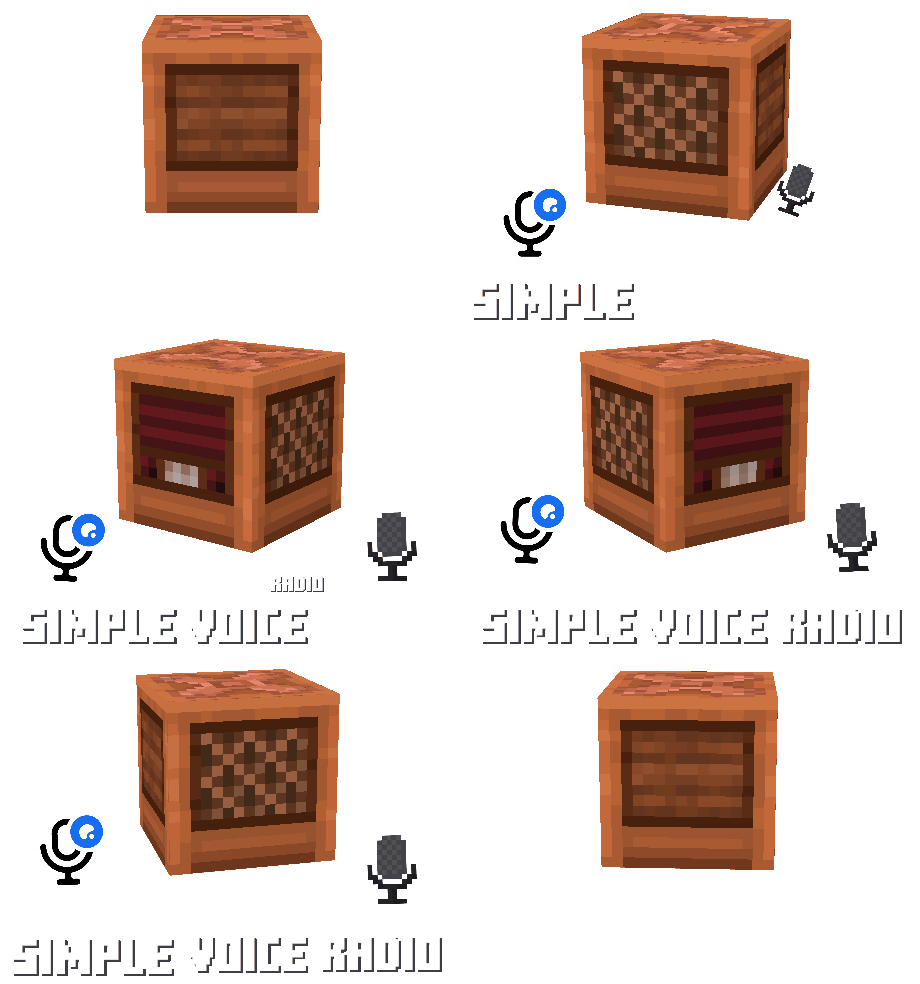
添加了具有基于频率的广播系统的收音机方块——与队友交谈、播放音乐、运营新闻电台,或构建你能想象到的任何其他事物,均可跨越极远距离。需要 PacketEvents、PlasmoVoice 或 SimpleVoiceChat,同时也兼容:CustomDiscsSVC 和 pv-addon-discs
收音机模式
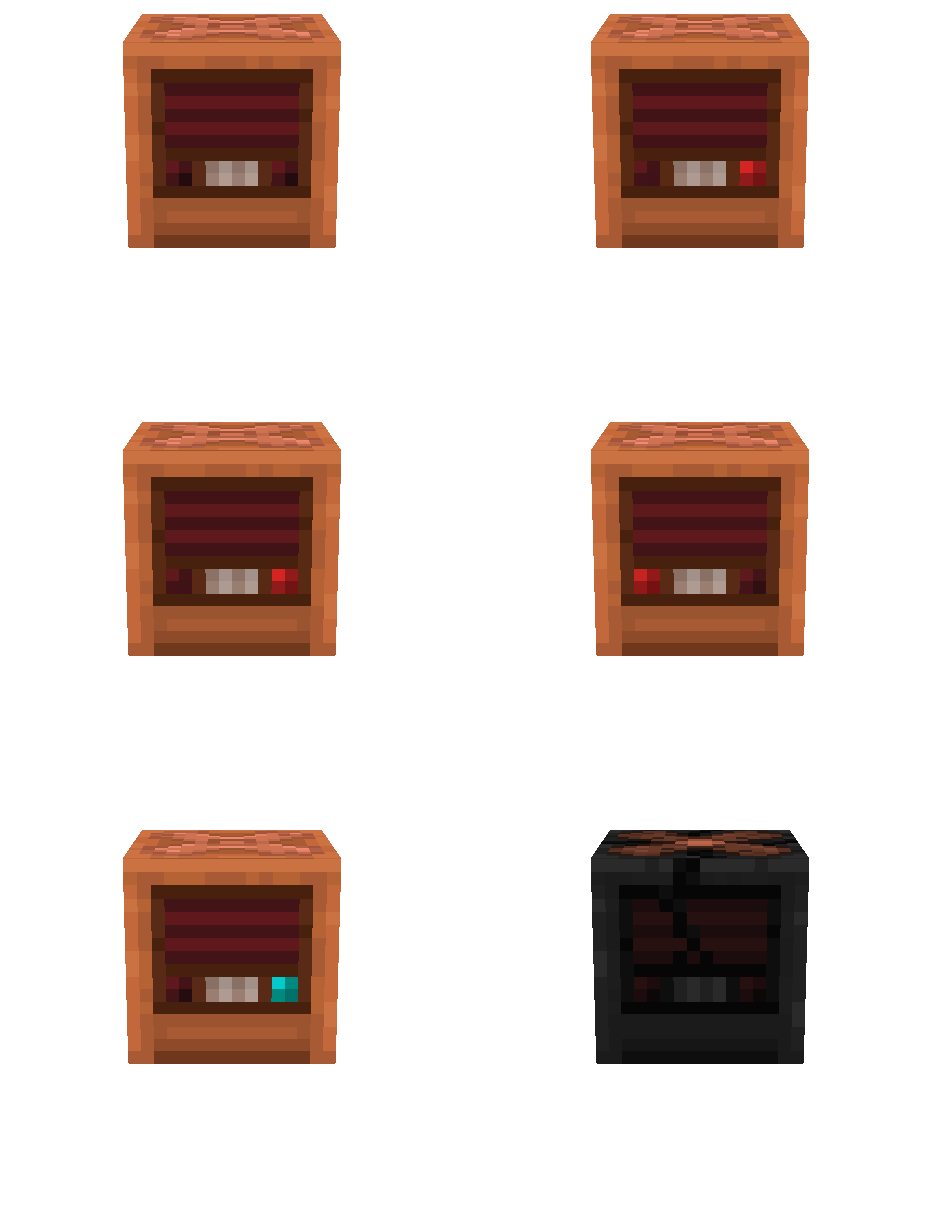
输出 (Output) - 默认模式。播放其频率上的所有内容,在
15格范围内可听。
输入 (Input) - 通过
右键点击切换。拾取15格内玩家的声音,并将其发送到该频率上所有的输出型收音机。
广播 (Broadcast) - 使用
play_audio子命令启动。所有指定的输出型收音机将播放来自文件或 URL 的音频。
监听 (Listen) - 当收音机下方的唱片机播放来自 CustomDiscsSVC 或 pv-addon-discs 的唱片时激活。将其频率上传音乐(工作原理类似于
输入)。
损毁 (Destroyed) - 收音机被雷击烧毁。它不再工作且不掉落任何物品。
收音机皮肤

收音机不需要资源包。它使用 显示实体,具体为玩家头颅。要使用自定义纹理,请编辑纹理文件并将你的 MineSkin API 密钥添加到
config.yml:下次重启后,插件将在游戏内更新纹理。
信号输出系统

在
config.yml中设置signal_output_system: true,收音机在播放声音时会发出红石信号。扬声器距离输入型收音机越近,信号越强:紧挨着时为15,在 15 格半径边缘时为1,而唱片和广播始终为 15。只有处于输出模式和广播模式的收音机会发射信号,声音停止时信号也随之停止。该设置在重启后生效,且不与redstone_frequency配合使用。
区块模式

天线仅在
config.yml中设置mode: chunk时有效。避雷针堆叠在收音机上方,其数量决定了每个方向上的传输覆盖区块数:无避雷针时为 3,有一个时为10,随后依次为30、50、70……
范围由发射器设定,但发射器和接收器都需要在天线上方保留
3(默认) 个自由空间(玻璃、火把和其他非固体方块不会阻挡信号)。
如果收音机上方的避雷针遭到雷击,只要启用了
lightning_destroys_radio,无论处于何种模式,它都将被永久烧毁。
自定义唱片

收音机可以广播来自 CustomDiscsSVC 和 pv-addon-discs 的唱片。将唱片机直接放置在收音机下方并播放唱片:收音机会切换到
监听模式,并通过其频率传输音乐,工作原理与输入传输语音相同。
频率系统
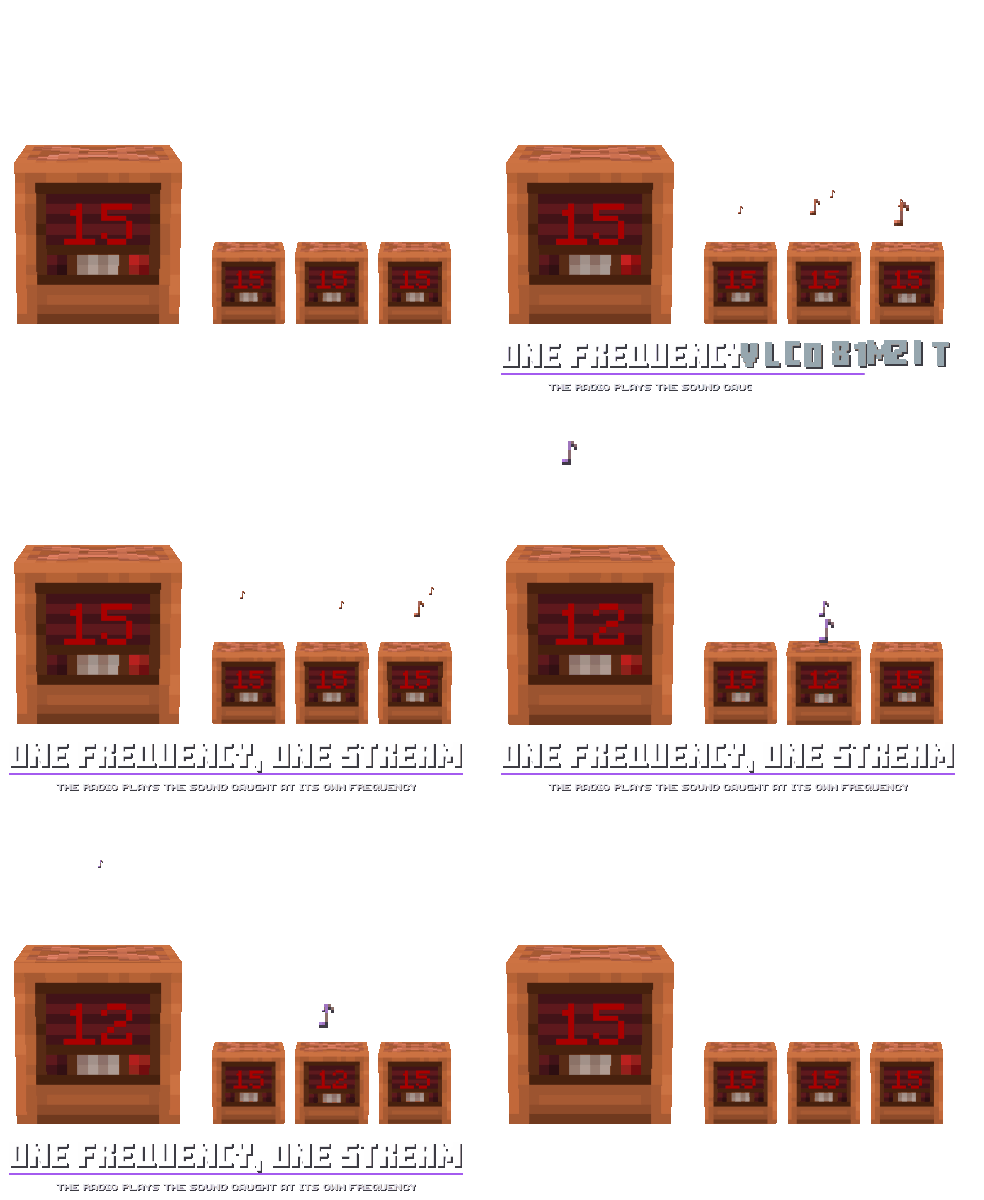
每台收音机都有一个从
1到15(默认) 的频率。只有相同频率之间的收音机才会传输声音。如果多名玩家在相同频率的输入型收音机前说话,他们的声音会混合在一起被听到。
红石频率
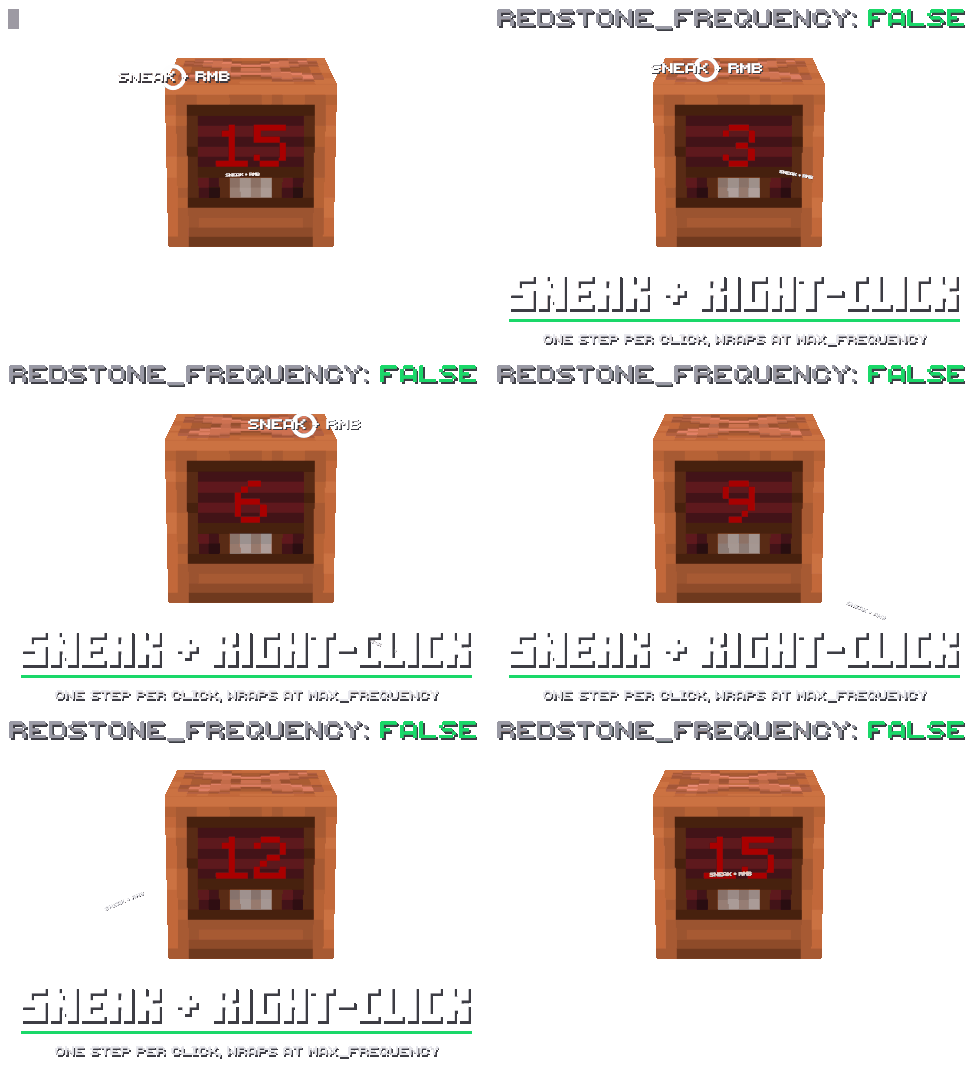
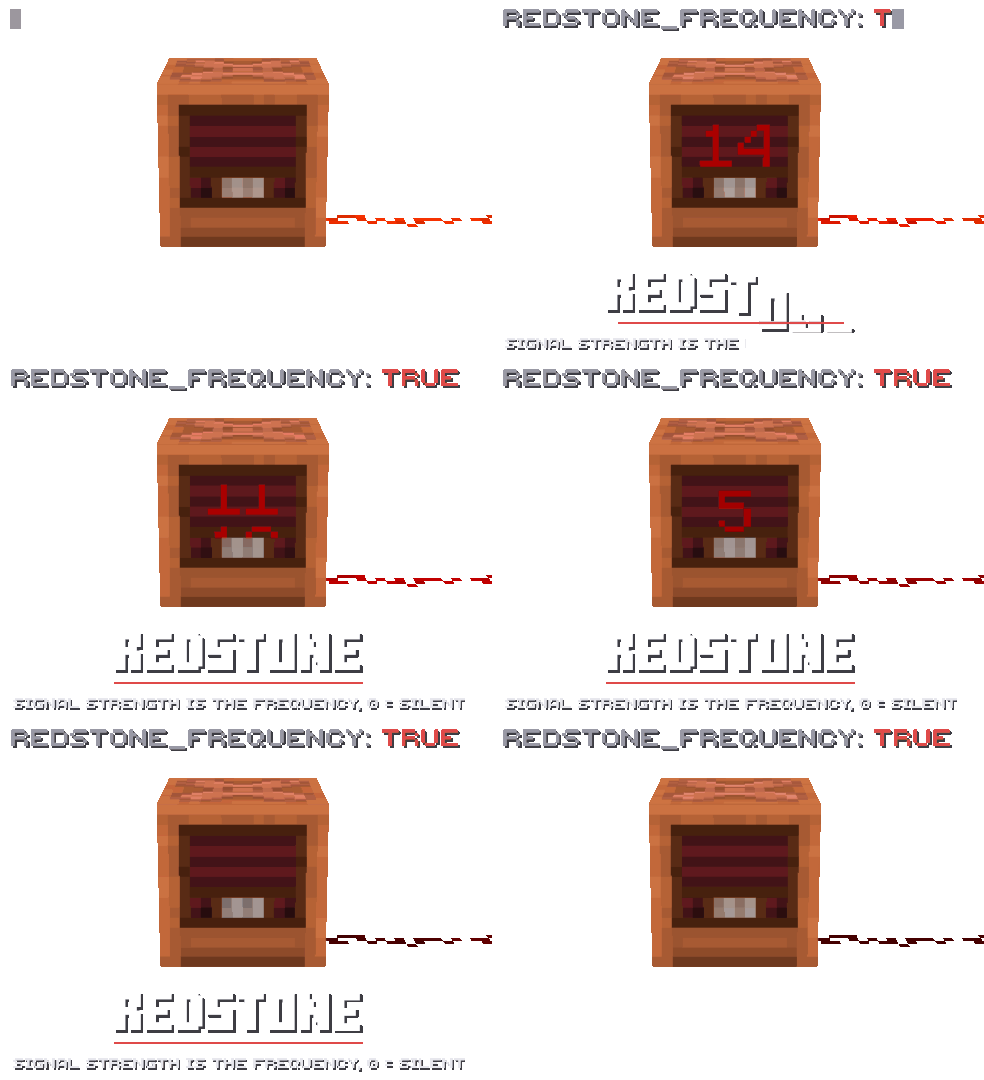
config.yml中的redstone_frequency选项决定收音机的频率来源。设置为false(默认) 时,由玩家更改频率:潜行 + 右键点击使其加一。
设置为
true时,频率变为 powering 该方块的红石信号强度,范围从 0 到 15。它会随信号变化。在此模式下,只有在收音机接收到信号时,才能在其输入模式和输出模式之间切换。
命令

play_audio file
<file>[frequency|all][loop]- 广播位于plugins/SimpleVoiceRadio/audio/文件夹中的 MP3/OGG/WAV 文件。
play_audio url
<url>[frequency|all][loop]- 广播来自 URL 的音频。
play_audio stop - 停止广播。
指定频率号码时,只有调至该频率的无线电才能收到。使用
all或不指定值时,所有无线电都能收到。loop会循环播放录音,且同一时间只能有一个广播进行。

give
<玩家>- 给予一个收音机。你可以使用选择器,例如@a。

reload - 重新加载
config.yml、texture.yml以及合成配方。部分设置仅在重启后生效。

view_craft - 显示无线电的合成配方。
Simple Voice Radio
Adds radio blocks with a frequency-based broadcasting system - talk with teammates, stream music, run a news station, or build anything else you can imagine, all across large distances. Needs PacketEvents, PlasmoVoice or SimpleVoiceChat, also works with: CustomDiscsSVC and pv-addon-discs
Radio modes
Output - The default mode. Plays everything sent on its frequency, audible within
15 blocks.
Input - Toggled with a
right-click. Picks up the voices of players within15 blocksand sends them to every Output radio on its frequency.
Broadcast - Started with the
play_audiosubcommand. All specified Output radios play audio from a file or URL.
Listen - Activates when a jukebox under the radio plays a disc from CustomDiscsSVC or pv-addon-discs. Transmits the music on its frequency (works like
Input).
Destroyed - The radio was burned out by lightning. It no longer works and doesn't drop anything.
Radio skins
The radio doesn't need a resource pack. It uses Display Entities, specifically player heads. To use your own textures, edit the texture files and add your MineSkin api key to
config.yml: after the next restart, the plugin will update the textures in game.
Signal Output System
With
signal_output_system: trueinconfig.yml, the radio emits a redstone signal while it plays sound. The closer the speaker is to the Input radio, the stronger the signal:15right next to it,1at the edge of the 15-block radius, and discs and broadcasts always give 15. Only radios in Output and Broadcast modes emit a signal, and it stops when the sound does. The setting applies after a restart and doesn't work together withredstone_frequency.
Chunk mode
The antenna only works with
mode: chunkinconfig.yml. Lightning rods are stacked on top of the radio, and their number sets how many chunks in each direction the transmission reaches: 3 without rods,10with one, then30,50,70...
The range is set by the transmitter, but both it and the receiver need
3(by default) free blocks above the antenna (glass, torches and other non-solid blocks don't get in the way).
A lightning strike on a rod on top of the radio burns it out for good, in any mode, as long as
lightning_destroys_radiois enabled.
Custom Discs
The radio can broadcast discs from CustomDiscsSVC and pv-addon-discs. Place a jukebox directly under the radio and play a disc in it: the radio switches to
Listenmode and transmits the music on its frequency, the same wayInputtransmits voice.
Frequency System
Each radio has a frequency from
1to15(by default). Sound is only transmitted between radios on the same frequency. If several players speak intoInputradios on the same frequency, their voices are heard together.
Redstone Frequency
The
redstone_frequencyoption inconfig.ymldecides where the radio gets its frequency from. Withfalse(default), players change the frequency: sneak + right-click raises it by one.
With
true, the frequency becomes the strength of the redstone signal powering the block, from 0 to 15. It changes along with the signal. In this mode you can only switch between Input and Output while the radio is receiving a signal.
Commands
play_audio file
<file>[frequency|all][loop]- broadcasts an MP3/OGG/WAV file from theplugins/SimpleVoiceRadio/audio/folder.
play_audio url
<url>[frequency|all][loop]- broadcasts audio from a URL.
play_audio stop - stops the broadcast.
With a frequency number, only radios on that frequency will hear it. With
allor no value, every radio will.looprepeats the recording, and only one broadcast can run at a time.
give
<player>- gives a radio. You can use a selector, for example@a.
reload - reloads
config.yml,texture.ymland the crafting recipe. Some settings still only apply after a restart.
view_craft - shows the radio crafting recipe.

下载 Simple Voice Radio ?
需要联机服务器吗?
稳定流畅、一键部署,几分钟即可和朋友联机开服
最低仅需 8 元/月 即可畅快联机
下载 Simple Voice Radio ?
需要联机服务器吗?
稳定流畅、一键部署,几分钟即可和朋友联机开服
最低仅需 8 元/月 即可畅快联机
下载 Simple Voice Radio ?
需要联机服务器吗?
稳定流畅、一键部署,几分钟即可和朋友联机开服
最低仅需 8 元/月 即可畅快联机
下载 Simple Voice Radio ?
需要联机服务器吗?
稳定流畅、一键部署,几分钟即可和朋友联机开服
最低仅需 8 元/月 即可畅快联机
下载 Simple Voice Radio ?
需要联机服务器吗?
稳定流畅、一键部署,几分钟即可和朋友联机开服
最低仅需 8 元/月 即可畅快联机
下载 Simple Voice Radio ?
需要联机服务器吗?
稳定流畅、一键部署,几分钟即可和朋友联机开服
最低仅需 8 元/月 即可畅快联机
下载 Simple Voice Radio ?
需要联机服务器吗?
稳定流畅、一键部署,几分钟即可和朋友联机开服
最低仅需 8 元/月 即可畅快联机
下载 Simple Voice Radio ?
需要联机服务器吗?
稳定流畅、一键部署,几分钟即可和朋友联机开服
最低仅需 8 元/月 即可畅快联机
下载 Simple Voice Radio ?
需要联机服务器吗?
稳定流畅、一键部署,几分钟即可和朋友联机开服
最低仅需 8 元/月 即可畅快联机
新增
- 开发者 API
/simple_voice_radio setblock命令messages.yml- 每日构建版本
更改
- 1.19.4-26.3 兼容性(Java 21+)
- 更新依赖项
- 更小的 jar 包体积
- 性能优化
- 修复光盘复制问题
- 修复战斧旋风冲击问题
- 修复收音机皮肤问题
- 修复数据丢失问题
- 修复副手持避雷针问题
新增
- Plasmo Voice 支持
关于这个资源的讨论、问题反馈与使用心得
还没有讨论,来发第一帖吧
你是这个资源的作者?登录后可认领此资源。
相似资源
 插件

PacketEvents 是一款专为 Minecraft Java 版打造的协议库,旨在简化数据包的处理与传输。
 插件

使床在所有维度中爆炸的模组
 插件
ExyliaPlugins 的库。
 插件
通过对话框或铁砧界面帮助你的 Anthme
 插件
自定义你的Minecraft头像!
 插件
重新定义服务器上的生物运输方式。使用高度可定制的口袋道具,安全地捕获、存储和释放任何实体。
评论 0
登录后参与评分
还没有评论,来抢沙发吧