
? 使用蓝图,构建更快!
厌倦了反复手动建造相同的结构,比如道路、路灯或房屋吗?这个模组非常适合你!扫描你的结构并创建蓝图,只需点击一下即可瞬间重建它!
? 合成配方:
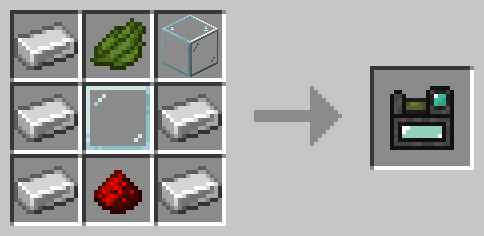
? 平板电脑
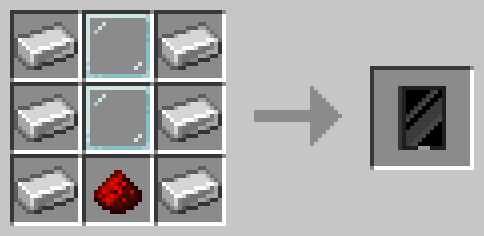
? 扫描仪
- 1.9.3 及以下版本:
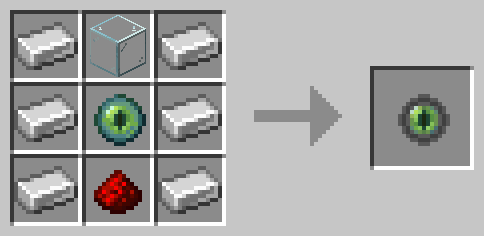
- 2.0.0 及以上版本:
?️ 主要功能
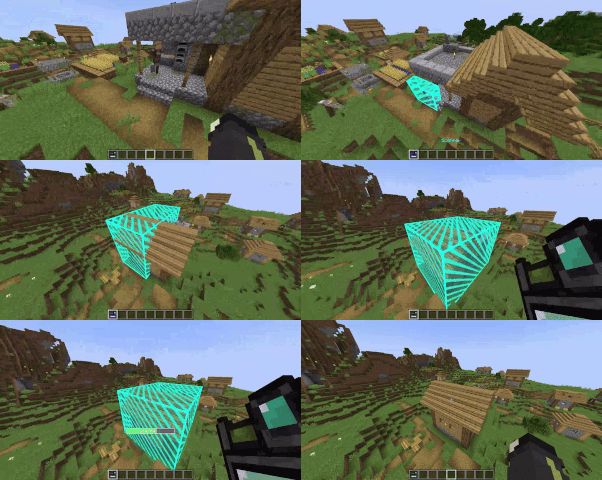
? 扫描仪 – 扫描任意结构并将其保存为蓝图。
- 右键点击一个方块以设置第一个角点。
- 右键点击另一个方块以设置第二个角点。
- 选定区域后,为其命名并保存该结构。
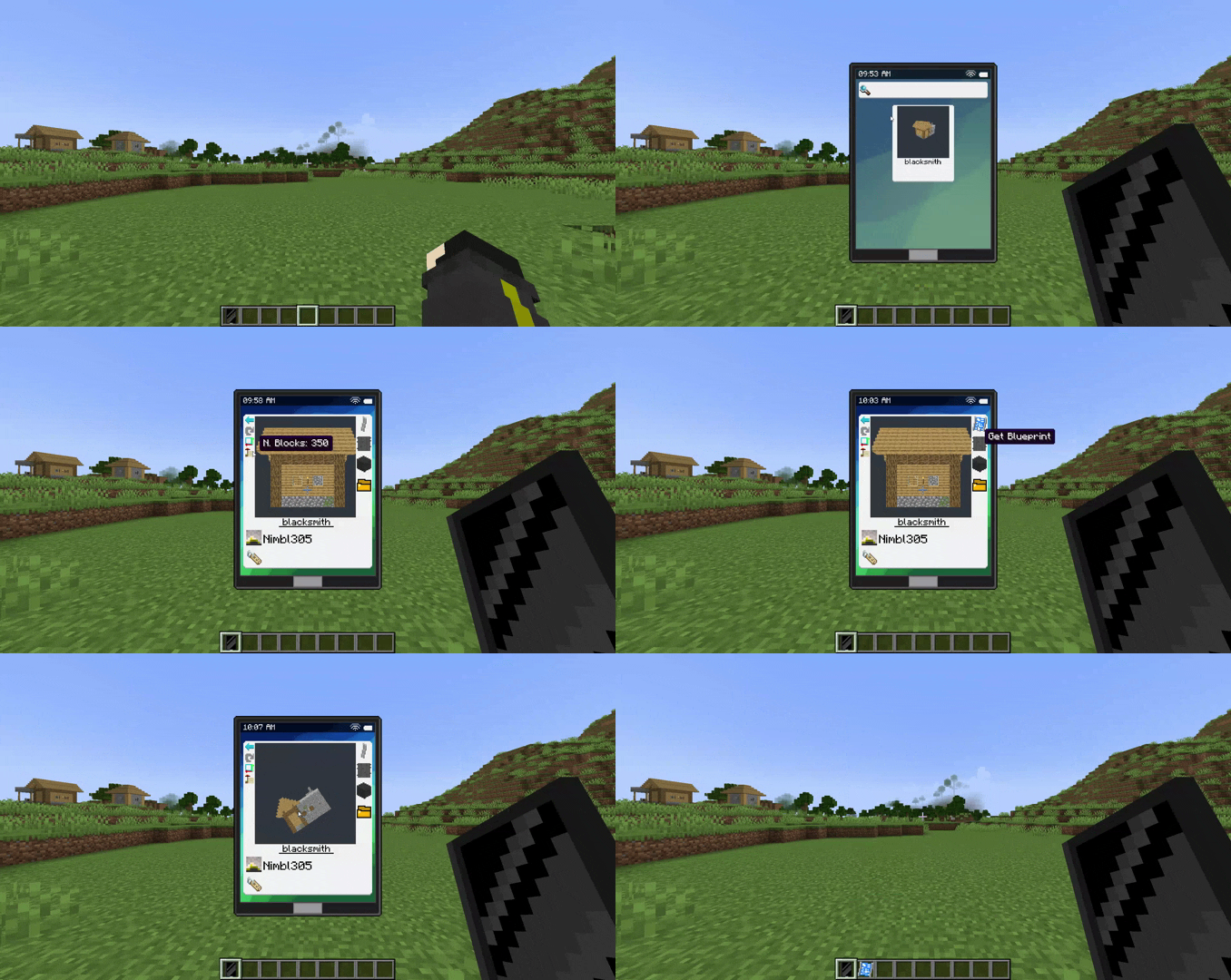
? 平板电脑 – 轻松管理你的蓝图。
- 查看已保存的结构。
- 删除不再需要的蓝图。
- 获取蓝图物品以便在世界中放置。
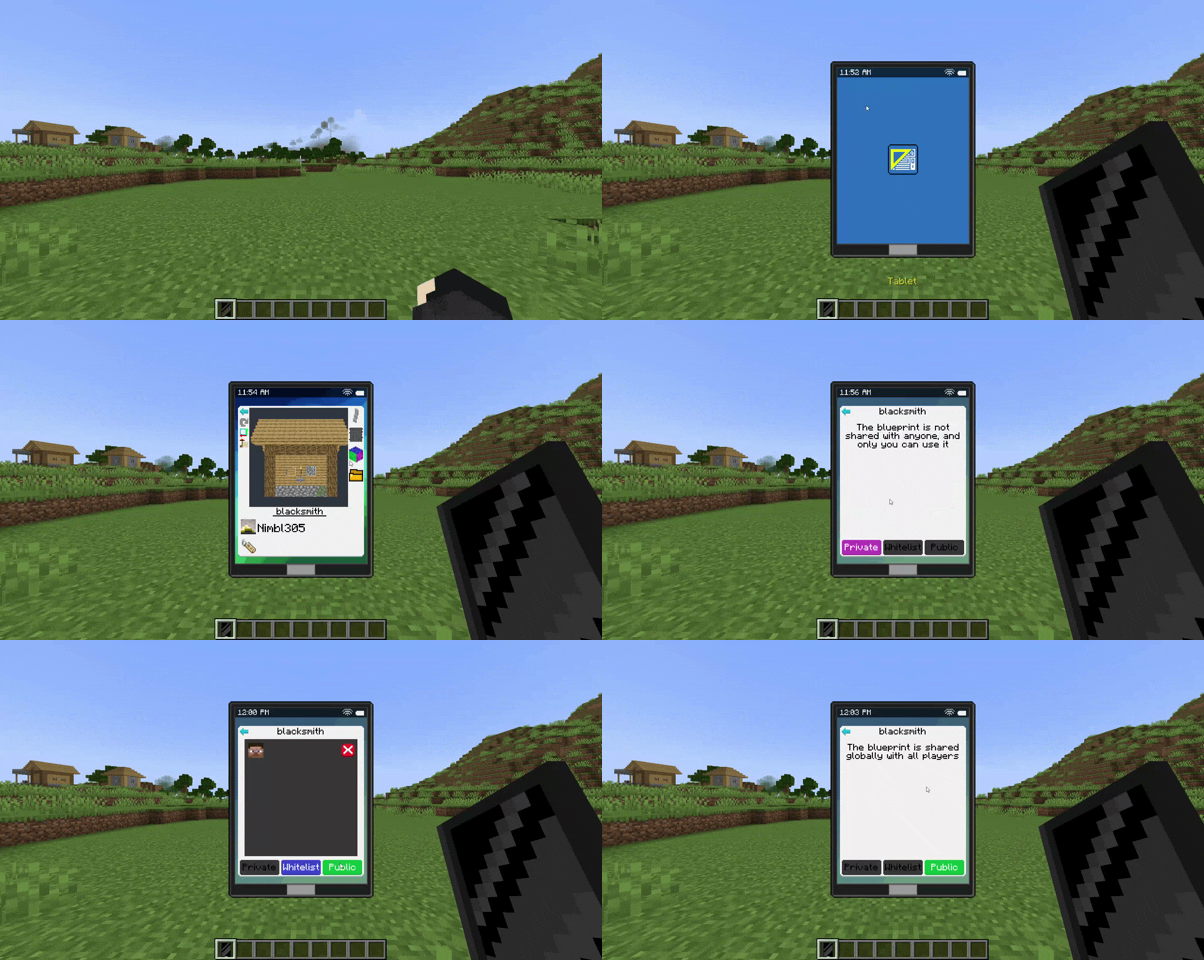
- 与同一世界中的其他玩家分享你的蓝图。
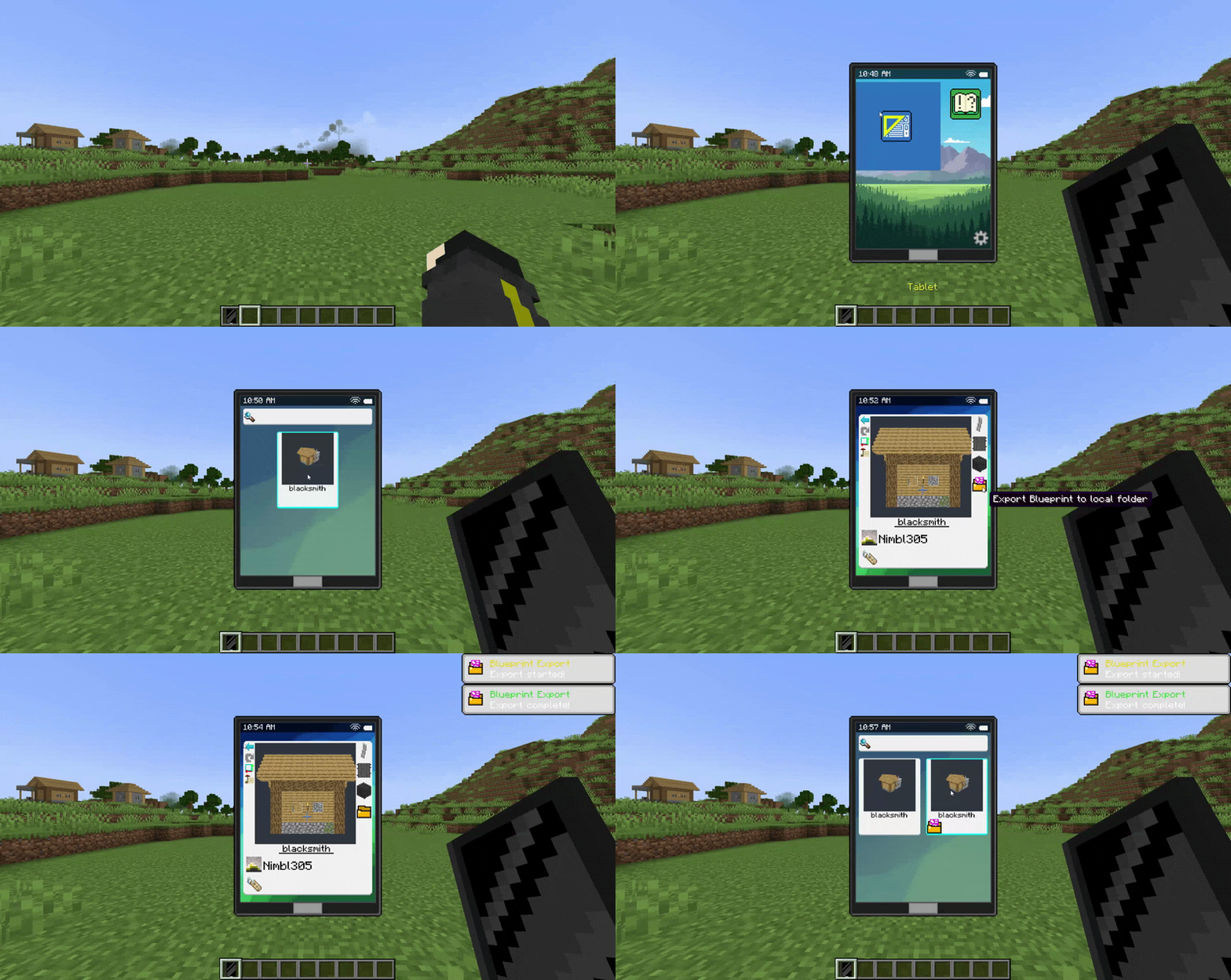
- 导出和导入全局蓝图,以便在不同世界中使用。
- 访问服务器提供的蓝图。
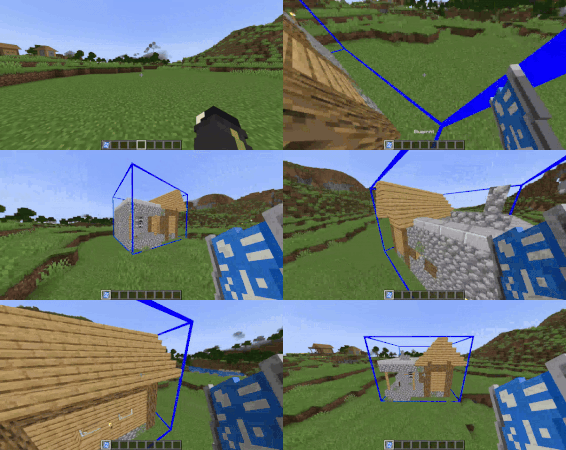
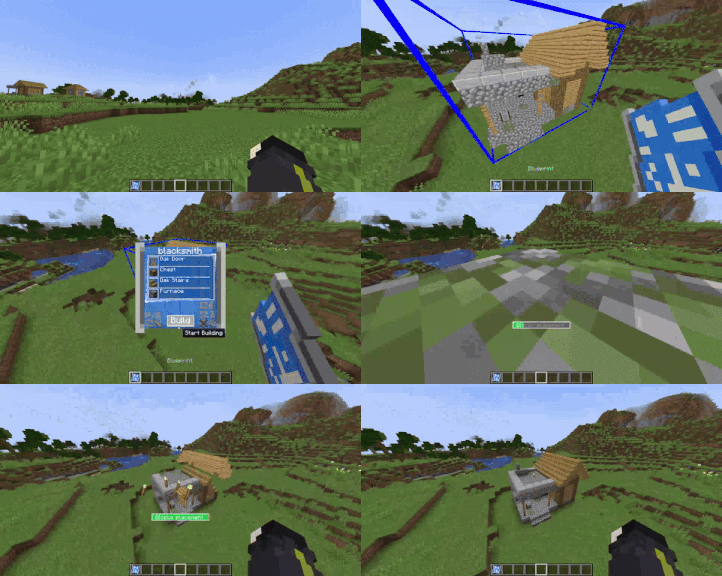
? 蓝图 – 轻松建造你保存的结构!
- 通过点击一个方块来选择原点。
- 全息预览将精确显示结构的放置效果。
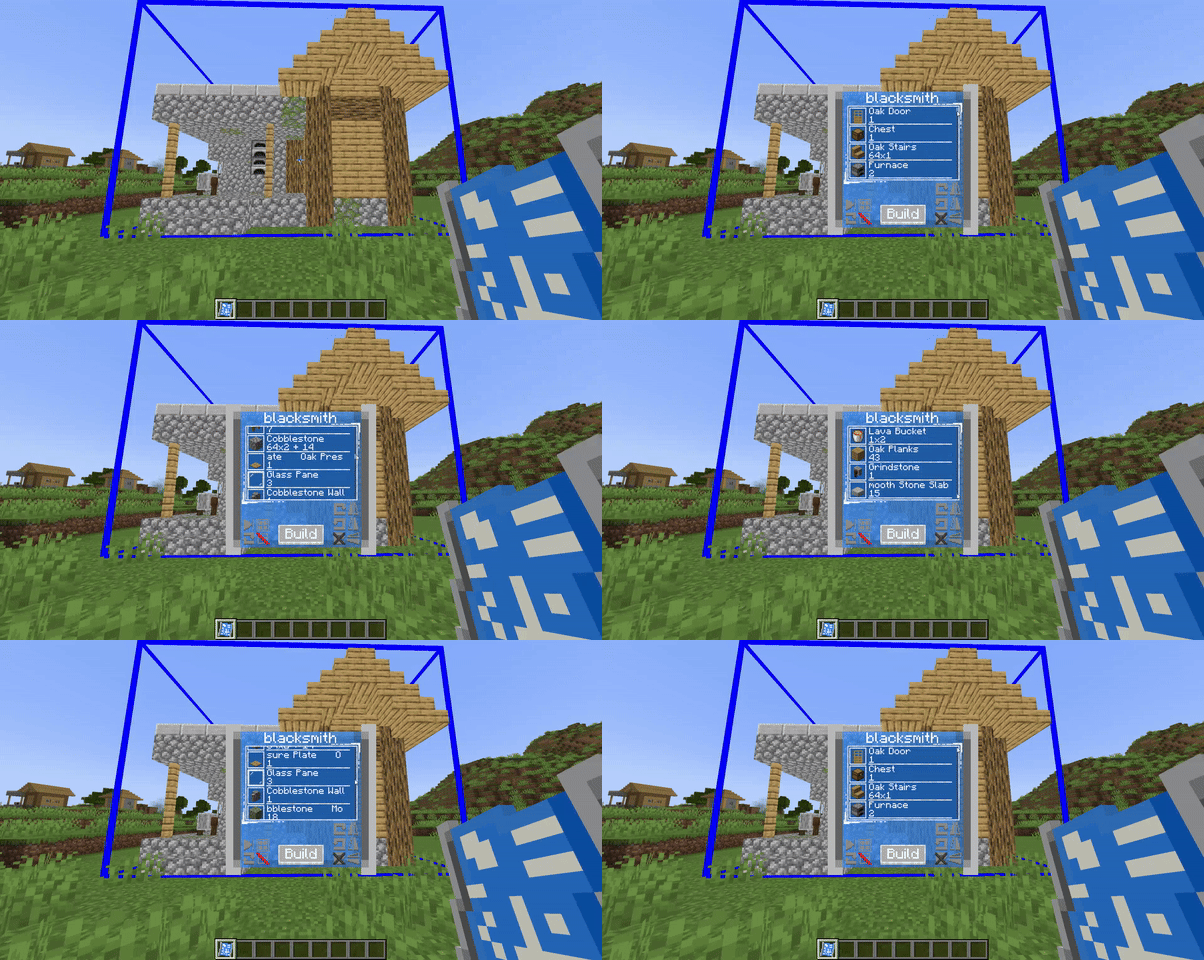
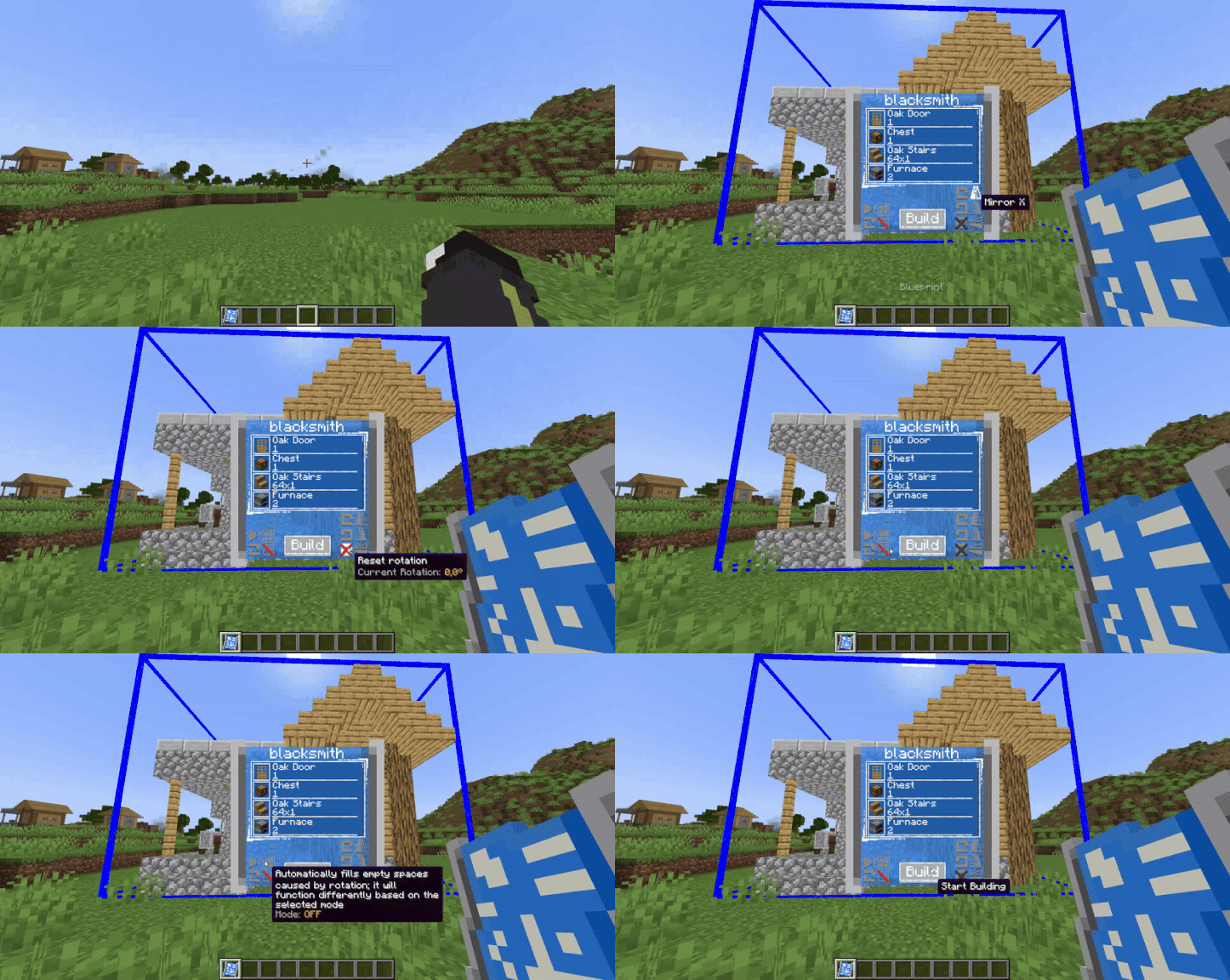
- 打开菜单(在空中 Shift + 右键点击)以:
✅ 检查所需材料。
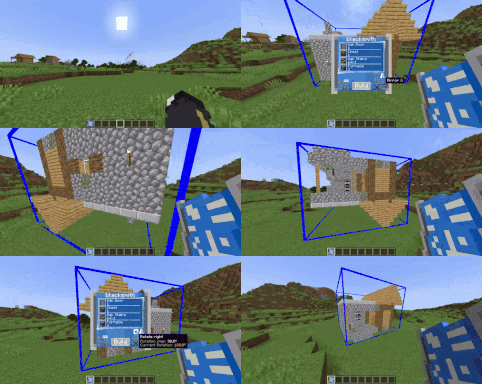
? 沿 X、Y 和 Z 轴旋转或镜像结构。
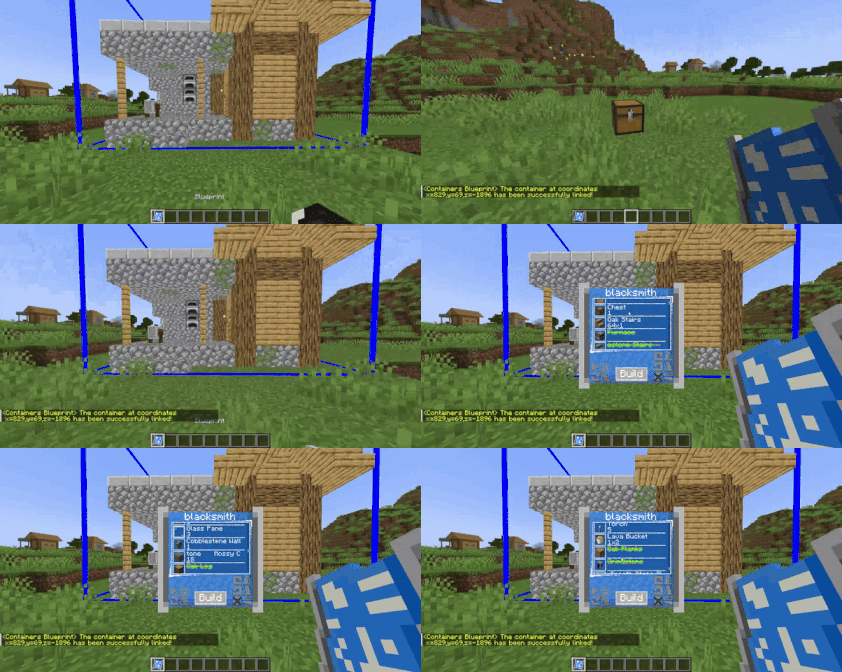
? 指定容器(Shift + 右键点击容器,如:箱子、潜影盒、桶等)来存储 材料,让你在没有库存限制的情况下建造大型结构!
⚙️ 使用游戏规则自定义限制
默认情况下,该模组包含某些限制,例如扫描仪可选择的最大方块数以及每个玩家可以存储的蓝图数量。但是,这些限制可以使用 游戏规则 (gamerules) 进行调整:
? 设置扫描区域内的最大方块数:
1.1.4 及以下版本:
/gamerule maxStructureBlockCount <整数>1.2.0 及以上版本:
/gamerule maxScannerBlockCount <整数>? 设置玩家拥有的最大蓝图数量:
1.9.3 及以下版本:
/gamerule maxBlueprintsForPlayer <整数>2.0.0 及以上版本:
/gamerule maxDigitizedStructuresForPlayer <整数>? 限制蓝图使用的容器数量
设置蓝图在建造过程中可同时交互的最大容器(如箱子或桶)数量:
/gamerule maxBlueprintContainers <整数>? 控制全局蓝图的使用
决定在你的世界中是否允许使用全局蓝图(跨多个世界共享):
/gamerule allowGlobalBlueprints <true/false>? 在蓝图(blueprints)中启用或禁用 NBT 数据复制 (1.8.0 版本新增)
允许蓝图扫描复制方块的 NBT 数据(如方块状态或自定义行为)。
默认情况下该功能处于禁用状态,以避免重复问题,特别是在多人游戏服务器中:
/gamerule allowNBTDataCopy <true/false>注意:此功能不会复制带有容器内容的方块(例如箱子或背包)。
⏳ 设置蓝图放置的冷却时间 (1.9.3 版本新增)
允许你定义一个冷却时间,以防止通过蓝图滥用建筑。
该值的单位为秒。
/gamerule blueprintsCooldown <integer>
? 允许商人村民生成 (2.0.0 版本新增)
启用此 gamerule 后,当有人试图在大量方块阻碍建设的区域进行建造时,商人村民将会生成。它的目的是收集方块,因此它会提出清理建设区域的建议,以换取保留所有被移除的方块。要接受其提议,只需右键点击公文包内的镐子即可。
/gamerule businessVillagerEnabled <true/false>
⚠️ 注意:本模组针对超大型结构进行了优化限制,因此在增加这些数值时请多加留意。
? 服务器蓝图管理 – 命令系统(仅限 OP)
使用 /blueprintserver 命令管理全服蓝图。
这些蓝图在整个服务器上共享,并可以设置为以下两种类型之一:
- Free(免费) – 所有玩家均可无限制访问。
- Permission(权限) – 只有拥有明确权限的玩家才能使用。
? 使用方法:
- 添加或替换服务器蓝图(手持蓝图物品时)
/blueprintserver set <free/permission> - 移除服务器蓝图:
/blueprintserver remove <server_blueprint_name> - 分配或撤销玩家对特定“权限”蓝图的访问权限:
/blueprintserver permission <player_name> <server_blueprint_name> <true/false>
默认情况下,除非明确授予,否则玩家没有权限。
? 磨损蓝图(Worn Blueprint)– 用法与功能
磨损蓝图是具有有限使用次数的蓝图,且可由任何玩家无限制地使用。
✅ 如何将其添加到世界中:
要在世界中注册磨损蓝图,请在手中持有普通蓝图并使用以下命令:
/blueprintworn add
若要稍后移除它,请使用:
/blueprintworn remove <worn_blueprint_name>
? 创建磨损蓝图物品
磨损蓝图物品可以通过 /give 命令或战利品表生成,但必须包含两个必需的 NBT 标签:
- remaining_uses:整数,定义剩余的使用次数。
- blueprint_name:字符串,将物品与世界中注册的磨损蓝图关联起来。
- free_build:布尔值(
0b/1b),允许你在不需要必要材料的情况下直接建造蓝图。 - allow_nbt (1.8.1 版本新增):
- 如果设置为
0b,它将始终在不携带 NBT 数据的情况下放置,忽略allowNBTDataCopygamerule。 - 如果设置为
1b,它将始终在携带 NBT 数据的情况下放置,同样忽略 该 gamerule。 - 如果未设置此标志,磨损蓝图将遵循当前
allowNBTDataCopygamerule 的值。
- 如果设置为
? 示例:
Minecraft 1.20.1 及以下版本
/give @s portable_blueprints:worn_blueprint{remaining_uses:1,blueprint_name:"worn_blueprint_name"} 1Minecraft 1.21.1
/give @s portable_blueprints:worn_blueprint[minecraft:custom_data={remaining_uses:1,blueprint_name:"worn_blueprint_name"}] 1(1.8.1 版本新增)
磨损蓝图世界注入系统
引入了自动向世界中注入磨损蓝图的系统。
这对于想要包含预置磨损蓝图(例如用于蓝图商店)的整合包制作者特别有用。
只需将你的 .bp 文件放入新文件夹:<Minecraft directory>/config/portable_blueprints/world_injection_worn_blueprints
此文件夹内还包含一个设置文件,可用于可选配置。
(1.9.3 版本新增)
? 阻止模组使用的命令
这些命令允许你禁止玩家使用扫描器和蓝图。
对于那些滥用模组机制来骚扰他人、造成卡顿或在服务器上引发问题的玩家非常有用。
无需完全封禁玩家,你可以简单地禁止他们使用该模组。
? 使用方法:
- 禁止某玩家使用该模组:
/portable_blueprint block <player_name> - 解除对之前被禁玩家的限制
/portable_blueprint unblock <player_name> - 显示被禁玩家列表:
/portable_blueprint blockedlist
? GitHub 社区与错误报告
加入社区、报告错误或提出新功能建议!
? Build Faster with Blueprints!
Tired of manually building the same structures over and over, like roads, street lamps, or houses? This mod is perfect for you! Scan your structure and create a blueprint so you can rebuild it instantly with just one click!
? Recipes:
? Tablet
? Scanner
- From version 1.9.3 and below:
- From version 2.0.0 and above:
?️ Main Features
? Scanner – Scan any structure to save it as a blueprint.
- Right-click a block to set the first corner.
- Right-click another block to set the second corner.
- Once the area is selected, give it a name and save the structure.
? Tablet – Easily manage your blueprints.
- View your saved structures.
- Delete blueprints you no longer need.
- Obtain the blueprint item to place it in the world.
- Share your blueprints with other players in the same world.
- Export and import global blueprints to use them across different worlds.
- Access server-provided blueprints.
? Blueprint – Build your saved structures effortlessly!
- Select the origin point by clicking on a block.
- A holographic preview will show exactly how the structure will be placed.
- Open the menu (Shift + Right-click in the air) to:
✅ Check the required materials.
? Rotate or mirror the structure along the X, Y, and Z axes.
? Assign containers (Shift + Right-click the container, like: chests, shulker boxes, barrels, etc.) to store materials, allowing you to build large structures without inventory limitations!
⚙️ Customizable Limits with Gamerules
By default, the mod includes certain limits, such as the maximum number of blocks that can be selected with the scanner and the number of blueprints each player can store. However, these limits can be adjusted using gamerules:
? Set the maximum number of blocks in a scanned area:
From version 1.1.4 and below:
/gamerule maxStructureBlockCount <integer>From version 1.2.0 and above:
/gamerule maxScannerBlockCount <integer>? Set the maximum number of blueprints a player can have:
From version 1.9.3 and below:
/gamerule maxBlueprintsForPlayer <integer>From version 2.0.0 and above:
/gamerule maxDigitizedStructuresForPlayer <integer>? Limit the number of containers a blueprint can use
Set the maximum number of containers (like chests or barrels) that a blueprint can interact with simultaneously during construction:
/gamerule maxBlueprintContainers <integer>? Control the use of global blueprints
Decide whether global blueprints (shared across multiple worlds) are allowed in your world:
/gamerule allowGlobalBlueprints <true/false>? Enable or disable NBT data copying in blueprints (added in version 1.8.0)
Allows blueprint scans to copy the NBT data of blocks (such as block states or custom behavior).
By default, it's disabled to avoid duplication issues, especially in multiplayer servers:
/gamerule allowNBTDataCopy <true/false>Note: This does not copy contents of blocks with inventories (like chests or backpacks).
⏳ Set a cooldown for blueprint placement (added in version 1.9.3)
Allows you to define a cooldown that prevents spamming builds through blueprints.
The value is in seconds.
/gamerule blueprintsCooldown <integer>
? Allows the Business Villager to spawn (added in version 2.0.0)
Enabling this gamerule allows the Business Villager to spawn when someone tries to build in an area where many blocks are obstructing the construction. Its goal is to collect blocks, so it will offer to clean up the construction area in exchange for keeping all the removed blocks for itself. To accept its offer, simply right-click on the pickaxe inside the briefcase.
/gamerule businessVillagerEnabled <true/false>
⚠️ Note: The mod is not optimized for very large structures, so be mindful when increasing these values.
? Server Blueprint Management – Command System (Op only)
Manage server-wide blueprints with the /blueprintserver command.
These blueprints are shared across the entire server and can be set as either:
- Free – accessible to all players without restrictions.
- Permission – only players with explicit permission can use them.
? How to Use:
- To add or replace a server blueprint (while holding a blueprint item in hand)
/blueprintserver set <free/permission> - To remove a server blueprint:
/blueprintserver remove <server_blueprint_name> - To assign or revoke a player's permission to use a specific "permission" blueprint:
/blueprintserver permission <player_name> <server_blueprint_name> <true/false>
By default, players do not have permission unless explicitly granted.
? Worn Blueprint – Usage and Functionality
Worn Blueprints are blueprints with a limited number of uses, and can be used by any player without restrictions.
✅ How to add them to the world:
To register a Worn Blueprint in the world, hold a normal blueprint in your hand and use the command:
/blueprintworn add
To remove it later, use:
/blueprintworn remove <worn_blueprint_name>
? Creating the Worn Blueprint Item
The Worn Blueprint item can be generated (via /give or through loot tables) using two required NBT tags:
- remaining_uses: an integer that defines how many uses are left.
- blueprint_name: a string linking the item to the registered worn blueprint in the world.
- free_build: a boolean value (
0b/1b) that allows you to build the blueprint without requiring the necessary materials. - allow_nbt (added in version 1.8.1):
- If set to
0b, it will always place without NBT data, ignoring theallowNBTDataCopygamerule. - If set to
1b, it will always place with NBT data, again ignoring the gamerule. - If the flag is not present, the worn blueprint will follow the current value of the
allowNBTDataCopygamerule.
- If set to
? Example:
minecraft version 1.20.1 and below
/give @s portable_blueprints:worn_blueprint{remaining_uses:1,blueprint_name:"worn_blueprint_name"} 1minecraft version 1.21.1
/give @s portable_blueprints:worn_blueprint[minecraft:custom_data={remaining_uses:1,blueprint_name:"worn_blueprint_name"}] 1(added in version 1.8.1)
Worn Blueprint World Injection System
Introduced a system to automatically inject worn blueprints into worlds.
This is especially useful for modpack creators who want to include premade worn blueprints (e.g. for a blueprint shop).
Just place your .bp files into the new folder: <Minecraft directory>/config/portable_blueprints/world_injection_worn_blueprints
A settings file is also included inside this folder for optional configuration.
(added in version 1.9.3)
? Block Mod Usage Commands
These commands allow you to block a player from using both the scanner and blueprints.
This is useful for players who abuse the mod’s mechanics to annoy others, cause lag, or create issues on the server.
Instead of banning the player entirely, you can simply block them from using the mod.
? How to Use:
- Block a player from using the mod:
/portable_blueprint block <player_name> - Unblock a previously blocked player
/portable_blueprint unblock <player_name> - Show the list of blocked players:
/portable_blueprint blockedlist
? GitHub Community & Bug Reporting
Join the community, report bugs, or suggest new features!

下载 Portable Blueprints
下载 Portable Blueprints
下载 Portable Blueprints
下载 Portable Blueprints
下载 Portable Blueprints
下载 Portable Blueprints
下载 Portable Blueprints
下载 Portable Blueprints
下载 Portable Blueprints
下载 Portable Blueprints
? 版本 2.0.11 - 兼容性修复
? 模组兼容性
- 修复了与 Carry On 的冲突:解决了当玩家使用 Carry On 模组持有实体/生物时,蓝图建造无法触发的问题。
关于这个资源的讨论、问题反馈与使用心得
还没有讨论,来发第一帖吧
你是这个资源的作者?登录后可认领此资源。
相似资源
 模组
缓冲的原始输入和线程化的事件轮询
 模组

可定制的鞘翅模组,支持装饰纹饰、旗帜图案等更多功能!
 模组

一个用于收集生物掉落物的多区块模组。
 模组

显示你正在注视的方块的信息。(适用于 Minecraft 1.16+ 的 Hwyla/Waila 分支)
 模组

原版世界生成优化模组
 模组
在游戏画面角落显示附近世界地形、玩家、生物和实体的地图。可创建路径点,帮助你找到标记过的位置。
评论 0
登录后参与评分
还没有评论,来抢沙发吧