药水容器
药水容器(Potion Container)添加了一个专用的药水存储物品,旨在让药水管理变得更快、更整洁、更方便。
你不必将多个药水堆叠填满快捷栏,而是可以将它们集中存放在一个容器中,并通过径向选择菜单进行访问。这使得在探索、战斗或 Boss 战中能够快速使用治疗药水、增益药水、抗性药水、实用药水以及任何你携带的药水。
该模组注重可用性和可配置性。几乎所有主要功能都可以通过配置文件进行调整或禁用,使其既适合休闲整合包,也适合经过严格平衡的服务器环境。
合成配方
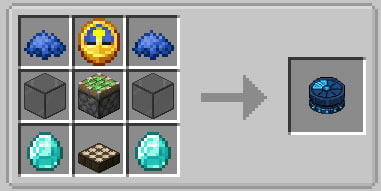
功能
径向药水菜单
模组的核心功能是径向菜单。
按住指定按键时,屏幕中央会出现一个圆形界面,允许你快速选择已存储的药水槽位之一。这种方法比在战斗中打开背包或在多个快捷栏槽位中搜索要快得多。
该菜单完全可配置,并支持根据你偏好的游玩风格显示不同数量的可见药水堆叠。
药水存储
容器内的每个槽位可以存储多种相同类型的药水。
每个槽位的最大存储量可通过配置文件进行调整,允许整合包制作者决定该容器是作为一个简单的实用工具还是一个强大的药水管理工具。
自动补给
可选的自动补给系统可以启用或禁用。
激活后,容器可以自动帮助维持药水的可用性,而无需频繁手动整理。
偏好更手动体验的玩家完全可以禁用此功能。
可调的饮用机制
药水容器为整合包制作者和服务器所有者提供了多种平衡选项。
你可以配置:
- 饮用延迟;
- 饮用后的移动减速效果;
- 减速强度;
- 减速持续时间;
- 声音重复间隔。
这使得该模组既能自然地融入轻量级的原版风格整合包,也能适应更具挑战性的进度导向型整合包。
Curios 集成
如果安装了 Curios 模组,药水容器可选择要求将容器装备在 Curios 槽位中才能使用。
此设置完全可选,可在配置文件中启用或禁用。
配置
药水容器的主要目标之一是灵活性。
服务器所有者和整合包开发者可以自定义模组的几乎所有重要方面:
- 径向菜单中显示的药水堆叠数量。
- 每个槽位存储的最大药水数量。
- 自动补给的可用性。
- 饮用冷却时间。
- 移动减速行为。
- 径向菜单的大小和布局。
- Curios 集成的要求。
例如:
- 如果你希望玩家手动管理资源,可以禁用自动补给按钮。
- 完全禁用移动减速以获得更街机式的体验。
- 减少槽位容量以创建更严格的库存管理。
- 增大径向菜单尺寸以便在大显示器上获得更好的可视性。
- 对于角色扮演导向的整合包,要求装备 Curios 物品。
本地化
药水容器内置了多种语言的翻译:
- 德语 (de_de)
- 英语 (en_us)
- 西班牙语 (es_es)
- 法语 (fr_fr)
- 日语 (ja_jp)
- 韩语 (ko_kr)
- 巴西葡萄牙语 (pt_br)
- 俄语 (ru_ru)
- 乌克兰语 (uk_ua)
- 简体中文 (zh_cn)
模组会自动使用 Minecraft 中选择的语言。
为什么要使用药水容器?
一旦玩家开始携带多种药水效果,药水管理往往会变得不便。宝贵的快捷栏空间被药水堆叠占用,而在战斗中切换药水可能会令人沮丧。
药水容器通过提供一种集中式、可配置且用户友好的方式来存储和访问药水,从而解决了这个问题,同时保持对不同游戏风格的完全可定制性。
无论你是想要一个简单的生活质量提升,还是需要一个大型整合包的可配置药水管理系统,药水容器都能根据你的需求进行适配。
Potion Container
Potion Container adds a dedicated potion storage item designed to make potion management faster, cleaner, and more convenient.
Instead of filling your hotbar with multiple potion stacks, you can keep them inside a single container and access them through a radial selection menu. This allows quick access to healing, buffs, resistance effects, utility potions, and any other potion you carry during exploration, combat, or boss fights.
The mod focuses on usability and configurability. Nearly every major feature can be adjusted or disabled through the configuration file, making Potion Container suitable for both casual modpacks and heavily balanced server environments.
Recipes
Features
Radial Potion Menu
The core feature of the mod is the radial menu.
By holding the assigned key, a circular interface appears around the center of the screen, allowing you to quickly select one of the stored potion slots. This approach is significantly faster than opening inventories or searching through multiple hotbar slots during combat.
The menu is fully configurable and supports different numbers of visible potion stacks depending on your preferred playstyle.
Potion Storage
Each slot inside the container can store multiple potions of the same type.
The maximum amount stored per slot can be adjusted through the configuration, allowing pack creators to decide whether the container should act as a simple utility item or a powerful potion management tool.
Auto Refill
An optional auto-refill system can be enabled or disabled.
When active, the container can automatically help maintain potion availability without requiring constant manual organization.
Players who prefer a more manual experience can disable this feature entirely.
Adjustable Drinking Mechanics
Potion Container includes several balance options for modpack creators and server owners.
You can configure:
- drinking delays;
- movement slowdown after drinking;
- slowdown strength;
- slowdown duration;
- sound repetition intervals.
This allows the mod to fit naturally into both lightweight vanilla-style packs and more challenging progression-focused modpacks.
Curios Integration
If Curios is installed, Potion Container can optionally require the container to be equipped in a Curios slot before it can be used.
This setting is completely optional and can be enabled or disabled in the configuration.
Configuration
One of the primary goals of Potion Container is flexibility.
Server owners and modpack developers can customize nearly every important aspect of the mod:
- Number of potion stacks shown in the radial menu.
- Maximum potions stored per slot.
- Auto-refill availability.
- Drinking cooldown timing.
- Movement slowdown behavior.
- Radial menu size and layout.
- Curios integration requirements.
For example:
- Disable the auto-refill button if you want players to manage resources manually.
- Disable movement slowdown entirely for a more arcade-style experience.
- Reduce slot capacity to create stricter inventory management.
- Increase the radial menu size for better visibility on large monitors.
- Require Curios equipment for RPG-oriented modpacks.
Localization
Potion Container includes built-in translations for multiple languages:
- German (de_de)
- English (en_us)
- Spanish (es_es)
- French (fr_fr)
- Japanese (ja_jp)
- Korean (ko_kr)
- Brazilian Portuguese (pt_br)
- Russian (ru_ru)
- Ukrainian (uk_ua)
- Simplified Chinese (zh_cn)
The mod automatically uses the language selected in Minecraft.
Why Use Potion Container?
Managing potions often becomes inconvenient once a player starts carrying multiple effects. Valuable hotbar space is consumed by potion stacks, and switching between them can become frustrating during combat.
Potion Container solves this problem by providing a centralized, configurable, and user-friendly way to store and access potions while remaining fully customizable for different gameplay styles.
Whether you want a simple quality-of-life improvement or a configurable potion management system for a large modpack, Potion Container is designed to adapt to your needs.


 模组

 模组
 模组
 模组

 模组
 模组
评论 0
登录后参与评分
还没有评论,来抢沙发吧