
本模组灵感来源于热门大逃杀游戏 PUBG。在本模组中,我试图将这款游戏还原至 Minecraft 中。
从版本 1.6.3 开始,需要安装自定义配置库。链接如下
加入我的 Discord 服务器 -
在 Patreon 上支持我 -
主要功能:
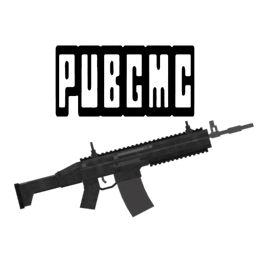
带有配件的武器
空投物资
治疗物品,如急救包、医疗箱
增益物品——能量饮料
增益系统——允许你获得生命值和速度加成
战利品生成方块
背包——可用于解锁更多物品栏槽位
物品栏上限——可通过背包解锁
玩家死亡时会掉落包含其物品的箱子
不同等级的护甲
吉利服
信号枪用于呼叫空投
手雷
降落伞
大多数物品的合成系统
部分装饰物(如栅栏),以增强地图氛围
配置文件——见下文
配置文件 (位于 .minecraft/config/pubgmc.cfg)
在此文件中,你可以配置或关闭你不想要使用的某些功能
在标有 [默认值: true/false]的字段中,你必须使用 true 或 false
如果需要填写数字,则始终存在定义的数字范围
示例:
# [1]战利品生成器内部的战利品渲染样式;0 = 关闭,1 = 快速渲染,2 = 精美渲染 [[2]范围:0 ~ 2,默认值:2 [3]]
B:"Render loot inside loot spawners"=2[4]
[1] - 此处始终有一个简单的描述,说明你正在修改的内容
[2] - 这是可填入 [4]字段的数字范围。该数字必须为 0、1 或 2!
[3] - 由我设置的默认值
[4] - 这是你要更改的数字
战利品刷新:
战利品不会自动生成,你需要运行 /loot generate 命令。
战利品将仅在已加载的战利品生成器内生成!
战利品生成自定义:
1.4.0-a 版本更新!
/loot generate > 此功能将根据当前设置生成战利品
如果你刚开始一个新世界,可能需要运行 /loot reset 来准备默认的战利品配置!
如何修改战利品生成?
最有用的是运行 '/loot help',它会尝试引导你走向正确的方向
你可以修改多个参数:
- /loot set [help, toggleAirdropWeapons, toggleAmmoLoot, toggleRandomAmmoCount, weapon, chance]。在这里解释所有内容会花费大量时间,因此建议你尝试 /loot 命令并使用键盘上的 TAB 键循环浏览选项。
武器
- 左键点击 (LMB) >> 射击
- 右键点击 (RMB) >> 开镜/瞄准镜
- R >> 换弹
- B >> 切换射击模式
- P >> 打开配件界面
- 在枪械工作台中合成武器
- 并非所有武器都能安装所有配件!
- 8倍和15倍瞄准镜仅适用于 DMR(精确射手步枪)和栓动狙击步枪
配件
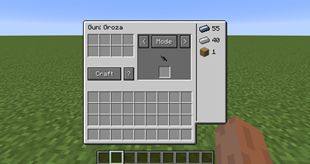
要将配件安装到武器上,请按 P 打开配件界面
然后将要修改的武器放入界面中心的插槽中
选取要添加到武器上的配件,并将其放入右侧对应的插槽中。
要快速将任何物品安装到武器上,只需按住 Shift 键点击物品,它们就会自动放入正确的插槽中
请注意,当向武器的插槽中添加新配件时,可能会丢失已经安装在武器上的其他配件。务必先从枪械上移除它们。
空投:
空投有两种版本:
- 普通空投——通过 /airdrop 命令呼叫。
- 大型空投——通过直接向天空发射信号弹呼叫
除非在配置文件中关闭此功能,否则空投落地时会自动生成战利品。
空投始终包含顶级护甲和背包 + 稀有强力武器 + 稀有配件和治疗物品。
手雷:
左键点击 (LMB) 近距离投掷
右键点击 (RMB) 远距离投掷
如果在投掷时处于疾跑状态,手雷将获得额外的初速度并飞得更远
- HE 高爆手雷——为了投掷这种手雷,你必须先拔掉保险销,然后投出——这允许你“延迟引爆”手雷以实现完美时机
在和平模式 (PEACEFUL) 下游玩时,手雷不会对玩家造成伤害!
- 烟雾弹 - 提供临时掩护。
水可以熄灭效果!
- 莫洛托夫鸡尾酒(燃烧瓶)- 燃烧瓶在撞击地面时爆炸,并会在短时间内点燃周围的一切。
站在火中的玩家也会受到额外伤害!
增益效果:
你可以通过饮用能量饮料、服用止痛药或使用肾上腺素注射器来获得增益效果。
当增益效果激活时,你会每隔 x 秒恢复 0.5 颗心。
当你的增益效果超过 50% 时,你还将获得速度加成以及额外的 0.5 颗心回复。
治疗:
战斗中有多种治疗方式:
- 绷带
- 急救包
- 医疗箱
要使用治疗物品,你需要按住鼠标右键并等待消耗完毕。在治疗期间,你将无法大幅移动。
降落伞:
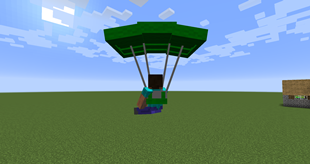
在这个模组中你可以找到降落伞。你需要右键点击降落伞才能打开它。
操作很简单。看向你想要前往的方向。
为了尽可能快地下降,你需要将视角向下倾斜超过 40 度角以获得额外的速度加成。
来自我模组的一些截图:
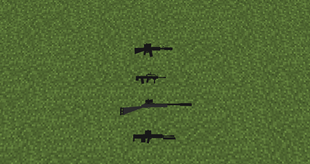
武器:
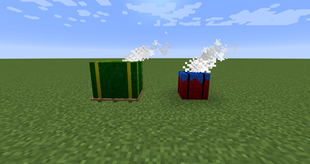
空投物资:
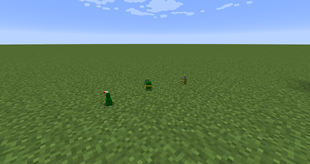
手榴弹:
降落伞:
自定义合成台 GUI
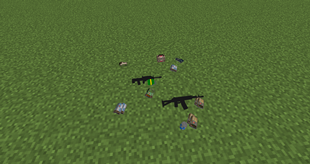
战利品生成器
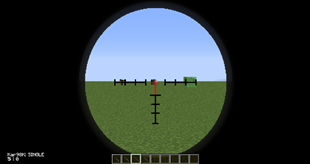
4倍镜准星覆盖层(冲锋枪、突击步枪)
该模组支持多人游戏,所以邀请你的朋友一起享受更多乐趣吧。
你们现在可以互相进行战斗,看看谁是最优秀的幸存者。
注意:
大多数图片取自我的地图,该地图位于我的整合包中。
This mod has been inspired by popular battle royale game - PUBG. In this mod I will try to remake the game into Minecraft.
Starting from version 1.6.3 custom config library is required. Link below
Join my discord server -
Support me on Patreon -
MAIN FEATURES:
Weapons with attachments
Airdrops
Healing items like Medkits, first aid kits
Booster items - energy drinks
Boost system - this allows you to gain health and speed boost
Loot generator blocks
Backpacks - you can use them to unlock more slots in inventory
Inventory limit - unlockable with backpacks
Players drop crates with their items on death
Different levels of armor
Ghillie suit
Flare guns to call airdrops
Grenades
Parachutes
Crafting system for most items
Some props like fences to make your map feel better
Config - see below
Config (located in .minecraft/config/pubgmc.cfg)
In this file you can configure/turn off some features which you don't want to use
You have to use true/false in fields which have [default: true/false]
If you're supposed to fill in numbers, there's always defined range for the number
Example:
# [1]Loot render style inside loot generators; 0 = Off, 1 = Fast render, 2 = Fancy render [[2]range: 0 ~ 2, default: 2 [3]]
B:"Render loot inside loot spawners"=2[4]
[1] - There is always located simple description what you're changing
[2] - This is the range for the number you can fill into [4]field. This number must be 0,1 or 2!
[3] - Default value set by me
[4] - This is the number you're going to change
Loot spawning:
Loot doesn't generate by itself, you have to run /loot generate command.
Loot will be generated ONLY INSIDE LOADED loot spawners!
Loot gen customization:
Updated in 1.4.0-a!
/loot generate > this function will generate loot with it's current settings
If you have just started a new world you might want to run /loot reset in order to prepare default loot configuration!
How can I modify the loot generation?
Most useful is running the '/loot help' which will try to guide you in the right direction
There are multiple parameters you can modify:
- /loot set [help, toggleAirdropWeapons, toggleAmmoLoot, toggleRandomAmmoCount, weapon, chance]. Explaining everything here would take a lot of time, so I suggest you trying the /loot command and cycling throught options using the TAB key on your keyboard.
Weapons
- LMB >> Shoot
- RMB >> ADS/Scope
- R >> Reload
- B >> Change Firemode
- P >> Open attachments GUI
- You craft weapons inside Gun Workbench
- Not all weapons can take all attachments!
- 8x and 15x scopes are only for DMRs and Bolt action sniper rifles
ATTACHMENTS
To attach something to you weapon you have to press P to open GUI for attachments
Then put the weapon you want to modify into slot which is located in the centre of the GUI
Grab attachments you want to add to your weapon and put them into right slots.
To quickly attach anything to weapon, you can simply shift-click the items and they will be added into right slots
Be careful because you might lose attachments which are already on weapon when you add another attachment into it's slot. Make sure to always remove them from the gun first.
Airdrops:
There are 2 version of airdrop:
- Regular airdrop - called from /airdrop command.
- Big airdrop - called from shooting flare straight into the sky
Loot is automatically generated when the airdrop lands unless you turn this feature off in the config.
Airdrops always contain top level armor and backpack + rare and powerful weapon + rare attachments and healing items.
Grenades:
LMB to throw close
RMB to throw far
If you're sprinting when you are throwing, the grenade will gain extra velocity and will fly further
- HE Grenade - In order to throw this grenade you have to first pull the pin and then throw - this allows you to "cook" the grenade for perfect timing
Grenades won't deal damage to players when you're playing in PEACEFUL mode!
- Smoke Grenade - provides temporary cover.
Water will extinguish the effect!
- Molotov - Molotovs explode on impact with ground and they will put everything on fire for short period of time.
Players are also getting extra damage when they stand inside the fire!
Boost:
You can gain boost by consuming energy drinks, painkillers or using adrenaline syringes
While you have boost active you will get 0.5 heart every x seconds.
When your boost is above 50% you'll also get speed boost + additional 0.5 heart bonus
Healing:
There are multiple ways to heal in combat:
- Bandages
- First Aid kits
- Medkits
To use healing item, you have to hold right mouse button and wait until you consume the healing item. You won't be able to move much while healing.
Parachutes:
In this mod you can find parachutes. You have to right click the parachute in order to open it.
Controls are simple. Look into the direction you want to go.
To drop down as fast as possible you have to look down under 40 degree angle to gain additional speed boost.
Some images from my mod:
Weapons:
Airdrops:
Grenades:
Parachute:
Custom crafting table GUI
Loot spawners
4x Scope overlay (SMG, AR)
Mod should be working in multiplayer so invite your friends for even more fun.
You can now do battles with each other and see who is the best survivor.
NOTE:
Most images has been taken from my map which is in my modpack.
下载 PUBGMC mod
需要联机服务器吗?
稳定流畅、一键部署,几分钟即可和朋友联机开服
最低仅需 8 元/月 即可畅快联机
下载 PUBGMC mod
需要联机服务器吗?
稳定流畅、一键部署,几分钟即可和朋友联机开服
最低仅需 8 元/月 即可畅快联机
下载 PUBGMC mod
需要联机服务器吗?
稳定流畅、一键部署,几分钟即可和朋友联机开服
最低仅需 8 元/月 即可畅快联机
下载 PUBGMC mod
需要联机服务器吗?
稳定流畅、一键部署,几分钟即可和朋友联机开服
最低仅需 8 元/月 即可畅快联机
下载 PUBGMC mod
需要联机服务器吗?
稳定流畅、一键部署,几分钟即可和朋友联机开服
最低仅需 8 元/月 即可畅快联机
下载 PUBGMC mod
需要联机服务器吗?
稳定流畅、一键部署,几分钟即可和朋友联机开服
最低仅需 8 元/月 即可畅快联机
下载 PUBGMC mod
需要联机服务器吗?
稳定流畅、一键部署,几分钟即可和朋友联机开服
最低仅需 8 元/月 即可畅快联机
下载 PUBGMC mod
需要联机服务器吗?
稳定流畅、一键部署,几分钟即可和朋友联机开服
最低仅需 8 元/月 即可畅快联机
下载 PUBGMC mod
下载 PUBGMC mod
1.10.7
- 添加了 C4
- 修复了 AI 玩家碰撞问题
- 自动降落伞功能
- 新增配置选项
关于这个资源的讨论、问题反馈与使用心得
还没有讨论,来发第一帖吧
你是这个资源的作者?登录后可认领此资源。
相似资源
 模组

可定制的鞘翅模组,支持装饰纹饰、旗帜图案等更多功能!
 模组

显示你正在注视的方块的信息。(适用于 Minecraft 1.16+ 的 Hwyla/Waila 分支)
 模组
使用 JavaScript 编辑配方、添加自定义物品、编写世界事件!
 模组

查看物品与配方
 模组
在游戏画面角落显示附近世界地形、玩家、生物和实体的地图。可创建路径点,帮助你找到标记过的位置。
 模组
AE2:一款流行的自动化与存储模组
评论 0
登录后参与评分
还没有评论,来抢沙发吧