

教程
Quick Widgets
38 个 HUD 小部件,你可以随时开启、拖拽到任意位置、调整大小和重新设计样式——无需触碰任何配置文件。
按下 右 Shift 键,点击开关即可在屏幕上显示。按下 编辑布局 并将其拖到你想要的位置。这就是整个学习过程。
Quick Widgets 仅适用于客户端,不使用 Mixin,并且基于同一套代码库支持 1.20.1、1.21.11、26.1 和 26.2。
截图
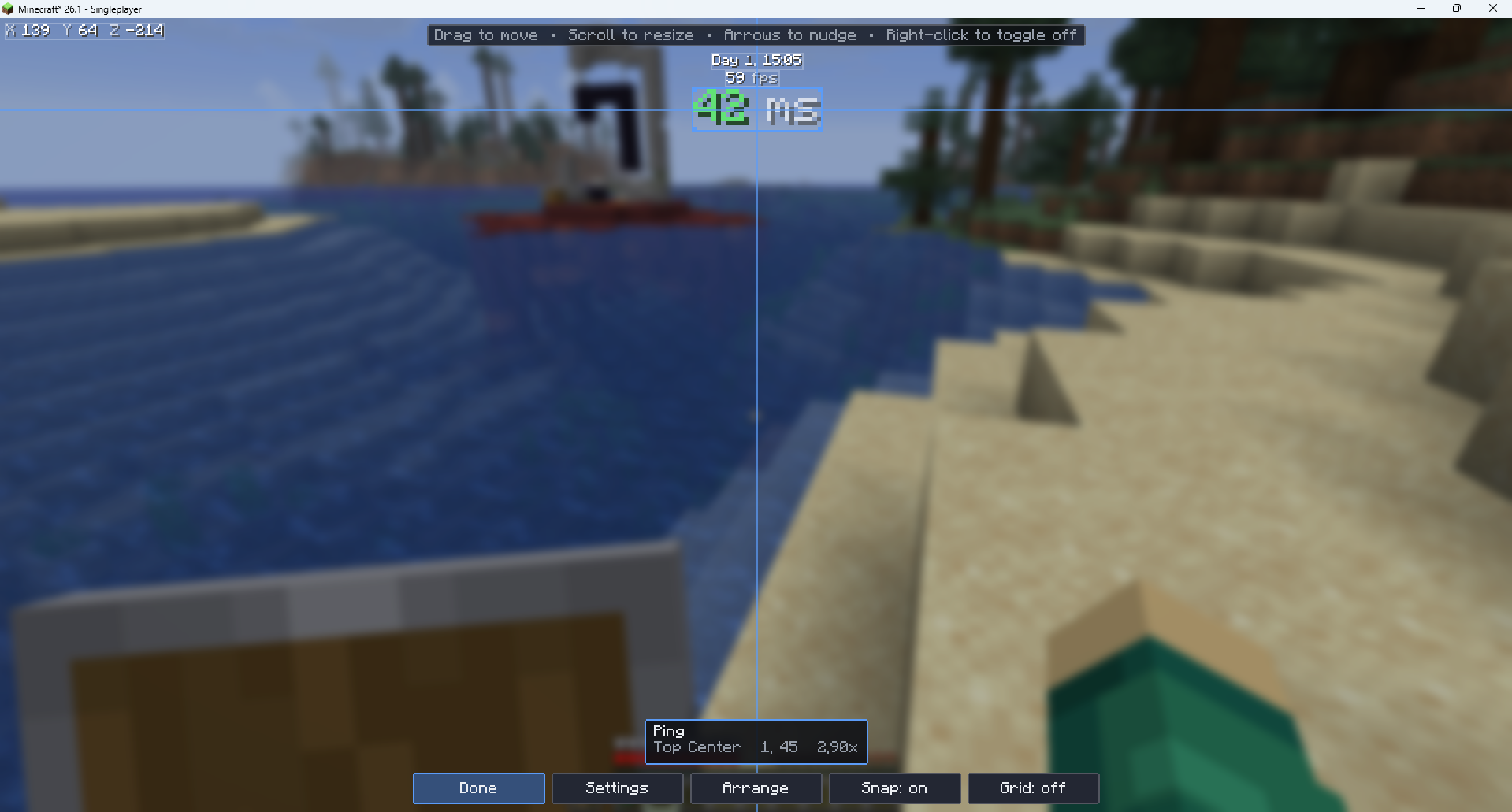
小部件列表
性能类
- FPS 计数器 — 帧率,可选显示过去 5 秒内的最小值/最大值/平均值
- 内存使用量 — Java 堆内存使用情况与最大值的对比,可选显示进度条
- Ping 值 — 往返延迟,带颜色编码
- TPS 指示器 — 服务器刻率
- 区块更新 — 每帧重建的区块数量以及待处理队列的大小
- GPU 显存 — 正在使用的视频内存(需驱动报告支持)
玩家类
- 坐标 — X、Y、Z,可选显示朝向和所在区块位置
- 生物群系 — 你当前所在的生物群系
- 速度 — 每秒移动方块数
- 护甲状态 — 已装备的护甲片图标及其耐久度
- 手持物品耐久度 — 手中物品的剩余耐久
- 药水效果 — 活跃效果及其等级和剩余时间
- 饱和度 — 饥饿条背后的隐藏数值
- 生命值指示器 — 精确的 HP 数值而非仅显示心形
- 攻击冷却 — 下一次挥击的蓄力程度
- 经验信息 — 等级、精确点数以及升至下一等级所需的点数
世界类
- 游戏内时间 — “第 4 天,14:30”
- 天数计数器 — 存活天数
- 实时时钟 — 你的系统时钟,方便你知道何时该下线
- 天气状况 — 晴天、雨天或雷暴
- 光照等级 — 方块光照强度,附带怪物生成判定
- 月相 — 附带绘制的月亮图案
- 史莱姆区块 — 判断你当前站立位置是否可生成史莱姆
PvP / 战斗类
- CPS 计数器 — 每秒左键/右键点击次数
- 攻击距离显示 — 你上次击中实体的距离
- 连击计数器 — 连续命中且未被反击的次数
- 命中检测 — 挥击是否命中的闪光提示
- 按键显示 — WASD 及鼠标按键,附带 Badlion 风格的按键动画
- 疾跑/潜行指示器 — 包括是否设置为切换模式
服务器类
- 服务器 IP — 提供选项以在直播时隐藏 IP
- 玩家数量 — 在线人数 / 最大人数
- 服务器名称 / MOTD
其他类
- 秒表 — 可通过绑定按键开始、停止和重置
- 背包警报 — 在你空间不足前发出警告
- 物品计数器 — 追踪箭矢、末影珍珠、方块等任意物品
- 资源包显示 — 当前加载的资源包列表
- 截图指示器 — 确认截图已保存
- 方向指南针 — 横跨屏幕顶部的简易指南针条
默认开启:FPS 计数器、Ping 值、坐标和游戏内时间。Ping 值在单人游戏中会自动隐藏,因此不会占用额外资源。
快速上手
- 安装 Fabric Loader 和 Fabric API。
- 将 Quick Widgets 放入
mods文件夹。 - 启动游戏,然后按下 右 Shift 键。
- 开启你需要的小部件,然后点击 编辑布局 将其拖放到合适位置。
设置界面中包含“如何使用”页面,如果你更倾向于在游戏中阅读说明。此外,当你加入游戏时,模组会在聊天栏中发送一条问候消息,并告知你当前绑定的按键。
按键绑定位于 选项 → 控制 → Quick Widgets 下,你可以在这里重新绑定设置页面的按键,并为秒表和隐藏叠加层设置可选按键。
兼容性
| Minecraft | 加载器 | 依赖项 |
|---|---|---|
| 1.20.1 | Fabric | Fabric API |
| 1.21.11 | Fabric | Fabric API |
| 26.1 | Fabric | Fabric API |
| 26.2 | Fabric | Fabric API |
无 Mixin。 Quick Widgets 不进行任何补丁修改——每个小部件所需的数据均通过公开的客户机 API 获取。这使得它在大型整合包中具有出色的兼容性,也是为什么同一套代码库能够同时支持混淆后的 1.20.1 和未混淆的 26.2 的原因。
支持单人和多人游戏。 建议?问题反馈?欢迎加入我的 Discord 服务器:
Tutorial
Quick Widgets
38 HUD widgets you can switch on, drag anywhere, resize and restyle — without touching a config file.
Press Right Shift, click a switch, and it's on your screen. Press Edit Layout and drag it wherever you like. That's the whole learning curve.
Quick Widgets is client-side only, uses no mixins, and runs on 1.20.1, 1.21.11, 26.1 and 26.2 from one codebase.
Screenshot
The widgets
Performance
- FPS Counter — frame rate, optionally with min/max/average over the last 5 seconds
- Memory Usage — Java heap in use against the maximum, with an optional bar
- Ping — round-trip latency, colour-coded
- TPS Indicator — server tick rate
- Chunk Updates — sections rebuilt per frame and the size of the pending queue
- GPU Memory — video memory in use, where the driver reports it
Player
- Coordinates — X, Y, Z, with optional facing and chunk position
- Biome — the biome you're standing in
- Speed — blocks per second
- Armor Status — equipped pieces as icons, with durability
- Held Item Durability — what's left on the thing in your hand
- Potion Effects — active effects with level and time remaining
- Saturation — the hidden value behind the hunger bar
- Health Indicator — exact HP instead of counting hearts
- Attack Cooldown — how charged your next swing is
- XP Info — level, exact points, and points to the next level
World
- In-Game Time — "Day 4, 14:30"
- Day Counter — days survived
- Real-Time Clock — your system clock, so you know when to stop
- Weather — clear, rain or thunder
- Light Level — block light, with a mob-spawning verdict
- Moon Phase — with a drawn moon
- Slime Chunk — whether slimes can spawn where you're standing
PvP / Combat
- CPS Counter — left and right clicks per second
- Reach Display — distance to the last entity you hit
- Combo Counter — hits landed without being hit back
- Hit Detection — flashes whether your swing connected
- Keystrokes — WASD and mouse buttons, with a Badlion-style press animation
- Sprint / Sneak Indicator — including whether they're set to toggle
Server
- Server IP — with an option to censor it for streaming
- Player Count — online out of the maximum
- Server Name / MOTD
Misc
- Stopwatch — start, stop and reset on a keybind
- Inventory Alerts — warns you before you run out of room
- Item Counter — track arrows, pearls, blocks, anything
- Pack Display — which resource packs are loaded
- Screenshot Indicator — confirms the shot was saved
- Direction Compass — a compass strip across the top of the screen
On by default: FPS Counter, Ping, Coordinates and In-Game Time. Ping hides itself in singleplayer, so it costs nothing.
Getting started
- Install Fabric Loader and Fabric API.
- Drop Quick Widgets in your
modsfolder. - Launch, then press Right Shift.
- Turn on what you want, then hit Edit Layout and drag it into place.
There's a How to use page in the settings screen if you'd rather read it in-game. The mod also says hello once in chat when you join, naming the key you have bound.
Keybinds live under Options → Controls → Quick Widgets, where you can rebind the settings key and set optional keys for the stopwatch and for hiding the overlay.
Compatibility
| Minecraft | Loader | Requires |
|---|---|---|
| 1.20.1 | Fabric | Fabric API |
| 1.21.11 | Fabric | Fabric API |
| 26.1 | Fabric | Fabric API |
| 26.2 | Fabric | Fabric API |
No mixins. Quick Widgets patches nothing — every widget gets what it needs from public client API. That makes it unusually well-behaved in a large modpack, and it's why one codebase covers both an obfuscated 1.20.1 and an unobfuscated 26.2.
Works in singleplayer and multiplayer. Suggestions? Issues? Join my server:

下载 Quick Widgets
需要联机服务器吗?
稳定流畅、一键部署,几分钟即可和朋友联机开服
最低仅需 8 元/月 即可畅快联机
下载 Quick Widgets
下载 Quick Widgets
下载 Quick Widgets
下载 Quick Widgets
下载 Quick Widgets
下载 Quick Widgets
下载 Quick Widgets
下载 Quick Widgets
下载 Quick Widgets
- 该模组现已兼容 VulkanMod
- 修复了命中指示器错误
- 修复了攻击距离错误
- 添加了命中指示器音效
致谢
rds_rain — 发现并报告了 Vulkan 兼容性错误。
leevi3052 — 发现并报告了 OptiFine 和攻击距离错误,并建议添加了基于距离的命中音效。
- 该模组现已兼容 VulkanMod
- 修复了命中指示器错误
- 修复了攻击距离错误
- 添加了命中指示器音效
鸣谢
rds_rain — 发现并报告了 Vulkan 兼容性问题。
leevi3052 — 发现并报告了 OptiFine 和攻击距离问题,并建议添加了基于距离的命中音效。
26.3 最后
关于这个资源的讨论、问题反馈与使用心得
还没有讨论,来发第一帖吧
你是这个资源的作者?登录后可认领此资源。
相似资源
 模组

显示你正在注视的方块的信息。(适用于 Minecraft 1.16+ 的 Hwyla/Waila 分支)
 模组

查看物品与配方
 模组
在游戏画面角落显示附近世界地形、玩家、生物和实体的地图。可创建路径点,帮助你找到标记过的位置。
 模组
使用 JavaScript 编辑配方、添加自定义物品、编写世界事件!
 模组
添加区块认领和玩家组队功能,并与 Xaero's Minimap 和 World Map 集成
 模组
添加全屏世界地图,显示你在世界中已探索的区域。与 Xaero's Minimap 搭配使用效果极佳。
评论 0
登录后参与评分
还没有评论,来抢沙发吧