
精确制作你想要的数量 —— 1.3.1 新增功能
由你决定 QuickCraft 的制作量:
- 点击配方书中的配方以加载足以进行一次制作的物品。再次点击为两次, 再点为三次——每次点击增加一个批次,因此你可以分阶段制作出精确数量的成品, 无需手动清点物品。
- Shift+点击配方以一次性加载所有可用材料(最多至一整组)。
- Shift+点击合成结果以一次性完成整个批次的制作。它仅使用网格中的物品——不会继续从你的箱子或背包中抽取资源。
- 普通点击结果以逐个制作,并在过程中从箱子中补充材料。
适用于工作台和你的背包中的 2×2 合成栏。
可用选项:
- 搜索距离(滑块):选择 QuickCraft 搜索容器的范围(最远可达 64 格)。
- 连锁模式(开关):启用后,QuickCraft 会从范围内已有的任意箱子开始,跟随相连/相邻的箱子进行搜索。
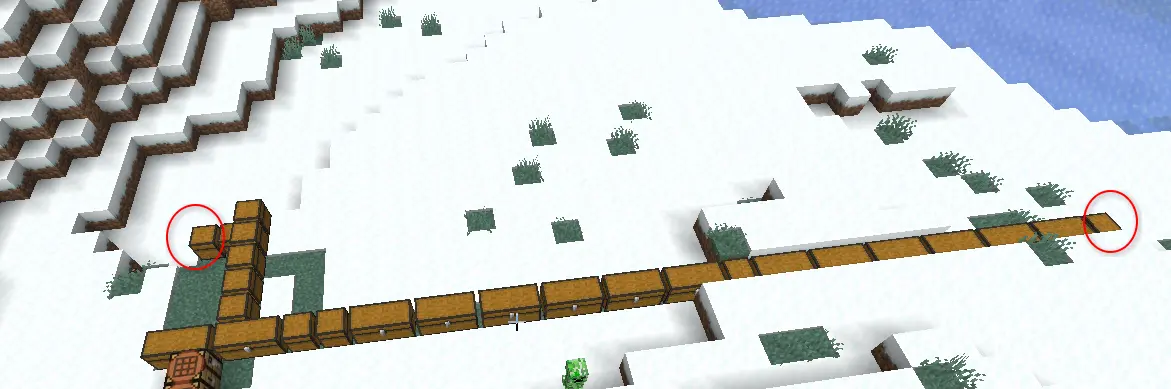
- 此示例中,其中一个标记的箱子里有 64 个白桦木板,另一个则有 64 个橡木木板
 !
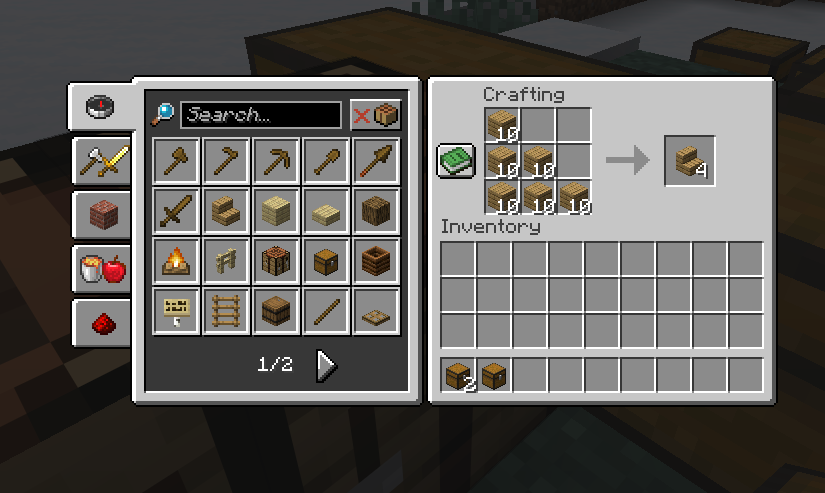
- 从而能够从这些链接的箱子中制作橡木楼梯(或白桦楼梯)
更新内容
- 配方书现在会读取你的箱子。 当你附近的存储中有可制作配方的物品时,该配方会高亮显示为可制作——不再仅限于背包里的物品。适用于工作台、背包合成栏以及熔炉。
- 配方自动出现。 如果材料就在附近,配方就会出现在你的配方书中——即使是你从未亲手持有过的物品。例如,如果箱子里有橡木木板,那么橡木楼梯就在那里随时可以制作。
- 支持熔炉、烟熏炉和高级熔炉。 在熔炉的配方书中点击配方,QuickCraft 会从你的箱子中加载待烧炼的物品,并为你添加燃料——优先使用煤和木炭,除非万不得已才不会燃烧木材。
- 让 QuickCraft 忽略某个箱子。 将箱子命名为包含
[ignore]字样,它就会被跳过(非常适合装饰性或禁止访问的储物箱)。详见下文。 - 上锁的箱子保持锁定状态。 用锁封存的容器除非你手持钥匙,否则不会被触碰。
- 更智能的材料匹配。 可互换的材料(如任意种类的木板)在填充配方时被视为相等。
- 可选末影箱支持,如果你希望末影箱也被计入的话。
修复
- 重大修复:不再卡顿。 打开配方书、工作台甚至背包时,游戏可能会陷入接近冻结的缓慢状态长达数秒。现已解决。
- 不再卡死熔炉。 使用熔炉配方书曾导致游戏严重挂起,甚至无法关闭。已修复。
- 不再因配方书崩溃。 在某些情况下打开配方书会导致游戏崩溃。已修复。
- 不再出现虚假的“无法制作”提示。 箱子中的物品有时会被错误地显示为红色,仿佛无法使用。现在它们被正确显示为可用。
- “显示全部”重新生效——包括你当前无法制作的配方。
- 大型基地运行更流畅。 大型连通储物室不再导致帧率骤降。
排除某个箱子
默认情况下,QuickCraft 会使用范围内的所有箱子。要跳过某个箱子,请在铁砧中将其重命名,使名称中包含 [ignore](例如 Decorations [ignore]),然后再放置它。想恢复?只需去掉标签并重命名即可。
兼容大多数存储模组
模组化的箱子和桶只要表现得像普通存储设备即可正常工作。大型网络式系统(如 Applied Energistics 2 或 Refined Storage)目前尚未自动支持——这已在计划之中。
其中大部分选项可以在 QuickCraft 的配置文件中进行调整,以便你微调各项设置。发现 Bug 或有新想法?请告诉我你使用的加载器和 Minecraft 版本。
感谢使用 QuickCraft ?
Craft the exact amount you want — new in 1.3.1
You decide how much QuickCraft makes:
- Click a recipe in the recipe book to load enough for one craft. Click again for two, again for three — each click adds one more, so you can stage the exact batch you want without counting items by hand.
- Shift-click a recipe to load everything available at once (up to a full stack).
- Shift-click the crafted result to make the whole batch in one go. It uses only what's in the grid — it won't keep draining your chests or inventory.
- Normal-click the result to craft one at a time, topping up from your chests as you go.
Works at the crafting table and your inventory's 2×2 grid.
Available options:
- Search Distance (slider): choose how far QuickCraft searches for containers (up to 64 blocks).
- Chain Mode (toggle): if enabled, QuickCraft follows touching/connected chests from any chest already in range.
- This example here one of the marked chests contains 64 birch planks and the other 64 oak planks
!
- Resulting in the ability to create oak stairs (or birch) from those linked chests
What's new
- The recipe book now uses your chests. Recipes you can make with items in nearby storage light up as craftable — not just the stuff in your backpack. Works at the crafting table, your inventory grid, and furnaces.
- Recipes show up automatically. If the materials are nearby, the recipe appears in your book — even for things you've never personally held. So if you've got oak planks in a chest, oak stairs are right there ready to make.
- Furnaces, smokers, and blast furnaces. Click a recipe in the furnace's recipe book and QuickCraft loads the item to smelt from your chests and adds fuel for you — using coal and charcoal first so it won't burn your wood unless it has to.
- Tell QuickCraft to leave a chest alone. Rename a chest to include
[ignore]and it'll be skipped (great for decoration or off-limits storage). See below. - Locked chests stay locked. Containers sealed with a lock are left untouched unless you're holding the key.
- Smarter material matching. Interchangeable materials (like any kind of planks) are treated as equal when filling a recipe.
- Optional ender chest support, if you want your ender chest counted too.
Fixes
- The big one: no more freezing. Opening the recipe book, crafting table, or even your inventory could drop the game to a near-frozen crawl for several seconds. That's gone.
- No more furnace lock-up. Using the furnace recipe book could hang the game so badly you couldn't even close it. Fixed.
- No more recipe-book crash. Opening the recipe book could crash the game in certain cases. Fixed.
- No more false "can't craft" recipes. Items in your chests were sometimes shown in red as if you couldn't use them. Now they're correctly shown as available.
- "Show All" shows all again — including recipes you can't currently craft.
- Smoother with big bases. Large connected storage rooms no longer cause lag spikes.
Leaving a chest out
By default QuickCraft uses every chest in range. To skip one, rename the chest in an
anvil so its name includes [ignore] (for example Decorations [ignore]) before you
place it. Want it back in? Just rename it without the tag.
Works with most storage mods
Modded chests and barrels work as long as they act like normal storage. Big network-style systems (like Applied Energistics 2 or Refined Storage) aren't supported automatically yet — that's on the to-do list.
Most of these options can be adjusted in QuickCraft's config file if you want to fine-tune things. Found a bug or have an idea? Let me know your loader and Minecraft version.
Thanks for using QuickCraft ?

下载 Quick Craft
下载 Quick Craft
下载 Quick Craft
需要联机服务器吗?
稳定流畅、一键部署,几分钟即可和朋友联机开服
最低仅需 8 元/月 即可畅快联机
下载 Quick Craft
下载 Quick Craft
下载 Quick Craft
需要联机服务器吗?
稳定流畅、一键部署,几分钟即可和朋友联机开服
最低仅需 8 元/月 即可畅快联机
下载 Quick Craft
下载 Quick Craft
下载 Quick Craft
需要联机服务器吗?
稳定流畅、一键部署,几分钟即可和朋友联机开服
最低仅需 8 元/月 即可畅快联机
下载 Quick Craft
选择你的物品来源,打造更流畅的体验
QuickCraft 1.4.0 将控制权交给你:决定它是从箱子、背包还是两者中获取材料——并且现在当你快速合成时也能保持流畅。
合成界面中的来源切换按钮
在合成格旁边有一个小小的 Source(来源)按钮。点击它可在以下选项间循环切换:
- All Items(所有物品)—— 从你的物品栏 和 附近的箱子中获取(经典行为)。
- Only Backpack(仅背包)—— 仅使用你物品栏中的材料;忽略箱子。
- Only Chests(仅箱子)—— 仅从附近的箱子中获取材料,不动用你的物品栏。
配方书会即时跟随你的选择:切换到 Only Chests(仅箱子)时,它只显示你的箱子能合成的物品;切换到 Only Backpack(仅背包)时,它只显示你背包中的物品。你也可以在设置屏幕中(输入 /quickcraft)设置默认值,而屏幕上的切换开关会在当前会话中覆盖该默认值。
在物品栏网格中关闭 QuickCraft
更喜欢只在合成台使用 QuickCraft?设置屏幕中新增了一个 Inventory Crafting(物品栏合成)开关。将其关闭后,你的 2×2 物品栏合成格将恢复为原版 vanilla 状态——不会拉取任何物品,因此箱子里的物品永远不会出现在你的物品栏中。合成台不受影响。
快速合成不再卡顿
以前,快速取出已合成物品会导致游戏在每次合成都重新扫描附近箱子时出现短暂的卡顿。QuickCraft 现在会在短时间内复用最近的扫描结果,因此合成一整组物品时也能保持流畅。
所有内容均在合成台生效,并且在启用时适用于你的物品栏 2×2 网格。
仅箱子模式提示:Only Chests(仅箱子)控制的是 QuickCraft 拉取物品的来源以及配方书显示的内容,但原版配方书在你点击某个配方时仍会从你的物品栏中放置匹配的物品。若要让你的物品栏完全不受影响,请使用 Inventory Crafting(物品栏合成)开关,或将这些材料移出你的背包。
仍需安装 CodxLib(列于“依赖项”下),需与 QuickCraft 一同安装。
发现 Bug 或有新想法?请告诉我你使用的加载器(Loader)和 Minecraft 版本。感谢使用 QuickCraft ?
关于这个资源的讨论、问题反馈与使用心得
还没有讨论,来发第一帖吧
你是这个资源的作者?登录后可认领此资源。
相似资源
 模组

显示你正在注视的方块的信息。(适用于 Minecraft 1.16+ 的 Hwyla/Waila 分支)
 模组

查看物品与配方
 模组
在游戏画面角落显示附近世界地形、玩家、生物和实体的地图。可创建路径点,帮助你找到标记过的位置。
 模组
使用 JavaScript 编辑配方、添加自定义物品、编写世界事件!
 模组
添加区块认领和玩家组队功能,并与 Xaero's Minimap 和 World Map 集成
 模组
添加全屏世界地图,显示你在世界中已探索的区域。与 Xaero's Minimap 搭配使用效果极佳。
评论 0
登录后参与评分
还没有评论,来抢沙发吧