QuickHearth
一种全新的家园与传送体验!QuickHearth 是一款适用于 Minecraft 26.1.x Fabric 的服务端家园与传送模组。它允许服务器玩家保存地点(作为家园)、一键返回、与好友共享传送点,以及快速回到出生点。该模组专为希望拥有比大型传送命令包更友好图形界面的生存服务器而设计,并提供随玩家进度扩展的、基于权限组(Rank)的家数量限制。完美支持 LuckPerms!
适用于专用服务器和单人世界。连接到专用服务器的原版客户端无需安装任何额外内容。
此模组使用了 SGUI by Patbox。该库已预打包在内。
新增功能
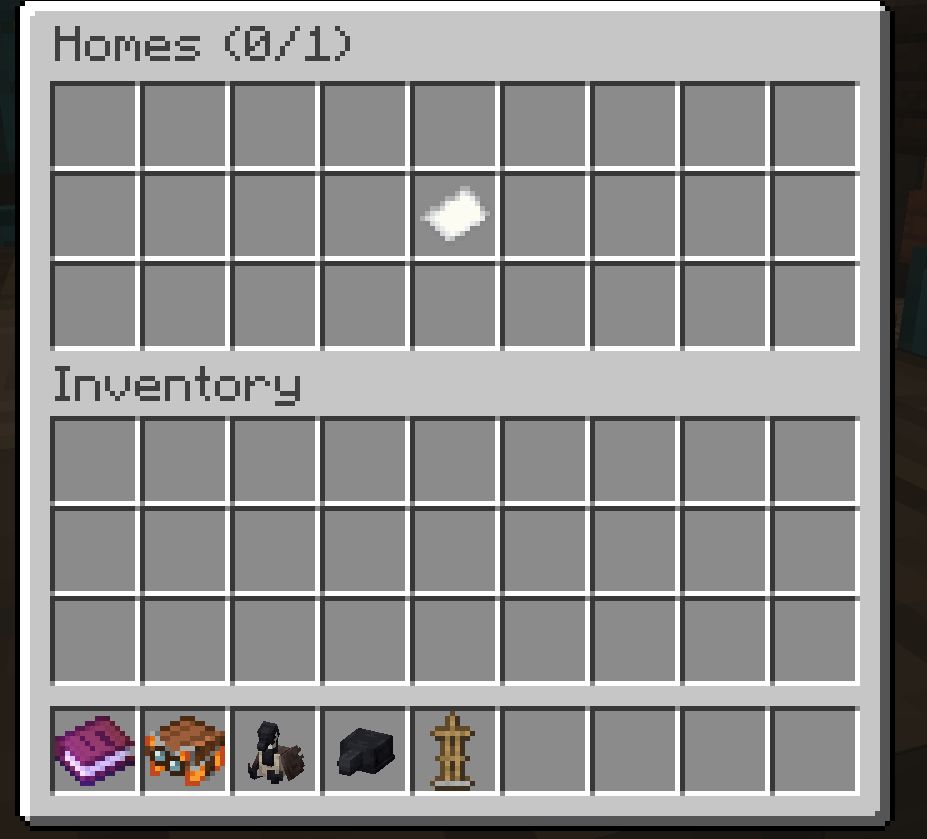
- 箱子风格的家园选择 GUI。运行
/home 并点击一个槽位即可传送。Shift+点击槽位可删除家园。
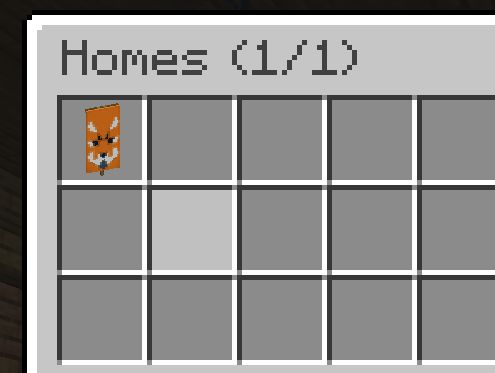
- 每个家园自定义图标。运行
/sethome 时你手持的物品将成为该家园槽位的图标。使用带有图案的自定义命名旗帜、玩家头颅、花朵或其他任何东西来在视觉上标记你的家园。

/spawn 用于瞬间返回世界出生点。/tpa、/tpahere(别名 /tpr)、/tpaccept、/tpdeny 和 /tpatoggle 用于玩家间的传送请求。- 基于权限组的家园限制。管理员通过 LuckPerms 为不同权限组设置不同的家园数量,并通过原版计分板目标授予个人额外家园作为奖励。这两层限制叠加生效。
命令
家园
/sethome 将当前位置保存为“home”(默认名称)。
/sethome <name> 以自定义名称保存,如“basecamp”或“iron-farm”。名称接受字母、数字、下划线和连字符,最多 24 个字符。
运行 /sethome 时你主手持有的物品将成为选择器中该家园的槽位图标。空手则默认为纯白色旗帜。使用相同名称重新运行 /sethome 将同时覆盖位置和图标。
/home 打开家园选择器,这是一个显示所有家园的 27 格箱子 GUI。点击槽位传送,Shift+点击删除。
/home <name> 直接传送到指定家园,支持 Tab 补全。
/home help 在聊天栏打印命令列表。
/homes 等同于 /home(打开选择器)。
/delhome <name> 删除指定家园,支持 Tab 补全。
出生点
/spawn 将你传送到世界出生点。
传送请求
/tpa <player> 向目标询问是否可以传送到他们那里。目标会看到一条聊天提示,要求他们执行 /tpaccept 或 /tpdeny。
/tpahere <player>(别名 /tpr)请求目标传送到你这里。
/tpaccept 接受最近发送给您的待处理请求。
/tpdeny 拒绝该请求。
/tpatoggle 阻止传入的传送请求,直到你再次将其开启。此设置跨服务器重启持久化。
待处理的请求在 60 秒后自动过期。
传送行为
所有传送共享以下规则:
- 3 秒预热时间。聊天栏会显示倒计时。移动会取消传送。
- 成功传送后有 30 秒冷却时间,之后才能开始下一次传送。
- 同一时间只能排队一个传送请求。
家园限制
玩家的最大家园数量计算如下:
max_homes = LuckPerms meta "homes-max" + scoreboard "homes_bonus"
这两层限制是独立的。权限组更改不会重置奖励授予,且奖励授予完全不依赖 LuckPerms。
设置 LuckPerms 权限组(可选)
在你的 mods/ 文件夹中安装 LuckPerms-Fabric,然后为每个组设置家园数量:
/lp group default meta set homes-max 2
/lp group member meta set homes-max 3
/lp group veteran meta set homes-max 5
或者为单个用户设置,以覆盖其所属组:
/lp user Steve meta set homes-max 4
如果未安装 LuckPerms,或未设置 homes-max 值,则权限组基础值回退为 1。
授予额外家园(无需 LuckPerms)
QuickHearth 会在首次启动服务器时自动创建一个名为 homes_bonus 的虚拟计分板目标。管理员可以使用原版计分板命令为玩家授予额外家园:
/scoreboard players add Steve homes_bonus 2
/scoreboard players set Steve homes_bonus 5
/scoreboard players reset Steve homes_bonus
计分板值会加到权限组基础值上。因此,一个成员(权限组基础值 3)若拥有 homes_bonus = 2,最多可以保存 5 个家园。
示例
| 玩家 |
权限组 |
LP homes-max |
homes_bonus |
总计 |
| Alice |
newcomer |
2 |
0 |
2 |
| Bob |
member |
3 |
1 (活动奖品) |
4 |
| Carol |
veteran |
5 |
2 (赠送) |
7 |
| Dave |
(无 LP) |
1 (默认) |
3 (授予) |
4 |
选择器 GUI 的标题会显示使用情况为 Homes (used/max),以便玩家一目了然地查看剩余槽位数。
权限节点
默认情况下允许所有命令。若要为某个组限制命令,请在 LuckPerms 中将该节点设置为 false。
quickhearth.command.homequickhearth.command.sethomequickhearth.command.delhomequickhearth.command.homesquickhearth.command.spawnquickhearth.command.tpaquickhearth.command.tpahere(涵盖 /tpr)quickhearth.command.tpacceptquickhearth.command.tpdenyquickhearth.command.tpatoggle
示例,要从 default 组撤销 /tpa 权限:
/lp group default permission set quickhearth.command.tpa false
如果未安装 LuckPerms,权限控制将回退到原版 OP 等级检查。
QuickHearth
A new take on homes and tpa teleports! QuickHearth is a server-side homes and teleport mod for Minecraft 26.1.x Fabric. This will allow server players to save spots (as a home), return to them with a click, share teleports with friends, and snap back to spawn. Designed for survival servers that want a friendlier GUI than larger teleport command bundles, with rank-aware home limits that scale as players progress. LuckPerms friendly!
Works on dedicated servers and in single-player worlds. Vanilla clients connecting to a dedicated server need nothing extra installed.
This mod also uses SGUI by Patbox. This is already pre-bundled.
What it adds
- A chest-style home picker GUI. Run
/home and click a slot to teleport. Shift-click a slot to delete the home.
- Custom icons for each home. Whatever you hold when running
/sethome becomes that home's slot icon. Use a custom-named banner with patterns, a player head, a flower, or anything else to label your homes visually.
/spawn for instant return to world spawn./tpa, /tpahere (alias /tpr), /tpaccept, /tpdeny, and /tpatoggle for teleport requests between players.- Rank-aware home limits. Admins give different ranks different home counts via LuckPerms and grant individual bonus homes as rewards via a vanilla scoreboard objective. The two layers stack.
Commands
Homes
/sethome saves your current location as "home" (the default name).
/sethome <name> saves with a custom name like "basecamp" or "iron-farm". Names accept letters, numbers, underscores, and hyphens, up to 24 characters.
The item in your main hand when you run /sethome becomes that home's slot icon in the picker. Empty hand falls back to a plain white banner. Re-running /sethome with the same name overwrites both the location and the icon.
/home opens the home picker, a 27-slot chest GUI showing all your homes. Click a slot to teleport. Shift-click to delete.
/home <name> teleports directly to a home, with tab-completion.
/home help prints the command list in chat.
/homes is the same as /home (opens the picker).
/delhome <name> deletes a home, with tab-completion.
Spawn
/spawn teleports you to world spawn.
Teleport requests
/tpa <player> asks the target if you can teleport to them. They see a chat prompt to /tpaccept or /tpdeny.
/tpahere <player> (alias /tpr) asks the target to teleport to you instead.
/tpaccept accepts the most recent pending request directed at you.
/tpdeny declines it.
/tpatoggle blocks incoming teleport requests until you toggle it back on. Persists across server restarts.
Pending requests expire automatically after 60 seconds.
Teleport behavior
All teleports share these rules:
- 3-second warmup. Countdown appears in chat. Moving cancels the teleport.
- 30-second cooldown after a successful teleport before another can start.
- Only one teleport can be queued at a time.
Home limits
A player's maximum number of homes is calculated as:
max_homes = LuckPerms meta "homes-max" + scoreboard "homes_bonus"
The two layers are independent. Rank changes do not reset bonus grants, and bonus grants do not depend on LuckPerms at all.
Setting up LuckPerms ranks (optional)
Install LuckPerms-Fabric in your mods/ folder, then set the home count per group:
/lp group default meta set homes-max 2
/lp group member meta set homes-max 3
/lp group veteran meta set homes-max 5
Or per individual user, to override their group:
/lp user Steve meta set homes-max 4
If LuckPerms is not installed, or no homes-max value is set, the rank base falls back to 1.
Granting bonus homes (no LuckPerms required)
QuickHearth auto-creates a dummy scoreboard objective named homes_bonus on first server start. Admins grant extra homes per player using the vanilla scoreboard command:
/scoreboard players add Steve homes_bonus 2
/scoreboard players set Steve homes_bonus 5
/scoreboard players reset Steve homes_bonus
The scoreboard value is added to the rank base. So a member (rank base 3) with homes_bonus = 2 can save up to 5 homes.
Worked example
| Player |
Rank |
LP homes-max |
homes_bonus |
Total |
| Alice |
newcomer |
2 |
0 |
2 |
| Bob |
member |
3 |
1 (event prize) |
4 |
| Carol |
veteran |
5 |
2 (gifted) |
7 |
| Dave |
(no LP) |
1 (default) |
3 (granted) |
4 |
The picker GUI title shows usage as Homes (used/max) so players can see at a glance how many slots they have left.
Permission nodes
Every command is allowed by default. To restrict a command for a group, set its node to false in LuckPerms.
quickhearth.command.homequickhearth.command.sethomequickhearth.command.delhomequickhearth.command.homesquickhearth.command.spawnquickhearth.command.tpaquickhearth.command.tpahere (covers /tpr too)quickhearth.command.tpacceptquickhearth.command.tpdenyquickhearth.command.tpatoggle
Example, to revoke /tpa from the default group:
/lp group default permission set quickhearth.command.tpa false
If LuckPerms is not installed, permission gating falls back to vanilla OP level checks.


 模组
 模组
 模组

 模组
 模组

 模组
评论 0
登录后参与评分
还没有评论,来抢沙发吧