
Real Camera
使第一人称视角下的摄像机更加逼真。
支持版本:1.18.2-1.20.4 Forge,1.18.2-26.1 Fabric,1.21-26.1 NeoForge。
功能
- 将摄像机绑定到身体的特定部位。
- 自定义摄像机的位置和旋转角度。
- 在第一人称视角下渲染玩家模型。
- 使用 F6 键切换功能的开启或关闭,以及其他热键来调整摄像机。
- 在配置界面(需要 Cloth Config)和模型查看界面(0.6+ 版本)中配置这些功能。
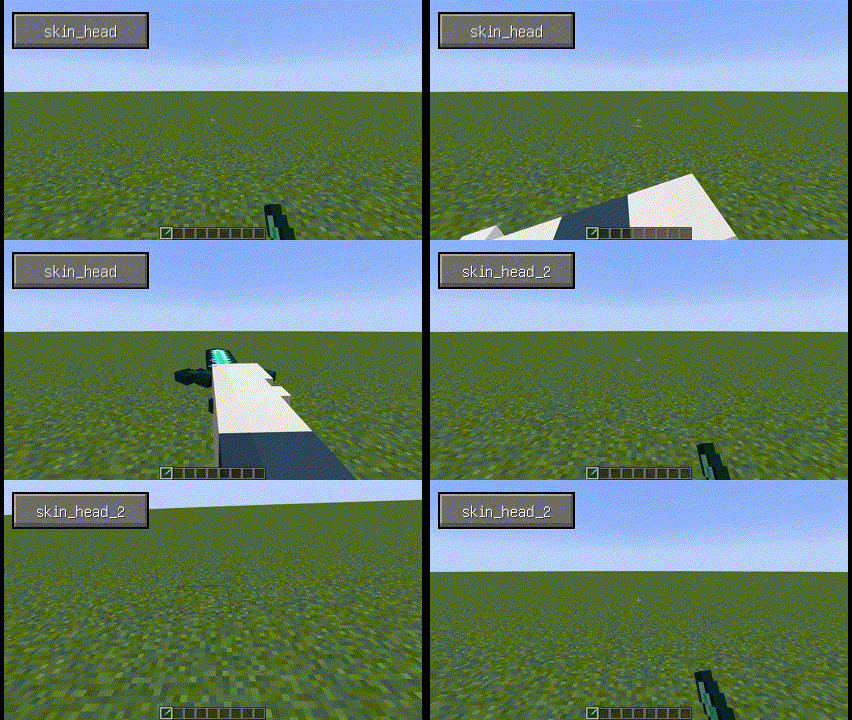
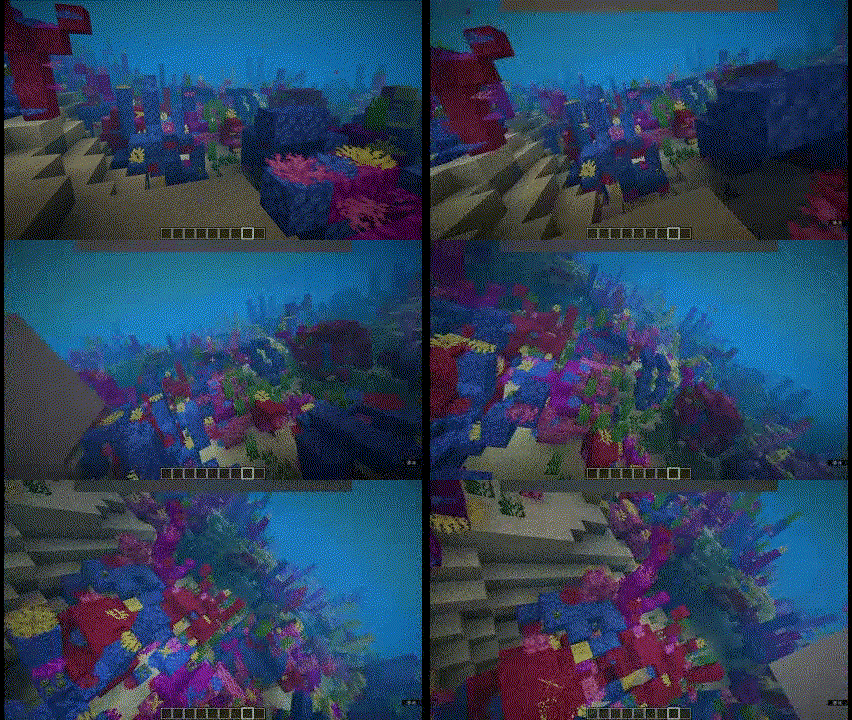
配置方法(0.6+ 版本)
- 理论上支持大多数模组模型,但需要手动进行配置:
- 首先,设置
打开模型查看界面的按键绑定。 - 打开模型查看界面,按住左 Alt 键并左键点击以选择模型的相应面;按住左 Alt 键滚动鼠标滚轮可在模型的不同图层之间切换。
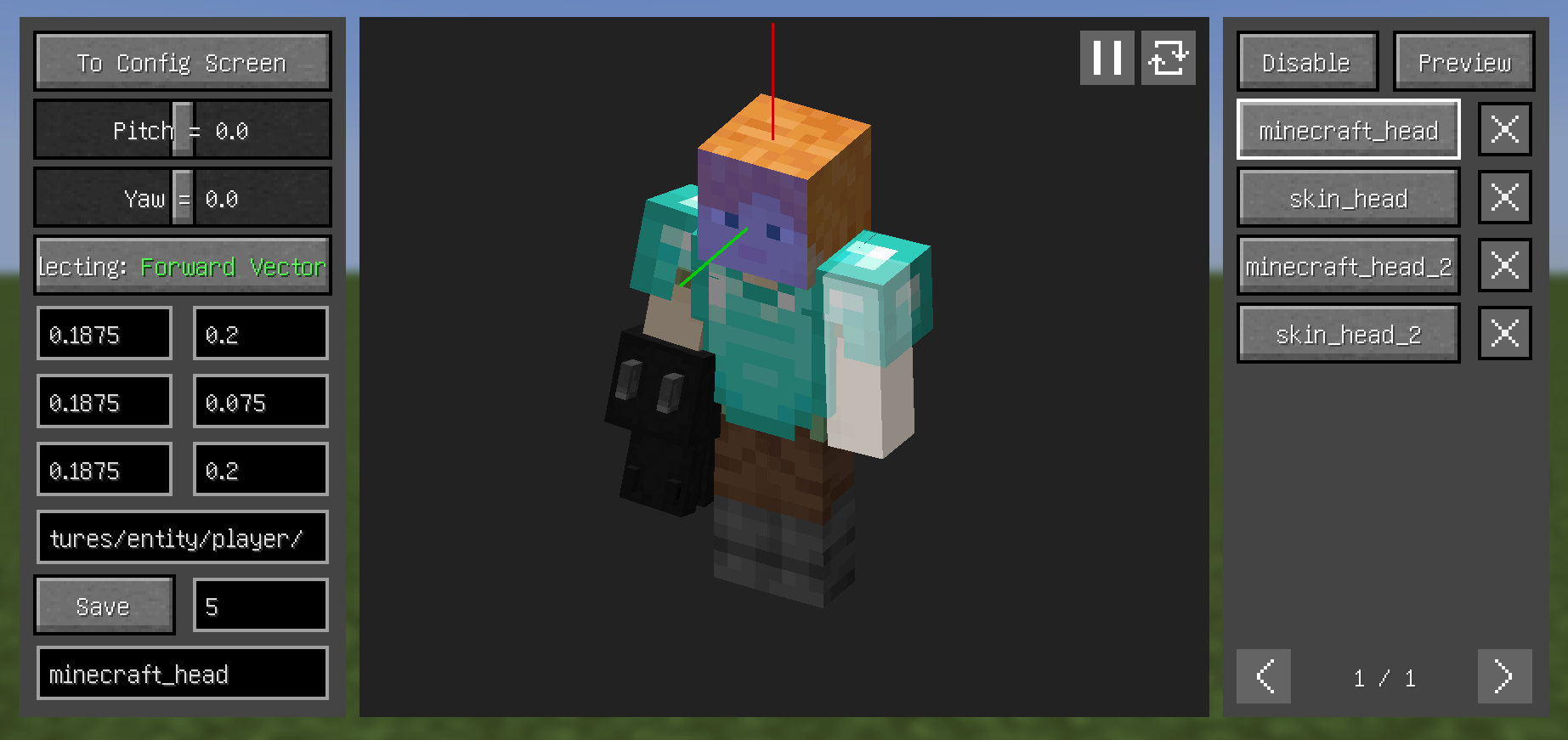
- 通过点击左侧的
Selecting按钮,在三个选项之间切换以选择前向向量、向上向量和目标平面。 - 从右上角的按钮进入
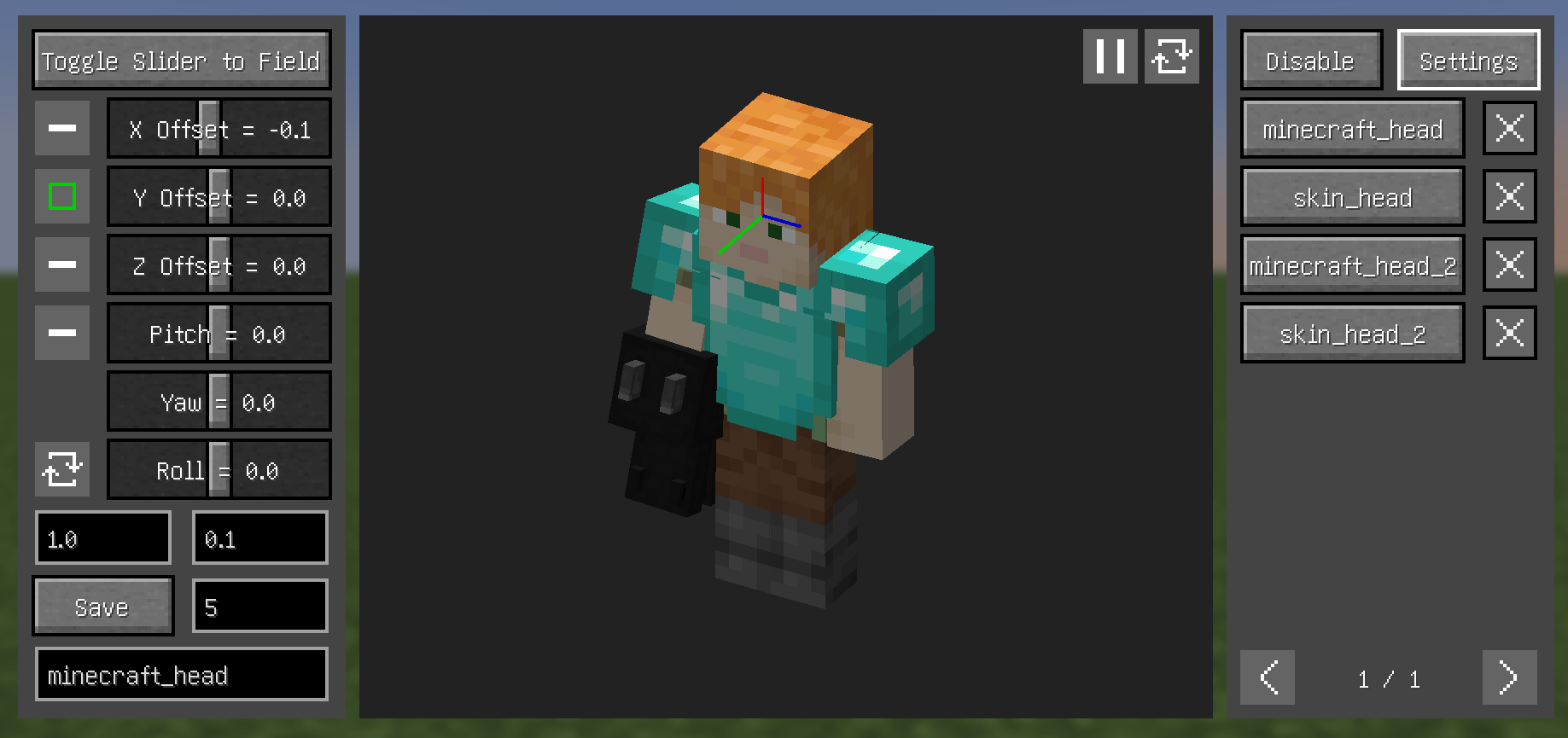
Preview(预览)部分,在此处可以看到摄像机与模型之间的相对关系并进行适当调整(也可以通过按键绑定进行调整)。 - 输入名称并保存。
提示
- 配置项可以调整优先级——优先级较高的配置会显示在右侧列表的上方
- 在
Preview(预览)部分禁用深度测试以隐藏遮挡视线的模型 - 关于
Disable(禁用)部分(当前版本仍较为粗糙,操作较复杂):- 当纹理 ID 字段为空时,使用左 Alt + 左键点击来选择纹理
- 被蓝色框包含的模型部件不会被渲染
- 在纹理视图中左键拖动进行选择,其他按键取消选择
- 左 Alt + 左键快速选择悬停的部件
- 在
All模式下,整个纹理对应的模型都不会渲染(左侧面板中包含该纹理的蓝色框表示此状态) 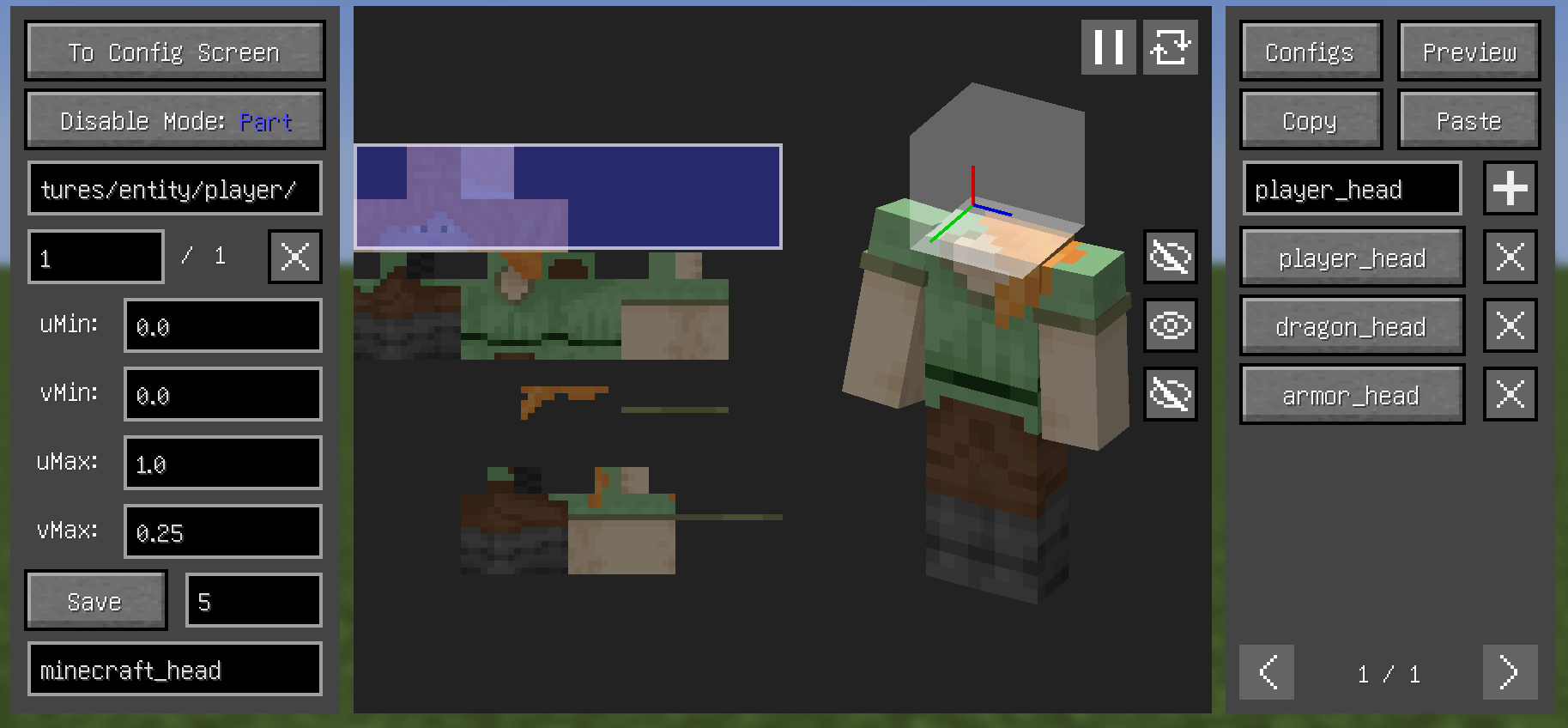
依赖项
- Fabric:
- 两者通用:
- (可选但推荐)Cloth Config API
常见问题解答
- 模型的某一部分(例如头发)总是碍事,如何使其不可见?
- 增加此值可能会有所帮助,或者使用
Disable部分
- 增加此值可能会有所帮助,或者使用
- 按哪个键可以打开模型查看界面?
- 自行设置按键绑定
- 为什么无法打开配置界面?
- 请下载 Cloth Config API
- 为什么在使用 YSM 模型时显示绑定失败?
- 快照版本 0.6.15 “尝试”修复问题,但未完全解决
- 如果 Minecraft 版本为 1.20.1,则将向上向量绑定到头部的左侧(或右侧),并在预览部分将翻滚角度设置为 90(或 -90)
- 为什么在模型查看界面中 YSM 模型的头部会消失?
- 你下载了 Better Combat,请将其移除
兼容性
-
不兼容:
- OptiFine
- Armourer's Workshop(模组版本 0.6+)
- 基于 GeckoLib 的盔甲
- Customizable Player Models
- Epic Fight(模组版本 0.6-)
- Timeless and Classics Zero,版本 1.1.4+
-
兼容:
- 大多数摄像机模组
- 大多数玩家模型模组
- Armourer's Workshop(模组版本 0.6-)
- Epic Fight(模组版本 0.6+)
- First-person Model
- Not Enough Animations
- ParCool!
- Pehkui
- Player Animation Lib
- Timeless and Classics Zero,版本 1.0.3-
- Yes Steve Model(兼容性不稳定)
Real Camera
Make the camera more realistic in the first-person view.
Supported versions: 1.18.2-1.20.4 Forge, 1.18.2-26.1 Fabric, 1.21-26.1 NeoForge.
Features
- Bind the camera to a specific part of the body.
- Customize the position and rotation of the camera.
- Render player model in first-person perspective.
- Use F6 to toggle the feature on or off and other hotkeys to adjust the camera.
- Configure these features in the Config Screen (Cloth Config required) and the Model View Screen (0.6+).
Configuration (0.6+)
- Theoretically, most mod models are supported, but need to be configured manually:
- First, set the key binding for
Open Model View Screen. - Open the model view screen and left click with left Alt held to select the corresponding face of the model, scroll with left Alt held to switch between the different layers of the model.
- By clicking the
Selectingbutton on the left, switch between the three to select theForward Vector,Upward Vector, andTarget Plane. - From the top right button, enter the
Previewsection, where you can see the relative relationship between the camera and the model and make certain adjustments (you can also adjust through key bindings). - Enter a name and save.
Tips
- Configs can have their priority adjusted - higher priority configs appear higher in the right-side list
- Disable depth in
Previewsection to hide models blocking the view - About
Disablesection (current version still rough, complex operations):- When texture ID field is empty, use Left Alt+Left Click to select texture
- Model parts contained by blue boxes won't be rendered
- Left-click drag to select in texture view, other keys cancel selection
- Left Alt+Left Click quickly selects hovered parts
- In
Allmode, entire texture's model won't render (blue box containing the texture in left panel indicates this)
Dependencies
- Fabric:
- Both:
- (Optional but recommended) Cloth Config API
FAQ
- A part of the model (e.g. hair) is always in the way, how to make it invisible?
- Increasing this value may help, or use
Disablesection
- Increasing this value may help, or use
- What key to press can open Model View Screen?
- Set the key binding by yourself
- Why can't i open the Config Screen?
- Please downlowd Cloth Config API
- Why does it show binding failed when use YSM models?
- Snapshot 0.6.15 "try" to fix problems, but it didn't fix completely
- If Minecraft version is 1.20.1, then bind upward vector to head left (or right) side, and set roll angle to 90 (or -90) in preview section
- why does the head of YSM model disappear when in the Model View Screen?
- You downloaded Better Combat, just put it away
Compatibility
-
Incompatible:
- OptiFine
- Armourer's Workshop (Mod version 0.6+)
- Armors based on GeckoLib
- Customizable Player Models
- Epic Fight (Mod version 0.6-)
- Timeless and Classics Zero,version 1.1.4+
-
Compatible:
- most camera mods
- most player model mods
- Armourer's Workshop (Mod version 0.6-)
- Epic Fight (Mod version 0.6+)
- First-person Model
- Not Enough Animations
- ParCool!
- Pehkui
- Player Animation Lib
- Timeless and Classics Zero,version 1.0.3-
- Yes Steve Model (Not stably compatible)
版本游戏版本平台发布时间本站下载
测试版
0.7.8-beta-26.3
[Fabric] v0.7.8-beta-26.3
26.3 Fabric 1 个月前 ·
1
26.3
Fabric
1 个月前
1

下载 Real Camera
测试版
0.7.8-beta-26.3
[NeoForge] v0.7.8-beta-26.2
26.3 NeoForge 1 个月前 ·
0
26.3
NeoForge
1 个月前
0
下载 Real Camera
测试版
0.7.8-beta-26.2
[Fabric] v0.7.8-beta-26.2
26.2 Fabric 4 个月前 ·
1
26.2
Fabric
4 个月前
1
下载 Real Camera
测试版
0.7.8-beta-26.2
[NeoForge] v0.7.8-beta-26.2
26.2 NeoForge 4 个月前 ·
0
26.2
NeoForge
4 个月前
0
下载 Real Camera
测试版
0.7.8-beta-26.1
[Fabric] v0.7.8-beta-26.1
26.1.226.1.1 Fabric 4 个月前 ·
0
26.1.2
26.1.1
26.1
Fabric
4 个月前
0
下载 Real Camera
版本:0.7.8-beta-26.1
游戏版本:26.1.2、26.1.1、26.1
平台:Fabric
需要联机服务器吗?
稳定流畅、一键部署,几分钟即可和朋友联机开服
最低仅需 8 元/月 即可畅快联机
测试版
0.7.8-beta-26.1
[NeoForge] v0.7.8-beta-26.1
26.1.226.1.1 NeoForge 4 个月前 ·
1
26.1.2
26.1.1
26.1
NeoForge
4 个月前
1
下载 Real Camera
版本:0.7.8-beta-26.1
游戏版本:26.1.2、26.1.1、26.1
平台:NeoForge
需要联机服务器吗?
稳定流畅、一键部署,几分钟即可和朋友联机开服
最低仅需 8 元/月 即可畅快联机
测试版
0.7.8-beta-1.21.1
[Fabric] v0.7.8-beta-1.21.1
1.21.1 Fabric 4 个月前 ·
1
1.21.1
Fabric
4 个月前
1
下载 Real Camera
测试版
0.7.8-beta-1.21.1
[NeoForge] v0.7.8-beta-1.21.1
1.21.1 NeoForge 4 个月前 ·
0
1.21.1
NeoForge
4 个月前
0
下载 Real Camera
版本:0.7.8-beta-1.21.1
游戏版本:1.21.1
平台:NeoForge
需要联机服务器吗?
稳定流畅、一键部署,几分钟即可和朋友联机开服
最低仅需 8 元/月 即可畅快联机
测试版
0.7.8-beta-1.20.1
[Fabric] v0.7.8-beta-1.20.1
1.20.1 Fabric 4 个月前 ·
0
1.20.1
Fabric
4 个月前
0
下载 Real Camera
测试版
0.7.8-beta-1.20.1
[Forge] v0.7.8-beta-1.20.1
1.20.1 Forge 4 个月前 ·
0
1.20.1
Forge
4 个月前
0
下载 Real Camera
0.7.8-beta-26.3
测试版
2026-09-25
更新内容
- 升级至 26.3
完整更新日志:
关于这个资源的讨论、问题反馈与使用心得
还没有讨论,来发第一帖吧
你是这个资源的作者?登录后可认领此资源。
相似资源
 模组

鞘翅纹饰Elytra Trims
KikuGie
可定制的鞘翅模组,支持装饰纹饰、旗帜图案等更多功能!
装饰装备
317
 模组

AAA Particles
ChloePrime
适用于 MC 1.18+ 的 Effekseer 加载器
前置装饰
181
 模组

生态幻境Biomes O' Plenty
Forstride
新增 50+ 个独特生物群系,为你的世界增添新树木、花卉等更多元素!
冒险装饰
158
 模组

格雷科技现代版GregTech CEu Modern
serenibyss
基于 GTCEu 1.12.2 的现代 GregTech
装饰科技
129
 模组

群峦传说TerraFirmaCraft
eerussianguy
TerraFirmaCraft (TFC) 是一个全面转换模组,对生存模式进行了彻底的改造与重新设计。
冒险玩法机制
87
 模组

YUNG's Better Desert Temples
YUNGNICKYOUNG
对 Minecraft 的沙漠神殿进行了全面重新设计!
冒险装饰
75
评论 0
登录后参与评分
还没有评论,来抢沙发吧