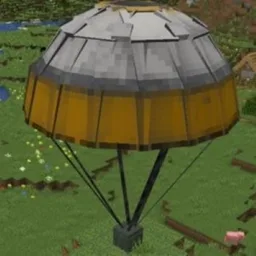
关于模组
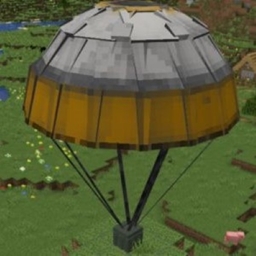
Realistic Airdrop 是一款以真实感和可定制性为特点的空投模组。
受大逃杀类游戏启发,该模组旨在完整复现空投系统,同时确保其能很好地融入 Minecraft 环境之中。
主要特性
本模组主要包含以下三个元素:
1. 全局空投事件
模仿《消逝的光芒》(Dying Light)和《方舟:生存进化》(ARK: Survival Evolved)中的空投补给系统,空投事件会在地图上随机触发。默认情况下,每经过游戏内 10 天,就会在距离玩家约 100 格范围内投放一个空投。空投内的战利品会随时间变化。(玩家可以通过配置文件自定义此触发过程)。
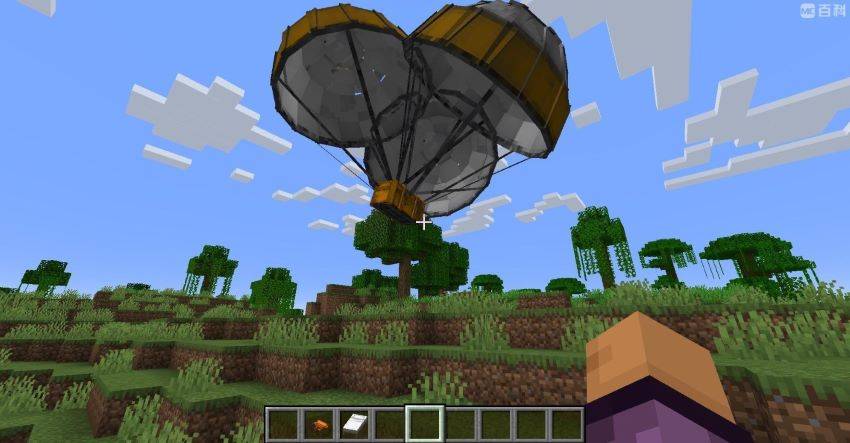
2. 玩家使用信号枪召唤空投
这复刻了 PUBG 中空投的召唤流程,允许玩家通过资源包自定义空投类型及其内部战利品。
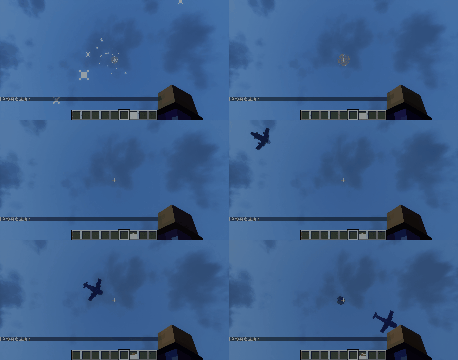
3. 空投掠夺系统
空投可能会吸引敌对生物。如果未能及时找到空投(默认为 2 分钟),敌对生物将在空投附近生成。如果空投长时间未被发现(默认为 5 分钟),它将被掠夺。
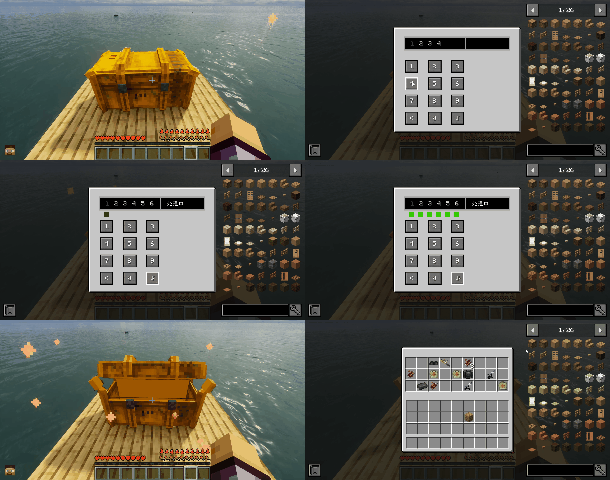
4. 空投密码系统
此功能是一项测试性实现,灵感来源于《赛博朋克 2077》(Cyberpunk 2077)的空投系统,于版本 0.9.1 中引入。要启用它,必须在配置文件中开启 enablelock 选项(默认关闭)。启用后,玩家需要猜测并输入正确的密码才能打开补给箱,密码在生存模式中随机生成。创造模式玩家可以直接访问或更改密码。
模组配置
命令
快速玩家命令
/airdrop @s [blockid] [true/false]
此命令可以在玩家附近生成指定的空投。
参数说明:
-
[blockid]:空投箱的注册表名称。 -
[true/false]:布尔参数,表示该空投是否需要密码才能解锁。
示例:
/airdrop @s dyairdrop:airdropweapon true
为你召唤一个需要密码解锁的武器空投。
快速世界空投命令
/airdrop world
此命令可立即模拟全局空投事件。
高级命令
高级命令允许你控制空投过程的所有参数。
它们适用于整合包制作者和服务器管理员。
1. 随机空投命令(推荐)
/setairdrop random @r [height] [length] [driftmin] [driftmax] [blockid] [loottable] [true/false] |
此命令仅能在主世界中使用。
- [height]:空投飞机的飞行高度;建议高于 200。较低的高度可能导致飞机撞山。
- [length]:飞机飞行的距离。数值越大,飞机从越远处出现。注意,如果你禁用了强制加载,此值必须小于加载距离 * 16,否则飞机可能生成在未加载的区域中,导致空投失败。
- [drift]:飞机偏离目标的最大距离。
- [blockid]:空投箱的注册名称,目前仅允许使用 "dyairdrop";否则会导致动画加载错误。
- [loottable]:用于空投的战利品表名称。
- [true/false]:逻辑参数,表示此次空投是否需要密码才能解锁。此参数为 0.9.1 版本新增,仅可对 "dyairdrop" 设置为 true;其他情况默认值为 false。
示例:
/setairdrop random @r 200 262 50 100 "dyairdrop:airdroplarge" "minecraft:chests/bastion_bridge" false2. 自由空投命令
/setairdrop free [x] [z] [高度] [长度] [方块ID] [战利品表] [true/false]
- [x]: 预期落点的 x 坐标;必须为数字。
- [z]: 预期落点的 z 坐标;必须为数字。
- [height]: 空投飞机的飞行高度;建议高于 200。
- [length]: 飞机将飞行的距离;数值越大,表示飞机将从更远处出现。注意:如果禁用了强制加载功能,此值必须小于加载距离 * 16,以防止在未加载区块中生成。
- [blockid]: 空投箱的注册名称。
- [loottable]: 用于空投的战利品表名称。
- [true/false]: 一个逻辑参数,指示此次空投是否需要密码才能解锁。此参数于 0.9.1 版本新增,仅可为 "dyairdrop" 设置为 true,否则默认为 false。
示例:
/setairdrop free 100 100 200 262 "dyairdrop:airdropsmall""minecraft:chests/bastion_bridge" false
该命令在坐标 [100, 100] 处投放一个未上锁的小型空投,战利品表为 Bastion Bridge,飞机高度为 200 米,飞行距离为 262 米。
性能相关
- 由于空投过程涉及实体事件,确保所有相关区块被强制加载至关重要。默认情况下,本模组会强制加载相应区块,但这可能会偶尔干扰已使用 /forceload 命令强制加载的区块,通常影响服务器玩家(因为单人游戏不使用强制加载)。因此,在拥有已建立强制加载区块的服务器上使用时,请在配置文件的性能部分禁用强制加载功能,并确保飞机的飞行长度严格处于已加载区块范围内。
- 如果您使用了可能减少实体渲染距离的优化模组(如 Rubidium),请注意这可能导致空投不可见,应将其关闭。
作者说明
关于版本与未来方向:
- 官方版本 1.0.0 现已发布!
除了增量更新外,此版本在配置文件的丰富度和命令的便捷性方面带来了重大改进。我们还编写了一份配置文件教程,以解决此前频繁提出的问题。 - 目前,本模组仅支持 1.20.1 和 1.19.2 版本,并计划在未来移植到更高版本以及 1.18.2。
- 本模组强烈鼓励与其他模组进行合作与联动,也欢迎社区努力将其移植到 1.18.2 以下版本。
- 展望未来,本模组将继续专注于 轻量化设计 和 高真实感,带来更精细的流程、更真实的模型以及更多样有趣的空投内容——敬请期待!
- 本模组已与 Zombie Survival Toolkit 集成,并与 Eternal Gun Workshop: Zero 的联动版本即将发布。
About Mods
Realistic Airdrop is a mod characterized by realism and customizability for airdrops.
Inspired by the battle royale genre, this mod aims to replicate the complete airdrop system while ensuring it fits well within the Minecraft environment.
Main Features
This mod primarily includes three elements:
1.Global Airdrop Events
Mimicking the airdrop supply systems of Dying Light and ARK: Survival Evolved, airdrop events are randomly triggered on the map. By default, every 10 in-game days, an airdrop will be deployed within approximately 100 blocks of a player. The loot in the airdrop will change over time. (Players can customize this trigger process through a configuration file).
2.Players use a flare gun to summon airdrops.
This replicates the airdrop summoning process from PUBG, allowing players to customize the type of airdrop and its internal loot through resource packs.
3.Airdrop Theft System
Airdrops may attract hostile mobs. If the airdrop is not found within a timely manner (default is 2 minutes), hostile mobs will spawn near the airdrop. If the airdrop remains unfound for an extended period (default is 5 minutes), it will be stolen.
4.Airdrop Password System
This feature is a test implementation inspired by the airdrop system from Cyberpunk 2077, introduced in version 0.9.1. To enable it, the enablelock option must be turned on in the configuration file (default is off). When enabled, players will need to guess and enter the correct password to open the supply crate, which is randomly generated in survival mode. Creative mode players can directly access or change the password.
Mod Configuration
commands
Quick Player Command
/airdrop @s [blockid] [true/false]
This command can generate a specified airdrop near the player.
Parameter explanation:
-
[blockid]: The registry name of the airdrop crate. -
[true/false]: A boolean parameter, indicating whether the airdrop requires a password to unlock.
Example:
/airdrop @s dyairdrop:airdropweapon true
Summons a weapon airdrop with a password for yourself.
Quick World Airdrop Command
/airdrop world
This command can immediately simulate a global airdrop event.
Advanced Commands
Advanced commands allow you to control all parameters of the airdrop process.
They are suitable for modpack creators and server administrators.
1.Random Airdrop Command (Recommended)
/setairdrop random @r [height] [length] [driftmin] [driftmax] [blockid] [loottable] [true/false] |
This command can only be used in the overworld.
- [height]: The flight height of the airdrop plane; recommended to be above 200. A lower height may cause the plane to crash into mountains.
- [length]: The distance the plane will fly. A larger number means the plane will appear from further away. Note that if you disable force loading, this value must be less than the loading distance * 16, otherwise the plane may spawn in unloaded chunks, leading to airdrop failure.
- [drift]: The distance the plane can deviate from the target.
- [blockid]: The registered name of the airdrop box, currently only "dyairdrop" and "dyairdrop" are allowed; otherwise, it will cause animation loading errors.
- [loottable]: The name of the loot table used for the airdrop.
- [true/false]: A logical parameter indicating whether this airdrop requires a password to unlock. This parameter is new in version 0.9.1 and can only be set to true for "dyairdrop"; otherwise, default to false.
Example:
/setairdrop random @r 200 262 50 100 "dyairdrop:airdroplarge" "minecraft:chests/bastion_bridge" false2.Free Airdrop Command
/setairdrop free [x] [z] [height] [length] [blockid] [loottable] [true/false]
- [x]: The expected landing point's x-coordinate; must be a number.
- [z]: The expected landing point's z-coordinate; must be a number.
- [height]: The flight height of the airdrop plane; recommended to be above 200.
- [length]: The distance the plane will fly; larger numbers mean the plane will appear from further away. Note that if you disable force loading, this value must be less than loading distance * 16 to prevent spawning in unloaded chunks.
- [blockid]: The registered name of the airdrop box.
- [loottable]: The name of the loot table used for the airdrop.
- [true/false]: A logical parameter indicating whether this airdrop requires a password to unlock. This parameter is new in version 0.9.1 and can only be set to true for "dyairdrop"; otherwise, default to false
Example:
/setairdrop free 100 100 200 262 "dyairdrop:airdropsmall""minecraft:chests/bastion_bridge" false
This command drops an unlocked small airdrop with a loot table of Bastion Bridge at the coordinates [100, 100], with a plane height of 200 meters and a flight distance of 262 meters.
Performance Related
- Since the airdrop process involves entity events, it’s essential to ensure that all relevant chunks are force-loaded. By default, this mod will force-load the corresponding chunks, but this may occasionally disrupt chunks that have already been force-loaded using /forceload, which generally affects server players (as single-player games do not use force loading). Therefore, when using this mod on a server with established force-loaded chunks, please disable the force-load function in the performance section of the configuration file and ensure that the plane's flight length is strictly within loaded chunks.
- If you are using optimization mods that may reduce entity rendering distances, such as Rubidium, please note that this may make the airdrop invisible and should be turned off.
Author's Note
About Versions and Future Directions:
- The official version 1.0.0 has now been released!
In addition to incremental updates, this version brings major improvements in the richness of configuration files and the convenience of commands. A configuration file tutorial has also been written to address the frequently asked questions raised earlier. - Currently, this mod only supports versions 1.20.1 and 1.19.2, with plans to be ported to higher versions as well as 1.18.2 in the future.
- The mod strongly encourages collaboration and crossovers with other mods, and also welcomes community efforts to port it to versions below 1.18.2.
- Looking ahead, this mod will continue to focus on lightweight design and high realism, bringing more refined processes, more realistic models, and a wider variety of fun airdrops—so stay tuned!
- This mod has already integrated with Zombie Survival Toolkit, and a crossover version with Eternal Gun Workshop: Zero will be released in the near future.
下载 Realistic Airdrop
需要联机服务器吗?
稳定流畅、一键部署,几分钟即可和朋友联机开服
最低仅需 8 元/月 即可畅快联机
下载 Realistic Airdrop
需要联机服务器吗?
稳定流畅、一键部署,几分钟即可和朋友联机开服
最低仅需 8 元/月 即可畅快联机
下载 Realistic Airdrop
需要联机服务器吗?
稳定流畅、一键部署,几分钟即可和朋友联机开服
最低仅需 8 元/月 即可畅快联机
下载 Realistic Airdrop
需要联机服务器吗?
稳定流畅、一键部署,几分钟即可和朋友联机开服
最低仅需 8 元/月 即可畅快联机
下载 Realistic Airdrop
需要联机服务器吗?
稳定流畅、一键部署,几分钟即可和朋友联机开服
最低仅需 8 元/月 即可畅快联机
下载 Realistic Airdrop
需要联机服务器吗?
稳定流畅、一键部署,几分钟即可和朋友联机开服
最低仅需 8 元/月 即可畅快联机
下载 Realistic Airdrop
需要联机服务器吗?
稳定流畅、一键部署,几分钟即可和朋友联机开服
最低仅需 8 元/月 即可畅快联机
下载 Realistic Airdrop
需要联机服务器吗?
稳定流畅、一键部署,几分钟即可和朋友联机开服
最低仅需 8 元/月 即可畅快联机
下载 Realistic Airdrop
需要联机服务器吗?
稳定流畅、一键部署,几分钟即可和朋友联机开服
最低仅需 8 元/月 即可畅快联机
修复了几个 bug
关于这个资源的讨论、问题反馈与使用心得
还没有讨论,来发第一帖吧
你是这个资源的作者?登录后可认领此资源。
相似资源
 模组

原版世界生成优化模组
 模组
在游戏画面角落显示附近世界地形、玩家、生物和实体的地图。可创建路径点,帮助你找到标记过的位置。
 模组
AE2:一款流行的自动化与存储模组
 模组

新增 50+ 个独特生物群系,为你的世界增添新树木、花卉等更多元素!
 模组
添加全屏世界地图,显示你在世界中已探索的区域。与 Xaero's Minimap 搭配使用效果极佳。
 模组

基于 GTCEu 1.12.2 的现代 GregTech
评论 0
登录后参与评分
还没有评论,来抢沙发吧